


iOS开发-设置某个界面强制横屏
方案一:
使用 presentViewController
1.首先设置项目 支持的屏幕方向
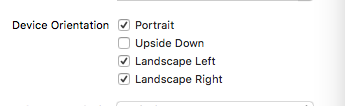
2.写一个子类CusNavigationController 继承 UINavigationController,在CusNavigationController中重写方法:shouldAutorotate 和 supportedInterfaceOrientations
 1 @implementation CusNavViewController
 2
 3 - (void)viewDidLoad {
 4     [super viewDidLoad];
 5     // Do any additional setup after loading the view.
 6 }
 7
 8 - (void)didReceiveMemoryWarning {
 9     [super didReceiveMemoryWarning];
10     // Dispose of any resources that can be recreated.
11 }
12
13 //支持旋转
14 -(BOOL)shouldAutorotate{
15     return [self.topViewController shouldAutorotate];
16 }
17
18 //支持的方向
19 - (UIInterfaceOrientationMask)supportedInterfaceOrientations {
20     return [self.topViewController supportedInterfaceOrientations];
21 }
22
23 @end
在AppDelegate中设置RootViewController
 1 - (BOOL)application:(UIApplication *)application didFinishLaunchingWithOptions:(NSDictionary *)launchOptions {
 2     // Override point for customization after application launch.
 3     self.window = [[UIWindow alloc]initWithFrame:[[UIScreen mainScreen]bounds]];
 4     [self.window makeKeyAndVisible];
 5     ViewController *vc  =[[ViewController alloc]init];
 6     CusNavViewController *nav = [[CusNavViewController alloc]initWithRootViewController:vc];
 7     [self.window setRootViewController:nav];
 8     return YES;
 9
10 }
3.最重要的来咯,界面A中,重写旋转方法 和 支持的方向
1 //支持旋转
2 -(BOOL)shouldAutorotate{
3     return YES;
4 }
5
6 //支持的方向 因为界面A我们只需要支持竖屏
7 - (UIInterfaceOrientationMask)supportedInterfaceOrientations {
8     return UIInterfaceOrientationMaskPortrait;
9 }
4.界面A跳转界面B的方法:
1 -(void)pushaction{
2     ViewControllertwo *vc = [[ViewControllertwo alloc]init];
3     //使用 presentViewController 跳转
4     [self presentViewController:vc animated:YES completion:nil];
5 }
5.界面B重写 旋转方法 和 支持的方向
 1 //支持旋转
 2 -(BOOL)shouldAutorotate{
 3     return YES;
 4 }
 5 //
 6 //支持的方向
 7 - (UIInterfaceOrientationMask)supportedInterfaceOrientations {
 8     return UIInterfaceOrientationMaskLandscapeLeft;
 9 }
10
11 //一开始的方向  很重要
12 -(UIInterfaceOrientation)preferredInterfaceOrientationForPresentation{
13     return UIInterfaceOrientationLandscapeLeft;
14 }
GitHub Demo地址:https://github.com/zhuxinleibandou/-Demo
原文地址:http://www.cnblogs.com/niit-soft-518/p/5611298.html
方案二:
使用方案一presentViewController确实很不错,但是毕竟也有些不方便,如果想用在界面使用Nav push到别的界面就不太好实现了,所以,我又找了半天,又找到了解决方案。
1.设置项目支持的旋转方向:

2.创建子类CusNavViewController 继承UINavigationController
3.界面A设置支持的方向 和 是否可以旋转
 1 //是否可以旋转
 2 - (BOOL)shouldAutorotate
 3 {
 4     return false;
 5 }
 6 //支持的方向
 7 -(UIInterfaceOrientationMask)supportedInterfaceOrientations
 8 {
 9     return UIInterfaceOrientationMaskPortrait;
10 }
4.push进去的界面B 设置 方向 和 旋转
 1 //支持的方向
 2 -(UIInterfaceOrientationMask)supportedInterfaceOrientations
 3 {
 4     return UIInterfaceOrientationMaskLandscapeLeft;
 5 }
 6
 7 //是否可以旋转
 8 -(BOOL)shouldAutorotate
 9 {
10     return YES;
11 }
5.界面B设置物理设备方向:
//setOrientation 在3.0以后变为私有方法了,不能直接去调用此方法,否则后果就是被打回。
在网上搜了很多很久,都是这种调用私有方法的:
//强制横屏,会被打回。
if ([[UIDevice currentDevice] respondsToSelector:@selector(setOrientation:)]) {
[[UIDevice currentDevice] performSelector:@selector(setOrientation:)
withObject:(id)UIInterfaceOrientationLandscapeRight];
}
不能直接调用,但是可以间接的去调用,下面的方法就是利用 KVO机制去间接调用,多次验证不会被打回,放心!
-(void)viewWillAppear:(BOOL)animated{
    NSNumber *orientationUnknown = [NSNumber numberWithInt:UIInterfaceOrientationUnknown];
    [[UIDevice currentDevice] setValue:orientationUnknown forKey:@"orientation"];

    NSNumber *orientationTarget = [NSNumber numberWithInt:UIInterfaceOrientationLandscapeLeft];
    [[UIDevice currentDevice] setValue:orientationTarget forKey:@"orientation"];
}
这里不是直接使用苹果的私有变量,而是利用kvo的方法 间接的调用此方法,可以上架,不会被打回。
至于这里为什么要 多写这两行代码:
NSNumber *orientationUnknown = [NSNumber numberWithInt:UIInterfaceOrientationUnknown];
[[UIDevice currentDevice] setValue:orientationUnknown forKey:@"orientation"];
请参考博客:http://www.jianshu.com/p/6c45fa2bb970
方法三:
*iOS中可以直接调用某个对象的消息方式有两种
*1.performSelector:withObject;
*2.NSInvocation
 1 //使用这里的代码也是oK的。 这里利用 NSInvocation 调用 对象的消息
 2 - (void) viewWillAppear:(BOOL)animated
 3 {
 4     [super viewWillAppear:animated];
 5     if([[UIDevice currentDevice]respondsToSelector:@selector(setOrientation:)]) {
 6
 7         SEL selector = NSSelectorFromString(@"setOrientation:");
 8
 9         NSInvocation *invocation = [NSInvocation invocationWithMethodSignature:[UIDevice instanceMethodSignatureForSelector:selector]];
10
11         [invocation setSelector:selector];
12
13         [invocation setTarget:[UIDevice currentDevice]];
14
15         int val = UIInterfaceOrientationLandscapeLeft;//横屏
16
17         [invocation setArgument:&val atIndex:2];
18
19         [invocation invoke];
20
21     }
22 }
第一个参数需要接收一个指针,也就是传递值的时候需要传递地址
第二个参数:需要给指定方法的第几个参数传值
注意:设置参数的索引时不能从0开始,因为0已经被self(target)占用,1已经被_cmd(selector)占用在NSInvocation的官方文档中已经说明
(_cmd在Objective-C的方法中表示当前方法的selector,正如同self表示当前方法调用的对象实例。)
[invocationsetArgument:&valatIndex:2];
调用NSInvocation对象的invoke方法*只要调用invocation的invoke方法,就代表需要执行NSInvocation对象中制定对象的指定方法,并且传递指定的参数
[invocationinvoke];
关于NSInvocation的博客
http://blog.csdn.net/onlyou930/article/details/7449102
http://www.jianshu.com/p/da96980648b6
http://my.oschina.net/u/2340880/blog/398552?fromerr=sAJ1ndvB
原文地址:http://www.cnblogs.com/niit-soft-518/p/5611298.html

 浙公网安备 33010602011771号