

【Azure】 Grafana with Azure Monitoring
Azure Monitoring提供了全方位的平台监控能力,不仅仅可以为用户提供Metrics供客户直接观看报表,还提供了Log服务将资源的服务收集到Log Analtics 中。
但是目前Azure中国还不支持将多个Source合并使用,但是国际版已经支持(不支持IP流量),所以我们需要借助GRAFANA来支持这个需求。
- 安装Grafana在虚拟机中(测试环境单台虚拟机)
apt-get update
apt-get install -y apt-transport-https
apt-get install -y software-properties-common wget
wget -q -O - https://packages.grafana.com/gpg.key | sudo apt-key add -
echo "deb https://packages.grafana.com/oss/deb stable main" | sudo tee -a /etc/apt/sources.list.d/grafana.list
apt-get update
apt-get install grafana
systemctl daemon-reload
systemctl start grafana-server
systemctl status grafana-server
- Grafana安装Monitoring Plugin,输入应用注册的Tenant ID, Clinet ID 和 Secret
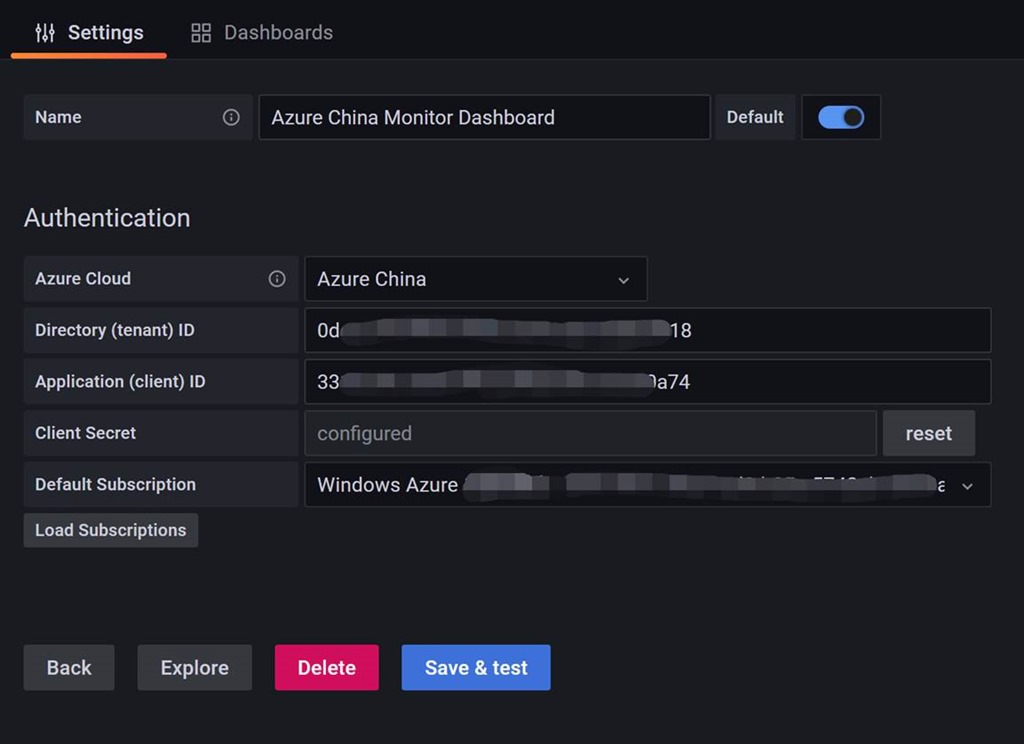
- 输入变量,目前支持的变量如下
Name | Description |
Subscriptions() | Returns subscriptions. |
ResourceGroups() | Returns resource groups. |
ResourceGroups(subscriptionID) | Returns resource groups for a specified subscription. |
Namespaces(aResourceGroup) | Returns namespaces for the default subscription and specified resource group. |
Namespaces(subscriptionID, aResourceGroup) | Returns namespaces for the specified subscription and resource group. |
ResourceNames(aResourceGroup, aNamespace) | Returns a list of resource names. |
ResourceNames(subscriptionID, aResourceGroup, aNamespace) | Returns a list of resource names for a specified subscription. |
MetricNamespace(aResourceGroup, aNamespace, aResourceName) | Returns a list of metric namespaces. |
MetricNamespace(subscriptionID, aResourceGroup, aNamespace, aResourceName) | Returns a list of metric namespaces for a specified subscription. |
MetricNames(aResourceGroup, aMetricDefinition, aResourceName, aMetricNamespace) | Returns a list of metric names. |
MetricNames(aSubscriptionID, aMetricDefinition, aResourceName, aMetricNamespace) | Returns a list of metric names for a specified subscription. |
workspaces() | Returns a list of workspaces for the default subscription. |
workspaces(subscriptionID) | Returns a list of workspaces for the specified subscription (the parameter can be quoted or unquoted). |
- 设置Log Analytics Agent收集日志种类,Azure里面包含了很多日志,我们可以自行选择。

- 制作DASHBOARD 通过METRICS or 收集上来的LOG,以下做了实例;
- 设置Log Analytics Workspace 变量
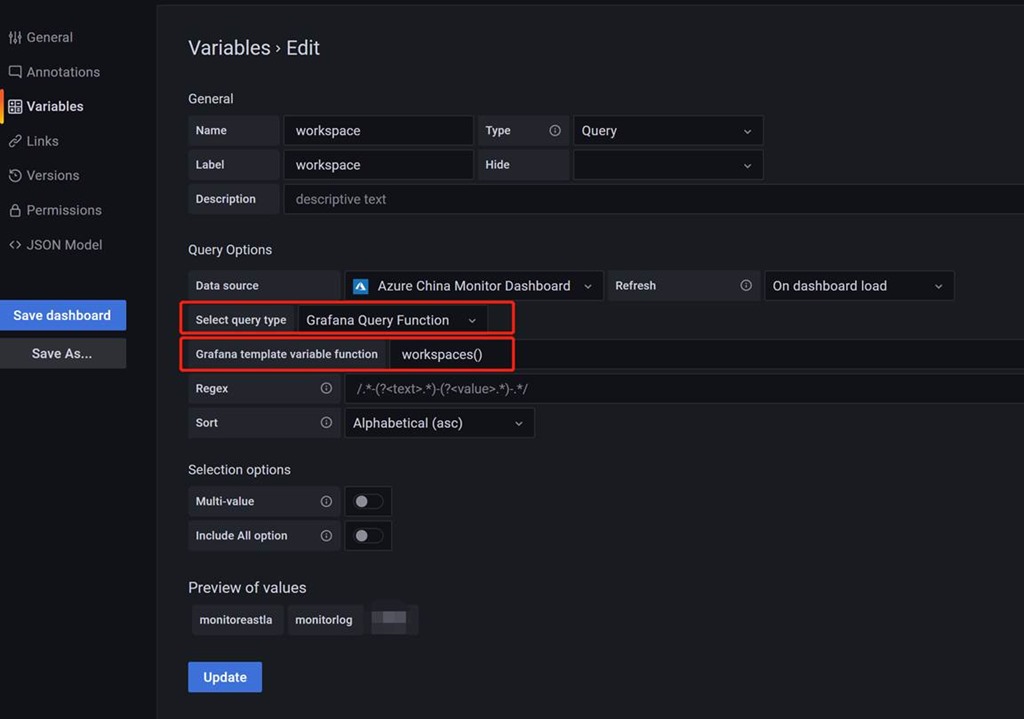
- 写一个简单的KUSTO查询% Processor Time

- 注意Kusto 在Grafana里面的Macros
Macro | Description |
$__timeFilter() | Used to filter the results to the time range of the dashboard. Example: TimeGenerated >= datetime(2018-06-05T18:09:58.907Z) and TimeGenerated <= datetime(2018-06-05T20:09:58.907Z). |
$__timeFilter(datetimeColumn) | Like $__timeFilter(), but specifies a custom field to filter on. |
$__timeFrom() | Expands to the start of the dashboard time range. Example: datetime(2018-06-05T18:09:58.907Z). |
$__timeTo() | Expands to the end of the dashboard time range. Example: datetime(2018-06-05T20:09:58.907Z). |
$__escapeMulti($myVar) | Used with multi-value template variables that contain illegal characters. If $myVar has the following two values as a string '\\grafana-vm\Network(eth0)\Total','\\hello!', then it expands to @'\\grafana-vm\Network(eth0)\Total', @'\\hello!'. If using single value variables there is no need for this macro, simply escape the variable inline instead - @'\$myVar'. |
$__contains(colName, $myVar) | Used with multi-value template variables. If $myVar has the value 'value1','value2', it expands to: colName in ('value1','value2'). If using the All option, then check the Include All Option checkbox and in the Custom all value field type in the value all. If $myVar has value all then the macro will instead expand to 1 == 1. For template variables with a lot of options, this will increase the query performance by not building a large “where..in” clause. |

 浙公网安备 33010602011771号