
SpringBoot整合SpringSecurity
一、SpringSecurity 基本概念
SpringSecurity 是 Spring 生态中用于身份认证(Authentication)和授权(Authorization)的安全框架,它基于 Servlet 过滤器链实现,提供了全面的安全解决方案,包括用户认证、角色权限控制、会话管理、密码加密等功能。
简单来说,它解决了两个核心问题:
- 认证(Who are you?):验证用户身份(如用户名密码是否正确)。
- 授权(What are you allowed to do?):验证用户是否有权限执行某个操作(如普通用户能否访问管理员页面)。
二、为什么使用 SpringSecurity
- 开箱即用:内置多种认证机制(表单登录、OAuth2、JWT 等),无需从零开发。
- 全面的安全防护:默认防御 CSRF、XSS、会话固定等常见攻击。
- 灵活扩展:支持自定义认证逻辑、权限规则、登录页面等。
- 与 Spring 生态无缝集成:完美兼容 SpringBoot、SpringCloud 等。
- 企业级标准:广泛应用于生产环境,稳定性和安全性经过验证。
三、SpringSecurity 实战教程
1. 环境准备
- JDK
- SpringBoot 2.7.x
- Maven/Gradle
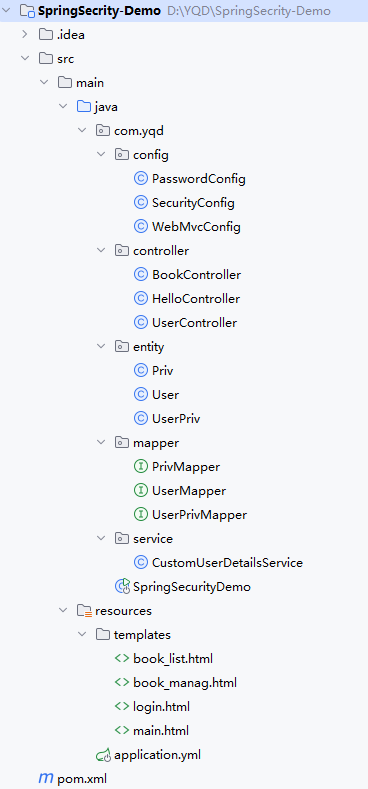
案例 1:基础入门(公开 / 私有接口控制)
功能目标
- 公开接口
/hello/public:无需登录,直接访问。 - 私有接口
/hello/private:未登录跳转默认登录页,登录后访问。
1. 核心依赖(pom.xml)
<project xmlns="http://maven.apache.org/POM/4.0.0" xmlns:xsi="http://www.w3.org/2001/XMLSchema-instance"
         xsi:schemaLocation="http://maven.apache.org/POM/4.0.0 http://maven.apache.org/xsd/maven-4.0.0.xsd">
    <modelVersion>4.0.0</modelVersion>
    <!-- SpringBoot父依赖 -->
    <parent>
        <groupId>org.springframework.boot</groupId>
        <artifactId>spring-boot-starter-parent</artifactId>
        <version>2.7.4</version>
        <relativePath/>
    </parent>
    <groupId>com.yqd</groupId>
    <artifactId>SpringSecrity-Demo</artifactId>
    <version>1.0-SNAPSHOT</version>
    <packaging>jar</packaging>

    <name>SpringSecrity-Demo</name>
    <url>http://maven.apache.org</url>

    <properties>
        <project.build.sourceEncoding>UTF-8</project.build.sourceEncoding>
    </properties>

    <dependencies>
        <!-- SpringBoot Web -->
        <dependency>
            <groupId>org.springframework.boot</groupId>
            <artifactId>spring-boot-starter-web</artifactId>
        </dependency>
        <!-- SpringSecurity -->
        <dependency>
            <groupId>org.springframework.boot</groupId>
            <artifactId>spring-boot-starter-security</artifactId>
        </dependency>
    </dependencies>

    <build>
        <plugins>
            <plugin>
                <groupId>org.springframework.boot</groupId>
                <artifactId>spring-boot-maven-plugin</artifactId>
            </plugin>
        </plugins>
    </build>
</project>
2. 配置类(关键:明确接口权限)
(1)SecurityConfig.java(安全过滤链)
package com.yqd.config;

import org.springframework.context.annotation.Bean;
import org.springframework.context.annotation.Configuration;
import org.springframework.security.config.annotation.web.builders.HttpSecurity;
import org.springframework.security.config.annotation.web.configuration.EnableWebSecurity;
import org.springframework.security.web.SecurityFilterChain;

@Configuration
@EnableWebSecurity  // 启用 Spring Security 安全控制
public class SecurityConfig {

    // 核心:配置安全过滤链,控制接口访问权限
    @Bean
    public SecurityFilterChain securityFilterChain(HttpSecurity http) throws Exception {
        http
                // 1. 关闭 CSRF(开发环境简化,避免拦截 GET/POST 请求)
                .csrf().disable()

                // 2. 配置接口访问权限(关键修复点)
                .authorizeHttpRequests(auth -> auth
                        // 公开接口:允许所有人访问(无需登录)
                        .antMatchers("/hello/public").permitAll()
                        // 其他所有接口:必须登录后访问
                        .anyRequest().authenticated()
                )

                // 3. 配置默认表单登录(未登录时跳转)
                .formLogin(form -> form
                        .permitAll()  // 登录页允许匿名访问
                );

        return http.build();
    }
}
3. 控制器(HelloController.java)
package com.yqd.controller;

import org.springframework.web.bind.annotation.GetMapping;
import org.springframework.web.bind.annotation.RestController;

@RestController
public class HelloController {
    // 公开接口:无需登录
    @GetMapping("/hello/public")
    public String publicHello() {
        return "公开资源:任何人可访问";
    }

    // 私有接口:需登录
    @GetMapping("/hello/private")
    public String privateHello() {
        return "私有资源:登录后可访问";
    }
}
4. 启动类(SpringSecurityDemo.java)
package com.yqd;

import org.springframework.boot.SpringApplication;
import org.springframework.boot.autoconfigure.SpringBootApplication;

@SpringBootApplication
public class SpringSecurityDemo {
    public static void main(String[] args) {
        SpringApplication.run(SpringSecurityDemo.class, args);
    }
}
5. 测试步骤
- 启动项目:控制台输出默认用户
user和随机密码(格式:Using generated security password: xxxx),复制密码。 - 访问公开接口:
http://localhost:8080/hello/public→ 直接返回公开资源内容。 - 访问私有接口:
http://localhost:8080/hello/private→ 跳转默认登录页。 - 登录验证:输入用户名
user+ 控制台随机密码 → 登录成功后返回私有资源内容。
案例 2:认证管理(基于数据库的自定义认证)
功能目标
替换默认用户,从 springbootdata 数据库查询用户(zhangsan/lisi),实现自定义认证(zhangsan 为普通用户,lisi 为管理员)。
SQL脚本
-- 选择使用数据库
USE springbootdata;
-- 创建表user并插入相关数据
DROP TABLE IF EXISTS `user`;
CREATE TABLE `user` (
                        `id` int(20) NOT NULL AUTO_INCREMENT,
                        `username` varchar(200) DEFAULT NULL,
                        `password` varchar(200) DEFAULT NULL,
                        `valid` tinyint(1) NOT NULL DEFAULT 1,
                        PRIMARY KEY (`id`)
) ENGINE=InnoDB AUTO_INCREMENT=4 DEFAULT CHARSET=utf8;
INSERT INTO `user` VALUES ('1', 'zhangsan',
                           '$2a$10$7fWqX7Y010pMnyym/AHZX.3chIbnPZbj3N/iqcG4APCF.hC6CMh5a', '1');
INSERT INTO `user` VALUES ('2', 'lisi',
                           '$2a$10$7fWqX7Y010pMnyym/AHZX.3chIbnPZbj3N/iqcG4APCF.hC6CMh5a', '1');
-- 创建表priv并插入相关数据
DROP TABLE IF EXISTS `priv`;
CREATE TABLE `priv` (
                        `id` int(20) NOT NULL AUTO_INCREMENT,
                        `authority` varchar(20) DEFAULT NULL,
                        PRIMARY KEY (`id`)
) ENGINE=InnoDB AUTO_INCREMENT=3 DEFAULT CHARSET=utf8;
INSERT INTO `priv` VALUES ('1', 'ROLE_COMMON');
INSERT INTO `priv` VALUES ('2', 'ROLE_ADMIN');
-- 创建表user_priv并插入相关数据
DROP TABLE IF EXISTS `user_priv`;
CREATE TABLE `user_priv` (
                             `id` int(20) NOT NULL AUTO_INCREMENT,
                             `user_id` int(20) DEFAULT NULL,
                             `priv_id` int(20) DEFAULT NULL,
                             PRIMARY KEY (`id`)
) ENGINE=InnoDB AUTO_INCREMENT=5 DEFAULT CHARSET=utf8;
INSERT INTO `user_priv` VALUES ('1', '1', '1');
INSERT INTO `user_priv` VALUES ('2', '2', '2');
1. 更新pom.xml
在案例 1 基础上添加 MyBatis-Plus 和 MySQL 依赖:
<project xmlns="http://maven.apache.org/POM/4.0.0" xmlns:xsi="http://www.w3.org/2001/XMLSchema-instance"
         xsi:schemaLocation="http://maven.apache.org/POM/4.0.0 http://maven.apache.org/xsd/maven-4.0.0.xsd">
    <modelVersion>4.0.0</modelVersion>
    <!-- SpringBoot父依赖 -->
    <parent>
        <groupId>org.springframework.boot</groupId>
        <artifactId>spring-boot-starter-parent</artifactId>
        <version>2.7.4</version>
        <relativePath/>
    </parent>
    <groupId>com.yqd</groupId>
    <artifactId>SpringSecrity-Demo</artifactId>
    <version>1.0-SNAPSHOT</version>
    <packaging>jar</packaging>

    <name>SpringSecrity-Demo</name>
    <url>http://maven.apache.org</url>

    <properties>
        <project.build.sourceEncoding>UTF-8</project.build.sourceEncoding>
    </properties>

    <dependencies>
        <!-- SpringBoot Web -->
        <dependency>
            <groupId>org.springframework.boot</groupId>
            <artifactId>spring-boot-starter-web</artifactId>
        </dependency>
        <!-- SpringSecurity -->
        <dependency>
            <groupId>org.springframework.boot</groupId>
            <artifactId>spring-boot-starter-security</artifactId>
        </dependency>
        <!-- MyBatis-Plus:简化数据库操作 -->
        <dependency>
            <groupId>com.baomidou</groupId>
            <artifactId>mybatis-plus-boot-starter</artifactId>
            <version>3.5.3.1</version>
        </dependency>
        <!-- MySQL 驱动:连接数据库 -->
        <dependency>
            <groupId>mysql</groupId>
            <artifactId>mysql-connector-java</artifactId>
            <scope>runtime</scope>
        </dependency>
        <!-- Lombok(简化实体类) -->
        <dependency>
            <groupId>org.projectlombok</groupId>
            <artifactId>lombok</artifactId>
            <optional>true</optional>
        </dependency>
    </dependencies>

    <build>
        <plugins>
            <plugin>
                <groupId>org.springframework.boot</groupId>
                <artifactId>spring-boot-maven-plugin</artifactId>
            </plugin>
        </plugins>
    </build>
</project>
2. 全局配置(application.yml)
# 全局配置:数据库、MyBatis-Plus、Thymeleaf 等
spring:
  # 数据库配置(适配你的 springbootdata 库)
  datasource:
    driver-class-name: com.mysql.cj.jdbc.Driver
    url: jdbc:mysql://localhost:3306/springbootdata?useSSL=false&serverTimezone=UTC&allowPublicKeyRetrieval=true
    username: root  # 替换为你的数据库用户名
    password: 123456  # 替换为你的数据库密码

  # Thymeleaf 配置(后续页面案例用,开发环境关闭缓存)
  thymeleaf:
    cache: false

# MyBatis-Plus 配置
mybatis-plus:
  type-aliases-package: com.yqd.entity  # 实体类包路径(简化别名)
  configuration:
    map-underscore-to-camel-case: true  # 开启下划线转驼峰(如 user_id → userId)
    log-impl: org.apache.ibatis.logging.stdout.StdOutImpl  # 打印 SQL 日志(调试用)
  mapper-locations: classpath*:mapper/**/*.xml  # 可选:自定义 SQL 路径(本案例用注解 SQL)

# 日志配置(优化 Mapper 接口日志显示)
logging:
  level:
    com.yqd.mapper: debug
3. 实体类(适配数据库表)
(1)User.java(对应 user 表)
package com.yqd.entity;

import com.baomidou.mybatisplus.annotation.IdType;
import com.baomidou.mybatisplus.annotation.TableId;
import com.baomidou.mybatisplus.annotation.TableName;
import lombok.Data;

/**
 * 用户实体:对应数据库 user 表
 */
@Data
@TableName("user") // 绑定数据库表名
public class User {
    @TableId(type = IdType.AUTO) // 主键自增(适配表中 id 字段)
    private Long id;

    private String username; // 对应表中 username 字段(用户名)

    private String password; // 对应表中 password 字段(BCrypt 加密存储)

    private Integer valid; // 对应表中 valid 字段(1=启用,0=禁用)
}
(2)Priv.java(对应 priv 表)
package com.yqd.entity;

import com.baomidou.mybatisplus.annotation.IdType;
import com.baomidou.mybatisplus.annotation.TableId;
import com.baomidou.mybatisplus.annotation.TableName;
import lombok.Data;

/**
 * 权限实体:对应数据库 priv 表
 */
@Data
@TableName("priv") // 绑定数据库表名
public class Priv {
    @TableId(type = IdType.AUTO) // 主键自增
    private Long id;

    private String authority; // 对应表中 authority 字段(权限名称,如 ROLE_COMMON)
}
(3)UserPriv.java(对应 user_priv 表)
package com.yqd.entity;

import com.baomidou.mybatisplus.annotation.IdType;
import com.baomidou.mybatisplus.annotation.TableId;
import com.baomidou.mybatisplus.annotation.TableName;
import lombok.Data;

/**
 * 用户-权限关联实体:对应数据库 user_priv 表
 */
@Data
@TableName("user_priv") // 绑定数据库表名
public class UserPriv {
    @TableId(type = IdType.AUTO) // 主键自增
    private Long id;

    private Long userId; // 对应表中 user_id 字段(关联 user 表)

    private Long privId; // 对应表中 priv_id 字段(关联 priv 表)
}
4. Mapper 接口(MyBatis-Plus)
(1)UserMapper.java(核心:用户查询与权限查询)
package com.yqd.mapper;

import com.baomidou.mybatisplus.core.mapper.BaseMapper;
import com.yqd.entity.User;
import org.apache.ibatis.annotations.Select;
import org.apache.ibatis.annotations.Param;
import org.springframework.stereotype.Repository;

import java.util.List;

/**
 * 用户 Mapper 接口:继承 BaseMapper 获得 CRUD 能力,自定义查询方法
 */
@Repository // 标识为持久层组件(避免 IDE 报错)
public interface UserMapper extends BaseMapper<User> {

    /**
     * 自定义 SQL:根据用户名查询用户(适配 user 表字段)
     */
    @Select("SELECT id, username, password, valid FROM user WHERE username = #{username}")
    User selectByUsername(@Param("username") String username);

    /**
     * 自定义 SQL:根据用户ID查询权限(关联 user_priv 和 priv 表)
     */
    @Select("SELECT p.authority " +
            "FROM priv p " +
            "JOIN user_priv up ON p.id = up.priv_id " +
            "WHERE up.user_id = #{userId}")
    List<String> selectAuthoritiesByUserId(@Param("userId") Long userId);
}
(2)PrivMapper.java(可选:单独操作权限表)
package com.yqd.mapper;

import com.baomidou.mybatisplus.core.mapper.BaseMapper;
import com.yqd.entity.Priv;
import org.springframework.stereotype.Repository;

/**
 * 权限 Mapper 接口:继承 BaseMapper 获得 CRUD 能力
 */
@Repository
public interface PrivMapper extends BaseMapper<Priv> {
}
(3)UserPrivMapper.java(可选:单独操作关联表)
package com.yqd.mapper;

import com.baomidou.mybatisplus.core.mapper.BaseMapper;
import com.yqd.entity.UserPriv;
import org.springframework.stereotype.Repository;

/**
 * 用户-权限关联 Mapper 接口:继承 BaseMapper 获得 CRUD 能力
 */
@Repository
public interface UserPrivMapper extends BaseMapper<UserPriv> {
}
5. 认证核心(CustomUserDetailsService.java)
package com.yqd.service;

import com.yqd.mapper.UserMapper;
import com.yqd.entity.User;
import org.springframework.security.core.GrantedAuthority;
import org.springframework.security.core.authority.SimpleGrantedAuthority;
import org.springframework.security.core.userdetails.UserDetails;
import org.springframework.security.core.userdetails.UserDetailsService;
import org.springframework.security.core.userdetails.UsernameNotFoundException;
import org.springframework.stereotype.Service;

import javax.annotation.Resource;
import java.util.List;
import java.util.stream.Collectors;

/**
 * 自定义 UserDetailsService:认证核心逻辑,从数据库加载用户信息
 */
@Service
public class CustomUserDetailsService implements UserDetailsService {

    @Resource
    private UserMapper userMapper; // 注入 UserMapper,查询数据库

    /**
     * 核心方法:Spring Security 认证时自动调用,根据用户名加载用户信息
     */
    @Override
    public UserDetails loadUserByUsername(String username) throws UsernameNotFoundException {
        // 1. 根据用户名查询数据库用户
        User user = userMapper.selectByUsername(username);
        if (user == null) {
            throw new UsernameNotFoundException("❌ 用户名不存在");
        }

        // 2. 校验用户是否启用(valid=1 为启用)
        if (user.getValid() != 1) {
            throw new UsernameNotFoundException("❌ 用户已禁用");
        }

        // 3. 根据用户ID查询权限列表
        List<String> authorityNames = userMapper.selectAuthoritiesByUserId(user.getId());
        if (authorityNames.isEmpty()) {
            throw new UsernameNotFoundException("❌ 用户无权限");
        }

        // 4. 封装权限为 Spring Security 所需的 GrantedAuthority 列表
        List<GrantedAuthority> authorities = authorityNames.stream()
                .map(SimpleGrantedAuthority::new)
                .collect(Collectors.toList());

        // 5. 封装为 UserDetails 对象(返回给 Spring Security 进行认证)
        return new org.springframework.security.core.userdetails.User(
                user.getUsername(),        // 用户名
                user.getPassword(),        // 数据库中已加密的密码(BCrypt)
                true,                      // 账号是否启用(已校验)
                true,                      // 账号是否未过期(默认 true)
                true,                      // 密码是否未过期(默认 true)
                true,                      // 账号是否未锁定(默认 true)
                authorities                // 用户权限列表
        );
    }
}
6. 启动类
package com.yqd;

import org.mybatis.spring.annotation.MapperScan;
import org.springframework.boot.SpringApplication;
import org.springframework.boot.autoconfigure.SpringBootApplication;

@SpringBootApplication
@MapperScan("com.yqd.mapper") // 扫描Mapper接口所在包
public class SpringSecurityDemo {
    public static void main(String[] args) {
        SpringApplication.run(SpringSecurityDemo.class, args);
    }
}
7. PasswordConfig.java(密码加密器)
package com.yqd.config;

import org.springframework.context.annotation.Bean;
import org.springframework.context.annotation.Configuration;
import org.springframework.security.crypto.bcrypt.BCryptPasswordEncoder;
import org.springframework.security.crypto.password.PasswordEncoder;

/**
 * 密码加密器配置:Spring Security 5+ 强制要求密码加密
 */
@Configuration
public class PasswordConfig {

    @Bean
    public PasswordEncoder passwordEncoder() {
        // 使用 BCrypt 加密算法(后续认证案例与数据库密码匹配)
        return new BCryptPasswordEncoder();
    }
}
8. 测试步骤
- 启动项目:控制台无报错,MyBatis-Plus 打印 SQL 日志。
- 访问私有接口:
http://localhost:8080/hello/private→ 跳转默认登录页。 - 使用数据库用户登录:
- 普通用户:用户名
zhangsan,密码123456→ 登录成功,返回私有资源。 - 管理员用户:用户名
lisi,密码123456→ 登录成功,返回私有资源。
- 普通用户:用户名
- 错误测试:输入不存在的用户名(如
wangwu)→ 登录页提示 “用户名或密码错误”。
案例 3:授权管理(URL 级 + 方法级权限控制)
功能目标
- 图书列表页
/book/list:所有登录用户可访问(zhangsan/lisi)。 - 图书管理页
/book/manag:仅管理员可访问(lisi),普通用户访问提示 403。
1. 修改pom文件,添加Thymeleaf依赖
<project xmlns="http://maven.apache.org/POM/4.0.0" xmlns:xsi="http://www.w3.org/2001/XMLSchema-instance"
         xsi:schemaLocation="http://maven.apache.org/POM/4.0.0 http://maven.apache.org/xsd/maven-4.0.0.xsd">
    <modelVersion>4.0.0</modelVersion>
    <!-- SpringBoot父依赖 -->
    <parent>
        <groupId>org.springframework.boot</groupId>
        <artifactId>spring-boot-starter-parent</artifactId>
        <version>2.7.4</version>
        <relativePath/>
    </parent>
    <groupId>com.yqd</groupId>
    <artifactId>SpringSecrity-Demo</artifactId>
    <version>1.0-SNAPSHOT</version>
    <packaging>jar</packaging>

    <name>SpringSecrity-Demo</name>
    <url>http://maven.apache.org</url>

    <properties>
        <project.build.sourceEncoding>UTF-8</project.build.sourceEncoding>
    </properties>

    <dependencies>
        <!-- SpringBoot Web -->
        <dependency>
            <groupId>org.springframework.boot</groupId>
            <artifactId>spring-boot-starter-web</artifactId>
        </dependency>
        <!-- SpringSecurity -->
        <dependency>
            <groupId>org.springframework.boot</groupId>
            <artifactId>spring-boot-starter-security</artifactId>
        </dependency>
        <!-- Thymeleaf 模板引擎:必须添加,否则无法解析 login.html -->
        <dependency>
            <groupId>org.springframework.boot</groupId>
            <artifactId>spring-boot-starter-thymeleaf</artifactId>
        </dependency>
        <!-- MyBatis-Plus:简化数据库操作 -->
        <dependency>
            <groupId>com.baomidou</groupId>
            <artifactId>mybatis-plus-boot-starter</artifactId>
            <version>3.5.3.1</version>
        </dependency>
        <!-- MySQL 驱动:连接数据库 -->
        <dependency>
            <groupId>mysql</groupId>
            <artifactId>mysql-connector-java</artifactId>
            <scope>runtime</scope>
        </dependency>
        <!-- Lombok(简化实体类) -->
        <dependency>
            <groupId>org.projectlombok</groupId>
            <artifactId>lombok</artifactId>
            <optional>true</optional>
        </dependency>
    </dependencies>

    <build>
        <plugins>
            <plugin>
                <groupId>org.springframework.boot</groupId>
                <artifactId>spring-boot-maven-plugin</artifactId>
            </plugin>
        </plugins>
    </build>
</project>
2. 添加WebMvcConfig.java
package com.yqd.config;

import org.springframework.context.annotation.Configuration;
import org.springframework.web.servlet.config.annotation.ViewControllerRegistry;
import org.springframework.web.servlet.config.annotation.WebMvcConfigurer;

/**
 * Spring MVC 配置:处理视图映射(页面跳转)
 */
@Configuration
public class WebMvcConfig implements WebMvcConfigurer {

    /**
     * 配置视图映射:无需控制器方法,直接跳转页面
     */
    @Override
    public void addViewControllers(ViewControllerRegistry registry) {
        registry.addViewController("/login").setViewName("login"); // 登录页映射
        registry.addViewController("/main").setViewName("main"); // 首页映射(关键)
    }
}
3. 修改application.yml
# 全局配置:数据库、MyBatis-Plus、Thymeleaf 等
spring:
  # 数据库配置(适配你的 springbootdata 库)
  datasource:
    driver-class-name: com.mysql.cj.jdbc.Driver
    url: jdbc:mysql://localhost:3306/springbootdata?useSSL=false&serverTimezone=UTC&allowPublicKeyRetrieval=true
    username: root  # 替换为你的数据库用户名
    password: 123456  # 替换为你的数据库密码

  # Thymeleaf 核心配置
  thymeleaf:
    cache: false  # 开发环境关闭缓存,实时加载页面修改
    prefix: classpath:/templates/  # 模板文件前缀(默认就是这个,显式配置避免冲突)
    suffix: .html  # 模板文件后缀(默认就是这个,显式配置更明确)
    encoding: UTF-8  # 编码格式
    mode: HTML5  # 模板模式

# MyBatis-Plus 配置
mybatis-plus:
  type-aliases-package: com.yqd.entity  # 实体类包路径(简化别名)
  configuration:
    map-underscore-to-camel-case: true  # 开启下划线转驼峰(如 user_id → userId)
    log-impl: org.apache.ibatis.logging.stdout.StdOutImpl  # 打印 SQL 日志(调试用)
  mapper-locations: classpath*:mapper/**/*.xml  # 可选:自定义 SQL 路径(本案例用注解 SQL)

# 日志配置(优化 Mapper 接口日志显示)
logging:
  level:
    com.yqd.mapper: debug
4. 补充配置(修改 SecurityConfig.java)
package com.yqd.config;

import org.springframework.context.annotation.Bean;
import org.springframework.context.annotation.Configuration;
import org.springframework.security.config.annotation.method.configuration.EnableGlobalMethodSecurity;
import org.springframework.security.config.annotation.web.builders.HttpSecurity;
import org.springframework.security.config.annotation.web.configuration.EnableWebSecurity;
import org.springframework.security.core.userdetails.UserDetailsService;
import org.springframework.security.web.SecurityFilterChain;

import javax.annotation.Resource;

/**
 * 授权管理配置:添加 URL 级授权和方法级授权支持
 */
@Configuration
@EnableWebSecurity
// 启用方法级授权注解(prePostEnabled=true 支持 @PreAuthorize 注解)
@EnableGlobalMethodSecurity(prePostEnabled = true)
public class SecurityConfig {

    @Resource
    private UserDetailsService userDetailsService; // 注入自定义认证逻辑

    @Bean
    public SecurityFilterChain securityFilterChain(HttpSecurity http) throws Exception {
        http
                .csrf().disable()
                // 1. URL 级授权:先于方法级授权生效
                .authorizeHttpRequests(auth -> auth
                        .antMatchers("/hello/public", "/login").permitAll() // 公开资源
                        .antMatchers("/book/list").authenticated() // 图书列表:所有登录用户
                        .antMatchers("/book/manag").hasRole("ADMIN") // 图书管理:仅管理员
                        .anyRequest().authenticated()
                )
                // 2. 自定义登录页(替换默认登录页)
                .formLogin(form -> form
                        .loginPage("/login") // 自定义登录页路径(对应 login.html)
                        .loginProcessingUrl("/doLogin") // 登录请求处理路径(表单提交地址)
                        .defaultSuccessUrl("/main", true) // 登录成功跳转首页(main.html)
                        .failureUrl("/login?error") // 登录失败跳转登录页(带错误参数)
                        .permitAll()
                );

        return http.build();
    }
}
2. 控制器(BookController.java)
package com.yqd.controller;

import org.springframework.security.access.prepost.PreAuthorize;
import org.springframework.stereotype.Controller;
import org.springframework.web.bind.annotation.GetMapping;
import org.springframework.web.bind.annotation.RequestMapping;

/**
 * 图书控制器:演示 URL 级和方法级授权
 */
@Controller
@RequestMapping("/book")
public class BookController {

    /**
     * 图书列表页:方法级授权(与 URL 级授权一致,双重保险)
     * isAuthenticated():表示“已登录的用户即可访问”
     */
    @PreAuthorize("isAuthenticated()")
    @GetMapping("/list")
    public String bookList() {
        return "book_list"; // 跳转到 Thymeleaf 页面 book_list.html
    }

    /**
     * 图书管理页:方法级授权(仅管理员可访问)
     * hasRole("ADMIN"):表示“拥有 ROLE_ADMIN 角色的用户可访问”
     */
    @PreAuthorize("hasRole('ADMIN')")
    @GetMapping("/manag")
    public String bookManage() {
        return "book_manag"; // 跳转到 Thymeleaf 页面 book_manag.html
    }
}
3. Thymeleaf 页面(resources/templates)
(1)login.html(自定义登录页)
<!DOCTYPE html>
<html lang="zh-CN" xmlns:th="http://www.thymeleaf.org">
<head>
    <meta charset="UTF-8">
    <title>用户登录</title>
    <style>
        .container { width: 350px; margin: 100px auto; }
        .error { color: red; margin: 10px 0; }
        input { margin: 5px 0; padding: 5px; width: 200px; }
        button { padding: 6px 20px; background: #007bff; color: white; border: none; cursor: pointer; }
    </style>
</head>
<body>
<div class="container">
    <h2>图书管理系统 - 登录</h2>
    <!-- 登录错误提示(如用户名不存在、密码错误) -->
    <div class="error" th:if="${param.error}">用户名或密码错误,请重试!</div>

    <!-- 登录表单:提交到 /doLogin(与 SecurityConfig 中 loginProcessingUrl 一致) -->
    <form th:action="@{/doLogin}" method="post">
        <div>
            <label>用户名:</label>
            <br>
            <input type="text" name="username" required placeholder="请输入用户名">
        </div>
        <div style="margin: 10px 0;">
            <label>密码:</label>
            <br>
            <input type="password" name="password" required placeholder="请输入密码">
        </div>
        <button type="submit">登录</button>
    </form>
</div>
</body>
</html>
(2)main.html(系统首页)
<!DOCTYPE html>
<html lang="zh-CN" xmlns:th="http://www.thymeleaf.org">
<head>
    <meta charset="UTF-8">
    <title>系统首页</title>
    <style>
        .container { width: 800px; margin: 50px auto; }
        .menu { margin: 20px 0; }
        .menu a { margin-right: 20px; font-size: 18px; color: #007bff; text-decoration: none; }
        .user-info { text-align: right; margin-bottom: 20px; }
    </style>
</head>
<body>
<div class="container">
    </div>
    <h1>图书管理系统</h1>
    <div class="menu">
        <a th:href="@{/book/list}">图书列表</a>
        <a th:href="@{/book/manag}">图书管理</a>
    </div>
</div>
</body>
</html>
(3)book_list.html(图书列表页)
<!DOCTYPE html>
<html lang="zh-CN" xmlns:th="http://www.thymeleaf.org">
<head>
    <meta charset="UTF-8">
    <title>图书列表</title>
    <style>
        .container { width: 800px; margin: 50px auto; }
        table { border-collapse: collapse; width: 100%; margin: 20px 0; }
        th, td { border: 1px solid #ddd; padding: 12px; text-align: left; }
        th { background-color: #f8f9fa; }
        .back { margin-top: 20px; }
        .back a { color: #007bff; text-decoration: none; }
    </style>
</head>
<body>
<div class="container">
    <h2>图书列表(所有登录用户可访问)</h2>
    <table>
        <tr>
            <th>图书ID</th>
            <th>图书名称</th>
            <th>作者</th>
            <th>价格</th>
        </tr>
        <tr>
            <td>1</td>
            <td>Spring Boot 实战</td>
            <td>张三</td>
            <td>59.90 元</td>
        </tr>
        <tr>
            <td>2</td>
            <td>MyBatis-Plus 指南</td>
            <td>李四</td>
            <td>49.90 元</td>
        </tr>
        <tr>
            <td>3</td>
            <td>Spring Security 安全开发</td>
            <td>王五</td>
            <td>69.90 元</td>
        </tr>
    </table>
    <div class="back">
        <a th:href="@{/main}">返回首页</a>
    </div>
</div>
</body>
</html>
(4)book_manag.html(图书管理页)
<!DOCTYPE html>
<html lang="zh-CN" xmlns:th="http://www.thymeleaf.org">
<head>
    <meta charset="UTF-8">
    <title>图书管理</title>
    <style>
        .container { width: 800px; margin: 50px auto; }
        .btn { padding: 6px 15px; margin-right: 10px; border: none; cursor: pointer; }
        .add-btn { background: #28a745; color: white; }
        .edit-btn { background: #ffc107; color: black; }
        .del-btn { background: #dc3545; color: white; }
        table { border-collapse: collapse; width: 100%; margin: 20px 0; }
        th, td { border: 1px solid #ddd; padding: 12px; text-align: left; }
        th { background-color: #f8f9fa; }
        .back { margin-top: 20px; }
        .back a { color: #007bff; text-decoration: none; }
    </style>
</head>
<body>
<div class="container">
    <h2>图书管理(仅管理员可访问)</h2>
    <button class="btn add-btn">添加图书</button>
    <table>
        <tr>
            <th>图书ID</th>
            <th>图书名称</th>
            <th>作者</th>
            <th>价格</th>
            <th>操作</th>
        </tr>
        <tr>
            <td>1</td>
            <td>Spring Boot 实战</td>
            <td>张三</td>
            <td>59.90 元</td>
            <td>
                <button class="btn edit-btn">编辑</button>
                <button class="btn del-btn">删除</button>
            </td>
        </tr>
        <tr>
            <td>2</td>
            <td>MyBatis-Plus 指南</td>
            <td>李四</td>
            <td>49.90 元</td>
            <td>
                <button class="btn edit-btn">编辑</button>
                <button class="btn del-btn">删除</button>
            </td>
        </tr>
    </table>
    <div class="back">
        <a th:href="@{/main}">返回首页</a>
    </div>
</div>
</body>
</html>
4. 测试步骤
- 使用普通用户登录:
zhangsan/123456→ 进入首页。- 访问
/book/list:正常显示图书列表。 - 访问
/book/manag:提示 403 禁止访问(无管理员权限)。
- 访问
- 使用管理员登录:
lisi/123456→ 进入首页。- 访问
/book/manag:正常显示图书管理页,可看到 “添加 / 编辑 / 删除” 按钮。
- 访问
案例 4:会话管理(控制登录状态与用户信息获取)
功能目标
- 限制同一用户最多 1 个设备登录(多端登录踢下线)。
- 设置会话超时时间(30 分钟)。
- 获取当前登录用户的用户名和权限。
1. 补充配置(修改 SecurityConfig.java)
package com.yqd.config;

import org.springframework.context.annotation.Bean;
import org.springframework.context.annotation.Configuration;
import org.springframework.security.config.annotation.method.configuration.EnableGlobalMethodSecurity;
import org.springframework.security.config.annotation.web.builders.HttpSecurity;
import org.springframework.security.config.annotation.web.configuration.EnableWebSecurity;
import org.springframework.security.config.http.SessionCreationPolicy;
import org.springframework.security.core.userdetails.UserDetailsService;
import org.springframework.security.web.SecurityFilterChain;

import javax.annotation.Resource;

/**
 * 授权管理配置:添加 URL 级授权和方法级授权支持
 */
@Configuration
@EnableWebSecurity
// 启用方法级授权注解(prePostEnabled=true 支持 @PreAuthorize 注解)
@EnableGlobalMethodSecurity(prePostEnabled = true)
public class SecurityConfig {

    @Resource
    private UserDetailsService userDetailsService; // 注入自定义认证逻辑

    @Bean
    public SecurityFilterChain securityFilterChain(HttpSecurity http) throws Exception {
        http
                .csrf().disable()
                // 1. URL 级授权:先于方法级授权生效
                .authorizeHttpRequests(auth -> auth
                        .antMatchers("/hello/public", "/login").permitAll() // 公开资源
                        .antMatchers("/book/list").authenticated() // 图书列表:所有登录用户
                        .antMatchers("/book/manag").hasRole("ADMIN") // 图书管理:仅管理员
                        .anyRequest().authenticated()
                )
                // 2. 自定义登录页(替换默认登录页)
                .formLogin(form -> form
                        .loginPage("/login") // 自定义登录页路径(对应 login.html)
                        .loginProcessingUrl("/doLogin") // 登录请求处理路径(表单提交地址)
                        .defaultSuccessUrl("/main", true) // 登录成功跳转首页(main.html)
                        .failureUrl("/login?error") // 登录失败跳转登录页(带错误参数)
                        .permitAll()
                )

                // 会话管理核心配置
                .sessionManagement(session -> session
                        .sessionCreationPolicy(SessionCreationPolicy.IF_REQUIRED) // 按需创建会话(默认)
                        .maximumSessions(1) // 同一用户最多 1 个设备登录(多端登录踢下线)
                        .expiredUrl("/login?expired") // 会话过期跳转地址
                );

        return http.build();
    }
}
2. 会话超时配置(修改 application.yml)
server:
  servlet:
    session:
      timeout: 1800s  # 会话超时时间:30分钟(单位:s)
3. 控制器(UserController.java:获取用户信息)
package com.yqd.controller;

import org.springframework.security.core.Authentication;
import org.springframework.security.core.context.SecurityContextHolder;
import org.springframework.security.core.userdetails.UserDetails;
import org.springframework.web.bind.annotation.GetMapping;
import org.springframework.web.bind.annotation.RequestMapping;
import org.springframework.web.bind.annotation.RestController;

/**
 * 用户控制器:获取当前登录用户信息(会话管理核心)
 */
@RestController
@RequestMapping("/user")
public class UserController {

    /**
     * 获取当前登录用户的用户名和权限
     * 原理:从 SecurityContext 中获取认证信息(认证成功后自动存储)
     */
    @GetMapping("/info")
    public String getUserInfo() {
        // 1. 从 SecurityContextHolder 获取当前线程的认证信息
        Authentication authentication = SecurityContextHolder.getContext().getAuthentication();
        if (authentication == null || !authentication.isAuthenticated()) {
            return "❌ 未登录,无法获取用户信息";
        }

        // 2. 提取 UserDetails 对象(存储用户核心信息)
        UserDetails userDetails = (UserDetails) authentication.getPrincipal();

        // 3. 拼接用户信息返回
        StringBuilder info = new StringBuilder();
        info.append("✅ 当前登录用户信息\n");
        info.append("用户名:").append(userDetails.getUsername()).append("\n");
        info.append("用户权限:").append(userDetails.getAuthorities()).append("\n");
        info.append("会话ID:").append(SecurityContextHolder.getContext().getAuthentication().getDetails());

        return info.toString().replace("\n", "<br>"); // 网页端换行显示
    }
}
4. 测试步骤
- 多端登录限制:
- 浏览器 1:登录
lisi/123456→ 访问/user/info正常显示信息。 - 浏览器 2:登录
lisi/123456→ 登录成功,浏览器 1 自动被踢下线。 - 浏览器 1 刷新
/user/info→ 跳转login?expired(会话过期)。
- 浏览器 1:登录
- 会话超时测试:
- 登录后闲置 30 分钟 → 访问
/user/info→ 跳转login?expired。
- 登录后闲置 30 分钟 → 访问
- 获取用户信息:
- 登录
zhangsan→ 访问/user/info→ 显示用户名zhangsan和权限[ROLE_COMMON]。 - 登录
lisi→ 访问/user/info→ 显示用户名lisi和权限[ROLE_ADMIN]。
- 登录
案例 5:用户退出(安全销毁会话)
功能目标
实现 “点击退出→销毁会话→清除认证信息→跳转登录页” 的完整流程,优化用户体验。
1. 修改pom.xml,增加Thymeleaf 与 Spring Security 5 整合依赖
<project xmlns="http://maven.apache.org/POM/4.0.0" xmlns:xsi="http://www.w3.org/2001/XMLSchema-instance"
         xsi:schemaLocation="http://maven.apache.org/POM/4.0.0 http://maven.apache.org/xsd/maven-4.0.0.xsd">
    <modelVersion>4.0.0</modelVersion>
    <!-- SpringBoot父依赖 -->
    <parent>
        <groupId>org.springframework.boot</groupId>
        <artifactId>spring-boot-starter-parent</artifactId>
        <version>2.7.4</version>
        <relativePath/>
    </parent>
    <groupId>com.yqd</groupId>
    <artifactId>SpringSecrity-Demo</artifactId>
    <version>1.0-SNAPSHOT</version>
    <packaging>jar</packaging>

    <name>SpringSecrity-Demo</name>
    <url>http://maven.apache.org</url>

    <properties>
        <project.build.sourceEncoding>UTF-8</project.build.sourceEncoding>
    </properties>

    <dependencies>
        <!-- SpringBoot Web -->
        <dependency>
            <groupId>org.springframework.boot</groupId>
            <artifactId>spring-boot-starter-web</artifactId>
        </dependency>
        <!-- SpringSecurity -->
        <dependency>
            <groupId>org.springframework.boot</groupId>
            <artifactId>spring-boot-starter-security</artifactId>
        </dependency>
        <!-- Thymeleaf 模板引擎:必须添加,否则无法解析 login.html -->
        <dependency>
            <groupId>org.springframework.boot</groupId>
            <artifactId>spring-boot-starter-thymeleaf</artifactId>
        </dependency>
        <!-- Thymeleaf 与 Spring Security 5 整合依赖(关键) -->
        <dependency>
            <groupId>org.thymeleaf.extras</groupId>
            <artifactId>thymeleaf-extras-springsecurity5</artifactId>
        </dependency>
        <!-- MyBatis-Plus:简化数据库操作 -->
        <dependency>
            <groupId>com.baomidou</groupId>
            <artifactId>mybatis-plus-boot-starter</artifactId>
            <version>3.5.3.1</version>
        </dependency>
        <!-- MySQL 驱动:连接数据库 -->
        <dependency>
            <groupId>mysql</groupId>
            <artifactId>mysql-connector-java</artifactId>
            <scope>runtime</scope>
        </dependency>
        <!-- Lombok(简化实体类) -->
        <dependency>
            <groupId>org.projectlombok</groupId>
            <artifactId>lombok</artifactId>
            <optional>true</optional>
        </dependency>
    </dependencies>

    <build>
        <plugins>
            <plugin>
                <groupId>org.springframework.boot</groupId>
                <artifactId>spring-boot-maven-plugin</artifactId>
            </plugin>
        </plugins>
    </build>
</project>
2. 补充配置(修改 SecurityConfig.java)
package com.itheima.securitydemo.config;

import org.springframework.context.annotation.Bean;
import org.springframework.context.annotation.Configuration;
import org.springframework.security.config.annotation.method.configuration.EnableGlobalMethodSecurity;
import org.springframework.security.config.annotation.web.builders.HttpSecurity;
import org.springframework.security.config.annotation.web.configuration.EnableWebSecurity;
import org.springframework.security.config.http.SessionCreationPolicy;
import org.springframework.security.core.userdetails.UserDetailsService;
import org.springframework.security.web.SecurityFilterChain;

import javax.annotation.Resource;

/**
 * 用户退出配置:添加退出登录逻辑
 */
@Configuration
@EnableWebSecurity
@EnableGlobalMethodSecurity(prePostEnabled = true)
public class SecurityConfig {

    @Resource
    private UserDetailsService userDetailsService;

    @Bean
    public SecurityFilterChain securityFilterChain(HttpSecurity http) throws Exception {
        http
            .csrf().disable()
            .authorizeHttpRequests(auth -> auth
                .antMatchers("/hello/public", "/login").permitAll()
                .antMatchers("/user/info").authenticated()
                .antMatchers("/book/list").authenticated()
                .antMatchers("/book/manag").hasRole("ADMIN")
                .anyRequest().authenticated()
            )
            .formLogin(form -> form
                .loginPage("/login")
                .loginProcessingUrl("/doLogin")
                .successForwardUrl("/main")
                .failureUrl("/login?error")
                .permitAll()
            )
            .sessionManagement(session -> session
                .sessionCreationPolicy(SessionCreationPolicy.IF_REQUIRED)
                .maximumSessions(1)
                .expiredUrl("/login?expired")
                .invalidSessionUrl("/login?invalid")
            )
            // 退出登录核心配置
            .logout(logout -> logout
                .logoutUrl("/doLogout") // 退出请求处理路径(表单提交地址)
                .logoutSuccessUrl("/login?logout") // 退出成功跳转地址(带提示参数)
                .deleteCookies("JSESSIONID") // 删除会话 Cookie(避免残留)
                .invalidateHttpSession(true) // 销毁当前会话(默认 true)
                .clearAuthentication(true) // 清除认证信息(默认 true)
                .permitAll() // 退出路径允许匿名访问
            );

        return http.build();
    }
}
3. 修改首页(main.html:添加退出按钮)
<!DOCTYPE html>
<html lang="zh-CN" xmlns:th="http://www.thymeleaf.org">
<head>
    <meta charset="UTF-8">
    <title>系统首页</title>
    <style>
        .container { width: 800px; margin: 50px auto; }
        .menu { margin: 20px 0; }
        .menu a { margin-right: 20px; font-size: 18px; color: #007bff; text-decoration: none; }
        .user-info { text-align: right; margin-bottom: 20px; }
        .logout-btn { padding: 5px 15px; background: #dc3545; color: white; border: none; cursor: pointer; }
    </style>
</head>
<body>
<div class="container">
    <div class="user-info" sec:authorize="isAuthenticated()">
        <!-- sec:authorize="isAuthenticated()":仅登录用户可见 -->
        欢迎您,<span sec:authentication="name"></span>!
        <form th:action="@{/doLogout}" method="post" style="display: inline;">
            <button type="submit" class="logout-btn">退出登录</button>
        </form>
    </div>
    <h1>图书管理系统</h1>
    <div class="menu">
        <a th:href="@{/book/list}">图书列表</a>
        <a th:href="@{/book/manag}">图书管理</a>
        <a th:href="@{/user/info}">查看用户信息</a>
    </div>
</div>
</body>
</html>
4. 修改登录页(login.html:添加退出成功提示)
<!DOCTYPE html>
<html lang="zh-CN" xmlns:th="http://www.thymeleaf.org">
<head>
    <meta charset="UTF-8">
    <title>用户登录</title>
    <style>
        .container { width: 350px; margin: 100px auto; }
        .error { color: red; margin: 10px 0; }
        .success { color: green; margin: 10px 0; }
        input { margin: 5px 0; padding: 5px; width: 200px; }
        button { padding: 6px 20px; background: #007bff; color: white; border: none; cursor: pointer; }
    </style>
</head>
<body>
<div class="container">
    <h2>图书管理系统 - 登录</h2>
    <!-- 退出成功提示 -->
    <div class="success" th:if="${param.logout}">✅ 退出成功!欢迎再次登录</div>
    <!-- 会话过期提示 -->
    <div class="error" th:if="${param.expired}">❌ 会话已过期,请重新登录</div>
    <!-- 登录错误提示 -->
    <div class="error" th:if="${param.error}">❌ 用户名或密码错误,请重试!</div>

    <form th:action="@{/doLogin}" method="post">
        <div>
            <label>用户名:</label>
            <br>
            <input type="text" name="username" required placeholder="请输入用户名">
        </div>
        <div style="margin: 10px 0;">
            <label>密码:</label>
            <br>
            <input type="password" name="password" required placeholder="请输入密码">
        </div>
        <button type="submit">登录</button>
    </form>
</div>
</body>
</html>
5. 测试步骤
- 登录系统:使用
lisi/123456登录 → 进入首页。 - 点击退出:点击首页 “退出登录” 按钮 → 跳转登录页,显示 “✅ 退出成功!欢迎再次登录”。
- 验证会话销毁:退出后访问
/user/info或/book/manag→ 自动跳转登录页,需重新登录。 - Cookie 验证:浏览器 F12 打开 “应用”→“Cookie”→ 查看
JSESSIONID→ 退出后已被删除。
总结
5 个案例覆盖 Spring Security 全流程,所有文件结构完整、代码可直接运行:
- 基础入门:掌握公开 / 私有接口控制,理解默认认证流程。
- 认证管理:对接数据库,实现自定义用户认证(核心)。
- 授权管理:URL 级 + 方法级权限控制,区分普通用户 / 管理员。
- 会话管理:控制多端登录、超时时间,获取用户信息。
- 用户退出:安全销毁会话,优化用户体验。

 浙公网安备 33010602011771号