

我认为这个问题是ArcGis Server ADF Javascript Library的BUG?!
问题起源于前几天我一直研究的问题,就是用户在客户端选择一个圆,然后在服务端做空间分析,选择出圆里边所有的点,比如乡镇,村庄等(当然,实际上我使用美国地图测试)。但是经过测试发现,选择出来的点数除了偶尔正确之外,大多数都是不正确的,起初我还怀疑是ADF的问题,又直接通过AO搜索,问题同样存在,为此郁闷了好久。昨天,我终于找到问题的所在了。因为昨天我写心得《ADF Toolbar与Map的客户端和服务端交互过程分析》时大概研究了ESRI.ADF.UI.Map.debug.js的内容,发现如下内容:
MapDragCircle = MapCircle = ESRI.ADF.MapTools.Circle = function(mapid, mode, showLoading, cursor, vectorToolbarState) {
var map = $find(mapid);
var onComplete = Function.createDelegate(map, function(geom) {
var geomString = geom.get_center().toString(':') + ':' + geom.get_width()*2;
this.doCallback('EventArg=Circle&coords='+geomString+'&'+mapid+'_mode='+mode,this);
});
map.getGeometry(ESRI.ADF.Graphics.ShapeType.Circle,onComplete,function(){map.__activeToolMode=null;},ESRI.ADF.MapTools.lineColor,ESRI.ADF.MapTools.fillColor,cursor, true);
map.__activeToolMode = mode;
};
注意这行代码:
var geomString = geom.get_center().toString(':') + ':' + geom.get_width()*2;
什么意思呢? 意思就是说你在MapCircleEventArgs得到的那个MapRadius并不是半径,而是一个4倍于半径的值。真正的半径值应该是“geom.get_width() / 2”。到底是不是真正这样呢? 我写了一个测试代码,就是以中点和MapCircleEventArgs.MapRadius构造一个正方形和原来在Javascript端画的圆形做叠加,ADF代码如下:
public void ServerAction(ToolEventArgs args)
{
try
{
//PointSelector.SelectByAO(args);
ESRI.ArcGIS.ADF.Web.UI.WebControls.Map map = (ESRI.ArcGIS.ADF.Web.UI.WebControls.Map)args.Control;
ESRI.ArcGIS.ADF.Web.UI.WebControls.MapCircleEventArgs circleArgs = (ESRI.ArcGIS.ADF.Web.UI.WebControls.MapCircleEventArgs)args;
ESRI.ArcGIS.ADF.ArcGISServer.PointN centerPointN = ESRI.ArcGIS.ADF.Web.DataSources.ArcGISServer.Converter.FromAdfPoint(circleArgs.MapCenter);
double radius = circleArgs.MapRadius;
//
// 以圆中点和半经构造一个正方型。
//
ESRI.ArcGIS.ADF.ArcGISServer.PointN[] fivePoint = new ESRI.ArcGIS.ADF.ArcGISServer.PointN[5];
fivePoint[0] = new ESRI.ArcGIS.ADF.ArcGISServer.PointN();
fivePoint[0].X = centerPointN.X - radius;
fivePoint[0].Y = centerPointN.Y + radius;
fivePoint[0].SpatialReference = centerPointN.SpatialReference;
fivePoint[1] = new ESRI.ArcGIS.ADF.ArcGISServer.PointN();
fivePoint[1].X = centerPointN.X + radius;
fivePoint[1].Y = centerPointN.Y + radius;
fivePoint[1].SpatialReference = centerPointN.SpatialReference;
fivePoint[2] = new ESRI.ArcGIS.ADF.ArcGISServer.PointN();
fivePoint[2].X = centerPointN.X + radius;
fivePoint[2].Y = centerPointN.Y - radius;
fivePoint[2].SpatialReference = centerPointN.SpatialReference;
fivePoint[3] = new ESRI.ArcGIS.ADF.ArcGISServer.PointN();
fivePoint[3].X = centerPointN.X - radius;
fivePoint[3].Y = centerPointN.Y - radius;
fivePoint[3].SpatialReference = centerPointN.SpatialReference;
fivePoint[4] = new ESRI.ArcGIS.ADF.ArcGISServer.PointN();
fivePoint[4].X = fivePoint[0].X;
fivePoint[4].Y = fivePoint[0].Y;
fivePoint[4].SpatialReference = centerPointN.SpatialReference;
ESRI.ArcGIS.ADF.ArcGISServer.Ring[] rings = new ESRI.ArcGIS.ADF.ArcGISServer.Ring[1];
rings[0] = new ESRI.ArcGIS.ADF.ArcGISServer.Ring();
rings[0].PointArray = fivePoint;
ESRI.ArcGIS.ADF.ArcGISServer.PolygonN poly = new ESRI.ArcGIS.ADF.ArcGISServer.PolygonN();
poly.RingArray = rings;
poly.SpatialReference = centerPointN.SpatialReference;
poly.HasID = false;
poly.HasM = false;
poly.HasZ = false;
//////////////
ESRI.ArcGIS.ADF.ArcGISServer.RgbColor fillColor = new ESRI.ArcGIS.ADF.ArcGISServer.RgbColor();
fillColor.Red = 0;
fillColor.Blue = 255;
fillColor.Green = 0;
fillColor.AlphaValueSpecified = true;
fillColor.AlphaValue = 128;
ESRI.ArcGIS.ADF.ArcGISServer.SimpleFillSymbol fillSym = new ESRI.ArcGIS.ADF.ArcGISServer.SimpleFillSymbol();
fillSym.Style = ESRI.ArcGIS.ADF.ArcGISServer.esriSimpleFillStyle.esriSFSSolid;
fillSym.Color = fillColor;
ESRI.ArcGIS.ADF.ArcGISServer.RectangleElement newRect = new ESRI.ArcGIS.ADF.ArcGISServer.RectangleElement();
newRect.Rectangle = poly;
newRect.Symbol = fillSym;
///////
IMapFunctionality mapFunc = map.GetFunctionality("USA_Base");
ESRI.ArcGIS.ADF.Web.DataSources.ArcGISServer.MapResourceBase realMapRes =
(ESRI.ArcGIS.ADF.Web.DataSources.ArcGISServer.MapResourceBase)mapFunc.Resource;
ESRI.ArcGIS.ADF.ArcGISServer.MapDescription mapDesc = realMapRes.MapDescription;
mapDesc.CustomGraphics = new ESRI.ArcGIS.ADF.ArcGISServer.GraphicElement[] { newRect};
map.RefreshResource("USA_Base");
}
catch (System.Exception ex)
{
}
}
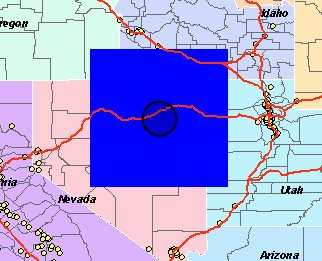
大家请看图,如果使用原来的ADF Javascript Library的代码,就是getWidth() * 2,则得出的图
![]()
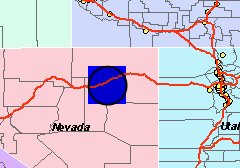
如果使用getWidth()/2值,则得出图:
![]()
如果我的分析没有错的话,那么这个问题就应该是BUG了。不过听说现在9.3版本不允许使用自己的代码了,所以解决方法只有两个了:
1、自己编写那个MapDragCricle代码。
2、在ADF Server端,做double realRadius = MapCircleEventArgs.MapRadius / 2。
MapDragCircle = MapCircle = ESRI.ADF.MapTools.Circle = function(mapid, mode, showLoading, cursor, vectorToolbarState) {
var map = $find(mapid);
var onComplete = Function.createDelegate(map, function(geom) {
var geomString = geom.get_center().toString(':') + ':' + geom.get_width()*2;
this.doCallback('EventArg=Circle&coords='+geomString+'&'+mapid+'_mode='+mode,this);
});
map.getGeometry(ESRI.ADF.Graphics.ShapeType.Circle,onComplete,function(){map.__activeToolMode=null;},ESRI.ADF.MapTools.lineColor,ESRI.ADF.MapTools.fillColor,cursor, true);
map.__activeToolMode = mode;
};
注意这行代码:
var geomString = geom.get_center().toString(':') + ':' + geom.get_width()*2;
什么意思呢? 意思就是说你在MapCircleEventArgs得到的那个MapRadius并不是半径,而是一个4倍于半径的值。真正的半径值应该是“geom.get_width() / 2”。到底是不是真正这样呢? 我写了一个测试代码,就是以中点和MapCircleEventArgs.MapRadius构造一个正方形和原来在Javascript端画的圆形做叠加,ADF代码如下:
public void ServerAction(ToolEventArgs args)
{
try
{
//PointSelector.SelectByAO(args);
ESRI.ArcGIS.ADF.Web.UI.WebControls.Map map = (ESRI.ArcGIS.ADF.Web.UI.WebControls.Map)args.Control;
ESRI.ArcGIS.ADF.Web.UI.WebControls.MapCircleEventArgs circleArgs = (ESRI.ArcGIS.ADF.Web.UI.WebControls.MapCircleEventArgs)args;
ESRI.ArcGIS.ADF.ArcGISServer.PointN centerPointN = ESRI.ArcGIS.ADF.Web.DataSources.ArcGISServer.Converter.FromAdfPoint(circleArgs.MapCenter);
double radius = circleArgs.MapRadius;
//
// 以圆中点和半经构造一个正方型。
//
ESRI.ArcGIS.ADF.ArcGISServer.PointN[] fivePoint = new ESRI.ArcGIS.ADF.ArcGISServer.PointN[5];
fivePoint[0] = new ESRI.ArcGIS.ADF.ArcGISServer.PointN();
fivePoint[0].X = centerPointN.X - radius;
fivePoint[0].Y = centerPointN.Y + radius;
fivePoint[0].SpatialReference = centerPointN.SpatialReference;
fivePoint[1] = new ESRI.ArcGIS.ADF.ArcGISServer.PointN();
fivePoint[1].X = centerPointN.X + radius;
fivePoint[1].Y = centerPointN.Y + radius;
fivePoint[1].SpatialReference = centerPointN.SpatialReference;
fivePoint[2] = new ESRI.ArcGIS.ADF.ArcGISServer.PointN();
fivePoint[2].X = centerPointN.X + radius;
fivePoint[2].Y = centerPointN.Y - radius;
fivePoint[2].SpatialReference = centerPointN.SpatialReference;
fivePoint[3] = new ESRI.ArcGIS.ADF.ArcGISServer.PointN();
fivePoint[3].X = centerPointN.X - radius;
fivePoint[3].Y = centerPointN.Y - radius;
fivePoint[3].SpatialReference = centerPointN.SpatialReference;
fivePoint[4] = new ESRI.ArcGIS.ADF.ArcGISServer.PointN();
fivePoint[4].X = fivePoint[0].X;
fivePoint[4].Y = fivePoint[0].Y;
fivePoint[4].SpatialReference = centerPointN.SpatialReference;
ESRI.ArcGIS.ADF.ArcGISServer.Ring[] rings = new ESRI.ArcGIS.ADF.ArcGISServer.Ring[1];
rings[0] = new ESRI.ArcGIS.ADF.ArcGISServer.Ring();
rings[0].PointArray = fivePoint;
ESRI.ArcGIS.ADF.ArcGISServer.PolygonN poly = new ESRI.ArcGIS.ADF.ArcGISServer.PolygonN();
poly.RingArray = rings;
poly.SpatialReference = centerPointN.SpatialReference;
poly.HasID = false;
poly.HasM = false;
poly.HasZ = false;
//////////////
ESRI.ArcGIS.ADF.ArcGISServer.RgbColor fillColor = new ESRI.ArcGIS.ADF.ArcGISServer.RgbColor();
fillColor.Red = 0;
fillColor.Blue = 255;
fillColor.Green = 0;
fillColor.AlphaValueSpecified = true;
fillColor.AlphaValue = 128;
ESRI.ArcGIS.ADF.ArcGISServer.SimpleFillSymbol fillSym = new ESRI.ArcGIS.ADF.ArcGISServer.SimpleFillSymbol();
fillSym.Style = ESRI.ArcGIS.ADF.ArcGISServer.esriSimpleFillStyle.esriSFSSolid;
fillSym.Color = fillColor;
ESRI.ArcGIS.ADF.ArcGISServer.RectangleElement newRect = new ESRI.ArcGIS.ADF.ArcGISServer.RectangleElement();
newRect.Rectangle = poly;
newRect.Symbol = fillSym;
///////
IMapFunctionality mapFunc = map.GetFunctionality("USA_Base");
ESRI.ArcGIS.ADF.Web.DataSources.ArcGISServer.MapResourceBase realMapRes =
(ESRI.ArcGIS.ADF.Web.DataSources.ArcGISServer.MapResourceBase)mapFunc.Resource;
ESRI.ArcGIS.ADF.ArcGISServer.MapDescription mapDesc = realMapRes.MapDescription;
mapDesc.CustomGraphics = new ESRI.ArcGIS.ADF.ArcGISServer.GraphicElement[] { newRect};
map.RefreshResource("USA_Base");
}
catch (System.Exception ex)
{
}
}
大家请看图,如果使用原来的ADF Javascript Library的代码,就是getWidth() * 2,则得出的图
如果使用getWidth()/2值,则得出图:
如果我的分析没有错的话,那么这个问题就应该是BUG了。不过听说现在9.3版本不允许使用自己的代码了,所以解决方法只有两个了:
1、自己编写那个MapDragCricle代码。
2、在ADF Server端,做double realRadius = MapCircleEventArgs.MapRadius / 2。

 浙公网安备 33010602011771号