Spring Boot 集成 Redis 全方位详解 - 指南
文章目录
一、Redis 与 Spring Boot 集成概述
1.1 Redis 简介
Redis(Remote Dictionary Server)是一个开源的、高性能的键值对存储数据库,它以其出色的性能、丰富的数据结构和灵活的使用方式,在现代软件开发中占据了重要地位。
Redis 具有以下核心特性:
- 基于内存存储,读写速度极快,单机每秒可处理数十万次操作
- 支持多种数据结构,包括字符串(String)、哈希(Hash)、列表(List)、集合(Set)、有序集合(ZSet)等
- 支持数据持久化,可将内存中的数据定期写入磁盘,避免数据丢失
- 支持主从复制、哨兵模式和集群模式,保证高可用性和扩展性
- 提供丰富的功能,如事务、Lua 脚本、发布 / 订阅、过期策略等
1.2 Spring Boot 集成 Redis 的优势
Spring Boot 作为当前流行的 Java 开发框架,简化了 Java 应用的开发配置过程。将 Spring Boot 与 Redis 集成,具有以下优势:
- 自动配置:Spring Boot 提供了 Redis 自动配置模块,减少手动配置工作
- 模板化操作:通过 RedisTemplate 等模板类,简化 Redis 操作
- 缓存支持:无缝集成 Spring 缓存抽象,轻松实现数据缓存
- 连接池管理:内置连接池支持,优化 Redis 连接性能
- 与 Spring 生态完美融合:可与 Spring MVC、Spring Data 等组件无缝协作
1.3 应用场景
Spring Boot 集成 Redis 后,可应用于多种场景:
- 数据缓存:减轻数据库压力,提高数据访问速度
- 会话存储:分布式系统中共享会话信息
- 计数器:实现访问量、下载量等计数功能
- 分布式锁:解决分布式系统中的并发问题
- 消息队列:基于发布 / 订阅功能实现简单的消息通信
- 排行榜:利用 ZSet 数据结构实现实时排行榜
二、环境准备与搭建
2.1 环境要求
- JDK:1.8 及以上版本
- Spring Boot:2.x 或 3.x 版本(本文以 2.7.10 为例)
- Redis:5.x 及以上版本
- Maven:3.6 及以上版本(或 Gradle 7.0 及以上)
2.2 Redis 安装与配置
2.2.1 Windows 系统安装 Redis
- 访问 Redis 官方网站(https://redis.io/download)下载 Windows 版本的 Redis(可2. 通过 GitHub 上的微软维护版本获取 解压下载的压缩包到指定目录,如 D:\redis
- 打开命令提示符,进入 Redis 目录,执行以下命令启动 Redis 服务器:
redis-server.exe redis.windows.conf- 另开一个命令提示符窗口,执行以下命令启动 Redis 客户端:
redis-cli.exe -h 127.0.0.1 -p 63792.2.2 Linux 系统安装 Redis
- 通过包管理器安装(以 Ubuntu 为例):
sudo apt update
sudo apt install redis-server- 启动 Redis 服务:
sudo systemctl start redis-server- 验证 Redis 是否启动成功:
redis-cli ping若返回 “PONG”,则表示 Redis 启动成功。
2.2.3 Redis 基本配置
Redis 的主要配置文件为 redis.conf,常用配置项如下:
- port 6379:默认端口号
- bind 127.0.0.1:绑定的 IP 地址,默认只允许本地访问
- requirepass yourpassword:设置访问密码
- daemonize yes:以守护进程方式运行(Linux 系统)
- maxmemory:设置 Redis 最大使用内存
- maxmemory-policy:内存达到上限时的淘汰策略
修改配置后,需重启 Redis 服务使配置生效。
2.3 创建 Spring Boot 项目
2.3.1 使用 Spring Initializr 创建项目
- 访问 https://start.spring.io/
- 填写项目信息:
Group:com.example
Artifact:springboot-redis-demo
Name:springboot-redis-demo
Description:Demo project for Spring Boot and Redis
Package name:com.example.redisdemo
Type:Maven
Java:8
Spring Boot:2.7.10
- 选择依赖:
Spring Web
Spring Data Redis
Lombok(可选,用于简化代码)
- 点击 “Generate” 按钮下载项目压缩包,解压后导入 IDE(如 IntelliJ IDEA 或 Eclipse)
2.3.2 手动配置 pom.xml
若手动创建项目,需在 pom.xml 中添加以下依赖:
<?xml version="1.0" encoding="UTF-8"?>
  <project xmlns="http://maven.apache.org/POM/4.0.0" xmlns:xsi="http://www.w3.org/2001/XMLSchema-instance"
  xsi:schemaLocation="http://maven.apache.org/POM/4.0.0 https://maven.apache.org/xsd/maven-4.0.0.xsd">
  <modelVersion>4.0.0</modelVersion>
    <parent>
      <groupId>org.springframework.boot</groupId>
        <artifactId>spring-boot-starter-parent</artifactId>
          <version>2.7.10</version>
            <relativePath/> <!-- lookup parent from repository -->
              </parent>
                <groupId>com.example</groupId>
                  <artifactId>springboot-redis-demo</artifactId>
                    <version>0.0.1-SNAPSHOT</version>
                      <name>springboot-redis-demo</name>
                        <description>Demo project for Spring Boot and Redis</description>
                          <properties>
                            <java.version>1.8</java.version>
                              </properties>
                                <dependencies>
                                  <!-- Spring Web 依赖 -->
                                    <dependency>
                                      <groupId>org.springframework.boot</groupId>
                                        <artifactId>spring-boot-starter-web</artifactId>
                                          </dependency>
                                            <!-- Spring Data Redis 依赖 -->
                                              <dependency>
                                                <groupId>org.springframework.boot</groupId>
                                                  <artifactId>spring-boot-starter-data-redis</artifactId>
                                                    </dependency>
                                                      <!-- 连接池依赖 -->
                                                        <dependency>
                                                          <groupId>org.apache.commons</groupId>
                                                            <artifactId>commons-pool2</artifactId>
                                                              </dependency>
                                                                <!-- Lombok 依赖(可选) -->
                                                                  <dependency>
                                                                    <groupId>org.projectlombok</groupId>
                                                                      <artifactId>lombok</artifactId>
                                                                        <optional>true</optional>
                                                                          </dependency>
                                                                            <!-- 测试依赖 -->
                                                                              <dependency>
                                                                                <groupId>org.springframework.boot</groupId>
                                                                                  <artifactId>spring-boot-starter-test</artifactId>
                                                                                    <scope>test</scope>
                                                                                      </dependency>
                                                                                        </dependencies>
                                                                                          <build>
                                                                                            <plugins>
                                                                                              <plugin>
                                                                                                <groupId>org.springframework.boot</groupId>
                                                                                                  <artifactId>spring-boot-maven-plugin</artifactId>
                                                                                                    <configuration>
                                                                                                      <excludes>
                                                                                                        <exclude>
                                                                                                          <groupId>org.projectlombok</groupId>
                                                                                                            <artifactId>lombok</artifactId>
                                                                                                              </exclude>
                                                                                                                </excludes>
                                                                                                                  </configuration>
                                                                                                                    </plugin>
                                                                                                                      </plugins>
                                                                                                                        </build>
                                                                                                                          </project>
三、Redis 核心配置
3.1 基本配置
Spring Boot 提供了自动配置功能,我们只需在配置文件中添加 Redis 相关配置即可。常用的配置文件格式有两种:application.properties 和 application.yml,这里以 application.yml 为例。
在 src/main/resources 目录下创建 application.yml 文件,添加以下配置:
spring:
redis:
# Redis 服务器地址
host: 127.0.0.1
# Redis 服务器端口
port: 6379
# Redis 服务器密码(若未设置密码,可省略)
password:
# 数据库索引(0-15,默认为 0)
database: 0
# 连接超时时间(毫秒)
timeout: 3000ms
# Lettuce 连接池配置
lettuce:
pool:
# 最大连接数
max-active: 8
# 最大空闲连接
max-idle: 8
# 最小空闲连接
min-idle: 2
# 最大等待时间(-1 表示无限制)
max-wait: -1ms
3.2 集群配置
如果使用 Redis 集群,配置方式如下:
spring:
redis:
password:
timeout: 3000ms
cluster:
# 集群节点列表
nodes:
- 192.168.1.101:6379
- 192.168.1.102:6379
- 192.168.1.103:6379
- 192.168.1.104:6379
- 192.168.1.105:6379
- 192.168.1.106:6379
# 最大重定向次数
max-redirects: 3
lettuce:
pool:
max-active: 16
max-idle: 8
min-idle: 4
max-wait: 1000ms
3.3 哨兵模式配置
若 Redis 采用哨兵模式,配置如下:
spring:
redis:
password:
timeout: 3000ms
sentinel:
# 主节点名称
master: mymaster
# 哨兵节点列表
nodes:
- 192.168.1.201:26379
- 192.168.1.202:26379
- 192.168.1.203:26379
lettuce:
pool:
max-active: 16
max-idle: 8
min-idle: 4
max-wait: 1000ms
3.4 自定义 RedisTemplate 配置
Spring Boot 自动配置的 RedisTemplate 使用 JdkSerializationRedisSerializer 进行序列化,这种方式会导致存储的数据带有序列化前缀,可读性差且占用空间。因此,通常需要自定义 RedisTemplate,使用 JSON 序列化方式。
创建 Redis 配置类:
package com.example.redisdemo.config;
import org.springframework.context.annotation.Bean;
import org.springframework.context.annotation.Configuration;
import org.springframework.data.redis.connection.RedisConnectionFactory;
import org.springframework.data.redis.core.RedisTemplate;
import org.springframework.data.redis.serializer.GenericJackson2JsonRedisSerializer;
import org.springframework.data.redis.serializer.StringRedisSerializer;
@Configuration
public class RedisConfig {
/**
* 自定义 RedisTemplate,使用 JSON 序列化
*/
@Bean
public RedisTemplate<String, Object> redisTemplate(RedisConnectionFactory factory) {
  // 创建 RedisTemplate 实例
  RedisTemplate<String, Object> template = new RedisTemplate<>();
    // 设置连接工厂
    template.setConnectionFactory(factory);
    // 创建字符串序列化器
    StringRedisSerializer stringSerializer = new StringRedisSerializer();
    // 创建 JSON 序列化器
    GenericJackson2JsonRedisSerializer jsonSerializer = new GenericJackson2JsonRedisSerializer();
    // 设置 key 的序列化器
    template.setKeySerializer(stringSerializer);
    // 设置 hash key 的序列化器
    template.setHashKeySerializer(stringSerializer);
    // 设置 value 的序列化器
    template.setValueSerializer(jsonSerializer);
    // 设置 hash value 的序列化器
    template.setHashValueSerializer(jsonSerializer);
    // 初始化模板
    template.afterPropertiesSet();
    return template;
    }
    }
上述配置中,我们使用 StringRedisSerializer 序列化 key,使用 GenericJackson2JsonRedisSerializer 序列化 value。GenericJackson2JsonRedisSerializer 基于 Jackson 库,能够将对象序列化为 JSON 格式,并且在反序列化时能够自动识别对象类型。
3.5 序列化器详解
Redis 序列化器用于将 Java 对象转换为可存储在 Redis 中的字节序列,以及将字节序列转换回 Java 对象。Spring Data Redis 提供了多种序列化器:
- StringRedisSerializer:将对象序列化为字符串,主要用于序列化 key
- JdkSerializationRedisSerializer:使用 JDK 自带的序列化机制,默认的序列化器
- GenericJackson2JsonRedisSerializer:使用 Jackson 库将对象序列化为 JSON 格式
- Jackson2JsonRedisSerializer:与 GenericJackson2JsonRedisSerializer 类似,但需要指定目标类
- OxmSerializer:使用 Spring O/X 映射功能进行序列化,支持 XML 格式
各种序列化器的优缺点:
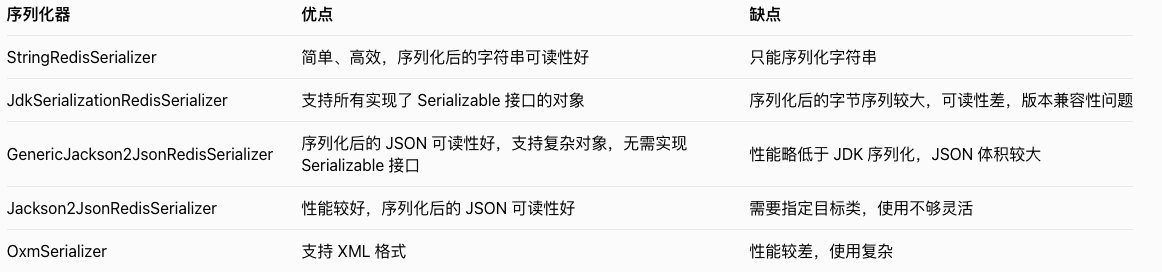
在实际开发中,推荐使用 StringRedisSerializer 作为 key 的序列化器,使用 GenericJackson2JsonRedisSerializer 或 Jackson2JsonRedisSerializer 作为 value 的序列化器。
四、Redis 数据结构操作
Spring Data Redis 提供了 RedisTemplate 和 StringRedisTemplate 两个模板类用于操作 Redis。StringRedisTemplate 是 RedisTemplate 的子类,专门用于处理字符串类型的数据。
4.1 StringRedisTemplate 操作
StringRedisTemplate 的 opsForValue() 方法返回 ValueOperations 对象,用于操作 String 类型的数据。
package com.example.redisdemo.service;
import org.springframework.data.redis.core.StringRedisTemplate;
import org.springframework.data.redis.core.ValueOperations;
import org.springframework.stereotype.Service;
import javax.annotation.Resource;
import java.util.concurrent.TimeUnit;
@Service
public class StringRedisService {
@Resource
private StringRedisTemplate stringRedisTemplate;
/**
* 设置字符串值
*/
public void setString(String key, String value) {
ValueOperations<String, String> operations = stringRedisTemplate.opsForValue();
  operations.set(key, value);
  }
  /**
  * 设置字符串值并指定过期时间
  */
  public void setStringWithExpire(String key, String value, long timeout, TimeUnit unit) {
  ValueOperations<String, String> operations = stringRedisTemplate.opsForValue();
    operations.set(key, value, timeout, unit);
    }
    /**
    * 获取字符串值
    */
    public String getString(String key) {
    ValueOperations<String, String> operations = stringRedisTemplate.opsForValue();
      return operations.get(key);
      }
      /**
      * 自增操作
      */
      public Long increment(String key, long delta) {
      ValueOperations<String, String> operations = stringRedisTemplate.opsForValue();
        return operations.increment(key, delta);
        }
        /**
        * 自减操作
        */
        public Long decrement(String key, long delta) {
        ValueOperations<String, String> operations = stringRedisTemplate.opsForValue();
          return operations.decrement(key, delta);
          }
          /**
          * 删除键
          */
          public Boolean delete(String key) {
          return stringRedisTemplate.delete(key);
          }
          }
4.2 RedisTemplate 操作对象
RedisTemplate 可以操作各种类型的对象,下面以操作用户对象为例进行说明。
首先定义一个 User 实体类:
package com.example.redisdemo.entity;
import lombok.AllArgsConstructor;
import lombok.Data;
import lombok.NoArgsConstructor;
import java.io.Serializable;
@Data
@NoArgsConstructor
@AllArgsConstructor
public class User implements Serializable {
private Long id;
private String name;
private Integer age;
private String email;
}
然后创建一个服务类,使用 RedisTemplate 操作 User 对象:
package com.example.redisdemo.service;
import com.example.redisdemo.entity.User;
import org.springframework.data.redis.core.RedisTemplate;
import org.springframework.data.redis.core.ValueOperations;
import org.springframework.stereotype.Service;
import javax.annotation.Resource;
import java.util.concurrent.TimeUnit;
@Service
public class ObjectRedisService {
@Resource
private RedisTemplate<String, Object> redisTemplate;
  /**
  * 存储用户对象
  */
  public void saveUser(String key, User user) {
  ValueOperations<String, Object> operations = redisTemplate.opsForValue();
    operations.set(key, user);
    }
    /**
    * 存储用户对象并指定过期时间
    */
    public void saveUserWithExpire(String key, User user, long timeout, TimeUnit unit) {
    ValueOperations<String, Object> operations = redisTemplate.opsForValue();
      operations.set(key, user, timeout, unit);
      }
      /**
      * 获取用户对象
      */
      public User getUser(String key) {
      ValueOperations<String, Object> operations = redisTemplate.opsForValue();
        return (User) operations.get(key);
        }
        /**
        * 删除用户对象
        */
        public Boolean deleteUser(String key) {
        return redisTemplate.delete(key);
        }
        }
4.3 操作 Hash 类型
Hash 类型适合存储对象的多个属性,RedisTemplate 的 opsForHash() 方法返回 HashOperations 对象,用于操作 Hash 类型的数据。
package com.example.redisdemo.service;
import org.springframework.data.redis.core.HashOperations;
import org.springframework.data.redis.core.RedisTemplate;
import org.springframework.stereotype.Service;
import javax.annotation.Resource;
import java.util.Map;
import java.util.Set;
@Service
public class HashRedisService {
@Resource
private RedisTemplate<String, Object> redisTemplate;
  /**
  * 向 Hash 中添加一个字段
  */
  public void put(String key, String hashKey, Object value) {
  HashOperations<String, String, Object> operations = redisTemplate.opsForHash();
    operations.put(key, hashKey, value);
    }
    /**
    * 向 Hash 中添加多个字段
    */
    public void putAll(String key, Map<String, Object> map) {
      HashOperations<String, String, Object> operations = redisTemplate.opsForHash();
        operations.putAll(key, map);
        }
        /**
        * 获取 Hash 中指定字段的值
        */
        public Object get(String key, String hashKey) {
        HashOperations<String, String, Object> operations = redisTemplate.opsForHash();
          return operations.get(key, hashKey);
          }
          /**
          * 获取 Hash 中所有字段和值
          */
          public Map<String, Object> getAll(String key) {
            HashOperations<String, String, Object> operations = redisTemplate.opsForHash();
              return operations.entries(key);
              }
              /**
              * 获取 Hash 中所有字段
              */
              public Set<String> getKeys(String key) {
                HashOperations<String, String, Object> operations = redisTemplate.opsForHash();
                  return operations.keys(key);
                  }
                  /**
                  * 获取 Hash 中所有值
                  */
                  public Object[] getValues(String key) {
                  HashOperations<String, String, Object> operations = redisTemplate.opsForHash();
                    return operations.values(key).toArray();
                    }
                    /**
                    * 删除 Hash 中指定字段
                    */
                    public Long delete(String key, String... hashKeys) {
                    HashOperations<String, String, Object> operations = redisTemplate.opsForHash();
                      return operations.delete(key, hashKeys);
                      }
                      /**
                      * 判断 Hash 中是否存在指定字段
                      */
                      public Boolean hasKey(String key, String hashKey) {
                      HashOperations<String, String, Object> operations = redisTemplate.opsForHash();
                        return operations.hasKey(key, hashKey);
                        }
                        }
4.4 操作 List 类型
List 类型是一个有序的字符串列表,RedisTemplate 的 opsForList() 方法返回 ListOperations 对象,用于操作 List 类型的数据。
package com.example.redisdemo.service;
import org.springframework.data.redis.core.ListOperations;
import org.springframework.data.redis.core.RedisTemplate;
import org.springframework.stereotype.Service;
import javax.annotation.Resource;
import java.util.List;
@Service
public class ListRedisService {
@Resource
private RedisTemplate<String, Object> redisTemplate;
  /**
  * 从列表左侧插入元素
  */
  public Long leftPush(String key, Object value) {
  ListOperations<String, Object> operations = redisTemplate.opsForList();
    return operations.leftPush(key, value);
    }
    /**
    * 从列表左侧插入多个元素
    */
    public Long leftPushAll(String key, Object... values) {
    ListOperations<String, Object> operations = redisTemplate.opsForList();
      return operations.leftPushAll(key, values);
      }
      /**
      * 从列表右侧插入元素
      */
      public Long rightPush(String key, Object value) {
      ListOperations<String, Object> operations = redisTemplate.opsForList();
        return operations.rightPush(key, value);
        }
        /**
        * 从列表右侧插入多个元素
        */
        public Long rightPushAll(String key, Object... values) {
        ListOperations<String, Object> operations = redisTemplate.opsForList();
          return operations.rightPushAll(key, values);
          }
          /**
          * 获取列表指定范围内的元素
          */
          public List<Object> range(String key, long start, long end) {
            ListOperations<String, Object> operations = redisTemplate.opsForList();
              return operations.range(key, start, end);
              }
              /**
              * 获取列表长度
              */
              public Long size(String key) {
              ListOperations<String, Object> operations = redisTemplate.opsForList();
                return operations.size(key);
                }
                /**
                * 从列表左侧弹出元素
                */
                public Object leftPop(String key) {
                ListOperations<String, Object> operations = redisTemplate.opsForList();
                  return operations.leftPop(key);
                  }
                  /**
                  * 从列表右侧弹出元素
                  */
                  public Object rightPop(String key) {
                  ListOperations<String, Object> operations = redisTemplate.opsForList();
                    return operations.rightPop(key);
                    }
                    /**
                    * 根据索引设置列表元素的值
                    */
                    public void set(String key, long index, Object value) {
                    ListOperations<String, Object> operations = redisTemplate.opsForList();
                      operations.set(key, index, value);
                      }
                      /**
                      * 删除列表中指定次数的元素
                      */
                      public Long remove(String key, long count, Object value) {
                      ListOperations<String, Object> operations = redisTemplate.opsForList();
                        return operations.remove(key, count, value);
                        }
                        }
4.5 操作 Set 类型
Set 类型是一个无序的字符串集合,不允许重复元素,RedisTemplate 的 opsForSet() 方法返回 SetOperations 对象,用于操作 Set 类型的数据。
package com.example.redisdemo.service;
import org.springframework.data.redis.core.SetOperations;
import org.springframework.data.redis.core.RedisTemplate;
import org.springframework.stereotype.Service;
import javax.annotation.Resource;
import java.util.Set;
@Service
public class SetRedisService {
@Resource
private RedisTemplate<String, Object> redisTemplate;
  /**
  * 向集合中添加元素
  */
  public Long add(String key, Object... values) {
  SetOperations<String, Object> operations = redisTemplate.opsForSet();
    return operations.add(key, values);
    }
    /**
    * 获取集合中的所有元素
    */
    public Set<Object> members(String key) {
      SetOperations<String, Object> operations = redisTemplate.opsForSet();
        return operations.members(key);
        }
        /**
        * 判断元素是否在集合中
        */
        public Boolean isMember(String key, Object value) {
        SetOperations<String, Object> operations = redisTemplate.opsForSet();
          return operations.isMember(key, value);
          }
          /**
          * 获取集合的大小
          */
          public Long size(String key) {
          SetOperations<String, Object> operations = redisTemplate.opsForSet();
            return operations.size(key);
            }
            /**
            * 从集合中移除元素
            */
            public Long remove(String key, Object... values) {
            SetOperations<String, Object> operations = redisTemplate.opsForSet();
              return operations.remove(key, values);
              }
              /**
              * 随机从集合中弹出一个元素
              */
              public Object pop(String key) {
              SetOperations<String, Object> operations = redisTemplate.opsForSet();
                return operations.pop(key);
                }
                /**
                * 计算两个集合的交集
                */
                public Set<Object> intersect(String key1, String key2) {
                  SetOperations<String, Object> operations = redisTemplate.opsForSet();
                    return operations.intersect(key1, key2);
                    }
                    /**
                    * 计算两个集合的并集
                    */
                    public Set<Object> union(String key1, String key2) {
                      SetOperations<String, Object> operations = redisTemplate.opsForSet();
                        return operations.union(key1, key2);
                        }
                        /**
                        * 计算两个集合的差集
                        */
                        public Set<Object> difference(String key1, String key2) {
                          SetOperations<String, Object> operations = redisTemplate.opsForSet();
                            return operations.difference(key1, key2);
                            }
                            }
4.6 操作 ZSet 类型
ZSet 类型是一个有序的字符串集合,每个元素都关联一个分数(score),RedisTemplate 的 opsForZSet() 方法返回 ZSetOperations 对象,用于操作 ZSet 类型的数据。
package com.example.redisdemo.service;
import org.springframework.data.redis.core.ZSetOperations;
import org.springframework.data.redis.core.RedisTemplate;
import org.springframework.stereotype.Service;
import javax.annotation.Resource;
import java.util.Set;
@Service
public class ZSetRedisService {
@Resource
private RedisTemplate<String, Object> redisTemplate;
  /**
  * 向有序集合中添加元素
  */
  public Boolean add(String key, Object value, double score) {
  ZSetOperations<String, Object> operations = redisTemplate.opsForZSet();
    return operations.add(key, value, score);
    }
    /**
    * 向有序集合中添加多个元素
    */
    public Long add(String key, Set<ZSetOperations.TypedTuple<Object>> tuples) {
      ZSetOperations<String, Object> operations = redisTemplate.opsForZSet();
        return operations.add(key, tuples);
        }
        /**
        * 获取有序集合中元素的分数
        */
        public Double score(String key, Object value) {
        ZSetOperations<String, Object> operations = redisTemplate.opsForZSet();
          return operations.score(key, value);
          }
          /**
          * 增加有序集合中元素的分数
          */
          public Double incrementScore(String key, Object value, double delta) {
          ZSetOperations<String, Object> operations = redisTemplate.opsForZSet();
            return operations.incrementScore(key, value, delta);
            }
            /**
            * 获取有序集合的大小
            */
            public Long size(String key) {
            ZSetOperations<String, Object> operations = redisTemplate.opsForZSet();
              return operations.size(key);
              }
              /**
              * 移除有序集合中的元素
              */
              public Long remove(String key, Object... values) {
              ZSetOperations<String, Object> operations = redisTemplate.opsForZSet();
                return operations.remove(key, values);
                }
                /**
                * 获取有序集合中指定排名范围的元素(按分数升序)
                */
                public Set<Object> range(String key, long start, long end) {
                  ZSetOperations<String, Object> operations = redisTemplate.opsForZSet();
                    return operations.range(key, start, end);
                    }
                    /**
                    * 获取有序集合中指定分数范围的元素(按分数升序)
                    */
                    public Set<Object> rangeByScore(String key, double min, double max) {
                      ZSetOperations<String, Object> operations = redisTemplate.opsForZSet();
                        return operations.rangeByScore(key, min, max);
                        }
                        /**
                        * 获取元素在有序集合中的排名(按分数升序)
                        */
                        public Long rank(String key, Object value) {
                        ZSetOperations<String, Object> operations = redisTemplate.opsForZSet();
                          return operations.rank(key, value);
                          }
                          /**
                          * 获取元素在有序集合中的排名(按分数降序)
                          */
                          public Long reverseRank(String key, Object value) {
                          ZSetOperations<String, Object> operations = redisTemplate.opsForZSet();
                            return operations.reverseRank(key, value);
                            }
                            }
五、Spring 缓存抽象集成
Spring 提供了缓存抽象,可以通过注解的方式轻松实现数据缓存功能。Spring Boot 与 Redis 集成后,可以将 Redis 作为缓存的存储介质。
5.1 开启缓存支持
要使用 Spring 缓存抽象,需要在配置类或启动类上添加 @EnableCaching 注解开启缓存支持。
package com.example.redisdemo;
import org.springframework.boot.SpringApplication;
import org.springframework.boot.autoconfigure.SpringBootApplication;
import org.springframework.cache.annotation.EnableCaching;
@SpringBootApplication
@EnableCaching // 开启缓存支持
public class RedisDemoApplication {
public static void main(String[] args) {
SpringApplication.run(RedisDemoApplication.class, args);
}
}
5.2 配置缓存管理器
Spring Boot 会自动配置 RedisCacheManager,但我们可以根据需要自定义缓存管理器,设置缓存过期时间、序列化方式等。
package com.example.redisdemo.config;
import org.springframework.cache.annotation.EnableCaching;
import org.springframework.context.annotation.Bean;
import org.springframework.context.annotation.Configuration;
import org.springframework.data.redis.cache.RedisCacheConfiguration;
import org.springframework.data.redis.cache.RedisCacheManager;
import org.springframework.data.redis.connection.RedisConnectionFactory;
import org.springframework.data.redis.serializer.GenericJackson2JsonRedisSerializer;
import org.springframework.data.redis.serializer.RedisSerializationContext;
import org.springframework.data.redis.serializer.StringRedisSerializer;
import java.time.Duration;
import java.util.HashMap;
import java.util.Map;
@Configuration
@EnableCaching
public class CacheConfig {
/**
* 自定义 RedisCacheManager
*/
@Bean
public RedisCacheManager cacheManager(RedisConnectionFactory factory) {
// 全局默认缓存配置
RedisCacheConfiguration defaultConfig = RedisCacheConfiguration.defaultCacheConfig()
// 设置 key 序列化器
.serializeKeysWith(RedisSerializationContext.SerializationPair
.fromSerializer(new StringRedisSerializer()))
// 设置 value 序列化器
.serializeValuesWith(RedisSerializationContext.SerializationPair
.fromSerializer(new GenericJackson2JsonRedisSerializer()))
// 默认过期时间 30 分钟
.entryTtl(Duration.ofMinutes(30))
// 不缓存 null 值
.disableCachingNullValues();
// 针对不同缓存名称设置不同的过期时间
Map<String, RedisCacheConfiguration> configMap = new HashMap<>();
  // 用户缓存过期时间 1 小时
  configMap.put("userCache", defaultConfig.entryTtl(Duration.ofHours(1)));
  // 商品缓存过期时间 10 分钟
  configMap.put("productCache", defaultConfig.entryTtl(Duration.ofMinutes(10)));
  // 订单缓存过期时间 5 分钟
  configMap.put("orderCache", defaultConfig.entryTtl(Duration.ofMinutes(5)));
  // 创建缓存管理器
  return RedisCacheManager.builder(factory)
  .cacheDefaults(defaultConfig) // 设置默认缓存配置
  .withInitialCacheConfigurations(configMap) // 设置自定义缓存配置
  .build();
  }
  }
5.3 缓存注解详解
Spring 缓存抽象提供了多个注解用于实现缓存功能:
- @Cacheable:用于查询操作,方法执行前先查询缓存,如果缓存中存在,则直接返回缓存结果,不执行方法;如果缓存中不存在,则执行方法,并将方法返回值存入缓存。
主要属性:- value/cacheNames:缓存名称,必填,用于指定缓存的存储位置
- key:缓存的 key,可以使用 SpEL 表达式,默认为方法参数组合
- condition:缓存条件,满足条件才进行缓存
- unless:排除条件,满足条件则不进行缓存
- @CachePut:用于更新操作,方法执行后将返回值存入缓存,无论缓存中是否已存在该 key。
主要属性与 @Cacheable 相同。 - @CacheEvict:用于删除操作,方法执行后删除缓存中的指定数据。
主要属性:- value/cacheNames:缓存名称,必填
- key:要删除的缓存 key
- allEntries:是否删除缓存中的所有数据,默认为 false
- beforeInvocation:是否在方法执行前删除缓存,默认为 false
- @Caching:用于组合多个缓存注解,可以同时指定 @Cacheable、@CachePut 和 @CacheEvict。
- @CacheConfig:用于类级别,统一配置该类中所有缓存注解的公共属性,如 value、keyGenerator 等。
5.4 缓存注解使用示例
下面以用户服务为例,展示缓存注解的使用:
package com.example.redisdemo.service;
import com.example.redisdemo.entity.User;
import org.springframework.cache.annotation.CacheEvict;
import org.springframework.cache.annotation.CachePut;
import org.springframework.cache.annotation.Cacheable;
import org.springframework.stereotype.Service;
import java.util.HashMap;
import java.util.Map;
@Service
public class UserCacheService {
// 模拟数据库存储用户信息
private static final Map<Long, User> userMap = new HashMap<>();
  static {
  // 初始化一些用户数据
  userMap.put(1L, new User(1L, "张三", 20, "zhangsan@example.com"));
  userMap.put(2L, new User(2L, "李四", 25, "lisi@example.com"));
  userMap.put(3L, new User(3L, "王五", 30, "wangwu@example.com"));
  }
  /**
  * 根据 ID 查询用户
  * 使用 @Cacheable 注解,缓存名称为 userCache,key 为 "user:" + id
  */
  @Cacheable(value = "userCache", key = "'user:' + #id")
  public User getUserById(Long id) {
  System.out.println("从数据库查询用户,id=" + id);
  return userMap.get(id);
  }
  /**
  * 添加用户
  * 使用 @CachePut 注解,将新添加的用户存入缓存
  */
  @CachePut(value = "userCache", key = "'user:' + #result.id")
  public User addUser(User user) {
  System.out.println("向数据库添加用户,user=" + user);
  userMap.put(user.getId(), user);
  return user;
  }
  /**
  * 更新用户
  * 使用 @CachePut 注解,更新缓存中的用户信息
  */
  @CachePut(value = "userCache", key = "'user:' + #user.id")
  public User updateUser(User user) {
  System.out.println("更新数据库中的用户,user=" + user);
  userMap.put(user.getId(), user);
  return user;
  }
  /**
  * 删除用户
  * 使用 @CacheEvict 注解,删除缓存中的用户信息
  */
  @CacheEvict(value = "userCache", key = "'user:' + #id")
  public void deleteUser(Long id) {
  System.out.println("从数据库删除用户,id=" + id);
  userMap.remove(id);
  }
  /**
  * 清空所有用户缓存
  * 使用 @CacheEvict 注解,allEntries = true 表示删除缓存中的所有数据
  */
  @CacheEvict(value = "userCache", allEntries = true)
  public void clearUserCache() {
  System.out.println("清空所有用户缓存");
  }
  }
5.5 SpEL 表达式在缓存中的应用
在缓存注解中,key、condition、unless 等属性支持使用 SpEL 表达式,使缓存配置更加灵活。
常用的 SpEL 表达式:
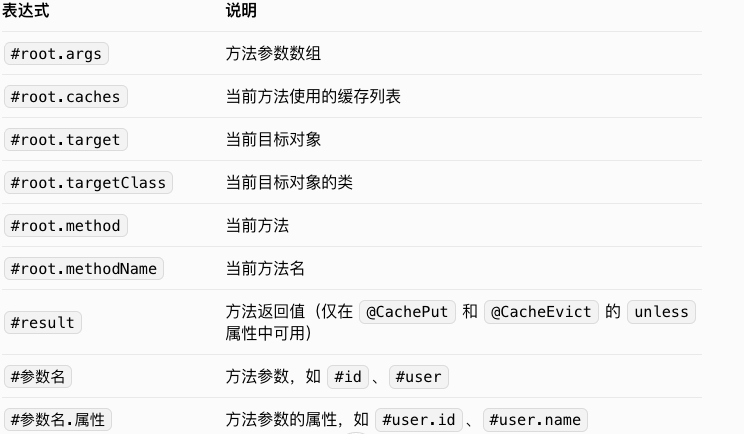
示例:
// 使用方法参数作为 key
@Cacheable(value = "userCache", key = "#id")
public User getUserById(Long id) { ... }
// 使用方法参数的属性作为 key
@Cacheable(value = "userCache", key = "#user.id")
public User getUserByUser(User user) { ... }
// 组合多个参数作为 key
@Cacheable(value = "userCache", key = "#name + ':' + #age")
public List<User> getUsersByNameAndAge(String name, Integer age) { ... }
  // 根据条件进行缓存
  @Cacheable(value = "userCache", key = "#id", condition = "#id > 10")
  public User getUserById(Long id) { ... }
  // 根据返回值决定是否缓存
  @Cacheable(value = "userCache", key = "#id", unless = "#result == null")
  public User getUserById(Long id) { ... }
六、Redis 高级特性
6.1 分布式锁
在分布式系统中,多个进程可能同时操作共享资源,为了保证数据一致性,需要使用分布式锁。Redis 可以通过 setIfAbsent 方法(即 SET NX 命令)实现分布式锁。
package com.example.redisdemo.service;
import org.springframework.data.redis.core.RedisTemplate;
import org.springframework.stereotype.Service;
import javax.annotation.Resource;
import java.util.concurrent.TimeUnit;
@Service
public class RedisDistributedLockService {
@Resource
private RedisTemplate<String, Object> redisTemplate;
  // 锁的前缀
  private static final String LOCK_PREFIX = "lock:";
  /**
  * 获取分布式锁
  *
  * @param lockKey 锁的 key
  * @param value 锁的 value,用于标识锁的持有者
  * @param expireTime 锁的过期时间
  * @param unit 时间单位
  * @return 是否获取到锁
  */
  public boolean tryLock(String lockKey, String value, long expireTime, TimeUnit unit) {
  String key = LOCK_PREFIX + lockKey;
  // 使用 setIfAbsent 方法实现分布式锁,该方法是原子操作
  return Boolean.TRUE.equals(redisTemplate.opsForValue().setIfAbsent(key, value, expireTime, unit));
  }
  /**
  * 释放分布式锁
  *
  * @param lockKey 锁的 key
  * @param value 锁的 value,用于验证是否为锁的持有者
  */
  public void unlock(String lockKey, String value) {
  String key = LOCK_PREFIX + lockKey;
  try {
  // 获取锁的 value
  Object currentValue = redisTemplate.opsForValue().get(key);
  // 验证是否为锁的持有者
  if (currentValue != null && currentValue.equals(value)) {
  // 释放锁
  redisTemplate.delete(key);
  }
  } catch (Exception e) {
  // 处理异常
  e.printStackTrace();
  }
  }
  }
上述实现存在一个问题:如果持有锁的进程在释放锁之前崩溃,可能导致锁无法释放。为了解决这个问题,可以给锁设置过期时间,确保锁最终会被释放。
更完善的分布式锁实现可以使用 Redisson 框架,它提供了更可靠的分布式锁实现,支持自动续期、公平锁等功能。
6.2 发布 / 订阅
Redis 提供了发布 / 订阅功能,可以实现简单的消息通信。Spring Data Redis 对 Redis 的发布 / 订阅功能进行了封装,使用起来更加方便。
6.2.1 消息发布者
package com.example.redisdemo.service;
import org.springframework.data.redis.core.RedisTemplate;
import org.springframework.stereotype.Service;
import javax.annotation.Resource;
@Service
public class RedisMessagePublisher {
@Resource
private RedisTemplate<String, Object> redisTemplate;
  /**
  * 发布消息
  *
  * @param channel 频道
  * @param message 消息内容
  */
  public void publish(String channel, Object message) {
  redisTemplate.convertAndSend(channel, message);
  }
  }
6.2.2 消息订阅者
package com.example.redisdemo.service;
import org.springframework.data.redis.connection.Message;
import org.springframework.data.redis.connection.MessageListener;
import org.springframework.stereotype.Service;
@Service
public class RedisMessageSubscriber implements MessageListener {
/**
* 接收消息
*
* @param message 消息
* @param pattern 模式
*/
@Override
public void onMessage(Message message, byte[] pattern) {
// 获取消息内容
String content = new String(message.getBody());
// 获取频道
String channel = new String(message.getChannel());
// 处理消息
System.out.println("收到来自频道 " + channel + " 的消息:" + content);
}
}
6.2.3 配置消息监听容器
package com.example.redisdemo.config;
import com.example.redisdemo.service.RedisMessageSubscriber;
import org.springframework.context.annotation.Bean;
import org.springframework.context.annotation.Configuration;
import org.springframework.data.redis.connection.RedisConnectionFactory;
import org.springframework.data.redis.listener.PatternTopic;
import org.springframework.data.redis.listener.RedisMessageListenerContainer;
import org.springframework.data.redis.listener.adapter.MessageListenerAdapter;
@Configuration
public class RedisMessageConfig {
/**
* 配置消息监听适配器
*/
@Bean
public MessageListenerAdapter messageListenerAdapter(RedisMessageSubscriber subscriber) {
return new MessageListenerAdapter(subscriber);
}
/**
* 配置消息监听容器
*/
@Bean
public RedisMessageListenerContainer redisMessageListenerContainer(
RedisConnectionFactory factory, MessageListenerAdapter adapter) {
RedisMessageListenerContainer container = new RedisMessageListenerContainer();
container.setConnectionFactory(factory);
// 订阅 "news" 频道
container.addMessageListener(adapter, new PatternTopic("news"));
// 可以订阅多个频道
container.addMessageListener(adapter, new PatternTopic("notice"));
return container;
}
}
6.3 管道操作
Redis 管道(Pipeline)允许客户端一次性发送多个命令,减少网络往返次数,提高批量操作的效率。
package com.example.redisdemo.service;
import org.springframework.data.redis.core.RedisCallback;
import org.springframework.data.redis.core.RedisTemplate;
import org.springframework.stereotype.Service;
import javax.annotation.Resource;
import java.util.List;
@Service
public class RedisPipelineService {
@Resource
private RedisTemplate<String, Object> redisTemplate;
  /**
  * 批量设置键值对
  *
  * @param keys 键列表
  * @param values 值列表
  * @return 操作结果
  */
  public List<Object> batchSet(List<String> keys, List<Object> values) {
    if (keys.size() != values.size()) {
    throw new IllegalArgumentException("keys 和 values 的大小必须相等");
    }
    // 使用管道进行批量操作
    return redisTemplate.executePipelined((RedisCallback<Object>) connection -> {
      for (int i = 0; i < keys.size(); i++) {
      String key = keys.get(i);
      Object value = values.get(i);
      // 序列化 key 和 value
      byte[] keyBytes = redisTemplate.getKeySerializer().serialize(key);
      byte[] valueBytes = redisTemplate.getValueSerializer().serialize(value);
      // 设置键值对
      connection.set(keyBytes, valueBytes);
      }
      return null;
      });
      }
      /**
      * 批量获取值
      *
      * @param keys 键列表
      * @return 值列表
      */
      public List<Object> batchGet(List<String> keys) {
        // 使用管道进行批量操作
        return redisTemplate.executePipelined((RedisCallback<Object>) connection -> {
          for (String key : keys) {
          // 序列化 key
          byte[] keyBytes = redisTemplate.getKeySerializer().serialize(key);
          // 获取值
          connection.get(keyBytes);
          }
          return null;
          }, redisTemplate.getValueSerializer());
          }
          }
6.4 事务
Redis 支持事务,可以将多个命令打包成一个事务,一次性执行,要么全部执行,要么全部不执行。
package com.example.redisdemo.service;
import org.springframework.data.redis.core.RedisTemplate;
import org.springframework.data.redis.core.SessionCallback;
import org.springframework.stereotype.Service;
import javax.annotation.Resource;
import java.util.List;
@Service
public class RedisTransactionService {
@Resource
private RedisTemplate<String, Object> redisTemplate;
  /**
  * 执行 Redis 事务
  */
  public List<Object> executeTransaction() {
    // 使用 SessionCallback 执行事务
    return redisTemplate.execute((SessionCallback<List<Object>>) session -> {
      // 开启事务
      session.multi();
      // 向事务中添加命令
      session.opsForValue().set("name", "张三");
      session.opsForValue().set("age", 20);
      session.opsForHash().put("user", "id", 1);
      session.opsForHash().put("user", "name", "张三");
      // 执行事务
      return session.exec();
      });
      }
      /**
      * 带条件的事务(使用 Watch 命令)
      */
      public List<Object> executeTransactionWithCondition(String key, Object expectedValue) {
        // 使用 SessionCallback 执行事务
        return redisTemplate.execute((SessionCallback<List<Object>>) session -> {
          // 监视 key
          session.watch(key);
          // 获取当前值
          Object currentValue = session.opsForValue().get(key);
          // 判断当前值是否与预期值一致
          if (expectedValue.equals(currentValue)) {
          // 开启事务
          session.multi();
          // 向事务中添加命令
          session.opsForValue().set(key, "new value");
          session.opsForValue().set("otherKey", "other value");
          // 执行事务
          return session.exec();
          } else {
          // 取消监视
          session.unwatch();
          return null;
          }
          });
          }
          }
七、实战案例
7.1 缓存用户信息
下面实现一个用户信息管理系统,使用 Redis 缓存用户信息,提高查询效率。
7.1.1 控制器
package com.example.redisdemo.controller;
import com.example.redisdemo.entity.User;
import com.example.redisdemo.service.UserCacheService;
import org.springframework.web.bind.annotation.*;
@RestController
@RequestMapping("/users")
public class UserController {
private final UserCacheService userCacheService;
public UserController(UserCacheService userCacheService) {
this.userCacheService = userCacheService;
}
/**
* 根据 ID 查询用户
*/
@GetMapping("/{id}")
public User getUserById(@PathVariable Long id) {
return userCacheService.getUserById(id);
}
/**
* 添加用户
*/
@PostMapping
public User addUser(@RequestBody User user) {
return userCacheService.addUser(user);
}
/**
* 更新用户
*/
@PutMapping
public User updateUser(@RequestBody User user) {
return userCacheService.updateUser(user);
}
/**
* 删除用户
*/
@DeleteMapping("/{id}")
public void deleteUser(@PathVariable Long id) {
userCacheService.deleteUser(id);
}
/**
* 清空用户缓存
*/
@DeleteMapping("/cache")
public void clearUserCache() {
userCacheService.clearUserCache();
}
}
7.1.2 测试
- 启动应用后,可以使用 Postman 或 curl 等工具测试接口:
- 查询用户:GET http://localhost:8080/users/1
- 添加用户:POST http://localhost:8080/users,请求体为 JSON 格式的用户信息
- 更新用户:PUT http://localhost:8080/users,请求体为 JSON 格式的用户信息
- 删除用户:DELETE http://localhost:8080/users/1
- 清空缓存:DELETE http://localhost:8080/users/cache
7.2 实现分布式计数器
使用 Redis 的自增操作实现一个分布式计数器,可用于统计网站访问量、下载量等。
package com.example.redisdemo.service;
import org.springframework.data.redis.core.StringRedisTemplate;
import org.springframework.stereotype.Service;
import javax.annotation.Resource;
import java.util.concurrent.TimeUnit;
@Service
public class DistributedCounterService {
@Resource
private StringRedisTemplate stringRedisTemplate;
/**
* 增加计数器的值
*
* @param key 计数器 key
* @param delta 增加的值
* @return 增加后的值
*/
public Long increment(String key, long delta) {
return stringRedisTemplate.opsForValue().increment(key, delta);
}
/**
* 减少计数器的值
*
* @param key 计数器 key
* @param delta 减少的值
* @return 减少后的值
*/
public Long decrement(String key, long delta) {
return stringRedisTemplate.opsForValue().decrement(key, delta);
}
/**
* 获取计数器的值
*
* @param key 计数器 key
* @return 计数器的值
*/
public Long getCount(String key) {
String value = stringRedisTemplate.opsForValue().get(key);
return value == null ? 0 : Long.parseLong(value);
}
/**
* 重置计数器的值
*
* @param key 计数器 key
*/
public void reset(String key) {
stringRedisTemplate.delete(key);
}
/**
* 设置计数器的过期时间
*
* @param key 计数器 key
* @param timeout 过期时间
* @param unit 时间单位
* @return 是否设置成功
*/
public Boolean expire(String key, long timeout, TimeUnit unit) {
return stringRedisTemplate.expire(key, timeout, unit);
}
}
八、问题排查与最佳实践
8.1 常见问题及解决方案
- 连接超时
- 检查 Redis 服务器是否启动
- 检查 Redis 服务器地址和端口是否正确
- 检查防火墙是否允许连接 Redis 端口
- 检查网络是否通畅
- 密码错误
- 检查 Redis 配置的密码是否正确
- 检查应用配置中的密码是否与 Redis 配置一致
- 序列化异常
- 确保使用的序列化器能够正确序列化和反序列化对象
- 对于自定义对象,确保其具有无参构造函数
- 检查对象是否实现了序列化接口(如果使用 JDK 序列化)
- 缓存与数据库不一致
- 确保更新数据库后及时更新或删除缓存
- 考虑使用事务保证缓存和数据库操作的原子性
- 对于并发场景,可使用分布式锁保证数据一致性
- Redis 内存溢出
- 合理设置缓存过期时间
- 配置 Redis 的内存淘汰策略
- 定期清理无用缓存
8.2 最佳实践
- 合理设置过期时间
- 根据业务需求为缓存设置合适的过期时间,避免 Redis 内存溢出
- 对于热点数据,可以适当延长过期时间
- 对于变化频繁的数据,应缩短过期时间
- 选择合适的序列化方式
- 推荐使用 StringRedisSerializer 作为 key 的序列化器
- 对于 value 的序列化,推荐使用 JSON 序列化器,如 GenericJackson2JsonRedisSerializer
- 避免使用 JDK 序列化器,除非有特殊需求
- 使用连接池
- 配置合理的连接池参数,提高连接复用率
- 根据业务并发量调整最大连接数、最大空闲连接数等参数
- 缓存穿透防护
- 对于不存在的 key,也进行缓存(缓存 null 值)
- 使用布隆过滤器过滤不存在的 key
- 缓存击穿防护
- 对于热点 key,设置永不过期或延长过期时间
- 使用互斥锁防止缓存击穿
- 缓存雪崩防护
- 为不同的 key 设置随机的过期时间,避免大量缓存同时过期
- 使用熔断降级机制,当 Redis 不可用时,直接访问数据库
- 部署 Redis 集群,提高可用性
- 监控与告警
- 监控 Redis 的内存使用情况、连接数、命中率等指标
- 设置告警阈值,当指标超过阈值时及时告警
- 数据备份与恢复
- 配置 Redis 持久化机制(RDB 或 AOF)
- 定期备份 Redis 数据,确保数据可恢复
九、总结
本文详细介绍了 Spring Boot 集成 Redis 的全过程,包括环境搭建、核心配置、数据结构操作、缓存注解使用、高级特性及实战案例。通过本文的学习,读者可以掌握 Spring Boot 与 Redis 集成的基本方法和最佳实践。
Redis 作为一款高性能的缓存数据库,在现代软件开发中有着广泛的应用。Spring Boot 提供了简洁的配置和丰富的模板类,使得集成 Redis 变得非常简单。在实际开发中,应根据业务需求合理使用 Redis 的各种功能,充分发挥其高性能的优势,同时注意解决缓存一致性、分布式锁等问题,确保系统的稳定运行。
随着业务的发展,还可以进一步学习 Redis 集群、哨兵模式、Redisson 框架等高级内容,以应对更高的并发和更复杂的业务场景。


 浙公网安备 33010602011771号