nginx平滑升级+location案例 - 教程
nginx平滑升级+location案例
一、平滑升级
1、部署nginx(略)
2、获取之前安装的nginx编译参数
[root@stw ~]# nginx -V
nginx version: nginx/1.24.0
built by gcc 4.8.5 20150623 (Red Hat 4.8.5-44) (GCC)
built with OpenSSL 1.0.2k-fips 26 Jan 2017
TLS SNI support enabled
configure arguments: --prefix=/usr/local/nginx --user=nginx --group=nginx --with-debug --with-http_ssl_module --with-http_realip_module --with-http_image_filter_module --with-http_gunzip_module --with-http_gzip_static_module --with-http_stub_status_module --http-log-path=/var/log/nginx/access.log --error-log-path=/var/log/nginx/error.log
3、下载新模块(echo-nginx-module-master.zip)
[root@stw ~]# rz -E
rz waiting to receive.
[root@stw ~]# ls
anaconda-ks.cfg Downloads Music Public
Desktop echo-nginx-module-master.zip nginx-1.24.0.tar.gz Templates
Documents initial-setup-ks.cfg Pictures Videos
4、重新编译软件
(1)解压新的模块包
[root@stw ~]# unzip echo-nginx-module-master.zip
[root@stw ~]# ls
anaconda-ks.cfg echo-nginx-module-master nginx-1.24.0.tar.gz Videos
Desktop echo-nginx-module-master.zip Pictures
Documents initial-setup-ks.cfg Public
Downloads Music Templates
(2)再次解压nginx源码包(解压到当前目录不指定目录)
[root@stw ~]# tar -zxf nginx-1.24.0.tar.gz
[root@stw ~]# ls
anaconda-ks.cfg echo-nginx-module-master nginx-1.24.0 Templates
Desktop echo-nginx-module-master.zip nginx-1.24.0.tar.gz Videos
Documents initial-setup-ks.cfg Pictures
Downloads Music Public
(3)添加新的模块进行编译安装(在原来编译安装的基础上加上–add-module=/root/echo-nginx-module-master)
[root@stw nginx-1.24.0]# nginx -V
nginx version: nginx/1.24.0
built by gcc 4.8.5 20150623 (Red Hat 4.8.5-44) (GCC)
built with OpenSSL 1.0.2k-fips 26 Jan 2017
TLS SNI support enabled
configure arguments: --prefix=/usr/local/nginx --user=nginx --group=nginx --with-debug --with-http_ssl_module --with-http_realip_module --with-http_image_filter_module --with-http_gunzip_module --with-http_gzip_static_module --with-http_stub_status_module --http-log-path=/var/log/nginx/access.log --error-log-path=/var/log/nginx/error.log
[root@stw nginx-1.24.0]# ./configure --prefix=/usr/local/nginx --user=nginx --group=nginx --with-debug --with-http_ssl_module --with-http_realip_module --with-http_image_filter_module --with-http_gunzip_module --with-http_gzip_static_module --with-http_stub_status_module --http-log-path=/var/log/nginx/access.log --error-log-path=/var/log/nginx/error.log --add-module=/root/echo-nginx-module-master
(4)查看objs目录下没有nginx程序
[root@stw nginx-1.24.0]# ls
auto CHANGES.ru configure html Makefile objs src
CHANGES conf contrib LICENSE man README
[root@stw nginx-1.24.0]# ls objs/
addon Makefile ngx_auto_headers.h src
autoconf.err ngx_auto_config.h ngx_modules.c
(5)使用make编译,编译完成之后再次查看objs目录下有nginx程序
[root@stw nginx-1.24.0]# make
[root@stw nginx-1.24.0]# ls objs/
addon Makefile nginx.8 ngx_auto_headers.h ngx_modules.o
autoconf.err nginx ngx_auto_config.h ngx_modules.c src
5、备份源程序并停止、覆盖、启动服务
(1)确保没有启动nginx(不能查看到80端口)
[root@stw nginx-1.24.0]# ss -anlt
State Recv-Q Send-Q Local Address:Port Peer Address:Port
LISTEN 0 128 *:111 *:*
LISTEN 0 128 *:6000 *:*
LISTEN 0 5 192.168.122.1:53 *:*
LISTEN 0 128 *:22 *:*
LISTEN 0 128 127.0.0.1:631 *:*
LISTEN 0 100 127.0.0.1:25 *:*
LISTEN 0 128 127.0.0.1:6010 *:*
LISTEN 0 128 :::111 :::*
LISTEN 0 128 :::6000 :::*
LISTEN 0 128 :::22 :::*
LISTEN 0 128 ::1:631 :::*
LISTEN 0 100 ::1:25 :::*
LISTEN 0 128 ::1:6010 :::*
(2)先查看升级前和升级后的版本区别,主要看编译参数
升级前:
[root@stw nginx-1.24.0]# nginx -V
nginx version: nginx/1.24.0
built by gcc 4.8.5 20150623 (Red Hat 4.8.5-44) (GCC)
built with OpenSSL 1.0.2k-fips 26 Jan 2017
TLS SNI support enabled
configure arguments: --prefix=/usr/local/nginx --user=nginx --group=nginx --with-debug --with-http_ssl_module --with-http_realip_module --with-http_image_filter_module --with-http_gunzip_module --with-http_gzip_static_module --with-http_stub_status_module --http-log-path=/var/log/nginx/access.log --error-log-path=/var/log/nginx/error.log
升级后:
[root@stw nginx-1.24.0]# objs/nginx -V
nginx version: nginx/1.24.0
built by gcc 4.8.5 20150623 (Red Hat 4.8.5-44) (GCC)
built with OpenSSL 1.0.2k-fips 26 Jan 2017
TLS SNI support enabled
configure arguments: --prefix=/usr/local/nginx --user=nginx --group=nginx --with-debug --with-http_ssl_module --with-http_realip_module --with-http_image_filter_module --with-http_gunzip_module --with-http_gzip_static_module --with-http_stub_status_module --http-log-path=/var/log/nginx/access.log --error-log-path=/var/log/nginx/error.log --add-module=/root/echo-nginx-module-master
(3)停止、备份、覆盖、启动程序(这里我已经停了服务)
备份
[root@stw nginx-1.24.0]# cd /usr/local/nginx/sbin
[root@stw sbin]# ls
nginx
[root@stw sbin]# cp /usr/local/nginx/sbin/nginx /opt/
覆盖
[root@stw sbin]# cd -
/root/nginx-1.24.0
[root@stw nginx-1.24.0]# ls
auto CHANGES.ru configure html Makefile objs src
CHANGES conf contrib LICENSE man README
[root@stw nginx-1.24.0]# cp objs/nginx /usr/local/nginx/sbin/
cp: overwrite ‘/usr/local/nginx/sbin/nginx’? y
[root@stw nginx-1.24.0]# nginx -V
nginx version: nginx/1.24.0
built by gcc 4.8.5 20150623 (Red Hat 4.8.5-44) (GCC)
built with OpenSSL 1.0.2k-fips 26 Jan 2017
TLS SNI support enabled
configure arguments: --prefix=/usr/local/nginx --user=nginx --group=nginx --with-debug --with-http_ssl_module --with-http_realip_module --with-http_image_filter_module --with-http_gunzip_module --with-http_gzip_static_module --with-http_stub_status_module --http-log-path=/var/log/nginx/access.log --error-log-path=/var/log/nginx/error.log --add-module=/root/echo-nginx-module-master
启动服务
[root@stw nginx-1.24.0]# nginx
[root@stw nginx-1.24.0]# ss -anlt
State Recv-Q Send-Q Local Address:Port Peer Address:Port
LISTEN 0 128 *:111 *:*
LISTEN 0 128 *:80 *:*
LISTEN 0 128 *:6000 *:*
LISTEN 0 5 192.168.122.1:53 *:*
LISTEN 0 128 *:22 *:*
LISTEN 0 128 127.0.0.1:631 *:*
LISTEN 0 100 127.0.0.1:25 *:*
LISTEN 0 128 127.0.0.1:6010 *:*
LISTEN 0 128 :::111 :::*
LISTEN 0 128 :::6000 :::*
LISTEN 0 128 :::22 :::*
LISTEN 0 128 ::1:631 :::*
LISTEN 0 100 ::1:25 :::*
LISTEN 0 128 ::1:6010 :::*
6、测试–引用echo模块
[root@stw ~]# vim /usr/local/nginx/conf/nginx.conf
[root@stw ~]# nginx -t
nginx: the configuration file /usr/local/nginx/conf/nginx.conf syntax is ok
nginx: configuration file /usr/local/nginx/conf/nginx.conf test is successful
[root@stw ~]# nginx -s reload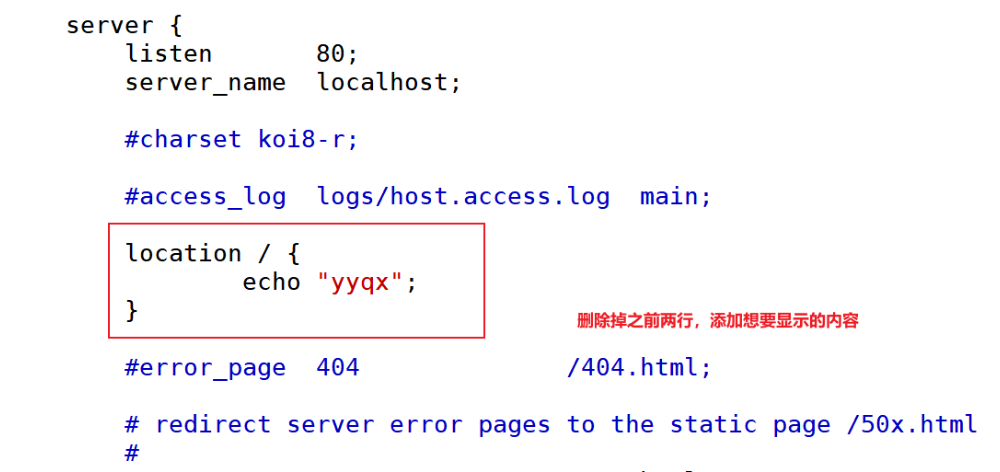
使用浏览器访问,发现浏览器无法支持echo模块,会当成文件进行下载
在新的主机中使用命令进行访问
[root@stw2 ~]# curl http://192.168.100.10
yyqx
二、location案例
Nginx 修饰符
| 修饰符 | 名称/类型 | 核心功能描述 |
|---|---|---|
= | 精确匹配 | 仅当请求的 URI 与指定模式完全一致时才匹配,不允许任何多余字符或差异 |
~ | 正则表达式匹配(区分大小写) | 使用正则表达式对 URI 进行匹配,且严格区分字符的大小写(如 A 与 a 视为不同) |
~* | 正则表达式匹配(不区分大小写) | 使用正则表达式对 URI 进行匹配,不区分字符的大小写(如 A 与 a 视为相同) |
^~ | 前缀匹配(终止搜索) | 匹配以指定模式为前缀的 URI,且一旦匹配成功,立即停止后续其他模式(包括正则)的搜索 |
@ | 命名 location 标记 | 用于定义内部可访问的命名 location 区段,客户端无法直接通过 URI 访问 |
1、没有修饰符表示必须以指定模式开始
node1:
[root@stw ~]# vim /usr/local/nginx/conf/nginx.conf
[root@stw ~]# nginx -s reload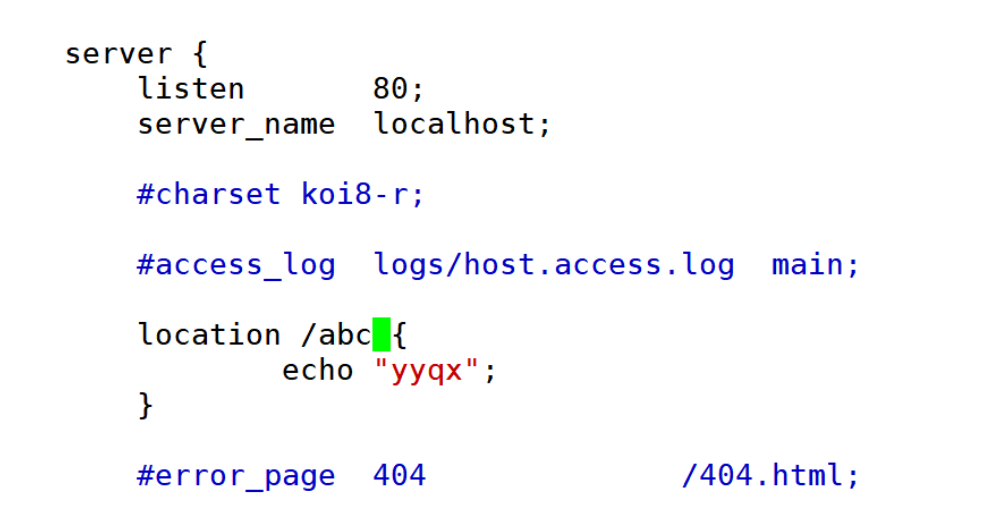
node2:
[root@stw2 ~]# curl http://192.168.100.10
yyqx
[root@stw2 ~]# curl http://192.168.100.10/abc
yyqx
[root@stw2 ~]# curl http://192.168.100.10/abc/
yyqx
[root@stw2 ~]# curl http://192.168.100.10/abc/abcs
yyqx
[root@stw2 ~]# curl http://192.168.100.10/abc/abcsedsee
yyqx
[root@stw2 ~]# curl http://192.168.100.10/aaabc/abcsedsee
<html>
  <head><title>404 Not Found</title></head>
    <body>
      <center><h1>404 Not Found</h1></center>
        <hr><center>nginx/1.24.0</center>
          </body>
            </html>
              [root@stw2 ~]# curl http://192.168.100.10/abcaa/abcsedsee
              yyqx
2、用 “ = ” 精准匹配(只能用/abc访问,写的是什么就用什么)
node1:
[root@stw ~]# vim /usr/local/nginx/conf/nginx.conf
[root@stw ~]# nginx -s reload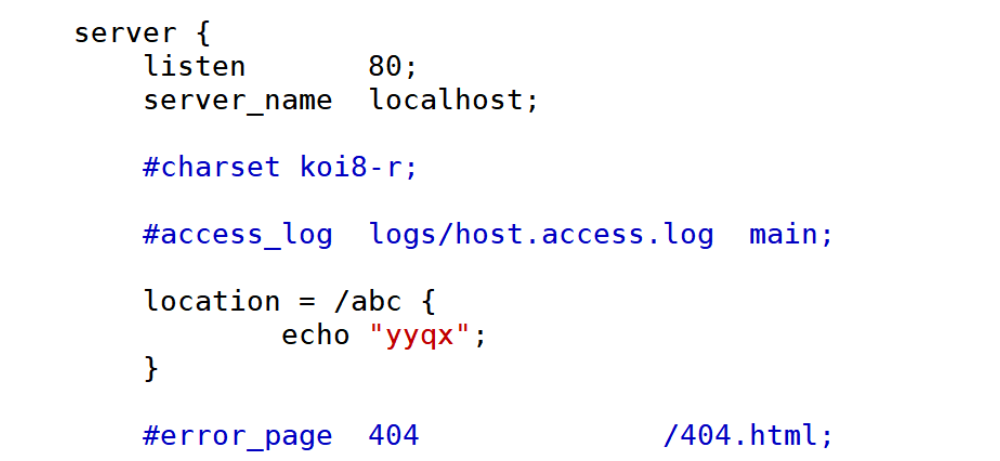
node2:
[root@stw2 ~]# curl http://192.168.100.10/abc
yyqx
[root@stw2 ~]# curl http://192.168.100.10/abcsdf
<html>
  <head><title>404 Not Found</title></head>
    <body>
      <center><h1>404 Not Found</h1></center>
        <hr><center>nginx/1.24.0</center>
          </body>
            </html>
3、~:表示指定的正则表达式要区分大小写
node1:这里是匹配以/abc结尾的(且区分大小写)
[root@stw ~]# vim /usr/local/nginx/conf/nginx.conf
[root@stw ~]# nginx -s reload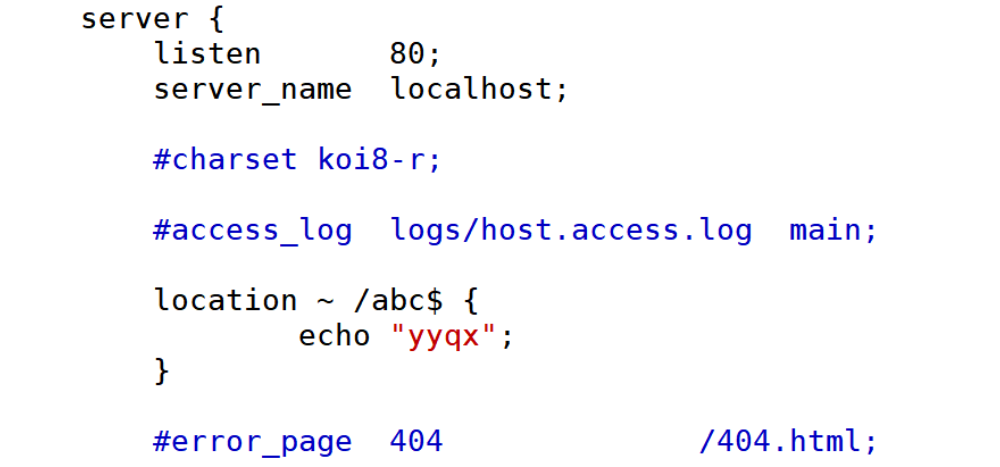
node2:
[root@stw2 ~]# curl http://192.168.100.10/abc
yyqx
[root@stw2 ~]# curl http://192.168.100.10/abc/
<html>
  <head><title>404 Not Found</title></head>
    <body>
      <center><h1>404 Not Found</h1></center>
        <hr><center>nginx/1.24.0</center>
          </body>
            </html>
              [root@stw2 ~]# curl http://192.168.100.10/abcasd
              <html>
                <head><title>404 Not Found</title></head>
                  <body>
                    <center><h1>404 Not Found</h1></center>
                      <hr><center>nginx/1.24.0</center>
                        </body>
                          </html>
                            [root@stw2 ~]# curl http://192.168.100.10/axdsabc
                            <html>
                              <head><title>404 Not Found</title></head>
                                <body>
                                  <center><h1>404 Not Found</h1></center>
                                    <hr><center>nginx/1.24.0</center>
                                      </body>
                                        </html>
                                          [root@stw2 ~]# curl http://192.168.100.10/axds/abc
                                          yyqx
                                          [root@stw2 ~]# curl http://192.168.100.10/axds/Abc
                                          <html>
                                            <head><title>404 Not Found</title></head>
                                              <body>
                                                <center><h1>404 Not Found</h1></center>
                                                  <hr><center>nginx/1.24.0</center>
                                                    </body>
                                                      </html>
4、~*:表示指定的正则表达式不区分大小写
node1:
[root@stw ~]# vim /usr/local/nginx/conf/nginx.conf
[root@stw ~]# nginx -s reload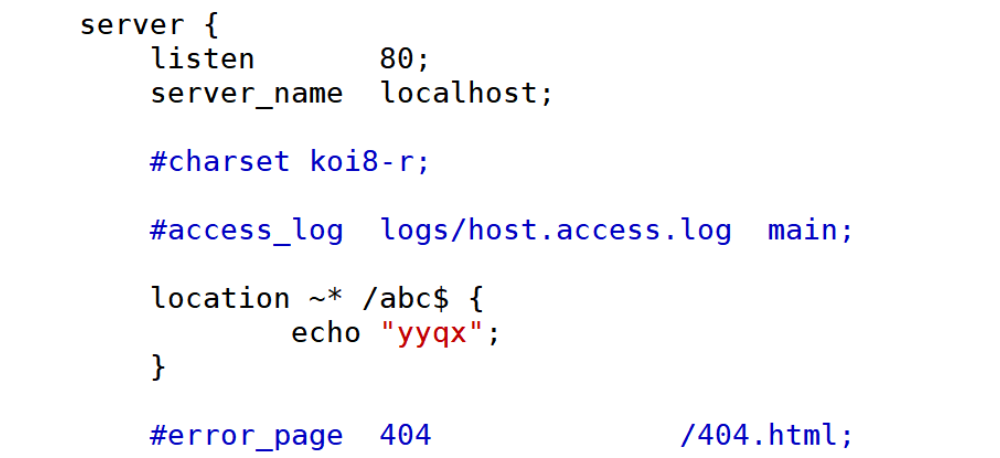
node2:
[root@stw2 ~]# curl http://192.168.100.10/abc
yyqx
[root@stw2 ~]# curl http://192.168.100.10/Abc
yyqx
[root@stw2 ~]# curl http://192.168.100.10/ABC
yyqx
5、^~ 前缀匹配,类似于无修饰符的行为,也是以指定模块开始,不同的是,如果模式匹配,那么就停止搜索其他模式了,不支持正则表达式
node1:
[root@stw ~]# vim /usr/local/nginx/conf/nginx.conf
[root@stw ~]# nginx -s reload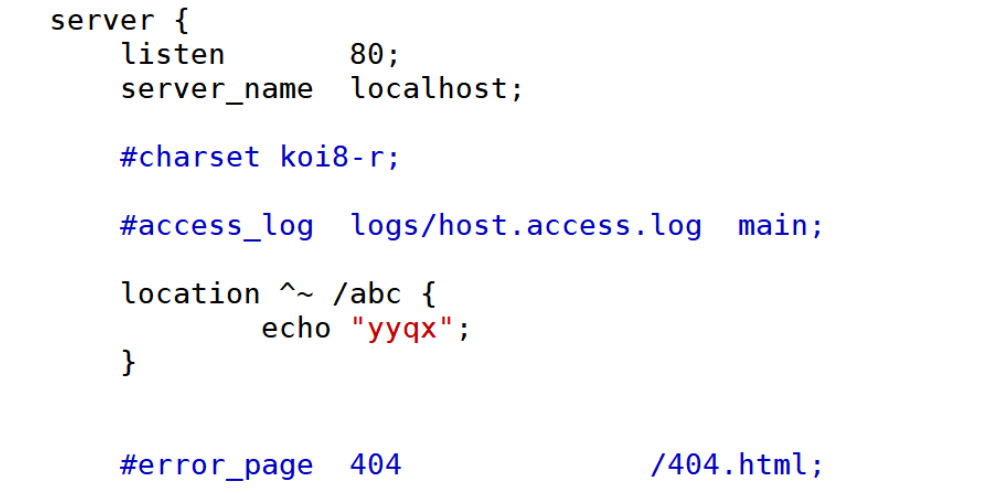
node2:
[root@stw2 ~]# curl http://192.168.100.10/abc
yyqx
[root@stw2 ~]# curl http://192.168.100.10/abcaxs
yyqx
[root@stw2 ~]# curl http://192.168.100.10/abc/
yyqx
[root@stw2 ~]# curl http://192.168.100.10/abc/wasd
yyqx
[root@stw2 ~]# curl http://192.168.100.10/asabc/wasd
<html>
  <head><title>404 Not Found</title></head>
    <body>
      <center><h1>404 Not Found</h1></center>
        <hr><center>nginx/1.24.0</center>
          </body>
            </html>
6、当“=”和“~”同时存在时,此时时 = 优先于 ~
node1:
[root@stw ~]# vim /usr/local/nginx/conf/nginx.conf
[root@stw ~]# nginx -s reload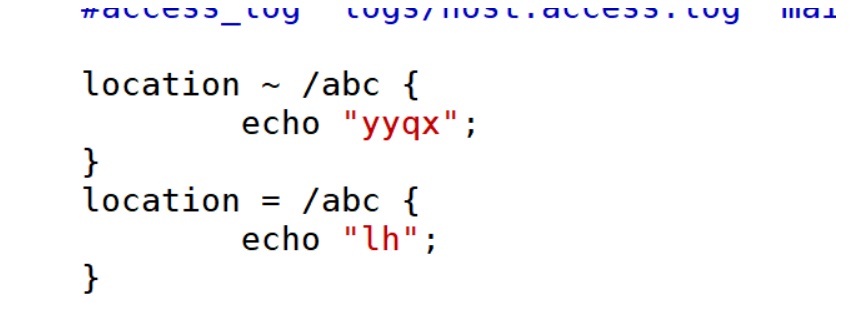
node2:
[root@stw2 ~]# curl http://192.168.100.10/abc
lh
6、查找顺序和优先级:由高到低
1、带有 = 的精确匹配优先
2、正则表达式按照他们在配置文件中定义的顺序(比如定义两个精准匹配,那么按照顺序匹配)
3、带有 ^~修饰符的,开头匹配
4、带有~或者~*修饰符的,如果正则表达式与URI匹配
5、没有修饰符的精确匹配
举例说明
node1:
[root@stw ~]# vim /usr/local/nginx/conf/nginx.conf
[root@stw ~]# nginx -s reload
location = /abc {
echo "=";
}
location ^~ /abc {
echo "^~";
}
location ~ /abc {
echo "~";
}
location ~* /abc {
echo "~*";
}node2:
[root@stw2 ~]# curl http://192.168.100.10/abc
=
//说明精准匹配优先级最高:=
node1:
location ^~ /abc {
echo "^~";
}
location ~ /abc {
echo "~";
}
location ~* /abc {
echo "~*";
}
node2:
[root@stw2 ~]# curl http://192.168.100.10/abc
^~
//前缀匹配优先级第二:^~
node1:
location ~ /abc {
echo "~";
}
location ~* /abc {
echo "~*";
}
node2:
[root@stw2 ~]# curl http://192.168.100.10/abc
~
//正则匹配区分大小写优先级第三:~
node1:
location ~* /abc {
echo "~*";
}
location /abc {
echo "123";
}
node2:
[root@stw2 ~]# curl http://192.168.100.10/abc
~*
//正则匹配不区分大小写优先级第四:~*
//直接接路径优先级最后
node1:
location ~* /abc {
echo "~*";
}
location /abc {
echo "123";
}
node2:
[root@stw2 ~]# curl http://192.168.100.10/abc
~*
//正则匹配不区分大小写优先级第四:~*
//直接接路径优先级最后
location = 路径
location ^~ 路径
location ~ 正则
location ~* 正则
location 路径


 浙公网安备 33010602011771号