

列表查询WebPart
SmartListSearchWebPart 简单列表查询WebPart.本代码只是一个简单的Demo,代码没有实际的价值,但是很有学习价值. 在项目中可以得到很好的应用!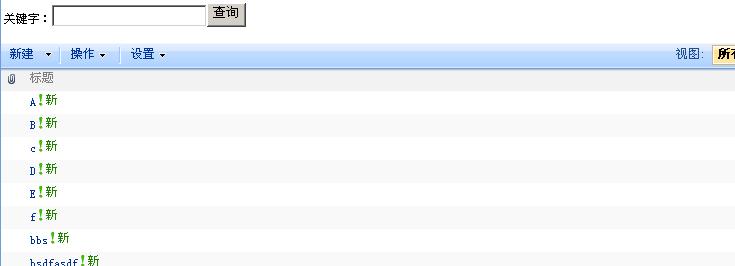 输入key
输入key 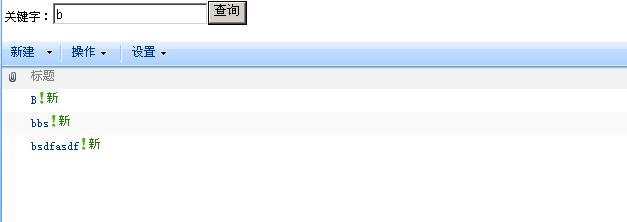
Code :
using System; using System.Runtime.InteropServices; using System.Web.UI; using System.Web.UI.WebControls; using System.Web.UI.WebControls.WebParts; using System.Xml.Serialization; using System.Xml;
using Microsoft.SharePoint; using Microsoft.SharePoint.WebControls; using Microsoft.SharePoint.WebPartPages;
namespace SmartListSearchWebPart { [Guid("34903418-36da-45cb-ae81-27cd82b628dd")] public class SmartListSearchWebPart : System.Web.UI.WebControls.WebParts.WebPart { public SmartListSearchWebPart() { this.ExportMode = WebPartExportMode.All; }
private Button btnSearch; private TextBox tbKey; /// <summary> /// create child controls /// </summary> protected override void CreateChildControls() { btnSearch = new Button(); btnSearch.Text = "查询"; btnSearch.Click += new EventHandler(btnSearch_Click); this.Controls.Add(btnSearch);
tbKey = new TextBox(); this.Controls.Add(tbKey);
base.CreateChildControls(); }
private SPList List { get { return SPContext.Current.List; } } /// <summary> /// search /// </summary> /// <param name="sender"></param> /// <param name="e"></param> void btnSearch_Click(object sender, EventArgs e) { if (this.tbKey.Text != "") { string cmal = string.Format("<Where><Contains><FieldRef Name='Title' /><Value Type='Text'>{0}</Value></Contains></Where>", this.tbKey.Text.ToString()); this.SetCurrentListViewSchemaQuery(cmal); }
} /// <summary> /// set current list view schema query /// </summary> /// <param name="cmal"></param> private void SetCurrentListViewSchemaQuery(string cmal) { if (!string.IsNullOrEmpty(cmal)) { string str = "{" +this.List.ID.ToString() +"}";
foreach (System.Web.UI.WebControls.WebParts.WebPart webPart in base.Zone.WebParts) { if (webPart is ListViewWebPart) { ListViewWebPart listViewWebPart = (ListViewWebPart)webPart; if (string.Compare(listViewWebPart.ListName, str, true) != 0) { continue; }
if (string.IsNullOrEmpty(cmal)) { listViewWebPart.ListViewXml = this.List.Views[new Guid(listViewWebPart.ViewGuid)].HtmlSchemaXml;
} else { XmlDocument xmlDocument = new XmlDocument(); xmlDocument.LoadXml(listViewWebPart.ListViewXml); this.ChangeSchemaXmlCaml(xmlDocument, cmal); listViewWebPart.ListViewXml = xmlDocument.InnerXml; } } } } } /// <summary> /// move where /// </summary> /// <param name="q"></param> /// <returns></returns> private string GetInnerQuery(string q) { XmlDocument docuemnt = new XmlDocument(); docuemnt.LoadXml(q); return docuemnt.DocumentElement.InnerXml; } /// <summary> /// change schema xml query /// </summary> /// <param name="xmlDocument"></param> /// <param name="query"></param> private void ChangeSchemaXmlCaml(XmlDocument xmlDocument,string query) { if (!string.IsNullOrEmpty(query)) { string innerXml = this.GetInnerQuery(query); if (innerXml != "") { XmlNode node = xmlDocument.DocumentElement.SelectSingleNode("Query"); XmlNode oldChild = node.SelectSingleNode("Where");
if (oldChild != null) { node.RemoveChild(oldChild); }
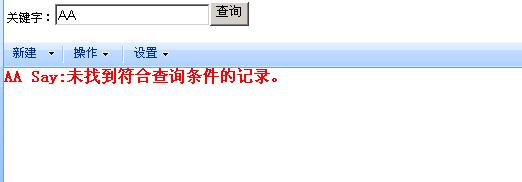
XmlNode newChild = xmlDocument.CreateElement("Where"); newChild.InnerXml = innerXml; node.AppendChild(newChild); xmlDocument.DocumentElement.SelectSingleNode("ViewEmpty").InnerXml = "<HTML><![CDATA[<font color='red'><b>AA Say:未找到符合查询条件的记录。</b></font>]]></HTML>"; }
} } /// <summary> /// render /// </summary> /// <param name="writer"></param> protected override void Render(HtmlTextWriter writer) { writer.Write("<table><tr><td>"); writer.Write("关键字:"); tbKey.RenderControl(writer); btnSearch.RenderControl(writer); writer.Write("</td></tr></table>"); } } }
这个webPart 核心就是修改它的Scheam就OK listViewWebPart.ListViewXml = xmlDocument.InnerXml;(主要代码)
jianyi 的文章对我很大帮助。。。希望更多的朋友向建议学习。分享
SmartListSearchWebPart
简单列表查询WebPart.本代码只是一个简单的Demo,代码没有实际的价值,但是很有学习价值.
在项目中可以得到很好的应用!

输入key

 Code :


using System;
 using System.Runtime.InteropServices;
 using System.Web.UI;
 using System.Web.UI.WebControls;
 using System.Web.UI.WebControls.WebParts;
 using System.Xml.Serialization;
 using System.Xml;

using Microsoft.SharePoint;
 using Microsoft.SharePoint.WebControls;
 using Microsoft.SharePoint.WebPartPages;

namespace SmartListSearchWebPart
 {
     [Guid("34903418-36da-45cb-ae81-27cd82b628dd")]
     public class SmartListSearchWebPart : System.Web.UI.WebControls.WebParts.WebPart
     {
         public SmartListSearchWebPart()
         {
             this.ExportMode = WebPartExportMode.All;
         }

        private Button btnSearch;
         private TextBox tbKey;
         /// <summary>
         /// create child controls
         /// </summary>
         protected override void CreateChildControls()
         {
             btnSearch = new Button();
             btnSearch.Text = "查询";
             btnSearch.Click += new EventHandler(btnSearch_Click);
             this.Controls.Add(btnSearch);

            tbKey = new TextBox();
             this.Controls.Add(tbKey);

            base.CreateChildControls();
         }

        private SPList List
         {
             get
             {
                 return SPContext.Current.List;
             }
         }
         /// <summary>
         /// search
         /// </summary>
         /// <param name="sender"></param>
         /// <param name="e"></param>
         void btnSearch_Click(object sender, EventArgs e)
         {

             if (this.tbKey.Text != "")
             {
                 string cmal = string.Format("<Where><Contains><FieldRef Name='Title' /><Value Type='Text'>{0}</Value></Contains></Where>", this.tbKey.Text.ToString());
                 this.SetCurrentListViewSchemaQuery(cmal);
             }


        }
         /// <summary>
         /// set current list view schema query
         /// </summary>
         /// <param name="cmal"></param>
         private void SetCurrentListViewSchemaQuery(string cmal)
         {
             if (!string.IsNullOrEmpty(cmal))
             {
                 string str = "{" +this.List.ID.ToString() +"}";


                 foreach (System.Web.UI.WebControls.WebParts.WebPart webPart in base.Zone.WebParts)
                 {
                     if (webPart is ListViewWebPart)
                     {
                         ListViewWebPart listViewWebPart = (ListViewWebPart)webPart;
                         if (string.Compare(listViewWebPart.ListName, str, true) != 0)
                         {
                             continue;
                         }

                        if (string.IsNullOrEmpty(cmal))
                         {
                             listViewWebPart.ListViewXml = this.List.Views[new Guid(listViewWebPart.ViewGuid)].HtmlSchemaXml;

                        }
                         else
                         {
                             XmlDocument xmlDocument = new XmlDocument();
                             xmlDocument.LoadXml(listViewWebPart.ListViewXml);
                             this.ChangeSchemaXmlCaml(xmlDocument, cmal);
                             listViewWebPart.ListViewXml = xmlDocument.InnerXml;
                         }
                     }
                 }
             }
         }
         /// <summary>
         /// move where
         /// </summary>
         /// <param name="q"></param>
         /// <returns></returns>
         private string GetInnerQuery(string q)
         {
             XmlDocument docuemnt = new XmlDocument();
             docuemnt.LoadXml(q);
             return docuemnt.DocumentElement.InnerXml;
         }
         /// <summary>
         /// change schema xml query
         /// </summary>
         /// <param name="xmlDocument"></param>
         /// <param name="query"></param>
         private void ChangeSchemaXmlCaml(XmlDocument xmlDocument,string query)
         {
             if (!string.IsNullOrEmpty(query))
             {
                 string innerXml = this.GetInnerQuery(query);
                 if (innerXml != "")
                 {
                     XmlNode node = xmlDocument.DocumentElement.SelectSingleNode("Query");
                     XmlNode oldChild = node.SelectSingleNode("Where");

                    if (oldChild != null)
                     {
                         node.RemoveChild(oldChild);
                     }

                    XmlNode newChild = xmlDocument.CreateElement("Where");
                     newChild.InnerXml = innerXml;
                     node.AppendChild(newChild);
                     xmlDocument.DocumentElement.SelectSingleNode("ViewEmpty").InnerXml = "<HTML><![CDATA[<font color='red'><b>AA Say:未找到符合查询条件的记录。</b></font>]]></HTML>";
                 }

            }
         }
         /// <summary>
         /// render
         /// </summary>
         /// <param name="writer"></param>
         protected override void Render(HtmlTextWriter writer)
         {
             writer.Write("<table><tr><td>");
             writer.Write("关键字:");
             tbKey.RenderControl(writer);
             btnSearch.RenderControl(writer);
             writer.Write("</td></tr></table>");
         }
     }
 }


这个webPart 核心就是修改它的Scheam就OK
 listViewWebPart.ListViewXml = xmlDocument.InnerXml;(主要代码)


jianyi 的文章对我很大帮助。。。希望更多的朋友向建议学习。分享



 浙公网安备 33010602011771号