


第四次作业
作业一
-
要求
熟练掌握 scrapy 中 Item、Pipeline 数据的序列化输出方法;Scrapy+Xpath+MySQL数据库存储技术路线爬取当当网站图书数据
-
代码
- 数据项目类items
import scrapy
class BookItem(scrapy.Item):
    id = scrapy.Field()
    title = scrapy.Field()
    author = scrapy.Field()
    date = scrapy.Field()
    publisher = scrapy.Field()
    detail = scrapy.Field()
    price = scrapy.Field()
pass- 爬虫程序MySpider
import scrapy
from getbook.items import BookItem
from bs4 import BeautifulSoup
from bs4 import UnicodeDammit

class MySpider(scrapy.Spider):
    name = 'mySpider'
    key = '机器学习'
    num = 0
    source_url = 'http://search.dangdang.com/'

    def start_requests(self):
        url = MySpider.source_url+"?key="+MySpider.key
        yield scrapy.Request(url=url,callback=self.parse)

    def parse(self,response):
        try:
            dammit = UnicodeDammit(response.body,["utf-8","gbk"])
            data = dammit.unicode_markup
            selector = scrapy.Selector(text=data)
            lis = selector.xpath("//li['@ddt-pit'][starts-with(@class,'line')]")
            for li in lis:
                title = li.xpath("./a[position()=1]/@title").extract_first()
                price = li.xpath("./p[@class='price']/span[@class='search_now_price']/text()").extract_first()
                author = li.xpath("./p[@class='search_book_author']/span[position()=1]/a/@title").extract_first()
                date = li.xpath("./p[@class='search_book_author']/span[position()=last()-1]/text()").extract_first()
                publisher = li.xpath("./p[@class='search_book_author']/span[position()=last()]/a/@title").extract_first()
                detail = li.xpath("./p[@class='detail']/text()").extract_first()
                self.num += 1
                item = BookItem()
                item["id"]=self.num
                item["title"]=title.strip() if title else ""
                item["author"]=author.strip() if author else ""
                item["date"]=date.strip()[1:] if date else ""
                item["publisher"] = publisher.strip() if publisher else ""
                item["price"] = price.strip() if price else ""
                item["detail"] = detail.strip() if detail else ""
                yield item
            link = selector.xpath("//div[@class='paging']/ul[@name='Fy']/li[@class='next']/a/@href").extract_first()
            if link:
                url = response.urljoin(link)
                yield scrapy.Request(url=url,callback=self.parse)

        except Exception as err:
print(err)- 数据管道处理类pipelines
import pymysql

class GetbookPipeline:
    def open_spider(self,spider):
        print("opened")
        try:
            self.con=pymysql.connect(host="127.0.0.1",port=3306,user="root",passwd="123456",db="mydb",charset="utf8")
            self.cursor=self.con.cursor(pymysql.cursors.DictCursor)
            self.cursor.execute("delete from books")
            self.opened=True
            self.count=1
        except Exception as err:
            print(err)
            self.opened=False

    def close_spider(self,spider):
        if self.opened:
            self.con.commit()
            self.con.close()
            self.opened=False
        print("closed")
        print("总共爬取",self.count,"本书籍")

    def process_item(self, item, spider):
        try:
            print(item["title"])
            print(item["author"])
            print(item["publisher"])
            print(item["date"])
            print(item["price"])
            print(item["detail"])
            print()
            if self.opened:
                self.cursor.execute("insert into books (id,bTitle,bAuthor,bPublisher,bDate,bPrice,bDetail) values (%s,%s,%s,%s,%s,%s,%s)",(item["id"],item["title"],item["author"],item["publisher"],item["date"],item["price"],item["detail"]))
                self.count+=1
        except Exception as err:
            print(err)
return item-
运行结果截图
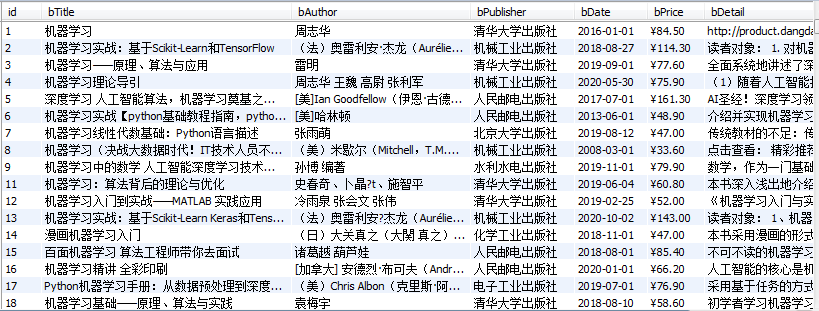
-
心得体会
1.更加熟悉了scrapy框架的使用
2.对xpath的使用更加熟练,在使用上xpath更加灵活方便
3.学习了如何连接数据库,将实验数据存储进mysql数据库中
作业二
-
要求
熟练掌握 scrapy 中 Item、Pipeline 数据的序列化输出方法;Scrapy+Xpath+MySQL数据库存储技术路线爬取股票相关信息
-
候选网络
东方财富网:https://www.eastmoney.com/
新浪股票:http://finance.sina.com.cn/stock/
-
思路
1.将selenium结合进入scrapy框架中,用xpath爬取
2.在spider的构造方法中创建一个浏览器对象(作为当前spider的一个属性)
3.重写spider的一个方法closed(self,spider),在该方法中执行浏览器关闭的操作
4.在下载中间件的process_response方法中,通过spider参数获取浏览器对象
5.在中间件的process_response中定制基于浏览器自动化的操作代码(获取动态加载出来的页面源码数据)
6.实例化一个响应对象,且将page_source返回的页面源码封装到该对象中
7.返回该新的响应对象
-
代码
- 数据项目类items
import scrapy
class GetstockItem(scrapy.Item):
    # define the fields for your item here like:
    index = scrapy.Field()
    code = scrapy.Field()
    name = scrapy.Field()
    latestPrice = scrapy.Field()
    upDownRange = scrapy.Field()
    upDownPrice = scrapy.Field()
    turnover = scrapy.Field()
    turnoverNum = scrapy.Field()
    amplitude = scrapy.Field()
    highest = scrapy.Field()
    lowest = scrapy.Field()
    today = scrapy.Field()
    yesterday = scrapy.Field()
    pass
- 爬虫程序MySpider
import scrapy
from getstock.items import GetstockItem
from bs4 import UnicodeDammit
from selenium import webdriver

class MySpider(scrapy.Spider):
    name = "mySpider"
    start_urls = ['http://quote.eastmoney.com/center/gridlist.html#hs_a_board']
    def __init__(self):
        self.browser = webdriver.Chrome()

    def parse(self,response):
        try:
            dammit = UnicodeDammit(response.body, ["utf-8", "gbk"])
            data = dammit.unicode_markup
            selector = scrapy.Selector(text=data)
            tds = selector.xpath("//table[@id='table_wrapper-table']/tbody/tr")
            for td in tds:
                item = GetstockItem()
                item["index"] = td.xpath("./td[position()=1]/text()").extract()
                item["code"] = td.xpath("./td[position()=2]/a/text()").extract()
                item["name"] = td.xpath("./td[position()=3]/a/text()").extract()
                item["latestPrice"] = td.xpath("./td[position()=5]/span/text()").extract()
                item["upDownRange"] = td.xpath("./td[position()=6]/span/text()").extract()
                item["upDownPrice"] = td.xpath("./td[position()=7]/span/text()").extract()
                item["turnover"] = td.xpath("./td[position()=8]/text()").extract()
                item["turnoverNum"] = td.xpath("./td[position()=9]/text()").extract()
                item["amplitude"] = td.xpath("./td[position()=10]/text()").extract()
                item["highest"] = td.xpath("./td[position()=11]/span/text()").extract()
                item["lowest"] = td.xpath("./td[position()=12]/span/text()").extract()
                item["today"] = td.xpath("./td[position()=13]/span/text()").extract()
                item["yesterday"] = td.xpath("./td[position()=14]/text()").extract()
                yield item
        except Exception as err:
            print(err)

    def closed(self, spider):
        print('bro has been closed')
self.browser.quit()- 数据管道处理类pipelines
import pymysql

class GetpricePipeline:
    def open_spider(self, spider):
        print("opened")
        try:
            self.con = pymysql.connect(host="127.0.0.1", port=3306, user="root", passwd="123456", db="mydb",
                                       charset="utf8")
            self.cursor = self.con.cursor(pymysql.cursors.DictCursor)
            self.cursor.execute("delete from stocks")
            self.opened = True
            self.count = 1
        except Exception as err:
            print(err)
            self.opened = False

    def close_spider(self, spider):
        if self.opened:
            self.con.commit()
            self.con.close()
            self.opened = False
        print("closed")

    def process_item(self, item, spider):
        try:
            if self.opened:
                self.cursor.execute("insert into stocks (序号,股票代码,股票名称,最新报价,涨跌幅,涨跌额,成交量,"
                                    "成交额,振幅,最高,最低,今开,昨收) values "
                                    "(%s,%s,%s,%s,%s,%s,%s,%s,%s,%s,%s,%s,%s)",
                                    (item["index"], item["code"], item["name"],item["latestPrice"], item["upDownRange"],
                                     item["upDownPrice"],item["turnover"], item["turnoverNum"], item["amplitude"],
                                     item["highest"], item["lowest"], item["today"],item["yesterday"]))
                self.count+=1
        except Exception as err:
            print(err)
return item- 下载中间键middlewares
    def process_response(self, request, response, spider):
        # Called with the response returned from the downloader.

        # Must either;
        # - return a Response object
        # - return a Request object
        # - or raise IgnoreRequest
        print('即将返回一个新的响应对象!!!')
        #如何获取动态加载出来的数据
        bro = spider.bro
        bro.get(url=request.url)
        sleep(3)
        #包含了动态加载出来的新闻数据
        page_text = bro.page_source
        sleep(3)
return HtmlResponse(url=spider.bro.current_url,body=page_text,encoding='utf-8',request=request)-
运行结果截图
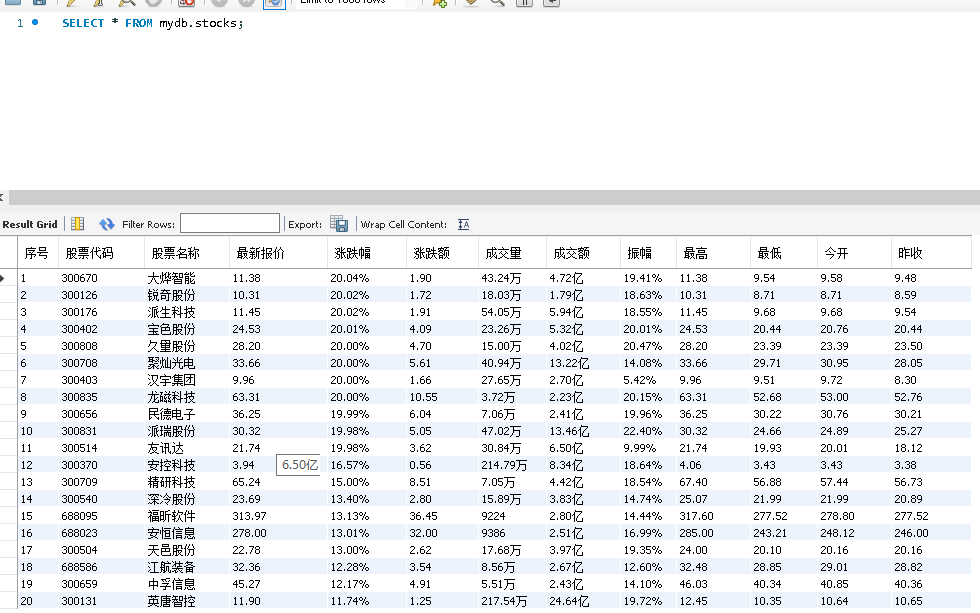
-
心得体会
1.了解了如何在scrapy框架中应用selenium,要重写下载中间件的process_response方法,让该方法对响应进行拦截,并篡改response中存储的页面数据
2.使用selenium和xpath的方式去获取股票信息更加方便,相比于js和re方法,使用selenium能够直接定位动态元素
作业三
-
要求
熟练掌握 scrapy 中 Item、Pipeline 数据的序列化输出方法;使用scrapy框架+Xpath+MySQL数据库存储技术路线爬取外汇网站数据。
-
候选网站
招商银行网:http://fx.cmbchina.com/hq/
-
思路
这题的思路就跟第一题基本一样了,稍微修改一些地方,更改一下xpath的使用就能完成。
-
代码
- 数据项目类items
import scrapy
class PriceItem(scrapy.Item):
    # define the fields for your item here like:
    # name = scrapy.Field()
    id = scrapy.Field()
    currency = scrapy.Field()
    tsp = scrapy.Field()
    csp = scrapy.Field()
    tbp = scrapy.Field()
    cbp = scrapy.Field()
    time = scrapy.Field()
pass- 爬虫程序MySpider
import scrapy
from bs4 import UnicodeDammit
from getprice.items import PriceItem

class MySpider(scrapy.Spider):
    name = "mySpider"
    num = 0

    def start_requests(self):
        url = 'http://fx.cmbchina.com/hq/'
        yield scrapy.Request(url=url, callback=self.parse)

    def parse(self,response):
        try:
            dammit = UnicodeDammit(response.body, ["utf-8", "gbk"])
            data = dammit.unicode_markup
            selector = scrapy.Selector(text=data)
            trs = selector.xpath("//div[@id='realRateInfo']/table/tr")
            for tr in trs[1:]:
                currency = tr.xpath("./td[@class='fontbold']/text()").extract_first()
                tsp = tr.xpath("./td[position()=4]/text()").extract_first()
                csp = tr.xpath("./td[position()=5]/text()").extract_first()
                tbp = tr.xpath("./td[position()=6]/text()").extract_first()
                cbp = tr.xpath("./td[position()=7]/text()").extract_first()
                time = tr.xpath("./td[position()=8]/text()").extract_first()
                self.num += 1
                item = PriceItem()
                item["id"] = self.num
                item["currency"] = currency.strip()
                item["tsp"] = tsp.strip()
                item["csp"] = csp.strip()
                item["tbp"] = tbp.strip()
                item["cbp"] = cbp.strip()
                item["time"] = time.strip()
                yield item
        except Exception as err:
print(err)- 数据管道处理类pipelines
import pymysql

class GetpricePipeline:
    def open_spider(self, spider):
        print("opened")
        try:
            self.con = pymysql.connect(host="127.0.0.1", port=3306, user="root", passwd="123456", db="mydb",
                                       charset="utf8")
            self.cursor = self.con.cursor(pymysql.cursors.DictCursor)
            self.cursor.execute("delete from prices")
            self.opened = True
            self.count = 1
        except Exception as err:
            print(err)
            self.opened = False

    def close_spider(self, spider):
        if self.opened:
            self.con.commit()
            self.con.close()
            self.opened = False
        print("closed")

    def process_item(self, item, spider):
        try:
            print(item["currency"])
            print(item["tsp"])
            print(item["csp"])
            print(item["tbp"])
            print(item["cbp"])
            print(item["time"])
            print()
            if self.opened:
                self.cursor.execute(
                    "insert into prices (id,Currency,TSP,CSP,TBP,CBP,Time) values (%s,%s,%s,%s,%s,%s,%s)",
                    (item["id"], item["currency"], item["tsp"], item["csp"], item["tbp"], item["cbp"],
                     item["time"]))
                self.count += 1
        except Exception as err:
            print(err)
return item-
运行结果截图
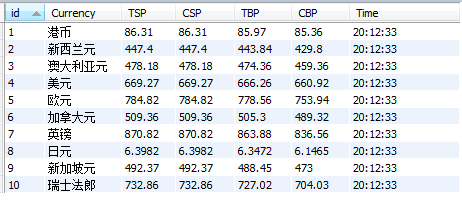
-
心得体会
1.进一步熟悉了对xpath的使用
2.逐渐熟练对mysql数据库的操作

 浙公网安备 33010602011771号