package shiyan8;
import java.util.Scanner
public class Yuanzhuiti {
	private double radius;
private double length;
	private double height;
	public Yuanzhuiti(double radius,double length,double height)
	{
	this.radius = radius;
	this.length = length;
	this.height = height;
	}
	public Yuanzhuiti()
	{
	this(0,0,0);
	}
	public double area() //计算圆锥的表面积,实现Area接口中的抽象方法
{
return Math.PI*this.radius*this.length+Math.PI*this.radius* this.radius ;
	}
	public double volume() //计算圆锥的体积,实现Volume接口中的抽象方法
{
return Math.PI * this.radius * this.radius * this.height/3;
	}
	public String toString()
	{
	return "一个圆锥,半径"+this.radius+",斜边"+this.length+",高"+this.height+"+表面积为"+this.area()+",体积为"+this.volume();

	}
	public static void main(String args[])
	{
	@SuppressWarnings("resource")
	Scanner shuru=new Scanner(System.in);
	int r,h,l;
	System.out.println("请输入圆锥体的底面半径r");//
	r=shuru.nextInt();
	System.out.println("请输入圆锥体的斜边长l");//
	l=shuru.nextInt();
	System.out.println("请输入圆锥体的高h");//
	h=shuru.nextInt();
	Yuanzhuiti y=new Yuanzhuiti(r,l,h);
	System.out.println(y.toString());
	System.out.println("请输入圆锥体的底面半径r");//
	r=shuru.nextInt();
	System.out.println("请输入圆锥体的斜边长l");//
	l=shuru.nextInt();
	System.out.println("请输入圆锥体的高h");//
	h=shuru.nextInt();
	Yuanzhuiti m=new Yuanzhuiti(r,l,h);
	System.out.println(m.toString());
	if(y.volume()>m.volume())
	{
	System.out.println("体积为"+y.volume()+"的圆锥体体积大");
	}
else {
	System.out.println("体积为"+m.volume()+"的圆锥体体积大");
	}


	}
	}
package shiyan8;

public interface Area {
	public abstract double area();
}


package shiyan8;

public interface Volume {
	public abstract double volume();

}

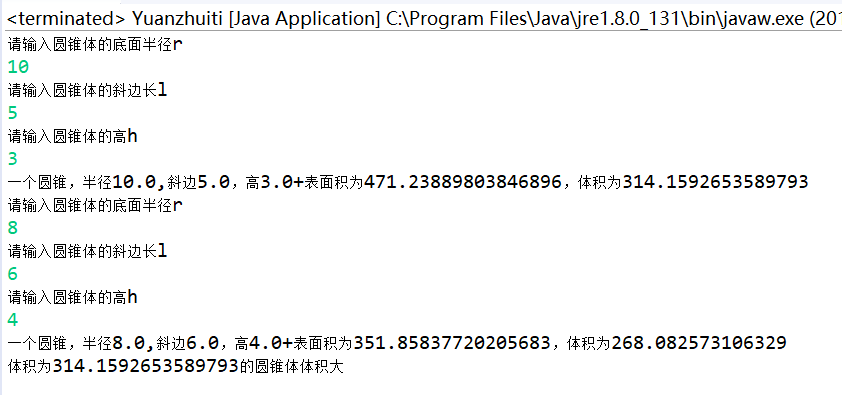
实验结果:
![]()
实验心得:了解了类的接口的声明与实现,许多地方操作不顺畅,还需继续努力。


 浙公网安备 33010602011771号