
uniapp+pixijs写的一个转盘
1,turntable.vue文件,这个里面显示菜单的时候,上一行文字还不能消除,我已经在研究了,等我搞好了我会更新这里的。后期等我多研究研究pixijs,我会出一些pixijs的文章。
<template>
    <view>
        <div id='pixi'></div>
    </view>
</template>

<script>
    export default {
        props: ['menu'],
        data() {
            return {
                app: null,
                container: null,
                winW: 0,
            }
        },
        mounted() {
            this.initPixi()
        },

        methods: {

            initPixi() {
                let type = "WebGL"
                if (!PIXI.utils.isWebGLSupported()) {
                    type = "canvas"
                }

                PIXI.utils.sayHello(type)
                this.app = new PIXI.Application({
                    width: 456, // default: 800
                    height: 456, // default: 600
                    antialias: true, // default: false
                    backgroundAlpha: false, // default: false
                    resolution: 1,
                })
                document.getElementById("pixi").appendChild(this.app.view);

                this.container = new PIXI.Container()
                this.app.stage.addChild(this.container)

                let sprite = PIXI.Sprite.from('/static/turnbg3.png');
                this.winW = document.body.clientWidth

                sprite.width = this.winW
                sprite.height = this.winW

                this.container.addChild(sprite);
                this.container.x = this.winW / 2;
                this.container.y = 250;
                this.container.pivot.x = this.container.width / 2
                this.container.pivot.y = this.container.width / 2

                let spritePointer = PIXI.Sprite.from('/static/pointer1.png');

                spritePointer.width = 75
                spritePointer.height = 100
                spritePointer.x = this.winW / 2 - 37
                spritePointer.y = 186

                this.app.stage.addChild(spritePointer);

            },
            rorate() {
                let angle = Math.floor(this.container.angle + Math.random() * 1000)

                let currentAngle = (angle - 45) % 360

                let index = 9 - (Math.floor(currentAngle / 45) == 0 ? 8 : Math.floor(currentAngle / 45))

                let singleAngle = (angle % 360)
                let toatlAngle = angle - (angle % 45) - 45 > 0 ? angle - (angle % 45) - 45 : 0

                // Listen for animate update

                console.log('index', index, angle, currentAngle, this.container.angle, toatlAngle)

                this.app.ticker.add((delta) => {
                    if (this.container.angle < toatlAngle) {
                        this.container.angle = this.container.angle >= toatlAngle ? toatlAngle : (this.container
                            .angle + 3 * delta)
                        // setTimeout(() => {
                        //     let msg = '今日菜单:'
                        //     if (index > this.menu.length) {
                        //         msg += '西北风'
                        //     } else {
                        //         msg += '' + this.menu[index - 1].dishName
                        //     }
                        //     this.currentMenu(msg)
                        // }, 30 * delta)
                    }
                });
                let msg = '今日菜单:'
                if (index > this.menu.length) {
                    msg += '西北风'
                } else {
                    msg += '' + this.menu[index - 1].dishName
                }
                setTimeout(() => {
                    this.currentMenu(msg)
                }, 4000)

            },
            currentMenu(msg) {
                console.log('this.app', this.app.stage.children)
                this.app.stage.children.clear()
                let menuTriangle = new PIXI.Graphics();
                menuTriangle.width = this.winW
                menuTriangle.height = this.winW
                menuTriangle.x = 10
                menuTriangle.y = 0
                let style = new PIXI.TextStyle({
                    fontFamily: 'Arial',
                    fontSize: 12,
                    fill: '#ff5400',
                    lineHeight: 40,
                    // wordWrapWidth: (265 / 3) * 2,
                    wordWrapWidth: this.win - 10,
                    wordWrap: true,
                    breakWords: true,
                });
                let currentMenu = new PIXI.Text(msg, style);
                currentMenu.x = 0 currentMenu.y = 0 menuTriangle
                    .addChild(currentMenu);
                this.app.stage.addChild(menuTriangle);
            }
        }
    }
</script>

<style>
    #id {
        /* text-align: center */
    }
</style>
2,index.vue,界面不够美观,我这个转盘还是花了好久去修改的,因为我本人不会ps,现学的。
<template>
    <view class="content">
        <!-- <image class="logo" src="/static/logo.png"></image> -->
        <view class="button-area">
            <button size='mini' @click='openDialog'>添加菜品</button>
            <button size='mini' @click='rorate'>转动</button>
        </view>

        <view class='menu'>
            <div class='menu-item' v-for='(item,index) in menu' :key='index'>
                <span>
                    <span>{{index +1}}:</span><span class='dish-name'>{{item.dishName}}</span>
                </span>
                <span>
                    <span class='edit-btn' @click='editDialog(item.dishName,item._id)'>编辑</span>
                    <span class='del-btn' @click='delDishName(item._id)'>删除</span>
                </span>
            </div>
        </view>
        <turntable ref='turntable' class='turn-con' :menu='menu'></turntable>
        <view class='pop' v-show='ifVisilble'>
            <form @submit="formSubmit" class='form-con'>
                <view class="input-con">
                    <span>菜单名称:</span>
                    <input class="uni-input" name="input" :value='dishName' placeholder="这是一个输入框" />
                </view>
                <view class="submit-btn">
                    <button size='mini' form-type="submit">提交</button>
                    <button size='mini' form-type="submit" @click='reset'>取消</button>
                </view>
            </form>
        </view>
    </view>
</template>

<script>
    import turntable from '../turntable/turntable.vue'
    export default {
        components: {
            turntable
        },

        data() {
            return {
                title: 'Hello',
                menu: [],
                ifVisilble: false,
                dishName: '',
                isEdit: false
            }
        },
        methods: {
            rorate() {
                this.$refs.turntable.rorate()
            },
            getMenuList(e) {
                uniCloud.callFunction({
                    name: 'menuList',
                    data: {
                        limit: 30,
                        offset: 0,
                        keyWord: e ? e.detail.value : ''
                    }
                }).then((res) => {
                    console.log('菜单', res.result.data)
                    this.menu = res.result.data
                })
            },
            formSubmit(e) {
                console.log('e', e.detail.value.input)
                if (this.isEdit) {
                    uniCloud.callFunction({
                        name: 'updateDishName',
                        data: {
                            id: this.id,
                            dishName: e.detail.value.input
                        }
                    }).then(res => this.getMenuList())
                } else {
                    uniCloud.callFunction({
                        name: 'addDishName',
                        data: {
                            dishName: e.detail.value.input
                        }
                    }).then(res => this.getMenuList())

                }
            },
            delDishName(id) {
                uniCloud.callFunction({
                    name: 'delDishName',
                    data: {
                        id
                    }
                })
                this.getMenuList()
            },
            reset() {
                this.dishName = ''
                this.ifVisilble = false
            },
            openDialog() {
                if (this.menu.length < 8) {
                    this.ifVisilble = true
                    this.dishName = ''
                    this.isEdit = false
                } else {
                    alert('只可以添加八个菜!')
                }

            },
            editDialog(dishName, id) {
                this.ifVisilble = true
                this.isEdit = true
                this.dishName = dishName
                this.id = id
            }
        },
        created() {
            this.getMenuList()
        }
    }
</script>

<style>
    .content {
        /* position: relative; */
    }

    .button-area {
        display: flex;
        justify-content: space-around;
        width: 100%;
        padding-top: 20px;
    }

    .title {
        font-size: 36rpx;
        color: #8f8f94;
    }

    .menu-item {
        display: inline-flex;
        justify-content: space-between;
        width: 50%;
        padding-bottom: 5px;
    }

    .edit-btn {
        padding-right: 5px;
        color: #4054e6b0;
    }

    .del-btn {
        padding-right: 5px;

        color: #e68540;
    }

    .dish-name {
        padding-left: 10px;
        color: #dc40e6
    }

    .menu {
        padding: 20px;
    }

    .input-con {
        display: flex;
        padding: 20px 20px;
    }

    .uni-input {
        border-bottom: 1px solid black;
        padding-left: 20px;
        width: 70%;
    }


    .submit-btn {
        text-align: right;
        padding-right: 20px;
    }

    .submit-btn :first-child {
        margin-right: 10px;
    }

    .turn-con {
        text-align: center;
        padding-top: 0px 20px 0 20px;
    }

    .pop {
        position: relative;
        top: -400px;
        background: #fff;
        padding: 20px 0;
        margin: 0 10px;
        border-radius: 10px;
        box-shadow: 5px 5px 5px #89898773;
    }
</style>
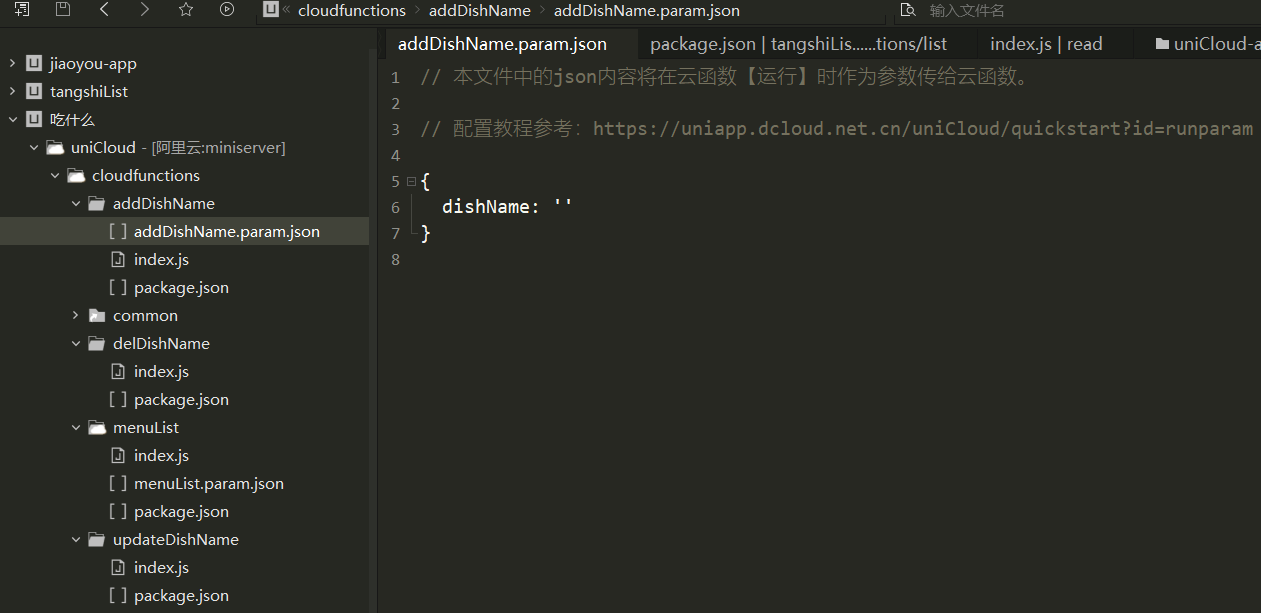
3,云函数文件我就写到一起了,后面大家自己写,可以分开。下面是文函数截图,再下面是里面的内容。有其他配置问题可以评论区问我。
'use strict'
const db = uniCloud.database()
exports.main = async (event, context) => {
    //event为客户端上传的参数
    console.log('event : ', event, context)
    let data = { dishName: event.dishName }
    await db.collection('menu').add(data)
    //返回数据给客户端
    return {
        code: 200,
        msg: '添加成功'
    }
}

'use strict'
const db = uniCloud.database()
exports.main = async (event, context) => {
    //event为客户端上传的参数
    console.log('event : ', event)
    const id = event.id
    const collection = db.collection('menu')
    const res = collection.doc(id).remove() //返回数据给客户端

    return {
        code: 200,
        msg: '删除成功'
    }
}

'use strict'
const db = uniCloud.database()
exports.main = async (event, context) => {
    //event为客户端上传的参数
    console.log('event : ', event)
    const collection = db.collection('menu') // 获取menu的集合对象
    console.log('collection : ', collection)
    const res = await collection.limit(event.limit).skip(event.offset).where({ dishName: new RegExp(event.keyWord) }).get()
    //返回数据给客户端
    return res
}


'use strict'
const db = uniCloud.database()
exports.main = async (event, context) => {
    //event为客户端上传的参数
    console.log('event : ', event)
    const id = event.id
    const dishName = event.dishName
    const collection = db.collection('menu')
    await collection.doc(id).update({ dishName })
    //返回数据给客户端
    return {
        code: 200,
        msg: '编辑成功'
    }
}
基本代码就是这样啦,细节不明白关注我,然后评论区问我,

 浙公网安备 33010602011771号