
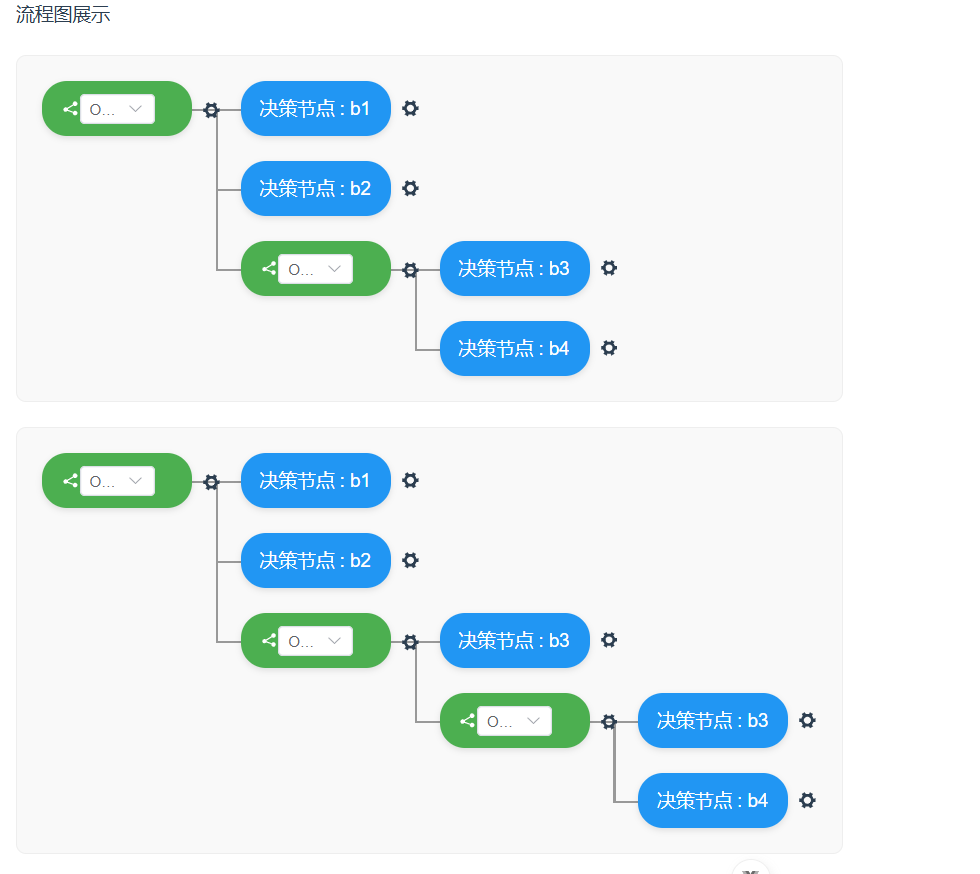
流程图有两个类型节点,type:a有子节点,功能:添加type:a节点,添加type:b节点,删除节点。type:b没有子节点,功能:删除
1.FlowNode.vue---type:a节点
<template>
  <div class="node-wrapper">
    <div class="node-container">
      <!-- 操作步骤节点 -->
      <div v-if="isTypeA" class="action-node-box">
        <div class="action-node-container">
          <el-icon><Share /></el-icon>
          <el-select
            v-model="selectValue"
            placeholder="Select"
            size="small"
            style="width: 60px"
          >
            <el-option
              v-for="item in selectOptions"
              :key="item.value"
              :label="item.label"
              :value="item.value"
            />
          </el-select>
        </div>
        <!-- 图标 -->
        <el-popover placement="right-start" :width="100">
          <template #reference>
            <el-icon class="set-menu-icon">
              <Tools />
            </el-icon>
          </template>
          <div class="menu-item" @click="handleAddAction">添加操作</div>
          <div class="menu-item" @click="handleAddDecision">添加节点</div>
          <div class="menu-item" v-if="isNested" @click="handleDelete()">
            删除
          </div>
        </el-popover>
      </div>

      <!-- 决策节点 -->

      <PatternNode
        v-else
        :node="node"
        :parentNode="parentNode"
        @update="handleUpdate"
      />

      <div v-if="hasExpression" class="expression-connector"></div>
    </div>
    <div v-if="hasExpression" class="expression-container">
      <div
        :style="{ height: 65 * (node.expression.length - 1) + 'px' }"
        class="vertical-line"
      ></div>
      <div class="expression-nodes">
        <FlowNode
          v-for="(child, index) in node.expression"
          :key="index"
          :node="child"
          :is-last="index === node.expression.length - 1"
          :is-nested="true"
          :parentNode="node"
          @update="handleUpdate"
        />
      </div>
    </div>
  </div>
</template>

<script setup>
import { computed } from 'vue'
import { useRuleNode, selectOptions, selectValue } from './rule-node.js'
import PatternNode from './PatternNode.vue'

const props = defineProps({
  isNested: {
    // 新增prop,表示是否是嵌套节点
    type: Boolean,
    default: false,
  },
  node: {
    type: Object,
    required: true,
  },
  isLast: {
    type: Boolean,
    default: false,
  },
  parentNode: {
    type: Object,
    default: null,
  },
  index: {
    type: Number,
    default: -1,
  },
})

const emit = defineEmits(['update'])

const { addActionNode, addDecisionNode } = useRuleNode()

const isTypeA = computed(() => props.node.type === 'A')
const hasExpression = computed(() => props.node.expression?.length > 0)

// 添加操作节点
const handleAddAction = () => {
  addActionNode(props.node)
  emit('update')
}
// 添加决策节点
const handleAddDecision = () => {
  addDecisionNode(props.node)
  emit('update')
}

// 删除当前节点
const handleDelete = () => {
  if (props.parentNode && typeof props.index === 'number') {
    props.parentNode.expression.splice(props.index, 1)
    emit('update')
  }
}
</script>
<style scoped lang="less">
.node-wrapper {
  display: flex;
  align-items: flex-start;
  margin-bottom: 20px;
  &:last-child {
    margin-bottom: 0px;
  }
}

.node-container {
  display: flex;
  align-items: center;
  position: relative;
}

.action-node-container {
  padding: 10px 15px;
  border-radius: 20px;
  min-width: 120px;
  text-align: center;
  background-color: #4caf50;
  color: white;
  box-shadow: 0 2px 5px rgba(0, 0, 0, 0.1);
  position: relative;
  z-index: 2;
  display: inline-flex;
  align-items: center;

  .node-label {
    font-weight: 500;
  }

  .node-value {
    margin-left: 4px;
    opacity: 0.9;
  }
}

/* 主节点右侧的水平连接线 */
.expression-connector {
  width: 20px;
  height: 2px;
  background: #999;
  margin-left: -1px;
  z-index: 1;
  margin-top: 2px;
}

.expression-container {
  display: flex;
}

/* 左侧垂直连接线 */
.vertical-line {
  width: 2px;
  background: #999;
  margin-right: 18px;
  margin-top: 22px;
}

.expression-nodes {
  display: flex;
  flex-direction: column;
  flex-grow: 1;
}

/* 子节点左侧的水平连接线 */
.expression-nodes > .node-wrapper > .node-container::before {
  content: '';
  position: absolute;
  left: -20px;
  top: 50%;
  width: 20px;
  height: 2px;
  background: #999;
  z-index: 1;
}

/* 最后一个子节点的垂直连接线缩短 */
.expression-nodes
  > .node-wrapper:last-child
  > .expression-container
  > .vertical-line {
  min-height: 22px;
}
.action-node-box {
  position: relative;
  .set-menu-icon {
    position: absolute;
    margin-left: 8px;
    top: 16px;
    z-index: 9;
  }
}
</style>
2.HomeView.vue---流程图入口
<template>
  <div class="flowchart-app">
    <div>流程图展示</div>
    <div
      class="flowchart-container"
      v-for="(flow, index) in flowData"
      :key="'flow' + index"
    >
      <FlowNode
        :node="flow"
        :index="index"
        @update="handleUpdate"
      />
    </div>
  </div>
</template>

<script setup>
import { flowData } from './rule-node.js'
import FlowNode from './FlowNode.vue'

const handleUpdate = () => {
  // 触发数据更新
  flowData.value = [...flowData.value]
}
</script>

<style>
.flowchart-app {
  font-family: Arial, sans-serif;
  padding: 20px;
  max-width: 1000px;
  margin: 0 auto;
}

.flowchart-container {
  margin-top: 20px;
  padding: 20px;
  border: 1px solid #eee;
  border-radius: 8px;
  background: #f9f9f9;
}
</style>
3.PatternNode.vue---type:b节点
<template>
  <div class="pattern-node-box">
    <!-- 节点 -->
    <div class="pattern-node-container">
      <span class="node-label">决策节点</span>
      <span v-if="node.content?.value" class="node-value"
        >: {{ node.content.value }}</span
      >
    </div>
    <!-- 图标 -->
    <el-popover placement="right-start" :width="80">
      <template #reference>
        <el-icon class="set-menu-icon">
          <Tools />
        </el-icon>
      </template>
      <div class="menu-item" @click="handleDelete">删除</div>
    </el-popover>
  </div>
</template>

<script setup>
const props = defineProps({
  parentNode: {
    type: Object,
    default: null,
  },
  node: {
    type: Object,
    required: true,
  },
})
const emit = defineEmits(['update'])

// 删除当前节点
const handleDelete = () => {
  const index = props.parentNode.expression.findIndex(
    (item) => item === props.node
  )
  if (index !== -1) {
    props.parentNode.expression.splice(index, 1)
    emit('update')
  } else {
    console.warn('未找到要删除的节点')
  }
}
</script>

<style scoped lang="less">
.pattern-node-box {
  display: inline-flex;
  align-items: center;
  .set-menu-icon {
    margin-left: 8px;
  }
}
.pattern-node-container {
  padding: 10px 15px;
  border-radius: 20px;
  min-width: 120px;
  text-align: center;
  background-color: #2196f3;
  color: white;
  box-shadow: 0 2px 5px rgba(0, 0, 0, 0.1);
  position: relative;
  z-index: 2;
  display: inline-flex;
  align-items: center;

  .node-label {
    font-weight: 500;
  }

  .node-value {
    margin-left: 4px;
  }
}
</style>
4.rule-node.js---数据、方法文件
import { ref } from 'vue'

// 流程图数据
export const flowData = ref([
  {
    type: 'A',
    expression: [
      {
        type: 'B',

        content: { value: 'b1' },
      },
      {
        type: 'B',

        content: { value: 'b2' },
      },
      {
        type: 'A',
        expression: [
          {
            type: 'B',
            content: { value: 'b3' },
          },
          {
            type: 'B',
            content: { value: 'b4' },
          },
        ],
      },
    ],
  },
  {
    type: 'A',
    expression: [
      {
        type: 'B',
        content: { value: 'b1' },
      },
      {
        type: 'B',
        content: { value: 'b2' },
      },
      {
        type: 'A',
        expression: [
          {
            type: 'B',
            content: { value: 'b3' },
          },
          {
            type: 'A',
            expression: [
              {
                type: 'B',
                content: { value: 'b3' },
              },
              {
                type: 'B',
                content: { value: 'b4' },
              },
            ],
          },
        ],
      },
    ],
  },
])
// 选择器Option数据
export const selectOptions = ref([
  {
    value: 'Option1',
    label: 'Option1',
  },
  {
    value: 'Option2',
    label: 'Option2',
  },
])
// 选择器绑定值
export const selectValue = ref('Option2')
// 节点操作方法
export const useRuleNode = () => {
  /**
   * 添加操作节点
   * @param {Object} parentNode - 父节点对象
   * @param {Number} [index] - 插入位置,默认为末尾
   */
  const addActionNode = (parentNode, index) => {
    if (!parentNode.expression) {
      parentNode.expression = []
    }
    const newNode = {
      type: 'A',
      expression: [],
    }
    if (typeof index === 'number') {
      parentNode.expression.splice(index, 0, newNode)
    } else {
      parentNode.expression.push(newNode)
    }
    return newNode
  }

  /**
   * 添加决策节点
   * @param {Object} parentNode - 父节点对象
   * @param {Number} [index] - 插入位置,默认为末尾
   */
  const addDecisionNode = (parentNode, index) => {
    if (!parentNode.expression) {
      parentNode.expression = []
    }
    const newNode = {
      type: 'B',
      content: { value: `决策${parentNode.expression.length + 1}` },
    }
    if (typeof index === 'number') {
      parentNode.expression.splice(index, 0, newNode)
    } else {
      parentNode.expression.push(newNode)
    }
    return newNode
  }

  /**
   * 根据路径查找节点
   * @param {Array} path - 节点路径数组
   */
  const findNodeByPath = (path) => {
    let current = flowData.value
    for (const segment of path) {
      current = current[segment]
    }
    return current
  }

  return {
    addActionNode,
    addDecisionNode,
    findNodeByPath,
  }
}
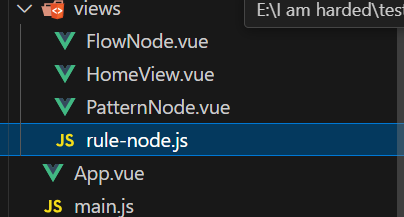
文件结构
流程图结构:

 浙公网安备 33010602011771号