


一想到数据库,我就联想起SQL注入攻击,如果ADO.NET处理得不好,数据库就很危险,当然我们可以通过数据库设置来保证安全(保持在拥有最低特权的帐户下运行等等),但这并不意味就可以放任ADO.NET。
任何来自前台的数据都有可能是不安全的,ADO.NET作为前台与数据库的桥梁,必须保证数据的安全,实际上每一层都必须保证数据的安全。比如要保证用户输入的是中文,前台用C#正则表达式就可以,但数据库也必须判断出来。
虽然需要开销,但用这点开销保证数据的安全还是值得的。
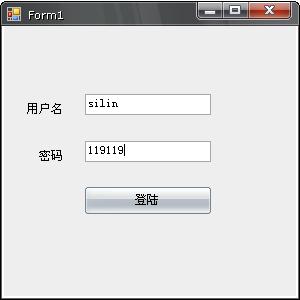
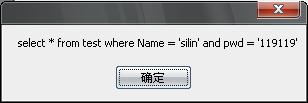
请看下SQL查询语句,待会对比一下就能看出问题。
下面是button的点击事件
1 private void button1_Click(object sender, EventArgs e)
2 {
3 try
4 {
5 //连接
6 string strCon = "Data Source=20090503-2108;Initial Catalog=test;Integrated Security=True";
7 SqlConnection con = new SqlConnection(strCon);
8
9 //拼接SQL查询语句
10 string sql = "select * from test where Name = '" + textBox1.Text + "' and pwd = '" + textBox2.Text + "'";
11
12 //查看下SQL查询语句
13 MessageBox.Show(sql);
14 SqlCommand com = new SqlCommand(sql, con);
15 con.Open();
16 SqlDataReader dr = com.ExecuteReader();
17
18 //判断是否登录成功
19 if (dr.HasRows)
20 {
21 MessageBox.Show("登陆成功!");
22 }
23 else
24 {
25 MessageBox.Show("登陆失败!");
26 }
27 }
28 catch(Exception ex)
29 {
30 MessageBox.Show(ex.Message);
31 }
2 {
3 try
4 {
5 //连接
6 string strCon = "Data Source=20090503-2108;Initial Catalog=test;Integrated Security=True";
7 SqlConnection con = new SqlConnection(strCon);
8
9 //拼接SQL查询语句
10 string sql = "select * from test where Name = '" + textBox1.Text + "' and pwd = '" + textBox2.Text + "'";
11
12 //查看下SQL查询语句
13 MessageBox.Show(sql);
14 SqlCommand com = new SqlCommand(sql, con);
15 con.Open();
16 SqlDataReader dr = com.ExecuteReader();
17
18 //判断是否登录成功
19 if (dr.HasRows)
20 {
21 MessageBox.Show("登陆成功!");
22 }
23 else
24 {
25 MessageBox.Show("登陆失败!");
26 }
27 }
28 catch(Exception ex)
29 {
30 MessageBox.Show(ex.Message);
31 }
现在我们来看下问题出在哪里,如果我们在密码一栏输入
“ 119119'delete from test where Name <>' ”
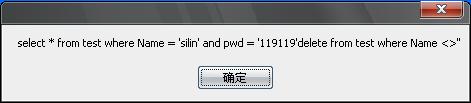
现在看下SQL查询语句,你会发现后半部分是删除test表的操作,接着test表的数据就会全部被删除。
这是重构的安全代码:
1 private void button1_Click(object sender, EventArgs e)
2 {
3 try
4 {
5 string strCon = "Data Source=20090503-2108;Initial Catalog=test;Integrated Security=True";
6 SqlConnection con = new SqlConnection(strCon);
7
8 //这是SQL查询语句,可以对比一下看下区别
9 string sql = "select * from test where Name = @Name and pwd = @pwd";
10
11 MessageBox.Show(sql);//查看下SQL查询语句
12
13 //用SqlParameter 类向SqlCommand 添加参数
14 SqlCommand com = new SqlCommand(sql, con);
15 SqlParameter sp1 = new SqlParameter("@Name", this.textBox1.Text);
16 SqlParameter sp2 = new SqlParameter("@pwd", this.textBox2.Text);
17 com.Parameters.Add(sp1);
18 com.Parameters.Add(sp2);
19
20 con.Open();
21 SqlDataReader dr = com.ExecuteReader();
22 //判断是否登录成功
23 if (dr.HasRows)
24 {
25 MessageBox.Show("登陆成功!");
26 }
27 else
28 {
29 MessageBox.Show("登陆失败!");
30 }
31 }
32 catch(Exception ex)
33 {
34 MessageBox.Show(ex.Message);
35 }
这是SQL查询语句,如果你在密码一栏输入“ 119119'delete from test where Name <>' ” 2 {
3 try
4 {
5 string strCon = "Data Source=20090503-2108;Initial Catalog=test;Integrated Security=True";
6 SqlConnection con = new SqlConnection(strCon);
7
8 //这是SQL查询语句,可以对比一下看下区别
9 string sql = "select * from test where Name = @Name and pwd = @pwd";
10
11 MessageBox.Show(sql);//查看下SQL查询语句
12
13 //用SqlParameter 类向SqlCommand 添加参数
14 SqlCommand com = new SqlCommand(sql, con);
15 SqlParameter sp1 = new SqlParameter("@Name", this.textBox1.Text);
16 SqlParameter sp2 = new SqlParameter("@pwd", this.textBox2.Text);
17 com.Parameters.Add(sp1);
18 com.Parameters.Add(sp2);
19
20 con.Open();
21 SqlDataReader dr = com.ExecuteReader();
22 //判断是否登录成功
23 if (dr.HasRows)
24 {
25 MessageBox.Show("登陆成功!");
26 }
27 else
28 {
29 MessageBox.Show("登陆失败!");
30 }
31 }
32 catch(Exception ex)
33 {
34 MessageBox.Show(ex.Message);
35 }
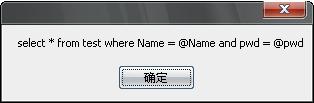
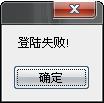
它会提示登录失败
所以尽量避免使用拼接SQL查询语句 或 尽量使用存储过程

 浙公网安备 33010602011771号