
用Webapi输出文件
前几天,写了一些接口,其中有一个接口里面,要求返回信息,已经文件,接口文档里面写明了文件要求的以流的形式。
而返回的文件,是一个证明。
这个证明是word的形式,这个东西其实不难,我写这个呢,也就是记录一下和以后万一有人遇到这个问题,能提供一些参考。
我一开始想的是用代码先把这个文件给创建出来,但我一想,这要好麻烦,我返回的这个证明格式是固定的,我不需要改什么,其实就是一个证明模板。
我如果用代码创建的话,感觉有点复杂,所以这个我就放弃了。
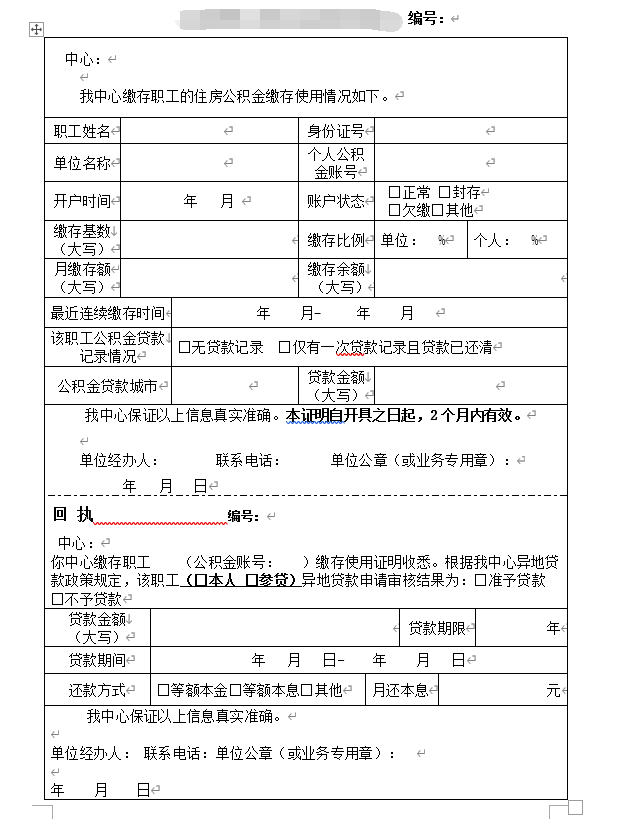
就类似像这种证明把。
我觉得我只需要把有用的信息,给放到固定的位置不久可以了吗。
于是我就去查了一下,还真让我找到了。
我把这个word做成一个模板,怎么做成一个模板呢?

把你创建好的表格啦什么的保存成模板(我这个是2016,好像2016以前是dot)
然后把你的光标放在,要输入的地方,点击插入书签
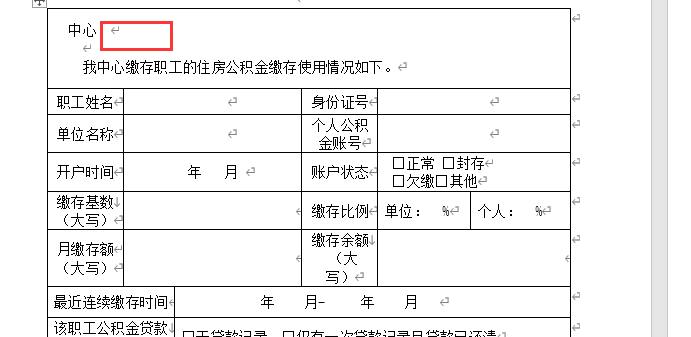

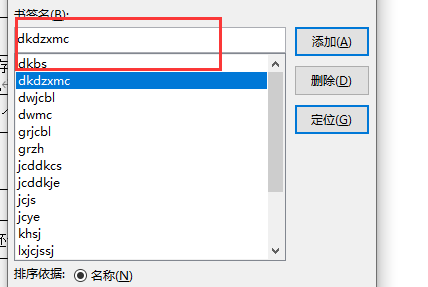
写上书签名,书签可以设置多个,在你需要插入内容的地方都可以设置书签。
这时候把保存的模板放到项目中去就可以了。
然后在代码里面把需要的信息填写进去。
下面上代码
     public static void test()
        {
            object oMissing = System.Reflection.Missing.Value;
            //创建一个Word应用程序实例
            Microsoft.Office.Interop.Word._Application oWord = new Microsoft.Office.Interop.Word.Application();
            //设置为不可见
            oWord.Visible = false;
            //模板文件地址,这里假设在X盘根目录
            object oTemplate = "C:/Users/13002/source/repos/练习/练习/WordDot/模板.dot";
            //以模板为基础生成文档
            Microsoft.Office.Interop.Word._Document oDoc = oWord.Documents.Add(ref oTemplate, ref oMissing, ref oMissing, ref oMissing);
            //声明书签数组
            object[] oBookMark = new object[17];
            //赋值书签名
            oBookMark[0] = "dkdzxmc";
            oBookMark[1] = "xingMing";
            oBookMark[2] = "zjhm";
            oBookMark[3] = "dwmc";
            //赋值任意数据到书签的位置
            oDoc.Bookmarks.get_Item(ref oBookMark[0]).Range.Text = "使用模板实现Word生成";
            oDoc.Bookmarks.get_Item(ref oBookMark[1]).Range.Text = "李四";
            oDoc.Bookmarks.get_Item(ref oBookMark[2]).Range.Text = "女";
            oDoc.Bookmarks.get_Item(ref oBookMark[3]).Range.Text = "1987.06.07";
            oDoc.Bookmarks.get_Item(ref oBookMark[4]).Range.Text = "贺州";


            //保存路径
            object filename = "C:/Users/13002/source/repos/练习/练习/WordDot/test.doc";
            oDoc.SaveAs(ref filename, ref oMissing, ref oMissing, ref oMissing,
            ref oMissing, ref oMissing, ref oMissing, ref oMissing, ref oMissing,
            ref oMissing, ref oMissing, ref oMissing, ref oMissing, ref oMissing,
            ref oMissing, ref oMissing);
            oDoc.Close(ref oMissing, ref oMissing, ref oMissing);
            //关闭word
            oWord.Quit(ref oMissing, ref oMissing, ref oMissing);
        }
这就把内容填写进去并保存了。
由于接口文档里面写的是以流的形式。
所以我就把这个word文件变成二进制数组。
     /// <summary>
        /// 二进制数据转换为word文件
        /// </summary>]
        /// <param name="data">二进制数据</param>
        /// <param name="fileName">word文件名</param>
        /// <returns>word保存的相对路径</returns>
        public static void ByteConvertWord(byte[] data)
        {
            string filePath = @"C:/Users/13002/source/repos/练习/练    习/WordDot/test1.doc";

            FileStream fs;
            if (System.IO.File.Exists(filePath))
            {
                fs = new FileStream(filePath, FileMode.Truncate);
            }
            else
            {
                fs = new FileStream(filePath, FileMode.CreateNew);
            }
            BinaryWriter br = new BinaryWriter(fs);
            br.Write(data, 0, data.Length);
            br.Close();
            fs.Close();
        }
把这个数组保存到对象里面的一个字段里面。
然后通过webapi将这个对象序列化成json。
问题就是从这里开始的。
我一开始拿着这个字段的内容想把它在还原成word文件的,但是在还原的时候却出错了,
找了下原因,webapi在返回byte[]数组的时候,会变成base64
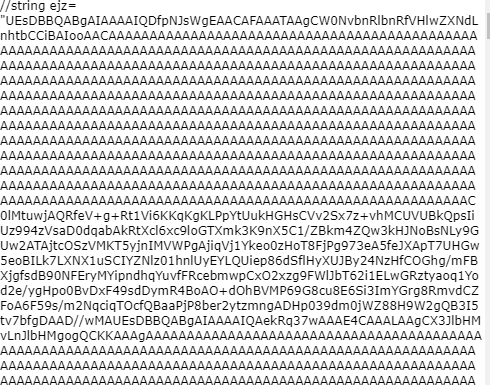
把webapi序列化的base64转换成byte[]数组在变成文件就可以了。
byte[] byteArray = Convert.FromBase64String(ejz);
byte[] byteArray = System.Text.Encoding.Default.GetBytes(ejz);
getFile(byteArray);
public static void getFile(byte[] content)
        {
            string fileName = @"C:/Users/13002/source/repos/练习/练习/WordDot/test1.doc";
            if (System.IO.File.Exists(fileName))
            {
                System.IO.File.Delete(fileName);
            }
            //FileStream sw = new FileStream(@fileName, FileMode.Create);
            //StreamWriter fs = new StreamWriter(sw, Encoding.UTF8);
            //fs.Write(entity.Content);
            System.IO.FileStream fs = new System.IO.FileStream(fileName, System.IO.FileMode.Create);
            fs.Write(content, 0, content.Length);
            fs.Flush();
            fs.Close();
        }
这样就可以完整的还原成文件了。
希望能解决你的问题。

 浙公网安备 33010602011771号