
实现跨域的几种方法
1.xhr
var img=new Image();

img.onload=img.onerror=function(){

     alert(1);

};

img.src="http://www,fuwuqi.com?name=tong";
简单单向跨域通信的方式,只能发送get请求,无法访问服务器的响应文本
3.JSONP
var s=document.createElement("script");
s.src="http://fuwuqi.com?name=tong&callback=cb";
document.body.insertBefore(s,document.body.firstElementChild||document.body.children[0]);
4.web socket
后面有专门介绍
5.postMessage
postMessage(data,origin)方法接受两个参数
1.data:要传递的数据,html5规范中提到该参数可以是JavaScript的任意基本类型或可复制的对象,然而并不是所有浏览器都做到了这点儿,部分浏览器只能处理字符串参数,所以我们在传递参数的时候需要使用JSON.stringify()方法对对象参数序列化,在低版本IE中引用json2.js可以实现类似效果。
2.origin:字符串参数,指明目标窗口的源,协议+主机+端口号[+URL],URL会被忽略,所以可以不写,这个参数是为了安全考虑,postMessage()方法只会将message传递给指定窗口,当然如果愿意也可以建参数设置为"*",这样可以传递给任意窗口,如果要指定和当前窗口同源的话设置为"/"。
http://test.com/index.html
<div style="width:200px; float:left; margin-right:200px;border:solid 1px #333;">
        <div id="color">Frame Color</div>
    </div>
    <div>
        <iframe id="child" src="http://lsLib.com/lsLib.html"></iframe>
    </div>
我们可以在http://test.com/index.html通过postMessage()方法向跨域的iframe页面http://lsLib.com/lsLib.html传递消息
window.onload=function(){
            window.frames[0].postMessage('getcolor','http://lslib.com');
        }
接收消息
test.com上面的页面向lslib.com发送了消息,那么在lslib.com页面上如何接收消息呢,监听window的message事件就可以
http://lslib.com/lslib.html
window.addEventListener('message',function(e){
                if(e.source!=window.parent) return;
                var color=container.style.backgroundColor;
                window.parent.postMessage(color,'*');
            },false);
这样我们就可以接收任何窗口传递来的消息了,为了安全起见,我们利用这时候的MessageEvent对象判断了一下消息源,MessageEvent是一个这样的东西
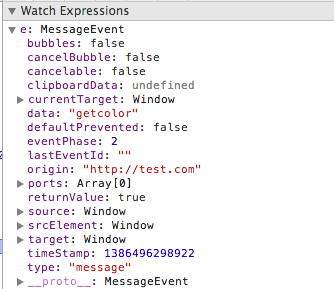
有几个重要属性
- data:顾名思义,是传递来的message
- source:发送消息的窗口对象
- origin:发送消息窗口的源(协议+主机+端口号)
这样就可以接收跨域的消息了,我们还可以发送消息回去,方法类似
简单的demo
在例子中页面加载的时候主页面向iframe发送’getColor‘ 请求(参数没实际用处)
window.onload=function(){
            window.frames[0].postMessage('getcolor','http://lslib.com');
        }
iframe接收消息,并把当前颜色发送给主页面呢
window.addEventListener('message',function(e){
                if(e.source!=window.parent) return;
                var color=container.style.backgroundColor;
                window.parent.postMessage(color,'*');
            },false);
主页面接收消息,更改自己div颜色
window.addEventListener('message',function(e){
            var color=e.data;
            document.getElementById('color').style.backgroundColor=color;
        },false);
当点击iframe事触发其变色方法,把最新颜色发送给主页面
function changeColor () {
                var color=container.style.backgroundColor;
                if(color=='rgb(204, 102, 0)'){
                    color='rgb(204, 204, 0)';
                }else{
                    color='rgb(204,102,0)';
                }
                container.style.backgroundColor=color;
                window.parent.postMessage(color,'*');
            }
主页面还是利用刚才监听message事件的程序处理自身变色
window.addEventListener('message',function(e){
            var color=e.data;
            document.getElementById('color').style.backgroundColor=color;
        },false);

 浙公网安备 33010602011771号