
Mysql多实例安装
1、在新增加磁盘目录/data后
pvcreate /dev/sdb
vgcreate -s 64M vg_data /dev/sdb
lvcreate -L 5G -n lv_data /dev/vg_data
mkfs -t ext4 /dev/vg_data/lv_data
partprobe
vi /etc/fstab
末尾追加
/dev/vg_data/lv_data    /data    ext4    0    0
命令行保存退出
mount -a
cd /data
mkdir mysql
cd mysql
mkdir 3306 3307
cd ../../
chown -R mysql
cp /usr/local/mysql/support-files/mysql.server /etc/init.d/mysqld
2、
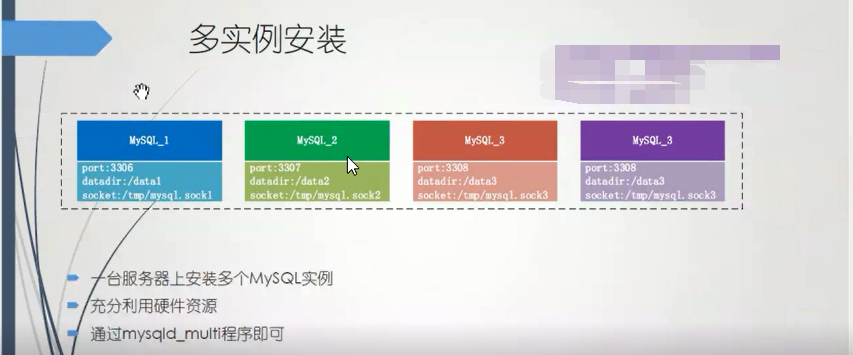
安装多实例,是为了充分利用硬件资源 ,目前mysql多数 是安装 在ssd上的。ssd的iops是非常高的,磁盘\CPU性能,在不出故障问题的时候是性能过剩的。
传闻阿里一台服务器上安装了100个mysql实例,做云数据库。
编辑Mysql的配置文件/etc/my.cnf
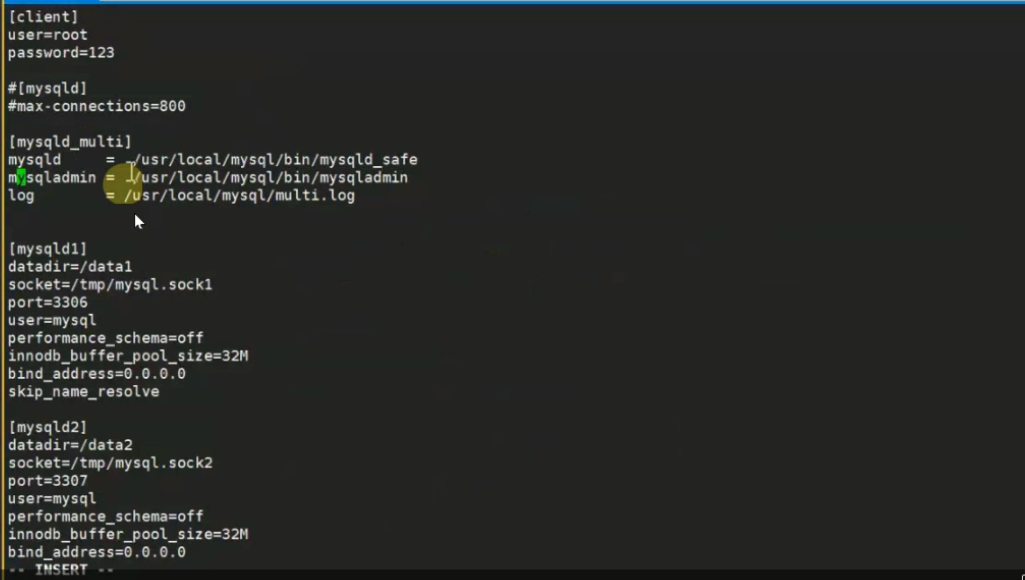
完整版my.cnf
[root@bogon data]# cat /etc/my.cnf
[client]
user=root
password=111111

#[mysqld]
#max-connections=800

[mysqld_multi]
mysqld          = /usr/local/mysql/bin/mysqld_safe
mysqladmin      = /usr/local/mysql/bin/mysqladmin
log             =/usr/local/mysql/multi.log

[mysqld1]
datadir = /data/3306
socket=/tmp/mysql.sock1
port=3306
user=mysql
log_error = error.log
performance_schema=off
innodb_buffer_pool_size=32M
bind_address=0.0.0.0
skip_name_resolve

[mysqld2]
datadir = /data/3307
socket=/tmp/mysql.sock2
port=3307
user=mysql
log_error = error.log
performance_schema=off
innodb_buffer_pool_size=32M
bind_address=0.0.0.0
skip_name_resolve

[mysqld3]
datadir = /data/3308
socket=/tmp/mysql.sock3
port=3308
user=mysql
log_error = error.log
performance_schema=off
innodb_buffer_pool_size=32M
bind_address=0.0.0.0
skip_name_resolve

[mysqld4]
datadir = /data/3309
socket=/tmp/mysql.sock4
port=33099
user=mysql
log_error = error.log
performance_schema=off
innodb_buffer_pool_size=32M
bind_address=0.0.0.0
skip_name_resolve
3、在mysql数据目录中创建几个实例的数据目录
[root@bogon mysql]# cd /data
[root@bogon data]# ll
总用量 16
drwxr-xr-x. 5 mysql mysql 4096 2月  26 13:25 3306
drwxr-xr-x. 5 mysql mysql 4096 2月  26 13:26 3307
drwxr-xr-x. 5 mysql mysql 4096 2月  26 13:26 3308
drwxr-xr-x. 5 mysql mysql 4096 2月  26 13:26 3309
[root@bogon data]#
mysql的数据目录,是在启动时要写入数据的,所以数据目录权限要是mysql mysql。先修改下权限
chown -R mysql /data/*
chgrp -R mysql /data/*
4、初始化各个实例
3306
[root@bogon data]# /usr/local/mysql/bin/mysqld --initialize --user=mysql --datadir=/data/3306
2020-02-26T03:01:46.180890Z 0 [Warning] TIMESTAMP with implicit DEFAULT value is deprecated. Please use --explicit_defaults_for_timestamp server option (see documentation for more details).
2020-02-26T03:01:46.431503Z 0 [Warning] InnoDB: New log files created, LSN=45790
2020-02-26T03:01:46.483299Z 0 [Warning] InnoDB: Creating foreign key constraint system tables.
2020-02-26T03:01:46.560474Z 0 [Warning] No existing UUID has been found, so we assume that this is the first time that this server has been started. Generating a new UUID: 533acc10-5844-11ea-b917-000c29a1571b.
2020-02-26T03:01:46.566729Z 0 [Warning] Gtid table is not ready to be used. Table 'mysql.gtid_executed' cannot be opened.
2020-02-26T03:01:46.571795Z 1 [Note] A temporary password is generated for root@localhost: 9UHvie5tHd%8
3307
[root@bogon 3306]# /usr/local/mysql/bin/mysqld --initialize --user=mysql --datadir=/data/3307
2020-02-26T03:03:18.952306Z 0 [Warning] TIMESTAMP with implicit DEFAULT value is deprecated. Please use --explicit_defaults_for_timestamp server option (see documentation for more details).
2020-02-26T03:03:19.184540Z 0 [Warning] InnoDB: New log files created, LSN=45790
2020-02-26T03:03:19.221023Z 0 [Warning] InnoDB: Creating foreign key constraint system tables.
2020-02-26T03:03:19.282114Z 0 [Warning] No existing UUID has been found, so we assume that this is the first time that this server has been started. Generating a new UUID: 8a7f0156-5844-11ea-8102-000c29a1571b.
2020-02-26T03:03:19.282961Z 0 [Warning] Gtid table is not ready to be used. Table 'mysql.gtid_executed' cannot be opened.
2020-02-26T03:03:19.283491Z 1 [Note] A temporary password is generated for root@localhost: aVp;&l*er0y(
3308
[root@bogon 3306]# /usr/local/mysql/bin/mysqld --initialize --user=mysql --datadir=/data/3308
2020-02-26T03:03:33.835209Z 0 [Warning] TIMESTAMP with implicit DEFAULT value is deprecated. Please use --explicit_defaults_for_timestamp server option (see documentation for more details).
2020-02-26T03:03:34.048370Z 0 [Warning] InnoDB: New log files created, LSN=45790
2020-02-26T03:03:34.122264Z 0 [Warning] InnoDB: Creating foreign key constraint system tables.
2020-02-26T03:03:34.198961Z 0 [Warning] No existing UUID has been found, so we assume that this is the first time that this server has been started. Generating a new UUID: 93632291-5844-11ea-82b7-000c29a1571b.
2020-02-26T03:03:34.200758Z 0 [Warning] Gtid table is not ready to be used. Table 'mysql.gtid_executed' cannot be opened.
2020-02-26T03:03:34.205906Z 1 [Note] A temporary password is generated for root@localhost: 1J+0<:wl=dQV
3309
[root@bogon 3306]# /usr/local/mysql/bin/mysqld --initialize --user=mysql --datadir=/data/3309
2020-02-26T03:03:49.432799Z 0 [Warning] TIMESTAMP with implicit DEFAULT value is deprecated. Please use --explicit_defaults_for_timestamp server option (see documentation for more details).
2020-02-26T03:03:49.684531Z 0 [Warning] InnoDB: New log files created, LSN=45790
2020-02-26T03:03:49.729264Z 0 [Warning] InnoDB: Creating foreign key constraint system tables.
2020-02-26T03:03:49.786058Z 0 [Warning] No existing UUID has been found, so we assume that this is the first time that this server has been started. Generating a new UUID: 9cad8980-5844-11ea-8414-000c29a1571b.
2020-02-26T03:03:49.787949Z 0 [Warning] Gtid table is not ready to be used. Table 'mysql.gtid_executed' cannot be opened.
2020-02-26T03:03:49.794550Z 1 [Note] A temporary password is generated for root@localhost: DcUFCpAuI1%f
5、用生成root帐户随机密码登录各个数据库实例:
先启动各个实例
[root@bogon 3309]# mysqld_multi start 1
[root@bogon 3309]# mysqld_multi start 2
[root@bogon 3309]# mysqld_multi start 3
[root@bogon 3309]# mysqld_multi start 4
登录:这里克隆四份机器,方便登录多个实例

在分别启动4个实例,
[root@bogon 3309]# mysql -uroot -S /tmp/mysql.sock1 -p
Enter password:
Welcome to the MySQL monitor.  Commands end with ; or \g.
Your MySQL connection id is 2
Server version: 5.7.9

Copyright (c) 2000, 2015, Oracle and/or its affiliates. All rights reserved.

Oracle is a registered trademark of Oracle Corporation and/or its
affiliates. Other names may be trademarks of their respective
owners.

Type 'help;' or '\h' for help. Type '\c' to clear the current input statement.

mysql>
mysql> alter  user 'root'@'localhost' identified by '111111';
Query OK, 0 rows affected (0.00 sec)
启动第二个
[root@bogon ~]#  mysql -uroot -S /tmp/mysql.sock2 -p
Enter password:
Welcome to the MySQL monitor.  Commands end with ; or \g.
Your MySQL connection id is 2
Server version: 5.7.9

Copyright (c) 2000, 2015, Oracle and/or its affiliates. All rights reserved.

Oracle is a registered trademark of Oracle Corporation and/or its
affiliates. Other names may be trademarks of their respective
owners.

Type 'help;' or '\h' for help. Type '\c' to clear the current input statement.

mysql> update mysql.user set authentication_string=password('111111') where user='root';
ERROR 1820 (HY000): You must reset your password using ALTER USER statement before executing this statement.
mysql> use mysql
ERROR 1820 (HY000): You must reset your password using ALTER USER statement before executing this statement.
mysql> alter user 'root'@'%' identified by '111111';
ERROR 1820 (HY000): You must reset your password using ALTER USER statement before executing this statement.
mysql> alter user 'root'@'localhost' identified by '111111';
Query OK, 0 rows affected (0.00 sec)

mysql> flush privileges;
Query OK, 0 rows affected (0.00 sec)

mysql>
第3、4个实例,步骤相同。更改完密码重启服务,重新登录后,可正常访问数据库。如下:
[root@bogon 3309]#  mysql -uroot -S /tmp/mysql.sock1 -p
Enter password:
Welcome to the MySQL monitor.  Commands end with ; or \g.
Your MySQL connection id is 3
Server version: 5.7.9 MySQL Community Server (GPL)

Copyright (c) 2000, 2015, Oracle and/or its affiliates. All rights reserved.

Oracle is a registered trademark of Oracle Corporation and/or its
affiliates. Other names may be trademarks of their respective
owners.

Type 'help;' or '\h' for help. Type '\c' to clear the current input statement.

mysql> show databases;
+--------------------+
| Database           |
+--------------------+
| information_schema |
| mysql              |
| performance_schema |
| sys                |
+--------------------+
4 rows in set (0.04 sec)
6、查看多实例配置文件中的multi.log
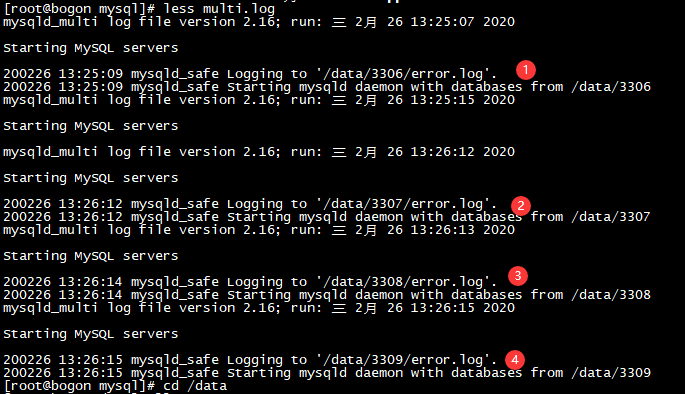
展示下3308实例的error.log
[root@bogon data]# cat 3308/error.log
200226 13:26:14 mysqld_safe Starting mysqld daemon with databases from /data/3308
2020-02-26T05:26:14.223540Z 0 [Warning] TIMESTAMP with implicit DEFAULT value is deprecated. Please use --explicit_defaults_for_timestamp server option (see documentation for more details).
2020-02-26T05:26:14.223625Z 0 [Warning] Insecure configuration for --secure-file-priv: Current value does not restrict location of generated files. Consider setting it to a valid, non-empty path.
2020-02-26T05:26:14.223646Z 0 [Note] /usr/local/mysql/bin/mysqld (mysqld 5.7.9) starting as process 18838 ...
2020-02-26T05:26:14.232189Z 0 [Note] InnoDB: PUNCH HOLE support not available
2020-02-26T05:26:14.232226Z 0 [Note] InnoDB: Mutexes and rw_locks use GCC atomic builtins
2020-02-26T05:26:14.232231Z 0 [Note] InnoDB: Uses event mutexes
2020-02-26T05:26:14.232235Z 0 [Note] InnoDB: GCC builtin __sync_synchronize() is used for memory barrier
2020-02-26T05:26:14.232238Z 0 [Note] InnoDB: Compressed tables use zlib 1.2.3
2020-02-26T05:26:14.232242Z 0 [Note] InnoDB: Using Linux native AIO
2020-02-26T05:26:14.232415Z 0 [Note] InnoDB: Number of pools: 1
2020-02-26T05:26:14.232493Z 0 [Note] InnoDB: Using CPU crc32 instructions
2020-02-26T05:26:14.309784Z 0 [Note] InnoDB: Initializing buffer pool, total size = 32M, instances = 1, chunk size = 32M
2020-02-26T05:26:14.332894Z 0 [Note] InnoDB: Completed initialization of buffer pool
2020-02-26T05:26:14.342158Z 0 [Note] InnoDB: If the mysqld execution user is authorized, page cleaner thread priority can be changed. See the man page of setpriority().
2020-02-26T05:26:14.407350Z 0 [Note] InnoDB: Highest supported file format is Barracuda.
2020-02-26T05:26:14.543402Z 0 [Note] InnoDB: Creating shared tablespace for temporary tables
2020-02-26T05:26:14.543500Z 0 [Note] InnoDB: Setting file './ibtmp1' size to 12 MB. Physically writing the file full; Please wait ...
2020-02-26T05:26:14.630882Z 0 [Note] InnoDB: File './ibtmp1' size is now 12 MB.
2020-02-26T05:26:14.631447Z 0 [Note] InnoDB: 96 redo rollback segment(s) found. 96 redo rollback segment(s) are active.
2020-02-26T05:26:14.631462Z 0 [Note] InnoDB: 32 non-redo rollback segment(s) are active.
2020-02-26T05:26:14.642678Z 0 [Note] InnoDB: 5.7.9 started; log sequence number 2471242
2020-02-26T05:26:14.653296Z 0 [Note] InnoDB: not started
2020-02-26T05:26:14.653554Z 0 [Note] InnoDB: Loading buffer pool(s) from /data/3308/ib_buffer_pool
2020-02-26T05:26:14.653802Z 0 [Note] Plugin 'FEDERATED' is disabled.
2020-02-26T05:26:14.747377Z 0 [Warning] Failed to set up SSL because of the following SSL library error: SSL context is not usable without certificate and private key
2020-02-26T05:26:14.747415Z 0 [Note] Server hostname (bind-address): '0.0.0.0'; port: 3308
2020-02-26T05:26:14.747454Z 0 [Note]   - '0.0.0.0' resolves to '0.0.0.0';
2020-02-26T05:26:14.747613Z 0 [Note] Server socket created on IP: '0.0.0.0'.
2020-02-26T05:26:14.815378Z 0 [Note] InnoDB: Buffer pool(s) load completed at 200226 13:26:14
2020-02-26T05:26:14.833452Z 0 [Warning] 'user' entry 'root@localhost' ignored in --skip-name-resolve mode.
2020-02-26T05:26:14.833499Z 0 [Warning] 'user' entry 'mysql.sys@localhost' ignored in --skip-name-resolve mode.
2020-02-26T05:26:14.834137Z 0 [Warning] 'db' entry 'sys mysql.sys@localhost' ignored in --skip-name-resolve mode.
2020-02-26T05:26:14.835006Z 0 [Warning] 'proxies_priv' entry '@ root@localhost' ignored in --skip-name-resolve mode.
2020-02-26T05:26:14.908529Z 0 [Warning] 'tables_priv' entry 'sys_config mysql.sys@localhost' ignored in --skip-name-resolve mode.
2020-02-26T05:26:14.991882Z 0 [Note] Event Scheduler: Loaded 0 events
2020-02-26T05:26:14.992344Z 0 [Note] /usr/local/mysql/bin/mysqld: ready for connections.
Version: '5.7.9'  socket: '/tmp/mysql.sock3'  port: 3308  MySQL Community Server (GPL)
2020-02-26T05:39:12.159708Z 2 [Warning] 'user' entry 'root@localhost' ignored in --skip-name-resolve mode.
2020-02-26T05:39:12.159806Z 2 [Warning] 'user' entry 'mysql.sys@localhost' ignored in --skip-name-resolve mode.
2020-02-26T05:39:12.159827Z 2 [Warning] 'db' entry 'sys mysql.sys@localhost' ignored in --skip-name-resolve mode.
2020-02-26T05:39:12.159844Z 2 [Warning] 'proxies_priv' entry '@ root@localhost' ignored in --skip-name-resolve mode.
2020-02-26T05:39:12.159973Z 2 [Warning] 'tables_priv' entry 'sys_config mysql.sys@localhost' ignored in --skip-name-resolve mode.
2020-02-26T05:42:49.049025Z 0 [Note] InnoDB: page_cleaner: 1000ms intended loop took 4388ms. The settings might not be optimal. (flushed=0 and evicted=0, during the time.)
2020-02-26T05:43:32.437255Z 0 [Note] InnoDB: page_cleaner: 1000ms intended loop took 4242ms. The settings might not be optimal. (flushed=0 and evicted=0, during the time.)
2020-02-26T05:44:01.894350Z 0 [Note] InnoDB: page_cleaner: 1000ms intended loop took 5014ms. The settings might not be optimal. (flushed=0 and evicted=0, during the time.)
2020-02-26T05:45:31.240102Z 0 [Note] InnoDB: page_cleaner: 1000ms intended loop took 5069ms. The settings might not be optimal. (flushed=0 and evicted=0, during the time.)
7、至此。多实例安装完成。


 浙公网安备 33010602011771号