
主从简介
1.1主从作用
- 实时灾备,用于故障切换
- 读写分离,提供查询服务
- 备份,避免影响业务
1.2主从形式
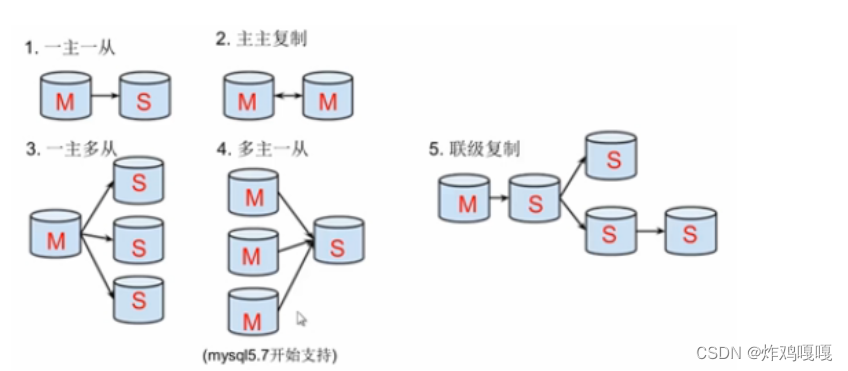
- 一主一从
- 主主复制
- 一主多从—扩展系统读取的性能,因为读是在从库读取的
- 多主一从—5.7开始支持
- 联级复制
2. 主从复制原理
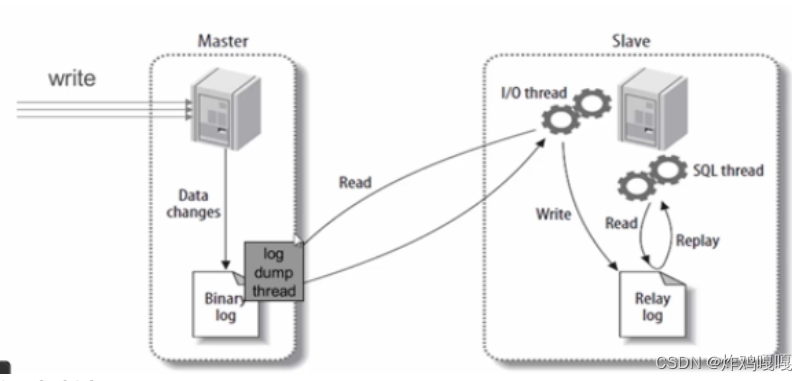
主从复制步骤:
- 主库将所有的写操作记录到binlog日志中并生成一个log dump线程,将binlog日志传给从库的I/O线程
- 从库生成两个线程,一个I/O线程,一个SQL线程
- I/O线程去请求主库的binlog,并将得到的binlog日志写到relay log(中继日志) 文件中
- SQL线程,会读取relay log文件中的日志,并解析成具体操作,来实现主从的操作一致,达到最终数据一致的目的
主库会将用户的操作写到log日志中,当从库需要的时候从库的I/O线程会向主库发出请求 然后将主库的log日志传到从库让后写道(relay log)中继日志里 从库的SQL线程会将中继日志里的内容解析成具体的操作 来实现主从操作一致,到达主从数据库数据一致的需求。
3. 主从复制配置
主从复制配置步骤:
- 确保从数据库与主数据库里的数据一样
- 在主数据库里创建一个同步账号授权给从数据库使用
- 配置主数据库(修改配置文件)
- 配置从数据库(修改配置文件)
需求:
搭建两台MySQL服务器,一台作为主服务器,一台作为从服务器,主服务器进行写操作,从服务器进行读操作
环境说明:
| 数据库角色 | IP | 应用与系统版本 | 有无数据 |
|---|---|---|---|
| 主数据库 | 172.16.12.128 | centos8/redhat8mysql-5.7 | 有数据 |
| 从数据库 | 172.16.12.129 | centos8/redhat8mysql-5.7 | 无数据 |
下载一个文件([Index of /232905 (mysql.com)](http://repo.mysql.com/))
[root@localhost ~]# wget https://repo.mysql.com/mysql57-community-release-el7-10.noarch.rpm
//下载一个mysql57-community-release-el7-10.noarch.rpm文件
[root@localhost ~]# ls
公共  模板  视频  图片  文档  下载  音乐  桌面  mysql57-community-release-el7-10.noarch.rpm
安装这个文件
[root@localhost ~]# rpm -ivh mysql57-community-release-el7-10.noarch.rpm
//安装mysql57-community-release-el7-10.noarch.rpm
下载5个小文件(Index of /232905/yum/mysql-5.7-community/el/7)
[root@localhost ~]# wget http://repo.mysql.com/yum/mysql-5.7-community/el/7/x86_64/mysql-community-client-5.7.37-1.el7.x86_64.rpm

[root@localhost ~]# wget http://repo.mysql.com/yum/mysql-5.7-community/el/7/x86_64/mysql-community-common-5.7.37-1.el7.x86_64.rpm

[root@localhost ~]# wget http://repo.mysql.com/yum/mysql-5.7-community/el/7/x86_64/mysql-community-devel-5.7.37-1.el7.x86_64.rpm

[root@localhost ~]# wget http://repo.mysql.com/yum/mysql-5.7-community/el/7/x86_64/mysql-community-libs-5.7.37-1.el7.x86_64.rpm

[root@localhost ~]# wget http://repo.mysql.com/yum/mysql-5.7-community/el/7/x86_64/mysql-community-server-5.7.37-1.el7.x86_64.rpm
[root@localhost ~]# ls
公共  文档  mysql57-community-release-el7-10.noarch.rpm     mysql-community-libs-5.7.37-1.el7.x86_64.rpm
模板  下载  mysql-community-client-5.7.37-1.el7.x86_64.rpm  mysql-community-server-5.7.37-1.el7.x86_64.rpm
视频  音乐  mysql-community-common-5.7.37-1.el7.x86_64.rpm
图片  桌面  mysql-community-devel-5.7.37-1.el7.x86_64.rpm
安装
[root@localhost ~]# rm -f mysql57-community-release-el7-10.noarch.rpm
//因为有一个没用的rpm包,已经在第一步安装完成所以这里需要删掉
[root@localhost ~]#rpm -e  mariadb-connector-c-config --nodeps
//删除原有的 mariadb 包,因为不做这个操作的话某些情况下会报冲突错误
[root@localhost ~]# yum -y install *.rpm	//安装/root目录下的所有.rpm结尾的包
关掉防火墙等一系列骚操作
[root@localhost ~]# systemctl disable --now firewalld.service
//关墙
Removed /etc/systemd/system/multi-user.target.wants/firewalld.service.
Removed /etc/systemd/system/dbus-org.fedoraproject.FirewallD1.service.
[root@localhost ~]# setenforce 0		//关setenforce

[root@localhost ~]# vim /etc/selinux//config 		//永久关

[root@localhost ~]# cat /etc/selinux//config		//文件如下

# This file controls the state of SELinux on the system.
# SELINUX= can take one of these three values:
#     enforcing - SELinux security policy is enforced.
#     permissive - SELinux prints warnings instead of enforcing.
#     disabled - No SELinux policy is loaded.
SELINUX=disabled		//这一行改成SELINUX=disabled	就行
# SELINUXTYPE= can take one of these three values:
#     targeted - Targeted processes are protected,
#     minimum - Modification of targeted policy. Only selected processes are protected.
#     mls - Multi Level Security protection.
SELINUXTYPE=targeted
设置开机自启,并启动服务
[root@localhost ~]# systemctl status mysqld
● mysqld.service - MySQL Server
   Loaded: loaded (/usr/lib/systemd/system/mysqld.service; enabled; vendor preset: disabled)
   Active: inactive (dead)
     Docs: man:mysqld(8)
           http://dev.mysql.com/doc/refman/en/using-systemd.html
[root@localhost ~]# systemctl enable --now mysqld
[root@localhost ~]# systemctl status mysqld
● mysqld.service - MySQL Server
   Loaded: loaded (/usr/lib/systemd/system/mysqld.service; enabled; vendor preset: disabled)
   Active: active (running) since Tue 2022-04-19 13:22:57 CST; 4s ago
     Docs: man:mysqld(8)
           http://dev.mysql.com/doc/refman/en/using-systemd.html
  Process: 82741 ExecStart=/usr/sbin/mysqld --daemonize --pid-file=/var/run/mysqld/mysqld.pid $MYSQLD_OPTS (code=exited, status>
  Process: 82485 ExecStartPre=/usr/bin/mysqld_pre_systemd (code=exited, status=0/SUCCESS)
 Main PID: 82743 (mysqld)
    Tasks: 27 (limit: 23329)
   Memory: 335.9M
   CGroup: /system.slice/mysqld.service
           └─82743 /usr/sbin/mysqld --daemonize --pid-file=/var/run/mysqld/mysqld.pid

4月 19 13:22:52 localhost.localdomain systemd[1]: Starting MySQL Server...
4月 19 13:22:57 localhost.localdomain systemd[1]: Started MySQL Server.
看端口
[root@localhost ~]# ss -antl
State        Recv-Q       Send-Q             Local Address:Port             Peer Address:Port      Process
LISTEN       0            128                      0.0.0.0:111                   0.0.0.0:*
LISTEN       0            32                 192.168.122.1:53                    0.0.0.0:*
LISTEN       0            128                      0.0.0.0:22                    0.0.0.0:*
LISTEN       0            5                      127.0.0.1:631                   0.0.0.0:*
LISTEN       0            80                             *:3306                        *:*
LISTEN       0            128                         [::]:111                      [::]:*
LISTEN       0            128                         [::]:22                       [::]:*
LISTEN       0            5                          [::1]:631                      [::]:*
//出现3306
进去搞临时密码改成永久的密码:
[root@localhost ~]# grep "password" /var/log/mysqld.log
2022-04-18T09:09:26.148970Z 1 [Note] A temporary password is generated for root@localhost: sehOgNLwq3.G
//看临时密码是多少(一般在结尾sehOgNLwq3.G)


[root@localhost ~]# mysql -uroot -p'sehOgNLwq3.G'    //注意-p和密码之间不能有空格
mysql: [Warning] Using a password on the command line interface can be insecure.
Welcome to the MySQL monitor.  Commands end with ; or \g.
Your MySQL connection id is 2
Server version: 5.7.37

Copyright (c) 2000, 2022, Oracle and/or its affiliates.

Oracle is a registered trademark of Oracle Corporation and/or its
affiliates. Other names may be trademarks of their respective
owners.

Type 'help;' or '\h' for help. Type '\c' to clear the current input statement.

mysql>    //进来了,第一件事改密码

mysql> set global validate_password_policy=0;	 //将设置密码的复杂性设为最低
Query OK, 0 rows affected (0.00 sec)

mysql> set global validate_password_length=1;
Query OK, 0 rows affected (0.00 sec)

mysql> set password = password('Qwer1234!');	//密码需要数字 大写字母 小写字母和符号(注意:密码带‘’是为了区分特殊字符,带()是为了加密传输防止网络嗅探到密码)

mysql> quit		//退出去验证密码是否更改成功
Bye


[root@localhost ~]# mysql -uroot -pQwer1234!
mysql: [Warning] Using a password on the command line interface can be insecure.
Welcome to the MySQL monitor.  Commands end with ; or \g.
Your MySQL connection id is 3
Server version: 5.7.37 MySQL Community Server (GPL)

Copyright (c) 2000, 2022, Oracle and/or its affiliates.

Oracle is a registered trademark of Oracle Corporation and/or its
affiliates. Other names may be trademarks of their respective
owners.

Type 'help;' or '\h' for help. Type '\c' to clear the current input statement.

mysql>
//这里是能进去的说明没问题


mysql> quit		//退出
删除安装好的mysql57-community-release,否则会升级很麻烦
[root@localhost ~]# rpm -e mysql57-community-release
3.1mysql主从配置
确保从数据库与主数据库里的数据一样
#开启新终端进入mysql给数据库加上读锁,避免在备份期间有其他人在写入导致数据不一致
mysql> FLUSH TABLES WITH READ LOCK;
Query OK, 0 rows affected (0.14 sec)

退出锁状态的话quit即可
全备
[root@Soap ~]#  mysqldump -uroot -p'Qwer1234!' --all-databases > all-$(date '+%Y%m%d%H%M%S').sql
mysqldump: [Warning] Using a password on the command line interface can be insecure.
[root@Soap ~]# ls
all-20220801172259.sql  initial-setup-ks.cfg    anaconda-ks.cfg

#将数据库从主库传到从库
[root@Soap ~]# scp all-20220801172259.sql 192.168.220.20:/root/
all-20220801172259.sql


#从库主机
[root@Soap ~]# ls
20.passwd  公共  模板  视频  图片  文档  下载  音乐  桌面  all-20220801172259.sql  anaconda-ks.cfg  initial-setup-ks.cfg

#讲数据库恢复
[root@Soap ~]# mysql -uroot -p'Qwer1234!' < all-20220801172259.sql
mysql: [Warning] Using a password on the command line interface can be insecure.
[root@Soap ~]# mysql -uroot -p'Qwer1234!' -e 'show databases;'
mysql: [Warning] Using a password on the command line interface can be insecure.
+--------------------+
| Database           |
+--------------------+
| information_schema |
| mysql              |
| performance_schema |
| school             |
| sys                |
+--------------------+
在主数据库里创建一个同步账号授权给从数据库使用
mysql> CREATE USER 'repl'@'192.168.220.20' IDENTIFIED BY 'repl123';
Query OK, 0 rows affected (0.27 sec)

mysql> GRANT REPLICATION SLAVE ON *.* TO 'repl'@'192.168.220.20';
Query OK, 0 rows affected (0.00 sec)

mysql> FLUSH PRIVILEGES;
Query OK, 0 rows affected (0.00 sec)
3.2配置主数据库
配置主数据库my.cnf文件
[root@Soap ~]# cat /etc/my.cnf
[mysqld]
basedir = /usr/local/mysql
datadir = /opt/data
socket = /tmp/mysql.sock
port = 3306
pid-file = /opt/data/mysql.pid
user = mysql
skip-name-resolve

server-id=10  //此处需要小于从库
log-bin=mysql_bin

root@Soap ~]# systemctl restart mysqld.service  //重启mysql


查看主库的状态
mysql> show master status;
+------------------+----------+--------------+------------------+-------------------+
| File             | Position | Binlog_Do_DB | Binlog_Ignore_DB | Executed_Gtid_Set |
+------------------+----------+--------------+------------------+-------------------+
| mysql_bin.000001 |      154 |              |                  |                   |
+------------------+----------+--------------+------------------+-------------------+
1 row in set (0.00 sec)
3.3配置从数据库
配置从数据库my.cnf文件
[root@Soap ~]# cat /etc/my.cnf
[mysqld]
basedir = /usr/local/mysql
datadir = /opt/data
socket = /tmp/mysql.sock
port = 3306
pid-file = /opt/data/mysql.pid
user = mysql
skip-name-resolve

server-id=20
relay-log=mysql-relay-bin   //此处为中继日志

[root@Soap ~]# systemctl restart mysqld.service
3.4配置并启动主从复制
#连接到从库
[root@Soap ~]# mysql -uroot -p'Qwer1234!'

mysql> CHANGE MASTER TO
    -> MASTER_HOST= '192.168.220.5',  //主库的ip
    -> MASTER_USER='repl',            //配置授权的用户和密码
    -> MASTER_PASSWORD='repl123',
    -> MASTER_LOG_FILE='mysql_bin.000001',   //主库show master status查看的内容
    -> MASTER_LOG_POS=154;
Query OK, 0 rows affected, 2 warnings (0.02 sec)

mysql> start slave;  //启动主从
Query OK, 0 rows affected (0.00 sec)


mysql> show slave status \G
*************************** 1. row ***************************
               Slave_IO_State: Connecting to master
                  Master_Host: 192.168.220.5
                  Master_User: repl
                  Master_Port: 3306
                Connect_Retry: 60
              Master_Log_File: mysql_bin.000001
          Read_Master_Log_Pos: 154
               Relay_Log_File: mysql-relay-bin.000001
                Relay_Log_Pos: 4
        Relay_Master_Log_File: mysql_bin.000001
             Slave_IO_Running: Connecting   //此处需要为yes才能生效
            Slave_SQL_Running: Yes           //此处需要为yes才能生效
              Replicate_Do_DB:
          Replicate_Ignore_DB:
           Replicate_Do_Table:
       Replicate_Ignore_Table:
      Replicate_Wild_Do_Table:
  Replicate_Wild_Ignore_Table:
                   Last_Errno: 0
                   Last_Error:
                 Skip_Counter: 0
          Exec_Master_Log_Pos: 154
              Relay_Log_Space: 154
              Until_Condition: None
               Until_Log_File:
                Until_Log_Pos: 0
           Master_SSL_Allowed: No
           Master_SSL_CA_File:
           Master_SSL_CA_Path:
              Master_SSL_Cert:
            Master_SSL_Cipher:
               Master_SSL_Key:
        Seconds_Behind_Master: NULL
Master_SSL_Verify_Server_Cert: No
                Last_IO_Errno: 2003
                Last_IO_Error: error connecting to master 'repl@192.168.220.5:3306' - retry-time: 60  retries: 1
               Last_SQL_Errno: 0
               Last_SQL_Error:
  Replicate_Ignore_Server_Ids:
             Master_Server_Id: 0
                  Master_UUID:
             Master_Info_File: /opt/data/master.info
                    SQL_Delay: 0
          SQL_Remaining_Delay: NULL
      Slave_SQL_Running_State: Slave has read all relay log; waiting for more updates
           Master_Retry_Count: 86400
                  Master_Bind:
      Last_IO_Error_Timestamp: 220702 18:06:49
     Last_SQL_Error_Timestamp:
               Master_SSL_Crl:
           Master_SSL_Crlpath:
           Retrieved_Gtid_Set:
            Executed_Gtid_Set:
                Auto_Position: 0
         Replicate_Rewrite_DB:
                 Channel_Name:
           Master_TLS_Version:
1 row in set (0.00 sec)


#关闭防火墙
[root@Soap ~]# systemctl disable --now firewalld.service
Removed /etc/systemd/system/multi-user.target.wants/firewalld.service.
Removed /etc/systemd/system/dbus-org.fedoraproject.FirewallD1.service.

[root@Soap ~]# systemctl status firewalld.service
● firewalld.service - firewalld - dynamic firewall daemon
   Loaded: loaded (/usr/lib/systemd/system/firewalld.service; disabled; vendor preset: enabled)
   Active: inactive (dead) since Sat 2022-07-02 06:08:47 EDT; 2h 52min ago
     Docs: man:firewalld(1)
  Process: 1061 ExecStart=/usr/sbin/firewalld --nofork --nopid $FIREWALLD_ARGS (code=exited, status=0/SUCCESS)
 Main PID: 1061 (code=exited, status=0/SUCCESS)


#再次生效并查看
mysql> start slave;
Query OK, 0 rows affected, 1 warning (0.00 sec)

mysql> show slave status \G
*************************** 1. row ***************************
               Slave_IO_State: Waiting for master to send event
                  Master_Host: 192.168.220.5
                  Master_User: repl
                  Master_Port: 3306
                Connect_Retry: 60
              Master_Log_File: mysql_bin.000001
          Read_Master_Log_Pos: 154
               Relay_Log_File: mysql-relay-bin.000002
                Relay_Log_Pos: 320
        Relay_Master_Log_File: mysql_bin.000001
             Slave_IO_Running: Yes
            Slave_SQL_Running: Yes  //此时已经生效了
              Replicate_Do_DB:
          Replicate_Ignore_DB:
           Replicate_Do_Table:
       Replicate_Ignore_Table:
      Replicate_Wild_Do_Table:
  Replicate_Wild_Ignore_Table:
                   Last_Errno: 0
                   Last_Error:
                 Skip_Counter: 0
          Exec_Master_Log_Pos: 154
              Relay_Log_Space: 527
              Until_Condition: None
               Until_Log_File:
                Until_Log_Pos: 0
           Master_SSL_Allowed: No
           Master_SSL_CA_File:
           Master_SSL_CA_Path:
              Master_SSL_Cert:
            Master_SSL_Cipher:
               Master_SSL_Key:
        Seconds_Behind_Master: 0
Master_SSL_Verify_Server_Cert: No
                Last_IO_Errno: 0
                Last_IO_Error:
               Last_SQL_Errno: 0
               Last_SQL_Error:
  Replicate_Ignore_Server_Ids:
             Master_Server_Id: 10
                  Master_UUID: 4c6c9441-f9ae-11ec-8757-000c2996f1b8
             Master_Info_File: /opt/data/master.info
                    SQL_Delay: 0
          SQL_Remaining_Delay: NULL
      Slave_SQL_Running_State: Slave has read all relay log; waiting for more updates
           Master_Retry_Count: 86400
                  Master_Bind:
      Last_IO_Error_Timestamp:
     Last_SQL_Error_Timestamp:
               Master_SSL_Crl:
           Master_SSL_Crlpath:
           Retrieved_Gtid_Set:
            Executed_Gtid_Set:
                Auto_Position: 0
         Replicate_Rewrite_DB:
                 Channel_Name:
           Master_TLS_Version:
1 row in set (0.00 sec)
测试验证
在主库创建一个test数据库
mysql> show databases;
+--------------------+
| Database           |
+--------------------+
| information_schema |
| mysql              |
| performance_schema |
| school             |
| sys                |
+--------------------+
5 rows in set (0.26 sec)

mysql> create database test;
Query OK, 1 row affected (0.12 sec)

mysql> show databases;
+--------------------+
| Database           |
+--------------------+
| information_schema |
| mysql              |
| performance_schema |
| school             |
| sys                |
| test               |
+--------------------+
6 rows in set (0.01 sec)
从库查看
[root@Soap ~]# mysql -uroot -p'Qwer1234!' -e 'show databases;'
mysql: [Warning] Using a password on the command line interface can be insecure.
+--------------------+
| Database           |
+--------------------+
| information_schema |
| mysql              |
| performance_schema |
| school             |
| sys                |
| test               |
+--------------------+
4. GTID主从
GTID概念介绍
GTID即全局事务ID (global transaction identifier), 其保证为每一个在主上提交的事务在复制集群中可以生成一个唯一的ID。GTID最初由google实现,官方MySQL在5.6才加入该功能。mysql主从结构在一主一从情况下对于GTID来说就没有优势了,而对于2台主以上的结构优势异常明显,可以在数据不丢失的情况下切换新主。使用GTID需要注意: 在构建主从复制之前,在一台将成为主的实例上进行一些操作(如数据清理等),通过GTID复制,这些在主从成立之前的操作也会被复制到从服务器上,引起复制失败。也就是说通过GTID复制都是从最先开始的事务日志开始,即使这些操作在复制之前执行。比如在server1上执行一些drop、delete的清理操作,接着在server2上执行change的操作,会使得server2也进行server1的清理操作。
GTID实际上是由UUID+TID (即transactionId)组成的。其中UUID(即server_uuid) 产生于auto.conf文件(cat /data/mysql/data/auto.cnf),是一个MySQL实例的唯一标识。TID代表了该实例上已经提交的事务数量,并且随着事务提交单条递增,所以GTID能够保证每个MySQL实例事务的执行(不会重复执行同一个事务,并且会补全没有执行的事务)。GTID在一组复制中,全局唯一。
了解了GTID的格式,通过UUID可以知道这个事务在哪个实例上提交的。通过GTID可以极方便的进行复制结构上的故障转移,新主设置,这就很好地解决了下面这个图所展现出来的问题。
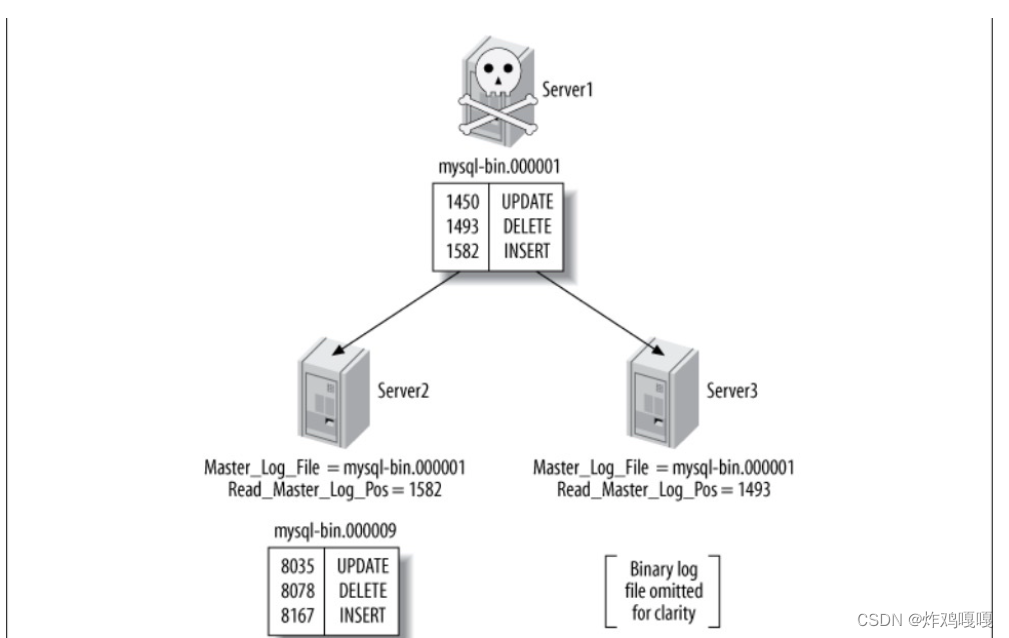
如图, Server1(Master)崩溃,根据从上show slave status获得Master_log_File/Read_Master_Log_Pos的值,Server2(Slave)已经跟上了主,Server3(Slave)没有跟上主。这时要是把Server2提升为主,Server3变成Server2的从。这时在Server3上执行change的时候需要做一些计算。
这个问题在5.6的GTID出现后,就显得非常的简单。由于同一事务的GTID在所有节点上的值一致,那么根据Server3当前停止点的GTID就能定位到Server2上的GTID。甚至由于MASTER_AUTO_POSITION功能的出现,我们都不需要知道GTID的具体值,直接使用CHANGE MASTER TO MASTER_HOST=‘xxx’, MASTER_AUTO_POSITION命令就可以直接完成failover的工作。
GTID和Binlog的关系
- GTID在binlog中的结构
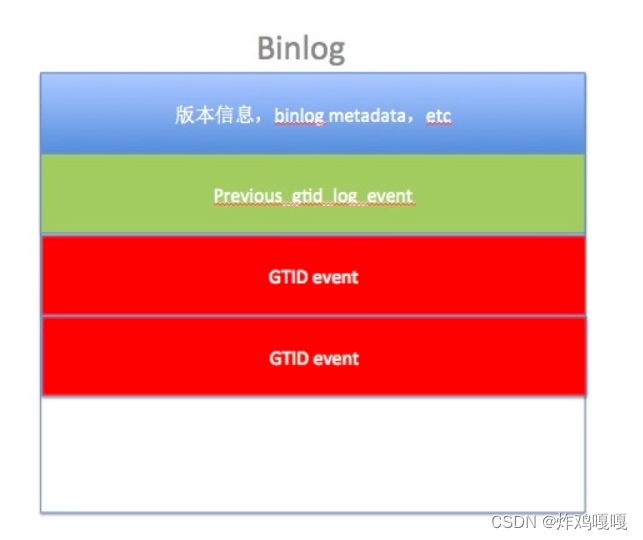
- GTID event 结构

GTID工作原理
从服务器连接到主服务器之后,把自己执行过的GTID (Executed_Gtid_Set: 即已经执行的事务编码) 、获取到的GTID (Retrieved_Gtid_Set: 即从库已经接收到主库的事务编号) 发给主服务器,主服务器把从服务器缺少的GTID及对应的transactions发过去补全即可。当主服务器挂掉的时候,找出同步最成功的那台从服务器,直接把它提升为主即可。如果硬要指定某一台不是最新的从服务器提升为主, 先change到同步最成功的那台从服务器, 等把GTID全部补全了,就可以把它提升为主了。
GTID是MySQL 5.6的新特性,可简化MySQL的主从切换以及Failover。GTID用于在binlog中唯一标识一个事务。当事务提交时,MySQL Server在写binlog的时候,会先写一个特殊的Binlog Event,类型为GTID_Event,指定下一个事务的GTID,然后再写事务的Binlog。主从同步时GTID_Event和事务的Binlog都会传递到从库,从库在执行的时候也是用同样的GTID写binlog,这样主从同步以后,就可通过GTID确定从库同步到的位置了。也就是说,无论是级联情况,还是一主多从情况,都可以通过GTID自动找点儿,而无需像之前那样通过File_name和File_position找点儿了。
简而言之,GTID的工作流程为:
- master更新数据时,会在事务前产生GTID,一同记录到binlog日志中。
- slave端的i/o 线程将变更的binlog,写入到本地的relay log中。
- sql线程从relay log中获取GTID,然后对比slave端的binlog是否有记录。
- 如果有记录,说明该GTID的事务已经执行,slave会忽略。
- 如果没有记录,slave就会从relay log中执行该GTID的事务,并记录到binlog。
- 在解析过程中会判断是否有主键,如果没有就用二级索引,如果没有就用全部扫描。
GTID主从配置
环境说明:
| 数据库角色 | IP | 应用与系统版本 |
|---|---|---|
| 主数据库 | 172.16.12.128 | centos8/redhat8mysql-5.7 |
| 从数据库 | 172.16.12.129 | centos8/redhat8mysql-5.7 |
| 主库从库数据统一 |
#主库全备 然后传到从库
[root@Soap ~]#  mysqldump -uroot -p'Qwer1234!' --all-databases > all-$(date '+%Y%m%d%H%M%S').sql
[root@Soap ~]# ls
all-20220704063635.sql  anaconda-ks.cfg    initial-setup-ks.cfg

[root@Soap ~]# scp all-20220704063635.sql web.example.com:/root/


#从库导入主库数据
[root@Soap ~]# mysql -uroot -p'Qwer1234!' < all-20220704063635.sql
主库操作
#将账号repl授权给从库
mysql> CREATE USER 'repl'@'192.168.220.20' IDENTIFIED BY 'repl123';
Query OK, 0 rows affected (0.27 sec)

mysql> GRANT REPLICATION SLAVE ON *.* TO 'repl'@'192.168.220.20';
Query OK, 0 rows affected (0.00 sec)

mysql> FLUSH PRIVILEGES;
Query OK, 0 rows affected (0.00 sec)


#配置主库my.cnf文件
[root@Soap ~]# cat /etc/my.cnf
[mysqld]
basedir = /usr/local/mysql
datadir = /opt/data
socket = /tmp/mysql.sock
port = 3306
pid-file = /opt/data/mysql.pid
user = mysql
skip-name-resolve

server_id=10
gtid_mode=on
enforce_gtid_consistency=on
log_bin=master-binlog
log-slave-updates=1
binlog_format=row
skip_slave_start=1

#重启mysql服务 关闭防火墙
[root@Soap ~]# systemctl restart mysqld.service

[root@Soap ~]# systemctl disable --now firewalld.service
Removed /etc/systemd/system/multi-user.target.wants/firewalld.service.
Removed /etc/systemd/system/dbus-org.fedoraproject.FirewallD1.service.
从库操作
#配置从库my.cnf文件
[root@Soap ~]# cat /etc/my.cnf
[mysqld]
basedir = /usr/local/mysql
datadir = /opt/data
socket = /tmp/mysql.sock
port = 3306
pid-file = /opt/data/mysql.pid
user = mysql
skip-name-resolve


gtid_mode=on
enforce_gtid_consistency=on
server_id=20
log-bin=mysql_bin
log-slave-updates=1
binlog_format=row
skip_slave_start=1

#重启从库的mysql服务
[root@Soap ~]# systemctl restart mysqld.service

#关闭防火墙
[root@Soap ~]# systemctl disable --now firewalld.service
Removed /etc/systemd/system/multi-user.target.wants/firewalld.service.
Removed /etc/systemd/system/dbus-org.fedoraproject.FirewallD1.service.
配置主从复制
mysql> CHANGE MASTER TO
    -> MASTER_HOST='192.168.98.5',
    -> MASTER_USER='repl',
    -> MASTER_PASSWORD='repl123',
    -> MASTER_PORT=3306,
    -> MASTER_AUTO_POSITION = 1;
Query OK, 0 rows affected, 2 warnings (0.00 sec)


mysql> start slave;

mysql>  show slave status \G
*************************** 1. row ***************************
               Slave_IO_State: Waiting for master to send event
                  Master_Host: 192.168.220.5
                  Master_User: repl
                  Master_Port: 3306
                Connect_Retry: 60
              Master_Log_File: master-binlog.000001
          Read_Master_Log_Pos: 313
               Relay_Log_File: Soap-relay-bin.000002
                Relay_Log_Pos: 534
        Relay_Master_Log_File: master-binlog.000001
             Slave_IO_Running: Yes  //此处必须为yes
            Slave_SQL_Running: Yes   //此处必须为yes
              Replicate_Do_DB:
          Replicate_Ignore_DB:
           Replicate_Do_Table:
       Replicate_Ignore_Table:
      Replicate_Wild_Do_Table:
  Replicate_Wild_Ignore_Table:
                   Last_Errno: 0
                   Last_Error:
                 Skip_Counter: 0
          Exec_Master_Log_Pos: 313
              Relay_Log_Space: 745
              Until_Condition: None
               Until_Log_File:
                Until_Log_Pos: 0
           Master_SSL_Allowed: No
           Master_SSL_CA_File:
           Master_SSL_CA_Path:
              Master_SSL_Cert:
            Master_SSL_Cipher:
               Master_SSL_Key:
        Seconds_Behind_Master: 0
Master_SSL_Verify_Server_Cert: No
                Last_IO_Errno: 0
                Last_IO_Error:
               Last_SQL_Errno: 0
               Last_SQL_Error:
  Replicate_Ignore_Server_Ids:
             Master_Server_Id: 10
                  Master_UUID: 4c6c9441-f9ae-11ec-8757-000c2996f1b8
             Master_Info_File: /opt/data/master.info
                    SQL_Delay: 0
          SQL_Remaining_Delay: NULL
      Slave_SQL_Running_State: Slave has read all relay log; waiting for more updates
           Master_Retry_Count: 86400
                  Master_Bind:
      Last_IO_Error_Timestamp:
     Last_SQL_Error_Timestamp:
               Master_SSL_Crl:
           Master_SSL_Crlpath:
           Retrieved_Gtid_Set: 4c6c9441-f9ae-11ec-8757-000c2996f1b8:1
            Executed_Gtid_Set: 4c6c9441-f9ae-11ec-8757-000c2996f1b8:1
                Auto_Position: 1
         Replicate_Rewrite_DB:
                 Channel_Name:
           Master_TLS_Version:
1 row in set (0.00 sec)
测试
#主库创建名为school的数据库
mysql> show databases;
+--------------------+
| Database           |
+--------------------+
| information_schema |
| mysql              |
| performance_schema |
| sys                |
| test               |
+--------------------+
5 rows in set (0.00 sec)
mysql> create database school;
Query OK, 1 row affected (0.00 sec)

mysql> show databases;
+--------------------+
| Database           |
+--------------------+
| information_schema |
| mysql              |
| performance_schema |
| school             |
| sys                |
| test               |
+--------------------+
6 rows in set (0.00 sec)
从库查看
主从同步可以实现
mysql> show databases;
+--------------------+
| Database           |
+--------------------+
| information_schema |
| mysql              |
| performance_schema |
| school             |
| sys                |
| test               |
+--------------------+
6 rows in set (0.01 sec)

 浙公网安备 33010602011771号