


robotframework接口测试导出文件方案/Postman导出文件
背景:
工作中需要做接口测试,我们的自动化方案选择是robotframework框架,有个restful接口是文件导出接口,之前从没有接触过。(自动化的方案只针对之前接触过robotframework接口测试的人,小白请先学习接口测试的基本知识)
手动测试方案:
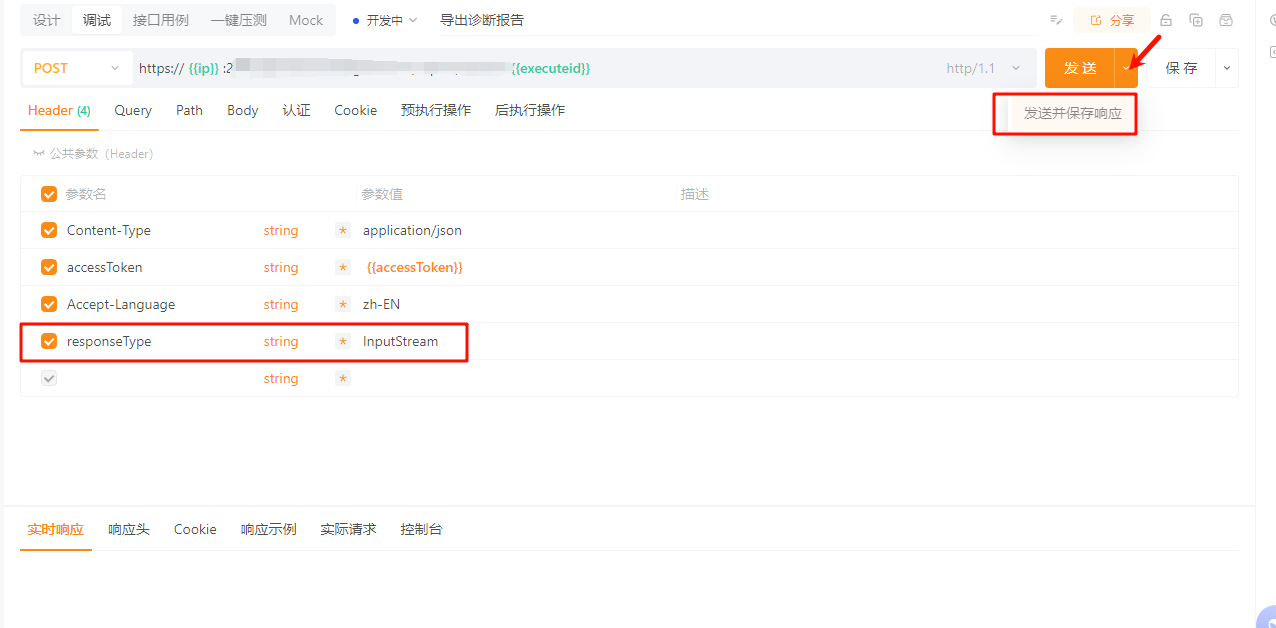
使用postman或者Apipost工具都可以 方法一致,但是版本不能过低,否则有可能不支持导出文件
图片为Apipost,参数可以参照图片设置,{{ip}}这种方法为变量,可以直接替换为对应的值
robot接口自动化方案:
下面重点讲下我的接口自动化方案
这是我封装的关键字,重点关注红框内的参数,保证文件流式输出,而不是把内容全部放到内存里。

北向新接口导出诊断报告
    [Arguments]    ${executeid}    ${file_name}    ${token}
    ${header} =    Create Dictionary    Content-Type=application/json    Authorization=Bearer ${token}    Accept-Language=zh-CH    responseType=InputStream
    ${response} =    Post On Session    api_session    url=${export_url_new}${executeid}    headers=${header}    stream=True    timeout=30
    Should Be Equal As Strings    ${response.status_code}    200
    # 此关键字将响应内容保存为文件,${file_name}为文件名,可以带路径,不带路径则为接口脚本执行的路径
    Create Binary File    ${file_name}    ${response.content}
    Log    File downloaded successfully: ${file_name}
    Log    Content-Type: ${response.headers['Content-Type']}
下面是测试用例,导出文件使用正则校验了文件名称,和文件大小
Set Log Level是为了解决接口导出文件时产生信息过大不能生成正确的报告的问题,但是修改完之后还要修改成默认的,否则调试时会看不到相关信息。
test_case导出文件
    Set Log Level    WARN
    ${token}    获取并返回token
    北向新接口导出诊断报告    ${executeid}    ${DOWNLOAD_DIR}/doctor_diagnose_export.zip    ${token}
    等待文件下载成功
    导出文件校验    doctor_diagnose_export.zip
    ${file_size}=    Get File Size    ${DOWNLOAD_DIR}/doctor_diagnose_export.zip
    Should Be True    ${file_size} > 0
    Set Log Level    INFO
导出的文件内容如果有中文,则在linux服务器解压时要指定编码格式,否则有可能乱码
zip解压命令:
unzip -O UTF-8 doctor_diagnose_export.zip不指定编码格式和指定编码格式解压出的两种结果对比


 浙公网安备 33010602011771号