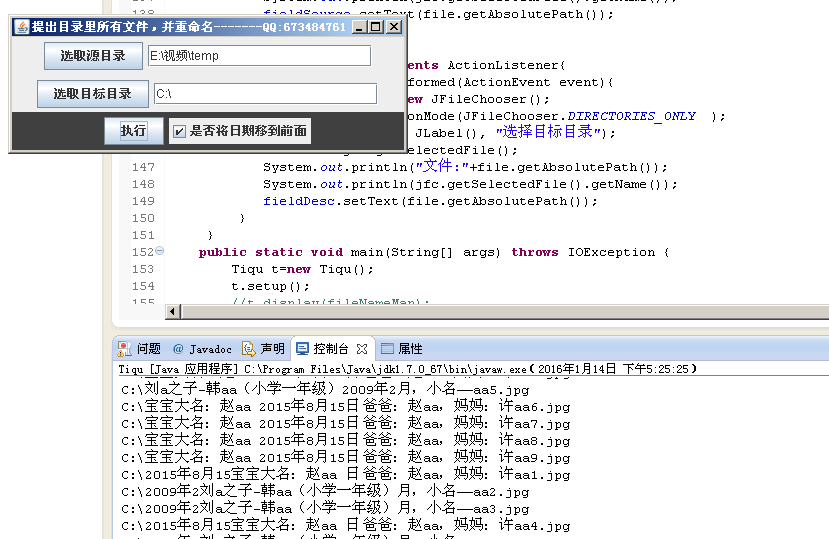
最近做视频,各个目录里都有图片,无法统一导入到视频编辑软件 写了个小程序,可以将指定各级目录下的文件拷贝到指定目录,并以文件夹名字加数字命名 如果文件夹上都有日期,可以选择将日期放前面,做视频时好排序.
![]()
import java.awt.BorderLayout;
import java.awt.Color;
import java.awt.event.*;
import java.awt.event.ActionEvent;
import java.awt.event.ActionListener;
import java.io.File;
import java.io.FileInputStream;
import java.io.FileOutputStream;
import java.io.IOException;
import java.util.HashMap;
import java.util.Iterator;
import java.util.Map;

import javax.swing.*;
public class Tiqu {
    public JFrame frame;
    public JTextField fieldSource;
    public JTextField fieldDesc;
    public JCheckBox check;
    public Boolean ifStop=true;
    public void listfile(File file,Map<String,String> map){
    //如果file代表的不是一个文件,而是一个目录
        if(!file.isFile()){
            //列出该目录下的所有文件和目录
            File files[] = file.listFiles();
            //遍历files[]数组
            for(File f : files){
                //递归
                listfile(f,map);
            }
        }else{
            String realName = file.getName();
            map.put(file.toString(), realName);
        }
    }
    public void display(Map<String,String> map){
        Iterator<String> it2=map.keySet().iterator();
        while(it2.hasNext()){
            System.out.println(it2.next());
        }
    }
    public void copyTodesc(Map<String,String> map,String destDir,Boolean flag) throws IOException{
        Iterator<String> it2=map.keySet().iterator();
        int i=1;
        while(it2.hasNext()){
            Object key = it2.next();
            File f=new File(key.toString());
            String value = f.getParent().substring(f.getParent().lastIndexOf("\\")+1);//获取上一级文件夹名字
            String valueExtr = f.getAbsolutePath().substring(f.getAbsolutePath().lastIndexOf("."),f.getAbsolutePath().length());
            System.out.println(value);
            if(flag)
            {   value=value.replaceFirst("\\.", "年");
                value=value.replaceFirst("\\.", "月");
                value=changePlace(value);}
            if(!f.isDirectory()){
                String s=destDir+"\\"+value+i+valueExtr;
                i++;
                this.copyFile(key.toString(),s);
                System.out.println(s);
            }
        }
    }
    public static String changePlace(String value){
        int head=value.length();
        int tail=0;
        for(int j=0;j<value.length();j++){
            if(Integer.valueOf(value.charAt(j))>=Integer.valueOf('0')&&Integer.valueOf(value.charAt(j))<=Integer.valueOf('9')){
                if(head>j)
                head=j;
                tail=j;
            }
        }
        if(tail>head){
        value=value.substring(head,tail+1)+value.substring(0,head)+value.substring(tail+1,value.length());
        }
        return value;
    }
     public  void copyFile(String src,String dest) throws IOException{
         FileInputStream in=new FileInputStream(src);
         File file=new File(dest);
         if(!file.exists())
             file.createNewFile();
         FileOutputStream out=new FileOutputStream(file);
         int c;
         byte buffer[]=new byte[1024];
         while((c=in.read(buffer))!=-1&&ifStop){
             for(int i=0;i<c;i++)
                 out.write(buffer[i]);
         }
         in.close();
         out.close();
     }
     public void setup(){
         //String strSource,strDest;
         frame=new JFrame("提出目录里所有文件,并重命名 ");
         //frame.setDefaultCloseOperation(JFrame.EXIT_ON_CLOSE);
         frame.addWindowListener(new WindowAdapter() {
             public void windowClosing(WindowEvent windowEvent){
                System.exit(0);
             }
          });
         JPanel panels=new JPanel();
         JPanel paneld=new JPanel();
         JPanel panela=new JPanel();
         JButton buttonSource=new JButton("选取源目录");
         fieldSource=new JTextField(20);
         JButton buttonDesc=new JButton("选取目标目录");
         fieldDesc=new JTextField(20);
         JButton buttonAction=new JButton("执行");
         JButton stopAction=new JButton("停止");
         check=new JCheckBox("是否将日期移到前面");
         buttonSource.addActionListener(new SourceListener());
         buttonDesc.addActionListener(new DescListener());
         buttonAction.addActionListener(new ActionListener(){
                public void actionPerformed(ActionEvent e){
                    Map<String,String> fileNameMap = new HashMap<String,String>();
                    String sourceFilePath = fieldSource.getText().trim();
                    String descFilePath=fieldDesc.getText().trim();
                    if(sourceFilePath.length()>0&&descFilePath.length()>0){
                        listfile(new File(sourceFilePath),fileNameMap);//File既可以代表一个文件也可以代表一个目录
                        try {
                            copyTodesc(fileNameMap,descFilePath,check.isSelected());
                        } catch (IOException e1) {
                            e1.printStackTrace();
                        }
                    }
                }
         });
         stopAction.addActionListener(new ActionListener(){
                public void actionPerformed(ActionEvent e){
                    ifStop=false;
                    System.exit(0);
                }
         });
         panels.add(buttonSource);
         panels.add(fieldSource);
         paneld.add(buttonDesc);
         paneld.add(fieldDesc);
         panela.add(buttonAction);
         panela.add(check);
         panela.add(stopAction);

         panela.setBackground(Color.darkGray);
         frame.getContentPane().add(BorderLayout.NORTH,panels);
         frame.getContentPane().add(BorderLayout.CENTER,paneld);
         frame.getContentPane().add(BorderLayout.SOUTH,panela);
         frame.setSize(400,140);
         frame.setVisible(true);

     }

    class SourceListener implements ActionListener{
         public void actionPerformed(ActionEvent event){
            JFileChooser jfc=new JFileChooser();
            jfc.setFileSelectionMode(JFileChooser.DIRECTORIES_ONLY  );
            jfc.showDialog(new JLabel(), "选择待处理目录");
            File file=jfc.getSelectedFile();
            System.out.println("文件:"+file.getAbsolutePath());
            System.out.println(jfc.getSelectedFile().getName());
            fieldSource.setText(file.getAbsolutePath());
         }
     }
     class DescListener implements ActionListener{
         public void actionPerformed(ActionEvent event){
            JFileChooser jfc=new JFileChooser();
            jfc.setFileSelectionMode(JFileChooser.DIRECTORIES_ONLY  );
            jfc.showDialog(new JLabel(), "选择目标目录");
            File file=jfc.getSelectedFile();
            System.out.println("文件:"+file.getAbsolutePath());
            System.out.println(jfc.getSelectedFile().getName());
            fieldDesc.setText(file.getAbsolutePath());
         }
     }
    public static void main(String[] args) throws IOException {
        Tiqu t=new Tiqu();
        t.setup();
        //t.display(fileNameMap);
    }

}

 浙公网安备 33010602011771号