
使用printJs实现打印效果
一、需求
需要实现部分页面的内容打印;页面内容为表单,表单中还包括了表格。使用了 a-form 、a-row、a-table 相关组件
二、实现方法
1、安装print-js
npm install --save print-js
2、给需要打印的部分设置一个id
例如:我需要打印的是一整个表单内容,就再form表单上面设置id(此id用于打印页面时确定需要打印的范围)

3、添加按钮和点击事件实现触发打印

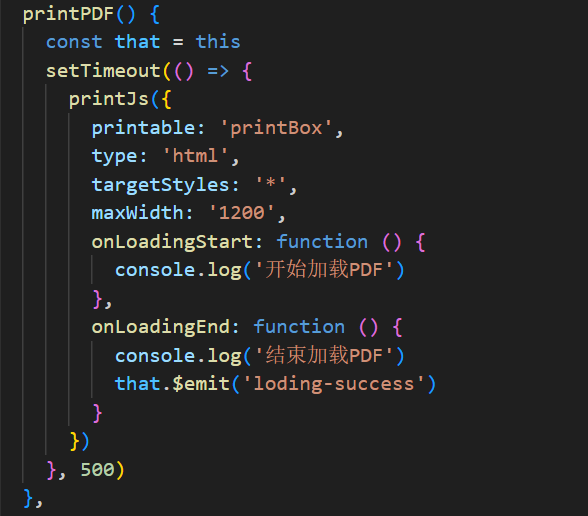
在按钮的点击事件中配置printJs相关属性,实现以实现打印效果。
printable: 数据对象
type: 打印类型(可选项为pdf, html, image, json and raw-html,默认值为pdf)
targetStyles: 打印样式(此处设置与官网的 ['*']不一致,但是'*'才能实现我需要的效果)
maxWidth: 最大文档宽度
onLoadingStart: 加载执行函数
onLoadingEnd: 结束执行函数
……其他配置参考
4、调整样式设置,实现页面内容的完整打印
a、原本a-table中设置了横向滚动,但是打印时有横向滚动会导致打印页面出现问题,再加上列表本身不需要横向滚动,遂去之
b、根据实际需要,给表格进行了一些原始样式的修改(去掉了表格数据的内部边框,只保留了外部和头部的边框,边框颜色也有改变),所以打印时外边框未进行显色。
解决办法:将原来的设置部分边框的颜色改为设置整体的边框的颜色
c、表头宽度够,但是表头文字还是换行了
解决办法:直接去掉表头的换行效果
::v-deep .ant-table-thead > tr > th {
  white-space: nowrap !important;
}
d、使用表单进行打印时,发现 a-form-item 自带的标题后面的:不在打印页面进行显示,猜测是打印时不接受伪元素的样式设置
解决办法:去掉组件自带的伪元素实现的:改为页面样式直接写:
::v-deep .ant-form-item-label > label::after {
  content: none !important;
}
三、完整代码
<template>
  <div>
    <a-modal :dialog-style="{ top: '20px' }" :visible="visible" width="1200px" @cancel="visible = !visible">
      <a-card :body-style="{ height: '70vh', overflowY: 'auto' }" :bordered="false">
        <a-form id="printBox" :form="from">
          <a-row type="flex" justify="center"><div style="font-size: 16px;">(打印时间:2024-11-20 11:11)</div></a-row>
          <a-row type="flex" justify="space-between">
            <a-col span="7">
              <a-form-item label="编号" :label-col="{ span: 10}" :wrapper-col="{span : 14 }">
                :11111
              </a-form-item>
            </a-col>
            <a-col span="7">
              <a-form-item label="名字" :label-col="{ span: 10}" :wrapper-col="{span : 14 }">
                :111
              </a-form-item>
            </a-col>
            <a-col span="7">
              <a-form-item label="日期" :label-col="{ span: 10}" :wrapper-col="{span : 14 }">
                :22222
              </a-form-item>
            </a-col>
          </a-row>
          <a-row type="flex" justify="center">
            <a-table bordered :data-source="dataSource" :columns="columns" :row-key="(record) => record.id" :pagination="false"></a-table>
          </a-row>
          <div style="display: flex;justify-content: center;">
            <div class="table-border">
              <a-row type="flex" justify="space-between">
                <a-col span="8">
                  <a-form-item label="总计" :label-col="{ span: 8}" :wrapper-col="{span : 14 }">
                    :11111
                  </a-form-item>
                </a-col>
                <a-col span="3">
                  <a-form-item :wrapper-col="{span: 20 }">
                    2024-11-20
                  </a-form-item>
                </a-col>
              </a-row>
            </div>
          </div>
          <div style="display: flex;justify-content: center;">
            <div class="table-border">
              <a-row type="flex" justify="space-between">
                <a-col span="7" class="border-right">
                  <a-form-item label="累计" :label-col="{ span: 8}" :wrapper-col="{span : 14 }">
                    :1111
                  </a-form-item>
                </a-col>
                <a-col span="7" class="border-right">
                  <a-form-item label="单个" :label-col="{ span: 10}" :wrapper-col="{span : 14 }">
                    :1
                  </a-form-item>
                </a-col>
                <a-col span="7">
                  <a-form-item label="合计" :label-col="{ span: 10}" :wrapper-col="{span : 14 }">
                    :1111
                  </a-form-item>
                </a-col>
              </a-row>
            </div>
          </div>
          <a-row type="flex" justify="space-between">
            <a-col span="7">
              <a-form-item label="名字" :label-col="{ span: 10}" :wrapper-col="{span : 14 }">
                :11111
              </a-form-item>
            </a-col>
            <a-col span="7">
              <a-form-item label="名字" :label-col="{ span: 10}" :wrapper-col="{span : 14 }">
                :111
              </a-form-item>
            </a-col>
            <a-col span="7">
              <a-form-item label="签名" :label-col="{ span: 10}" :wrapper-col="{span : 14 }">
                :21111
              </a-form-item>
            </a-col>
          </a-row>
        </a-form>
      </a-card>
      <div slot="footer">
        <a-button type="primary" @click="printPDF()">打印</a-button>
      </div>
    </a-modal>
  </div>
</template>

<script>
import printJs from 'print-js'

const columns = [
  {
    title: '序号',
    key: 'number1',
    align: 'center',
    width: 50
  },
  {
    title: '编码',
    dataIndex: 'purchaseModeName',
    align: 'center',
    width: 150
  },
  {
    title: '名称',
    dataIndex: 'materialName',
    align: 'center',
    width: 150
  },
  {
    title: '型号',
    dataIndex: 'specs',
    align: 'center',
    width: 90
  },
  {
    title: '单位',
    dataIndex: 'collectionDate',
    align: 'center',
    width: 150
  },
  {
    title: '数量',
    dataIndex: 'number',
    align: 'center',
    width: 120
  },
  {
    title: '单价',
    dataIndex: 'unitPrice',
    align: 'center',
    width: 150
  },
  {
    title: '金额',
    dataIndex: 'amount',
    align: 'center',
    width: 120,
  }
]
export default {
  data() {
    return {
      visible: false,
      form: this.$form.createForm(this, { name: 'from' }),
      columns,
      dataSource: [{ id: 1, purchaseModeName: '8026t12', amount: 100, unitPrice: 10 }, { id: 2, purchaseModeName: '8026t88hsidab', amount: 3000, unitPrice: 20 }],
    }
  },
  methods: {
    openModal() {
      this.visible = true
    },
    printPDF() {
      const that = this
      setTimeout(() => {
        printJs({
          printable: 'printBox',
          type: 'html',
          targetStyles: '*',
          maxWidth: '1200',
          onLoadingStart: function () {
            console.log('开始加载PDF')
          },
          onLoadingEnd: function () {
            console.log('结束加载PDF')
            that.$emit('loding-success')
          }
        })
      }, 500)
    },
    printPage() {
      window.print();
    }
  }
}
</script>

<style scoped lang="less">
.table-border {
  width: 981px;
  display: block;
  border: 1px solid #0f0f0f;
  border-top: 0;

  .border-right {
    border-right: 1px solid #0f0f0f;
  }
}

::v-deep .ant-table-tbody > tr > td {
  border: none !important;
}

::v-deep .ant-table-bordered .ant-table-body > table {
  border: 1px solid #0f0f0f !important;
}

::v-deep .ant-table-thead > tr > th {
  border: 1px solid #000000 !important;
  text-align: center !important;
  white-space: nowrap !important;
}

::v-deep .ant-form-item-control {
  line-height: 30px !important;
}

::v-deep .ant-form-item-label {
  line-height: 27px !important;
}

::v-deep .ant-form-item {
  margin-bottom: 0 !important;
}

::v-deep .ant-form-item-label > label::after {
  content: none !important;
}
</style>

 浙公网安备 33010602011771号