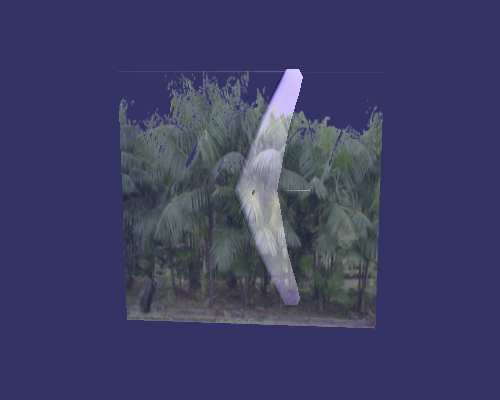
- 手动生成纹理坐标
- 自动生成纹理坐标
- 纹理与颜色结合
#include <windows.h>
#include <osg\node>
#include <osg\group>
#include <osg\geometry>
#include <osg\matrixtransform>
#include <osg\Point>
#include <osg\LineWidth>
#include <osg\LineStipple>
#include <osgViewer\Viewer>

int main()
{
	osgViewer::Viewer viewer;

	osg::ref_ptr<osg::Group> group = new osg::Group();
	group->addChild(osgDB::readNodeFile("glider.osg"));
	viewer.setSceneData(group);

	osg::ref_ptr<osg::Geode> geode = new osg::Geode();
	geode->getOrCreateStateSet()->setMode(GL_LIGHTING, osg::StateAttribute::OFF | osg::StateAttribute::OVERRIDE);
	geode->getOrCreateStateSet()->setMode(GL_BLEND, osg::StateAttribute::ON | osg::StateAttribute::OVERRIDE);
        geode->getOrCreateStateSet()->setRenderingHint(TRANSPARENT);
	geode->getOrCreateStateSet()->setAttributeAndModes(new osg::Point(5.0f));
	geode->getOrCreateStateSet()->setAttributeAndModes(new osg::LineWidth(2.0f));
	geode->getOrCreateStateSet()->setAttributeAndModes(new osg::LineStipple(1, 0x0F0F));
	geode->getOrCreateStateSet()->setAttributeAndModes(new osg::PolygonMode(osg::PolygonMode::FRONT_AND_BACK, osg::PolygonMode::FILL));
	osg::ref_ptr<osg::Geometry> geometry = new osg::Geometry();

	//顶点
	osg::ref_ptr<osg::Vec3Array> vertex = new osg::Vec3Array();
	vertex->push_back(osg::Vec3(-1.0, -1.0, 0.5));
	vertex->push_back(osg::Vec3(1.0, -1.0, 0.5));
	vertex->push_back(osg::Vec3(1.0, 1.0, 0.5));
	vertex->push_back(osg::Vec3(-1.0, 1.0, 0.5));
	geometry->setVertexArray(vertex);

	//颜色
	osg::ref_ptr<osg::Vec4Array> colors = new osg::Vec4Array();
	colors->push_back(osg::Vec4(1.0, 1.0, 1.0, 0.5));
	geometry->setColorArray(colors, osg::Array::BIND_OVERALL);

	//图元装配
	geometry->addPrimitiveSet(new osg::DrawArrays(osg::PrimitiveSet::Mode::QUADS, 0, vertex->size()));

#if 1
	//手动压入纹理坐标
	osg::ref_ptr<osg::Vec2Array> coord = new osg::Vec2Array();
	coord->push_back(osg::Vec2(0.0, 0.0));
	coord->push_back(osg::Vec2(1.0, 0.0));
	coord->push_back(osg::Vec2(1.0, 1.0));
	coord->push_back(osg::Vec2(0.0, 1.0));
	geometry->setTexCoordArray(0, coord);
#else
	//自动生成纹理坐标
	osg::ref_ptr<osg::TexGen> tex_gen = new osg::TexGen();
	tex_gen->setMode(osg::TexGen::OBJECT_LINEAR);
	geode->getOrCreateStateSet()->setTextureAttributeAndModes(0, tex_gen);
#endif

	//纹理
	osg::ref_ptr<osg::Image> image = osgDB::readImageFile("Images\\forestWall.png");
	osg::ref_ptr<osg::Texture2D> texture = new osg::Texture2D();
	texture->setImage(image);
	texture->setDataVariance(osg::Object::DYNAMIC);
	texture->setWrap(osg::Texture::WRAP_S, osg::Texture::REPEAT);
	texture->setWrap(osg::Texture::WRAP_T, osg::Texture::REPEAT);
	texture->setWrap(osg::Texture::WRAP_R, osg::Texture::REPEAT);
	texture->setFilter(osg::Texture::MIN_FILTER, osg::Texture::LINEAR_MIPMAP_LINEAR);
	texture->setFilter(osg::Texture::MAG_FILTER, osg::Texture::LINEAR);
	geode->getOrCreateStateSet()->setTextureAttributeAndModes(0, texture);

	geode->addDrawable(geometry);
	group->addChild(geode);

	viewer.setUpViewInWindow(100, 100, 500, 400);
	return viewer.run();
}


 浙公网安备 33010602011771号