
Linux shell 文件测试
一、检查目录
-d检查是否存在且是目录。
!/bin/bash
jump_directory=/home/arthur
if [ -d $jump_directory ]; then
echo "The $jump_directory directory exists."
cd $jump_directory
else
echo "The $jump_directory directory does not exists."
fi

sudo mkdir /home/arthur

二、检查对象是否存在
-e检查对象是否存在。
!/bin/bash
location=$HOME
file_name="sentinel"
if [ -e $location ]; then
echo "The \(location exists"
echo "Now checking on the file,\)file_name"
if [ -e \(HOME/\)file_name ]; then
echo "OK,on the filename."
echo "Updating Current Date."
date >> \(location/\)file_name
else
echo "File \(location/\)file_name does not exists."
echo "Nothing to update."
fi
else
echo "The $location directory does not exists."
echo "Nothing to update."
fi

touch $HOME/sentinel

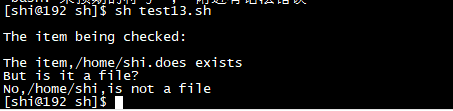
三、检查是否是文件
-f测试是否是文件
!/bin/bash
item_name=$HOME
echo
echo "The item being checked:$iem_name"
echo
if [ -e \(item_name ]; then
echo "The item,\)item_name.does exists"
echo "But is it a file?"
if [ -f \(item_name ]; then
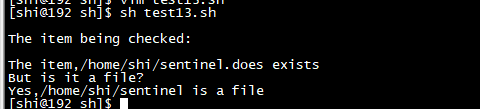
echo "Yes,\)item_name is a file"
else
echo "No,\(item_name,is not a file"
fi
else
echo "The item,\)item_name,does not exists"
echo "Nothing to update"
fi
修改:
item_name=$HOME/sentinel
四、测试文件否是可读
-r测试文件是否可读
!/bin/bash
file_item=/etc/shadow
if [ -f $file_item ]; then
if [ -r \(file_item ]; then
echo "\)file_item is readable"
tail \(file_item
else
echo "\)file_item is not readable"
fi
else
echo "$file_item is not a file"
fi

五、检查空文件
-s检查文件是否为空
!/bin/bash
item_name=$HOME/sentinel
if [ -f $item_name ]; then
if [ -s \(item_name ]; then
echo "\)item_name exist and it is a file,and has data in"
else
echo "No,$item_name is empty"
rm \(item_name
fi
else
echo "The item,\)item_name,does not exists or is not a file"
echo "Nothing to update"
fi

六、文件是否可写
-w判断文件是否可写
!/bin/bash
item_name=$HOME/sentinel
if [ -f $item_name ]; then
if [ -w \(item_name ]; then
echo "\)item_name is a file and is a writeable"
date +%H%M > \(item_name
else
echo "\)item_name is a not writeable file"
fi
else
echo "$item_name does not exists or it is not a file"
echo "Nothing to update"
fi


七、判断文件是否可执行
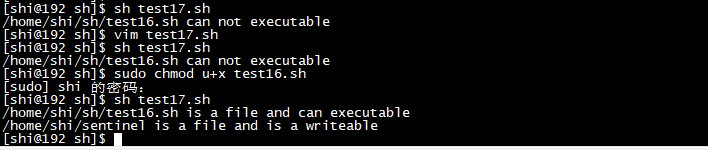
-x判断文件是否可执行
!/bin/bash
file_name=$HOME/sh/test16.sh
if [ -f $file_name ]; then
if [ -x \(file_name ]; then
echo "\)file_name is a file and can executable"
\(file_name
else
echo "\)file_name can not executable"
fi
else
echo "$file_name does not exist or is not a file"
fi
八、测试文件属主和默认组
-O测试是否是文件属主。-G测试是不是文件默认组。-G比较只会检查默认组而非用户所属的所有组。
!/bin/bash
file_name=$HOME/sentinel
if [ -f $file_name ]; then
if [ -O $file_name ]; then
echo "The $file_name owner youself."
else
echo "The $file_name does not owner you."
fi
if [ -G \(file_name ]; then
echo "You are in the same group as the file"
else
echo "The file is not owned by your group"
fi
else
echo "\)file_name is not a file"
fi



九、检查文件日期
-nt比较会判定一个文件是否比另一个文件新。-ot比较会判定一个文件是否比另一个文件旧。
!/bin/bash
test18=\(HOME/sh/test18.sh test19=\)HOME/sh/test19.sh
if [ -e $test18 ] && [ -e $test19 ]; then
if [ $test18 -nt \(test19 ]; then
echo "\)test18 is newer than \(test19"
else
echo "\)test19 is newer than $test18"
fi
if [ $test18 -ot \(test19 ]; then
echo "\)test18 is older than \(test19"
else
echo "\)test19 is older than \(test18"
fi
else
echo "\)test18,$test19, one of that does not exist"
fi


 浙公网安备 33010602011771号