


【Unity实用插件】SpriteDicing 2.1.0 中文文档
简介
使用 SpriteDicing 将一组精灵纹理分割成多个单元,丢弃相同的单元,并将独特的单元烘焙到图集纹理中,然后在运行时无缝重建原始精灵图,而无需在构建过程中保留原始纹理。
当使用多个具有相同区域的纹理时,此解决方案可显著减小构建大小。
例如,在 视觉小说 类型的游戏中,每个角色使用多个纹理,每个纹理都代表不同的表情;大部分纹理空间都被相同的数据占据,只有一小部分区域不同:
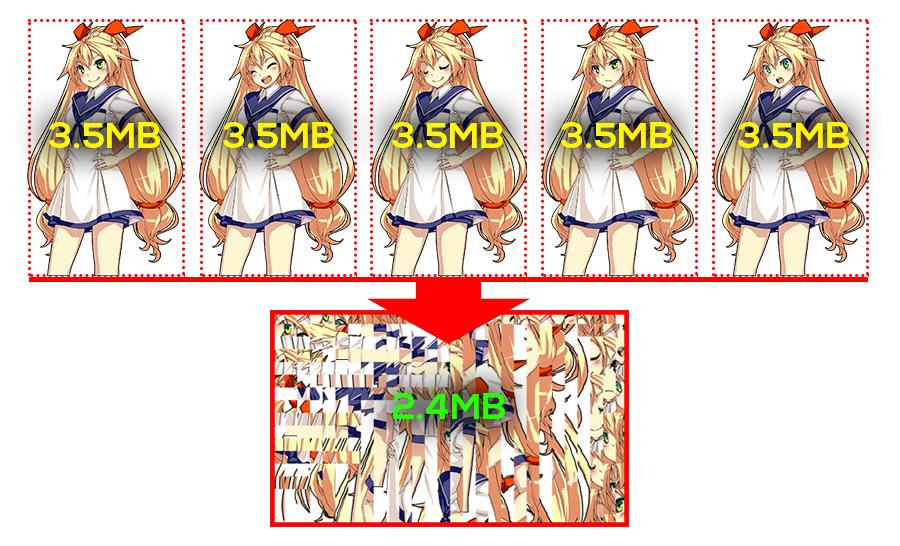
分割前,这五个原始纹理的总大小为 17.5MB。分割后,生成的atlas纹理将仅包含原始纹理中独特的区域,仅占用 2.4MB,纹理有效压缩率达到了 86.3%。
快速入门
https://dicing.elringus.com/guide/getting-started
安装方式
1.使用 Unity 包管理器 将该包作为远程 git 包安装,要使用的 URI 如下:
https://github.com/elringus/sprite-dicing.git?path=/plugins/unity/Assets/SpriteDicing
2.替代方案:也可以克隆仓库并安装 扩展目录 作为本地包。
使用方法
- 使用
Assets -> 创建 -> Diced Sprite Atlas菜单选项创建DicedSpriteAtlas资源,并选中它; - 指定
Input Folder— 项目目录,包含要处理的源纹理。您可以从项目层级窗口拖放文件夹,或使用对象选择器选择一个文件夹; - 点击
Build Atlas按钮,并等待过程完成; - 生成的精灵图会出现在 atlas 资产中;像普通精灵图一样将它们拖放到场景中。
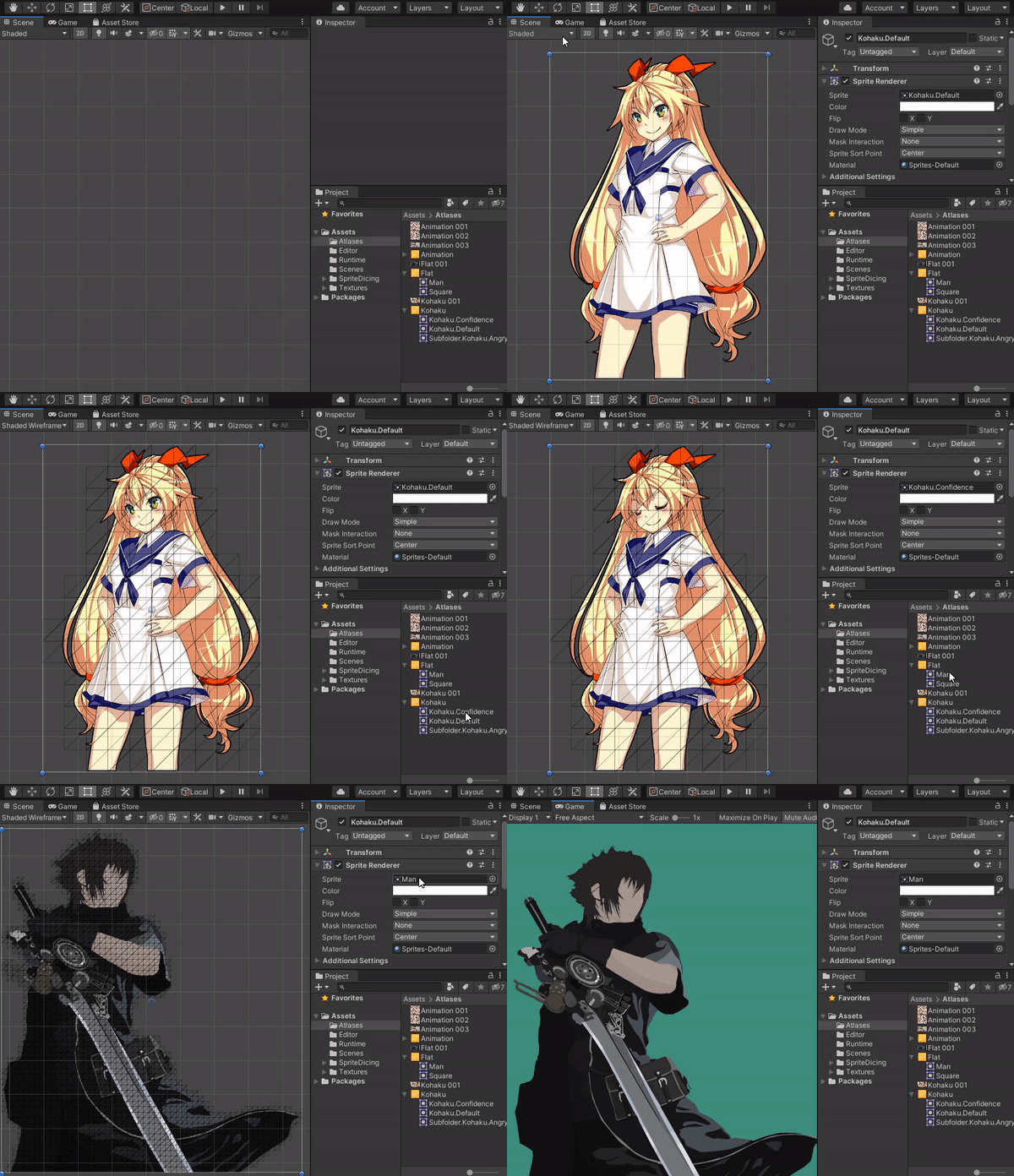
Atlas 生成选项
你可以通过编辑器检查器窗口选择配置atlas生成设置。
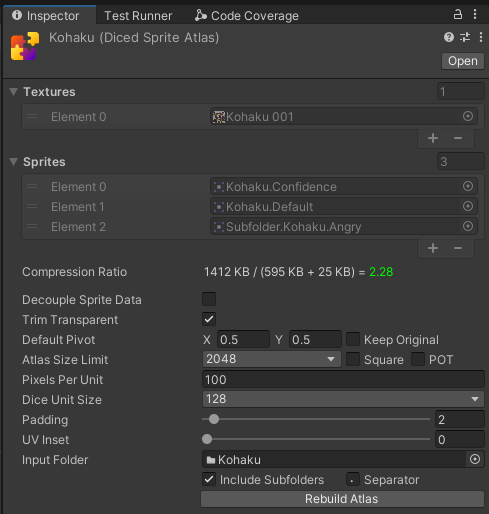
| 选项 | 描述 |
|---|---|
| Decouple Sprite Data | Whether to save sprite assets in a separate folder instead of adding them as childs of the atlas asset. |
| Trim Transparent | Whether to discard fully-transparent diced units on the generated mesh. Disable to preserve original texture dimensions (usable for animations). |
| Default Pivot | Relative pivot point position in 0 to 1 range, counting from the bottom-left corner. Can be changed after build for each sprite individually. |
| Keep Original | Whether to use pivot set on source textures (if any) instead of default. |
| Atlas Size Limit | Maximum size of a single generated atlas texture; will generate multiple textures when the limit is reached. |
| Square | The generated atlas textures will always be square. Less efficient, but required for PVRTC compression. |
| POT | The generated atlas textures will always have width and height of power of two. Extremely inefficient, but may be required by some older GPUs. |
| Pixels Per Unit | How many pixels in the sprite correspond to the unit in the world. |
| Dice Unit Size | The size of a single diced unit. |
| Padding | The size of a pixel border to add between adjacent diced units inside atlas. Increase to prevent texture bleeding artifacts (usually appear as thin gaps between diced units). Larger values will consume more texture space, but yield better anti-bleeding results. Minimum value of 2 is recommended in most cases. When 2 is not enough to prevent bleeding, consider adding a bit of UV Inset before increasing the padding. |
| UV Inset | Relative inset of the diced units UV coordinates. Can be used in addition to (or instead of) Padding to prevent texture bleeding artifacts. Won't consume any texture space, but higher values could visually distort the final result. |
| Input Folder | Asset folder with source sprite textures. |
| Include Subfolders | Whether to recursively search for textures inside the input folder. |
| Separator | When sprite is from a sub-folder(s), the separator will be used to join the folder name(s) and the sprite name. |
以上所有描述在编辑器中鼠标悬停对应配置选项时,都会作为tooltips显示。
压缩比
检查atlas资产时,注意Compression Ratio这一行; 它会显示源纹理大小与生成数据(atlas纹理+精灵网格)的比值。

当比值接近1或更低时,数值会显示为黄色或红色,表示生成的数据大小接近甚至大于源数据,你应该改变atlas生成配置(例如,增加切块单位大小),或者直接不要使用该解决方法。
uGUI
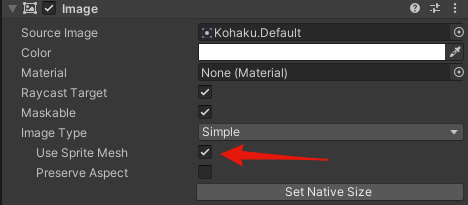
To use the diced sprites in with Unity UI (aka uGUI), enable Use Sprite Mesh. In case the option is not available, make sure to assign a source image.
UI Toolkit
Diced sprites are normal Unity sprite assets and can be assigned as source for various visual UI Toolkit elements, no additional setup is required. Check "UI" scene in the samples directory for an example.
动画
It's possible to use diced sprites for animation. Make sure to disable Trim Transparent when generating the atlas to preserve relative positions of the generated sprites. An example on animating diced sprites is available in "Animation" scene.


 浙公网安备 33010602011771号