

io流-File获取功能的方法和FIle判断功能的方法
File常见方法
public String getAbsolutePath():返回次File的绝对路径名称字符串
public String getPath():将此File转换为路径名字符串
public String getName():返回由此File表示的文件或目录的名称
public long length():返回由此File表示的文件的长度
代码

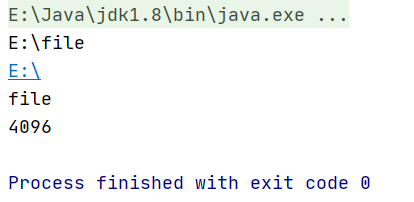
public static void main(String[] args) {
        File file = new File("E:\\file");
        //返回次File的绝对路径名称字符串
        String path = file.getAbsolutePath();
        System.out.println(path);
        //将此File转换为路径名字符串
        String parent = file.getParent();
        System.out.println(parent);
        //返回由此File表示的文件或者目录的名称
        String name = file.getName();
        System.out.println(name);
        //返回由此File表示的文件的长度
        long length = file.length();
        System.out.println(length);
    }
运行结果
FIle判断功能的方法
public boolean exists():此File表示的文件或是否实际存在
public boolean isDirectory():此File表示的是否为目录
public boolean isFile():此File表示的是否为文件
代码:
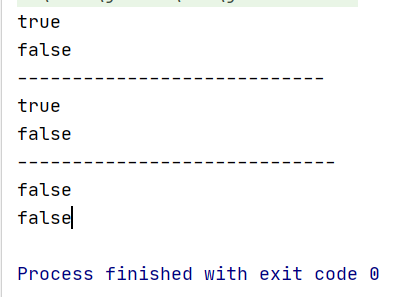
public static void main(String[] args) {
        File file = new File("E:\\DiskGenius");//存在的文件
        File file1=new File("E:\\linux.txt");//不存在的文件
        //此File表示的文件或是否实际存在
        boolean exists = file.exists();
        System.out.println(exists);//存在 true
        boolean exists1 = file1.exists();
        System.out.println(exists1);//不存在 flase
        System.out.println("----------------------------");
        //此File表示的是否为目录
        boolean dir = file.isDirectory();
        System.out.println(dir);//true
        boolean dir1 = file1.isDirectory();
        System.out.println(dir1);//false
        System.out.println("-----------------------------");
        //此File表示的是否为文件
        boolean file2 = file.isFile();
        System.out.println(file2);//false
        boolean file3 = file1.isFile();
        System.out.println(file3);//false
    }
运行结果:
String path = file.getAbsolutePath();
    System.out.println(path);
    //将此File转换为路径名字符串
String parent = file.getParent();
    System.out.println(parent);
    //返回由此File表示的文件或者目录的名称
String name = file.getName();
    System.out.println(name);
    //返回由此File表示的文件的长度
long length = file.length();
    System.out.println(length);
}

 浙公网安备 33010602011771号