
他是SpringFramework创始人,interface21 CEO
Spring 的作者:Rod Johnson

一 :Spring的核心IOC和AOP(本处详解IOC)
IOC:控制反转:(Inverse Of Control)
控制反转(Inversion of Control),是一个重要的面向对象编程的法则来削减计算机程序的耦合问题,也是轻量级的Spring框架的核心,beans。
理解一:将组件对象(业务对象)的控制权从代码本身转移到外部容器()
理解二:IOC控制反转:说的是创建对象实例的控制权从代码控制剥离到IOC容器(spring容器)控制,实际就是你在xml文件控制,侧重于原理。
AOP:面向切面编程; (Aspect Oritend Programming)
提及一下对象间的关系把

案例:
1.下载jar包:
pom文件 节点:
<!--单元测试的依赖  ctrl+shif+/-->
        <dependency>
            <groupId>junit</groupId>
            <artifactId>junit</artifactId>
            <version>4.12</version>
            <scope>test</scope>
        </dependency>

        <!--Spring-->
        <dependency>
            <groupId>org.springframework</groupId>
            <artifactId>spring-beans</artifactId>
            <version>4.2.0.RELEASE</version>
        </dependency>

        <dependency>
            <groupId>org.springframework</groupId>
            <artifactId>spring-context</artifactId>
            <version>4.2.0.RELEASE</version>
        </dependency>

        <!--aop使用的jar-->
        <dependency>
            <groupId> org.aspectj</groupId >
            <artifactId> aspectjweaver</artifactId >
            <version> 1.8.7</version>
        </dependency>
--------------------------------------------------------------------------------------------------------------------------------------------------
2.一个普通类
package cn.dawn.day01.service;

/**
 * Created by Dawn on 2018/3/3.
 */
public class DawnService {

    private String workInfo;
    private Integer age;
    public void work(){
        System.out.println("info"+workInfo);
    }

    @Override
    public String toString() {
        return "DawnService{" +
                "workInfo='" + workInfo + '\'' +
                ", age=" + age +
                '}';
    }

    public String getWorkInfo() {
        return workInfo;
    }

    public void setWorkInfo(String workInfo) {
        this.workInfo = workInfo;
    }

    public Integer getAge() {
        return age;
    }

    public void setAge(Integer age) {
        this.age = age;
    }
}
--------------------------------------------------------------------------------------------------------------------------------------------------
3.大配置文件
<?xml version="1.0" encoding="UTF-8"?>
<beans xmlns="http://www.springframework.org/schema/beans"
       xmlns:xsi="http://www.w3.org/2001/XMLSchema-instance"
       xsi:schemaLocation="http://www.springframework.org/schema/beans http://www.springframework.org/schema/beans/spring-beans.xsd">

    <bean id="service" class="cn.dawn.day01.service.DawnService">
        <property name="workInfo" value="第一个Spring程序"></property>
        <property name="age" value="12"></property>
    </bean>
</beans>
--------------------------------------------------------------------------------------------------------------------------------------------------
4.单测
package cn.dawn.day01;

import cn.dawn.day01.service.DawnService;
import org.junit.Test;
import org.springframework.context.ApplicationContext;
import org.springframework.context.support.ClassPathXmlApplicationContext;

/**
 * Created by Dawn on 2018/3/3.
 */
public class test20180303 {
    @Test
    /*入门案例*/
    public void t01(){
        ApplicationContext context=new ClassPathXmlApplicationContext("ApplicationContext01.xml");
        DawnService service = (DawnService) context.getBean("service");
        System.out.println(service);
    }
}
--------------------------------------------------------------------------------------------------------------------------------------------------
在没有new 的情况下,就拿到了他的实现
ApplicationContext context=new ClassPathXmlApplicationContext("ApplicationContext01.xml");
这行如果不理解我就放一张图
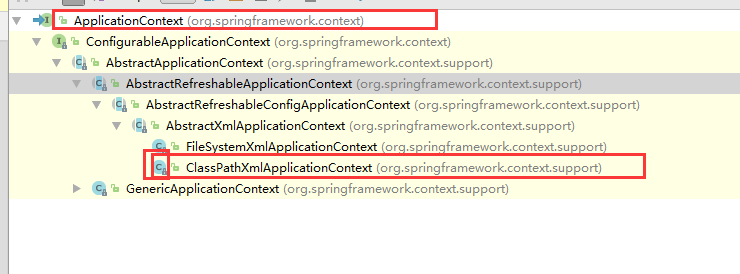
看到ClassPathXmlApplicationContext前面的C吗?在结合这个,表示他是ApplicationContext的实现类,里氏替换,为什么不可以用
--------------------------------------------------------------------------------------------------------------------------------------------------
还记得我提了的IOC吗?我不是说他把创建对象的控制权交给了Spring容器嘛,那么容器在什么时候创建对象呢,是getBean的时候吗?还是。。。。(小实验)
在刚才的那个普通类中,添加一个构造,如下
public DawnService(){
        System.out.println("========================DawnService创建=======================");
    }
单测方法如下
 @Test
    /*入门案例*/
    public void t01(){
        ApplicationContext context=new ClassPathXmlApplicationContext("ApplicationContext01.xml");
        /*DawnService service = (DawnService) context.getBean("service");
        System.out.println(service);*/
    }
运行结果:

结论就是Spring容器初始化的时候就把bean中的对象实例化了
二 DI:依赖注入
域属性注入:java类
package cn.dawn.day02di;

/**
 * Created by Dawn on 2018/3/3.
 */
//小汽车类
public class Car {
    private String type;
    private String color;

    public String getType() {
        return type;
    }

    public void setType(String type) {
        this.type = type;
    }

    public String getColor() {
        return color;
    }

    public void setColor(String color) {
        this.color = color;
    }
}


package cn.dawn.day02di;

/**
 * Created by Dawn on 2018/3/3.
 */
//学生类
public class Stu {
    private String name;
    private Integer age;
    private Car car;

    public String getName() {
        return name;
    }

    public void setName(String name) {
        this.name = name;
    }

    public Integer getAge() {
        return age;
    }

    public void setAge(Integer age) {
        this.age = age;
    }

    public Car getCar() {
        return car;
    }

    public void setCar(Car car) {
        this.car = car;
    }
}
配置xml中
<?xml version="1.0" encoding="UTF-8"?>
<beans xmlns="http://www.springframework.org/schema/beans"
       xmlns:xsi="http://www.w3.org/2001/XMLSchema-instance"
       xsi:schemaLocation="http://www.springframework.org/schema/beans http://www.springframework.org/schema/beans/spring-beans.xsd">

    <!--汽车-->
    <bean id="car" class="cn.dawn.day02di.Car">
        <property name="type" value="奔驰"></property>
        <property name="color" value="红色"></property>
    </bean>
    <!--学生-->
    <!--这儿的小汽车不能用value,用ref引用上面的那个汽车car-->
    <bean id="stu" class="cn.dawn.day02di.Stu">
        <property name="name" value="孟六"></property>
        <property name="age" value="20"></property>
        <property name="car" ref="car"></property>
    </bean>

</beans>
测试类
package cn.dawn.day02;

import cn.dawn.day02di.Stu;
import org.junit.Test;
import org.springframework.context.ApplicationContext;
import org.springframework.context.support.ClassPathXmlApplicationContext;

/**
 * Created by Dawn on 2018/3/3.
 */
public class test20180303 {
    @Test
    /*域属性*/
    public void t01(){
        ApplicationContext context=new ClassPathXmlApplicationContext("ApplicationContext-day02.xml");
        Stu stu = (Stu) context.getBean("stu");
        System.out.println(stu.getName()+"开"+stu.getCar().getType());
    }
}
打印机案例先把架构放上来
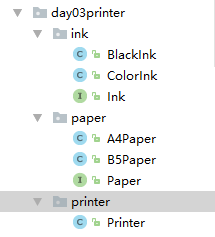
把里面每个类中的代码(code) 放上来
package cn.dawn.day03printer.ink;

/**
 * Created by Dawn on 2018/3/3.
 */
/*墨盒*/
public interface Ink {
    public String getInkColor();
}


package cn.dawn.day03printer.ink;

/**
 * Created by Dawn on 2018/3/3.
 */
/*彩色墨盒*/
public class ColorInk implements Ink {
    public String getInkColor() {
        return "彩色墨盒";
    }
}


package cn.dawn.day03printer.ink;

/**
 * Created by Dawn on 2018/3/3.
 */
/*黑白墨盒*/
public class BlackInk implements Ink {
    public String getInkColor() {
        return "黑白墨盒";
    }
}


package cn.dawn.day03printer.paper;

/**
 * Created by Dawn on 2018/3/3.
 */
/*纸张*/
public interface Paper {
    public String getPagerSize();
}


package cn.dawn.day03printer.paper;

/**
 * Created by Dawn on 2018/3/3.
 */
/*B5纸张*/
public class B5Paper implements Paper{

    public String getPagerSize() {
        return "B5纸";
    }
}


package cn.dawn.day03printer.paper;

/**
 * Created by Dawn on 2018/3/3.
 */
/*A4纸张*/
public class A4Paper implements Paper {
    public String getPagerSize() {
        return "A4纸";
    }
}


package cn.dawn.day03printer.printer;

import cn.dawn.day03printer.ink.Ink;
import cn.dawn.day03printer.paper.Paper;

/**
 * Created by Dawn on 2018/3/3.
 */
/*打印机*/
public class Printer {
    /*墨盒*/
    private Ink ink;
    /*纸张*/
    private Paper paper;
    /*打印方法*/
    public void print(){
        System.out.println("我们的喷墨打印机,用"+ink.getInkColor()+"和"+paper.getPagerSize()+"打印出了------》我爱Spring");
    }


    public Ink getInk() {
        return ink;
    }

    public void setInk(Ink ink) {
        this.ink = ink;
    }

    public Paper getPaper() {
        return paper;
    }

    public void setPaper(Paper paper) {
        this.paper = paper;
    }
}
配置文件中:
<?xml version="1.0" encoding="UTF-8"?>
<beans xmlns="http://www.springframework.org/schema/beans"
       xmlns:xsi="http://www.w3.org/2001/XMLSchema-instance"
       xsi:schemaLocation="http://www.springframework.org/schema/beans http://www.springframework.org/schema/beans/spring-beans.xsd">

    <!--墨盒-->
    <bean id="ink" class="cn.dawn.day03printer.ink.ColorInk"></bean>
    <!--纸张-->
    <bean id="paper" class="cn.dawn.day03printer.paper.A4Paper"></bean>
    <!--打印机-->
    <bean id="printer" class="cn.dawn.day03printer.printer.Printer">
        <property name="ink" ref="ink"></property>
        <property name="paper" ref="paper"></property>
     </bean>
</beans>
单测方法
package cn.dawn.day03;

import cn.dawn.day02di.Stu;
import cn.dawn.day03printer.printer.Printer;
import org.junit.Test;
import org.springframework.context.ApplicationContext;
import org.springframework.context.support.ClassPathXmlApplicationContext;

/**
 * Created by Dawn on 2018/3/3.
 */
public class test20180303 {
    @Test
    /*打印机案例*/
    public void t01(){
        ApplicationContext context=new ClassPathXmlApplicationContext("ApplicationContext-day03.xml");
        Printer printer = (Printer) context.getBean("printer");
        printer.print();
    }
}
三 AOP:面向切面编程
AOP的主要作用:
加上双引号的意思:所谓业务,是指他的核心,各行业中需要处理的核心事务,核心啊
AOP的思想:
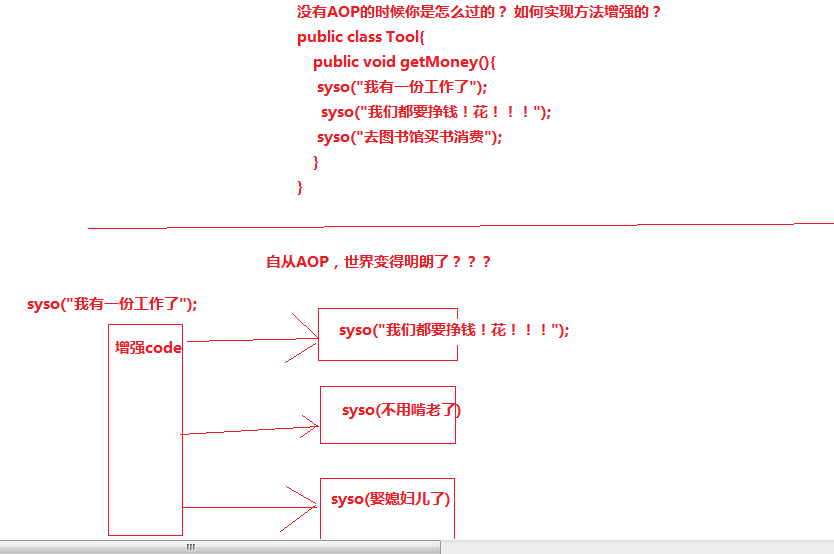
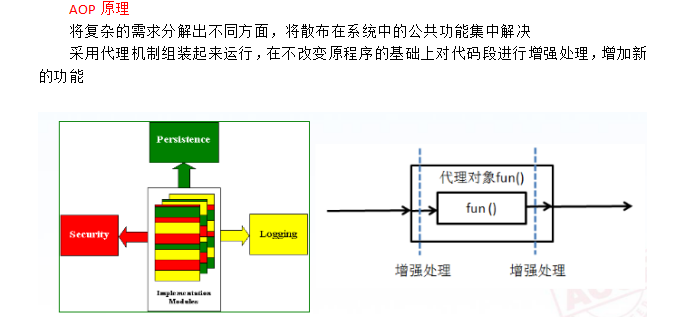
AOP的原理
入门案例:DAO层(一个接口,一个他的实现类,模拟操作修改数据库)
package cn.dawn.day04aop.dao;

/**
 * Created by Dawn on 2018/3/5.
 */
/*dao层接口*/
public interface IHellowDAO {
    /*aop入门案例*/
    public void doSome();
}


package cn.dawn.day04aop.dao.impl;

import cn.dawn.day04aop.dao.IHellowDAO;

/**
 * Created by Dawn on 2018/3/5.
 */
/*dao层实现类*/
public class HellowDAOImpl implements IHellowDAO{

    public void doSome() {
        System.out.println("数据已经成功写入到DB");
    }
}
service层
package cn.dawn.day04aop.service;

/**
 * Created by Dawn on 2018/3/5.
 */
/*service层接口*/
public interface IHellowService {
    /*aop入门案例*/
    public void doSome();
}


package cn.dawn.day04aop.service.impl;

import cn.dawn.day04aop.dao.IHellowDAO;
import cn.dawn.day04aop.service.IHellowService;

/**
 * Created by Dawn on 2018/3/5.
 */
/*service层实现类 */
public class HellowServiceImpl implements IHellowService {
    IHellowDAO dao;
    public void doSome() {
        dao.doSome();
    }

    public IHellowDAO getDao() {
        return dao;
    }

    public void setDao(IHellowDAO dao) {
        this.dao = dao;
    }
}
新开多的一层,叫aop层,他就存放了增强的操作(也就是交叉业务,例如日志记录等),此处我放了俩个类,一个执行前置增强,一个后置增强
需要实现MethodBeforeAdvice
package cn.dawn.day04aop.aop;


import org.springframework.aop.MethodBeforeAdvice;

import java.lang.reflect.Method;

/**
 * Created by Dawn on 2018/3/5.
 */
/*前置增强*/
public class LoggerBefore implements MethodBeforeAdvice {
    public void before(Method method, Object[] objects, Object o) throws Throwable {
        System.out.println("日志记录");
    }
}


需要实现AfterReturningAdvice

package cn.dawn.day04aop.aop;

import org.springframework.aop.AfterReturningAdvice;

import java.lang.reflect.Method;

/**
 * Created by Dawn on 2018/3/5.
 */
/*后置增强*/
public class LoggerAfter implements AfterReturningAdvice {
    public void afterReturning(Object o, Method method, Object[] objects, Object o1) throws Throwable {
        System.out.println("===============after==================");
    }
}
大配置xml文件(idea)
<?xml version="1.0" encoding="UTF-8"?>
<beans xmlns="http://www.springframework.org/schema/beans"
       xmlns:xsi="http://www.w3.org/2001/XMLSchema-instance" xmlns:aop="http://www.springframework.org/schema/aop"
       xsi:schemaLocation="http://www.springframework.org/schema/beans http://www.springframework.org/schema/beans/spring-beans.xsd http://www.springframework.org/schema/aop http://www.springframework.org/schema/aop/spring-aop.xsd">

    <!--aop入门案例起-->
    <!--dao-->
    <bean id="dao" class="cn.dawn.day04aop.dao.impl.HellowDAOImpl"></bean>
    <!--service-->
    <bean id="service" class="cn.dawn.day04aop.service.impl.HellowServiceImpl">
        <property name="dao" ref="dao"></property>
    </bean>
    <!--通知-->
    <bean id="afterAdvice" class="cn.dawn.day04aop.aop.LoggerAfter"></bean>
    <bean id="beforeAdvice" class="cn.dawn.day04aop.aop.LoggerBefore"></bean>
    <!--aop-->
    <aop:config>
        <!--切点-->
        <aop:pointcut id="mypointcut" expression="execution(* *..service.*.*(..))"></aop:pointcut>
        <!--<aop:pointcut id="mypointcut" expression="execution(public void cn.dawn.day04aop.service.IHellowService.doSome())"></aop:pointcut>-->
        <!--<aop:pointcut id="mypointcut" expression="execution(* *..service.*.*(..))">-->
        <!--顾问,织入-->
        <aop:advisor advice-ref="beforeAdvice" pointcut-ref="mypointcut"></aop:advisor>
        <aop:advisor advice-ref="afterAdvice" pointcut-ref="mypointcut"></aop:advisor>
    </aop:config>
    <!--aop入门案例完毕-->
</beans>
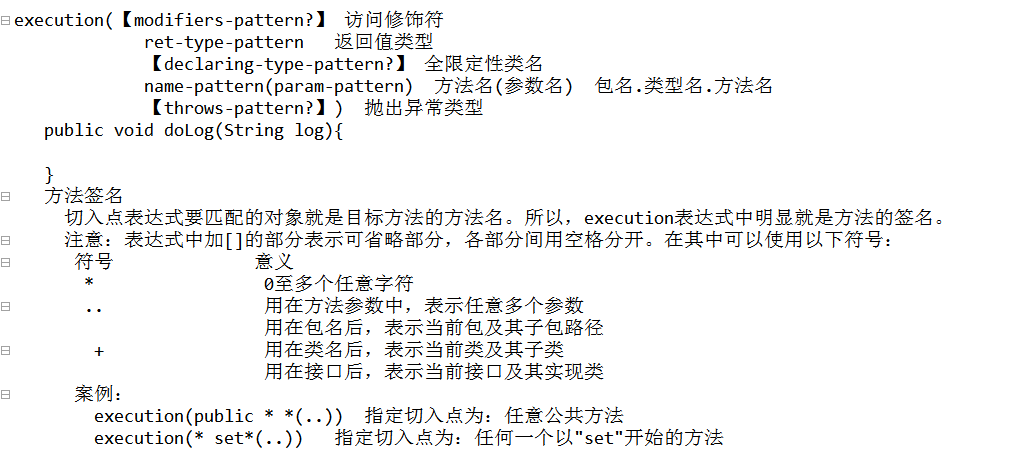
切点pointcut:expression的属性:
单测方法:
package cn.dawn.day04aop;

import cn.dawn.day03printer.printer.Printer;
import cn.dawn.day04aop.service.IHellowService;
import org.junit.Test;
import org.springframework.context.ApplicationContext;
import org.springframework.context.support.ClassPathXmlApplicationContext;

/**
 * Created by Dawn on 2018/3/3.
 */
public class test20180305 {
    @Test
    /*aop入门案例*/
    public void t01(){
        ApplicationContext context=new ClassPathXmlApplicationContext("ApplicationContext-day04aop.xml");
        IHellowService service = (IHellowService) context.getBean("service");
        service.doSome();
    }
}
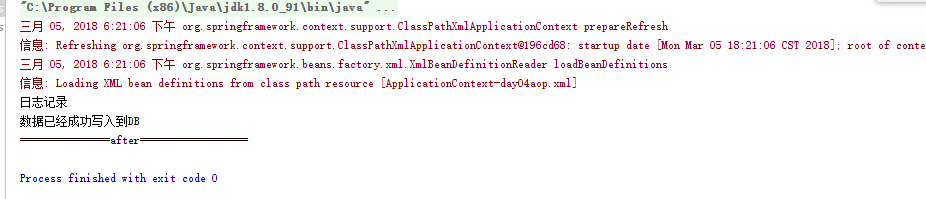
结果如下:
四 DI和IOC相比,DI更偏向于实现
在实体类中(有俩个实体类,我做了关联关系)
package cn.dawn.day05diup;

/**
 * Created by Dawn on 2018/3/5.
 */
public class Car {
    private String color;
    private String type;

    public String getColor() {
        return color;
    }

    public void setColor(String color) {
        this.color = color;
    }

    public String getType() {
        return type;
    }

    public void setType(String type) {
        this.type = type;
    }
}


package cn.dawn.day05diup;

/**
 * Created by Dawn on 2018/3/5.
 */
//student类
public class Student {
    private String name;
    private Integer age;
    private Car car;

    //带参构造
    public Student(String name, Integer age, Car car) {
        this.name = name;
        this.age = age;
        this.car = car;
    }

    //无参构造
    public Student() {
    }

    public String getName() {
        return name;
    }

    public void setName(String name) {
        this.name = name;
    }

    public Integer getAge() {
        return age;
    }

    public void setAge(Integer age) {
        this.age = age;
    }

    public Car getCar() {
        return car;
    }

    public void setCar(Car car) {
        this.car = car;
    }
}
在大配置xml文件中
<?xml version="1.0" encoding="UTF-8"?>
<beans xmlns="http://www.springframework.org/schema/beans"
       xmlns:xsi="http://www.w3.org/2001/XMLSchema-instance" xmlns:p="http://www.springframework.org/schema/p"
       xsi:schemaLocation="http://www.springframework.org/schema/beans http://www.springframework.org/schema/beans/spring-beans.xsd ">

    <bean id="car" class="cn.dawn.day05diup.Car">
        <property name="color" value="黑色"></property>
        <property name="type" value="奥迪"></property>
    </bean>
    <!--di构造注入-->   index索引从0开始,对应的是那个带参构造的index
    <!--<bean id="student" class="cn.dawn.day05diup.Student">
        <constructor-arg index="0" value="孟六"></constructor-arg>
        <constructor-arg index="1" value="20"></constructor-arg>
        <constructor-arg index="2" ref="car"></constructor-arg>
    </bean>-->

    <!--p命名注入-->
    <bean id="student" class="cn.dawn.day05diup.Student" p:name="孟小六" p:age="8" p:car-ref="car"></bean>

</beans>
单测方法:
 @Test
    /*diP命名注入*/
    public void t02(){
        ApplicationContext context=new ClassPathXmlApplicationContext("ApplicationContext-day05diup.xml");
        Student student = (Student) context.getBean("student");
        System.out.println("学生"+student.getName()+"开着"+student.getCar().getColor()+"的"+student.getCar().getType());
    }


    @Test
    /*di构造注入*/
    public void t01(){
        ApplicationContext context=new ClassPathXmlApplicationContext("ApplicationContext-day05diup.xml");
        Student student = (Student) context.getBean("student");
        System.out.println("学生"+student.getName()+"开着"+student.getCar().getColor()+"的"+student.getCar().getType());
    }
集合注入:数组,List,Set,Map,Properties
实体类
package cn.dawn.day05diup;

import java.util.*;

/**
 * Created by Dawn on 2018/3/5.
 */
public class MyCollection {
    private String[] array;
    private List<String> list;
    private Set<String> set;
    private Map<String,String> map;
    private Properties properties;

    @Override
    public String toString() {
        return "MyCollection{" +
                "array=" + Arrays.toString(array) +
                ", list=" + list +
                ", set=" + set +
                ", map=" + map +
                ", properties=" + properties +
                '}';
    }

    public String[] getArray() {
        return array;
    }

    public void setArray(String[] array) {
        this.array = array;
    }

    public List<String> getList() {
        return list;
    }

    public void setList(List<String> list) {
        this.list = list;
    }

    public Set<String> getSet() {
        return set;
    }

    public void setSet(Set<String> set) {
        this.set = set;
    }

    public Map<String, String> getMap() {
        return map;
    }

    public void setMap(Map<String, String> map) {
        this.map = map;
    }

    public Properties getProperties() {
        return properties;
    }

    public void setProperties(Properties properties) {
        this.properties = properties;
    }
}
大配置中的bean节点
<!--di的集合注入-->
    <bean id="mycollection" class="cn.dawn.day05diup.MyCollection">
        <!--数组注入-->
        <property name="array">
            <array>
                <value>孟六</value>
                <value>孟六十六</value>
                <value>孟六百六十六</value>
            </array>
        </property>
        <!--list集合注入-->
        <property name="list">
            <list>
                <value>奥迪</value>
                <value>奥小迪</value>
                <value>奥迪迪</value>
            </list>
        </property>
        <!--set集合注入-->
        <property name="set">
            <set>
                <value>set1</value>
                <value>set2</value>
                <value>set3</value>
            </set>
        </property>
        <!--map集合注入-->
        <property name="map">
            <map>
                <entry key="姓名">
                    <value>孟五</value>
                </entry>
                <entry key="年龄">
                    <value>555</value>
                </entry>
            </map>
        </property>
        <!--properties-->
        <property name="properties">
            <props>
                <prop key="key1">v1</prop>
                <prop key="key2">v2</prop>
                <prop key="key3">v3</prop>
            </props>
        </property>
    </bean>
单测
 @Test
    /*di集合注入*/
    public void t03(){
        ApplicationContext context=new ClassPathXmlApplicationContext("ApplicationContext-day05diup.xml");
        MyCollection mycollection = (MyCollection) context.getBean("mycollection");
        System.out.println(mycollection);
    }
五 自动注入byType方式
案例:实体类:
package cn.dawn.day06autowire;


/**
 * Created by Dawn on 2018/3/5.
 */
//student类
public class Student {
    private String name;
    private Integer age;
    private Car car;

    //带参构造
    public Student(String name, Integer age, Car car) {
        this.name = name;
        this.age = age;
        this.car = car;
    }

    //无参构造
    public Student() {
    }

    public String getName() {
        return name;
    }

    public void setName(String name) {
        this.name = name;
    }

    public Integer getAge() {
        return age;
    }

    public void setAge(Integer age) {
        this.age = age;
    }

    public Car getCar() {
        return car;
    }

    public void setCar(Car car) {
        this.car = car;
    }
}


package cn.dawn.day06autowire;

/**
 * Created by Dawn on 2018/3/5.
 */
public class Car {
    private String color;
    private String type;

    public String getColor() {
        return color;
    }

    public void setColor(String color) {
        this.color = color;
    }

    public String getType() {
        return type;
    }

    public void setType(String type) {
        this.type = type;
    }
}
在配置文件中:
<!--汽车的bean-->
    <bean id="car" class="cn.dawn.day06autowire.Car">
        <property name="color" value="黑色"></property>
        <property name="type" value="奥迪"></property>
    </bean>

    <!--装配student-->
    <bean id="student" class="cn.dawn.day06autowire.Student" autowire="byType">
        <property name="name" value="马云"></property>
        <property name="age" value="18"></property>
    </bean>
单测方法:
package cn.dawn.day06autowire;

import org.junit.Test;
import org.springframework.context.ApplicationContext;
import org.springframework.context.support.ClassPathXmlApplicationContext;

/**
 * Created by Dawn on 2018/3/3.
 */
public class test20180306 {


    @Test
    /*di自动注入*/
    public void t01(){
        ApplicationContext context=new ClassPathXmlApplicationContext("ApplicationContext-day06autowire.xml");
        Student student = (Student) context.getBean("student");
        System.out.println("学生"+student.getName()+"开着"+student.getCar().getColor()+"的"+student.getCar().getType());
    }
}
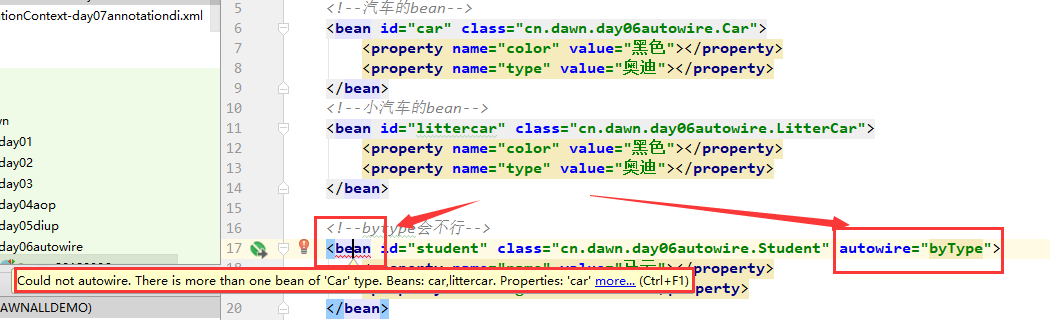
单测后可以正常执行
byType结果是不行的,它报错的解释是,不能自动装配,所以,引出了另外一种方式byName
byName
    <bean id="student" class="cn.dawn.day06autowire.Student" autowire="byName">
        <property name="name" value="马云"></property>
        <property name="age" value="18"></property>
    </bean>
六 注解:@Overried,@Test,@Param等等
Car类
package cn.dawn.day07annotationdi;

import org.springframework.beans.factory.annotation.Value;
import org.springframework.stereotype.Component;

/**
 * Created by Dawn on 2018/3/5.
 */
@Component("car")//表示这个生成的对象的名字
public class Car {
    @Value("红色") //用于给属性赋值
    private String color;
    @Value("奔驰")
    private String type;

    public String getColor() {
        return color;
    }

    public void setColor(String color) {
        this.color = color;
    }

    public String getType() {
        return type;
    }

    public void setType(String type) {
        this.type = type;
    }
}
Student类
package cn.dawn.day07annotationdi;


import org.springframework.beans.factory.annotation.Autowired;
import org.springframework.beans.factory.annotation.Qualifier;
import org.springframework.beans.factory.annotation.Value;
import org.springframework.stereotype.Component;

import javax.annotation.Resource;

/**
 * Created by Dawn on 2018/3/5.
 */
//student类
    @Component("student")
public class Student {
        @Value("老胡小子,呵呵哒")
    private String name;
        @Value("20")
    private Integer age;

        //@Resource(name = "car")//这个是javax包下的注解,可以实现域属性的注入,下面还有一种方式,@AutoWried
    @Autowired
    @Qualifier(value = "car") //这两行联用,他是spring的注解,也是给对象的域属性赋值
    private Car car;

    //带参构造
    public Student(String name, Integer age, Car car) {
        this.name = name;
        this.age = age;
        this.car = car;
    }

    //无参构造
    public Student() {
    }

    public String getName() {
        return name;
    }

    public void setName(String name) {
        this.name = name;
    }

    public Integer getAge() {
        return age;
    }

    public void setAge(Integer age) {
        this.age = age;
    }

    public Car getCar() {
        return car;
    }

    public void setCar(Car car) {
        this.car = car;
    }
}
在Spring的配置文件中首先导入命名空间context,和注解的包扫描器(idea)
<?xml version="1.0" encoding="UTF-8"?>
<beans xmlns="http://www.springframework.org/schema/beans"
       xmlns:xsi="http://www.w3.org/2001/XMLSchema-instance"
       xmlns:aop="http://www.springframework.org/schema/aop"

xmlns:p="http://www.springframework.org/schema/p"

xmlns:context="http://www.springframework.org/schema/context"
xsi:schemaLocation="http://www.springframework.org/schema/beans
http://www.springframework.org/schema/beans/spring-beans.xsd
 http://www.springframework.org/schema/aop
 http://www.springframework.org/schema/aop/spring-aop.xsd

http://www.springframework.org/schema/context
http://www.springframework.org/schema/context/spring-context.xsd">
<context:component-scan base-package="cn.dawn.day07annotationdi">
</context:component-scan>
 </beans>
单测方法
package cn.dawn.day07annotationdi;


import org.junit.Test;
import org.springframework.context.ApplicationContext;
import org.springframework.context.support.ClassPathXmlApplicationContext;

/**
 * Created by Dawn on 2018/3/3.
 */
public class test20180306 {


    @Test
    /*di注解注入*/
    public void t01(){
        ApplicationContext context=new ClassPathXmlApplicationContext("ApplicationContext-day07annotationdi.xml");
        Student student = (Student) context.getBean("student");
        System.out.println("学生"+student.getName()+"开"+student.getCar().getType());
    }
}

 浙公网安备 33010602011771号