

Spark Streaming
一、概述
(一)什么是Spark Streaming
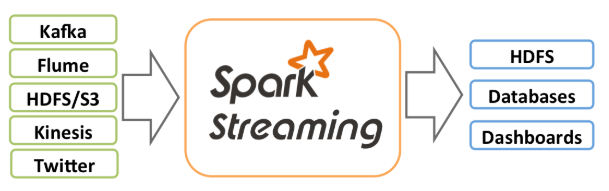
Spark Streaming是Spark核心API的扩展,它支持实时数据的可伸展的、高吞吐量的、容错的流处理;数据可以从很多的数据源来获取,比如,Kafka, Flume, Kinesis, 或者TCP sockets,并且这些数据可以使用像map, reduce, join和window这样的复杂算法方法来处理;最后,这些处理后的数据可以输出到文件系统、数据库等地方;事实上你也可以将Spark的机器学习以及图算法应用到这样的数据流上。
(二)执行原理
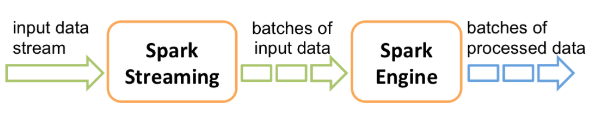
Spark Streaming接收输入的数据流,然后将这些数据切分成批次(按照间隔时间,Spark Streaming不是一个真正的实时流处理),再通过Spark引擎将其处理,最终生成处理后的数据流批次。
Spark Streamin与Spark Core类似,它也提供了高级抽象DStream(类似于RDD)。你可以通过Scala、Java或者Python来编写Spark Stream程序。
二、快速入门
假设现在从监听的TCP套接字上来获取数据流,然后对其进行处理,统计单词的个数:
1、启动套接字服务
如果你已经下载并且在机器上构建好了Spark,可以按照下面的方式启动该服务:
[root@hadoop-master bin]# nc -lk 9999
2、启动hdfs
Spark依赖于hdfs,所以先启动hdfs,进入/root/app/hadoop-2.6.1/sbin:
[root@hadoop-master sbin]# ./start-dfs.sh
3、启动Spark客户端
[root@hadoop-master ~]# pyspark
Python 3.5.2 (default, Mar 30 2020, 22:25:54)
[GCC 4.8.5 20150623 (Red Hat 4.8.5-39)] on linux
Type "help", "copyright", "credits" or "license" for more information.
Setting default log level to "WARN".
To adjust logging level use sc.setLogLevel(newLevel).
20/05/03 13:40:36 WARN util.NativeCodeLoader: Unable to load native-hadoop library for your platform... using builtin-java classes where
applicable
Welcome to
      ____              __
     / __/__  ___ _____/ /__
    _\ \/ _ \/ _ `/ __/  '_/
   /__ / .__/\_,_/_/ /_/\_\   version 2.0.2
      /_/

Using Python version 3.5.2 (default, Mar 30 2020 22:25:54)
SparkSession available as 'spark'.
》
4、shell命令
"""
在shell中已经有sc
from pyspark import SparkContext
sc = SparkContext("local[2]", "NetworkWordCount")
所以不需要再创建了
"""
>>> from pyspark.streaming import StreamingContext
>>> sc
<pyspark.context.SparkContext object at 0x7fdfe2b63588>
>>> ssc = StreamingContext(sc, 1) # Create a local StreamingContext with two working thread and batch interval of 1 second
>>> lines = ssc.socketTextStream("localhost", 9999) # Create a DStream that will connect to hostname:port, like localhost:9999
>>> words = lines.flatMap(lambda line: line.split(" ")) # Split each line into words
>>> pairs = words.map(lambda word: (word, 1)) ## Count each word in each batch
>>> wordCounts = pairs.reduceByKey(lambda x, y: x + y)
>>> wordCounts.pprint() # Print the first ten elements of each RDD generated in this DStream to the console
>>> ssc.start() # Start the computation
5、输入数据流
在启动的9999端口上输入数据:
[root@hadoop-master bin]# nc -lk 9999
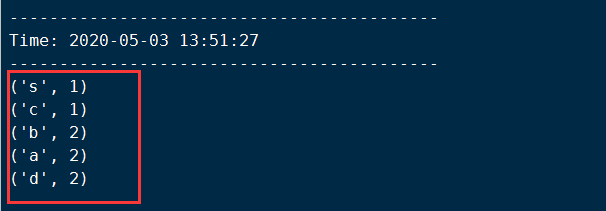
a b c d d s a b #数据流
在另一个shell命令窗口中观察结果:
三、Spark Streaming编程
上面是在命令行中进行的演示,如何在本地通过IDE进行编程呢?其中涉及的概念主要有:
- StreamingContext
- Discretized Streams (DStreams)
(一)StreamingContext
要初始化一个Spark Streaming应用程序,你必须创建一个StreamingContext对象,它是所有Spark Streaming应用程序功能的入口点。
from pyspark import SparkContext
from pyspark.streaming import StreamingContext

def handle_streaming():
    sc = SparkContext(appName='streaming_test')
    ssc = StreamingContext(sc,5)
    #Define Input source by creating input DStreams
    lines = ssc.socketTextStream("192.168.0.110",9999)

    # Define the Streaming computations apply transformation
    counts = lines.flatMap(lambda line:line.split(" ")).\
        map(lambda word:(word,1)).\
        reduceByKey(lambda a,b:a+b)

    # output operations to be DStream
    counts.pprint()

    #start receiving data and processing it
    ssc.start()

    #wait for the processing to be stopped
    ssc.awaitTermination()

if __name__ == '__main__':
    handle_streaming()
注意的是在运行这个程序之前需要先启动192.168.0.110主机上9999端口服务。
上述应用程序其实就是下面这几个步骤:
1、Define the input sources by creating input DStreams.
2、Define the streaming computations by applying transformation and output operations to DStreams.
3、Start receiving data and processing it using streamingContext.start().
4、Wait for the processing to be stopped (manually or due to any error) using streamingContext.awaitTermination().
5、The processing can be manually stopped using streamingContext.stop().
(二)DStream
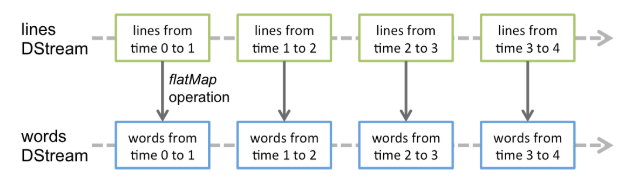
DStream是Spark Streaming的基本抽象,它代表的是连续的数据流,它可以从数据源来接受数据流或者从已经存在的数据流转换而来(类似于RDD的血缘依赖)。在内部,DStream是由一系列连续的RDD表示,它是不可变的、分布式数据集的抽象。DStream中的每一个RDD是来自特定间隔时间的数据。

任何应用于DStream上的操作都被转成底层RDD上的操作,这些底层RDD操作是由Spark引擎来完成的,DStream隐藏了大部分的细节并且为开发人员提供了高级的API来便于操作。
(三)文件流操作
上面读取数据流是通过shell命令行上来输入数据的,那么也可以通过读取一个文件来进行处理实时数据流的处理,主要是通过textFileStream方法:
from pyspark import SparkContext
from pyspark.streaming import StreamingContext

def handle_file_streaming():
    sc = SparkContext(appName="file_streaming")
    ssc = StreamingContext(sc,5)
    lines = ssc.textFileStream("./example") #监听这个文件夹,如果外部将文件移动到这个文件夹,就会被感知
    # Define the Streaming computations apply transformation
    counts = lines.flatMap(lambda line:line.split(" ")).\
        map(lambda word:(word,1)).\
        reduceByKey(lambda a,b:a+b)

    # output operations to be DStream
    counts.pprint()

    #start receiving data and processing it
    ssc.start()

    #wait for the processing to be stopped
    ssc.awaitTermination()

if __name__ == '__main__':
    handle_file_streaming()
文件流操作需要注意的是:
- 文件中的数据必须具有相同的格式
- 这些文件必须从其它地方移动或者重命名到这个监听的目录中
- 文件一旦被移动就不能改变,也就是说如果文件的内容时追加的,就不会读取新的内容

 浙公网安备 33010602011771号