sprint day9
1.项目预期任务量:15天
2.已花费时间:14天
3.剩余时间:1天
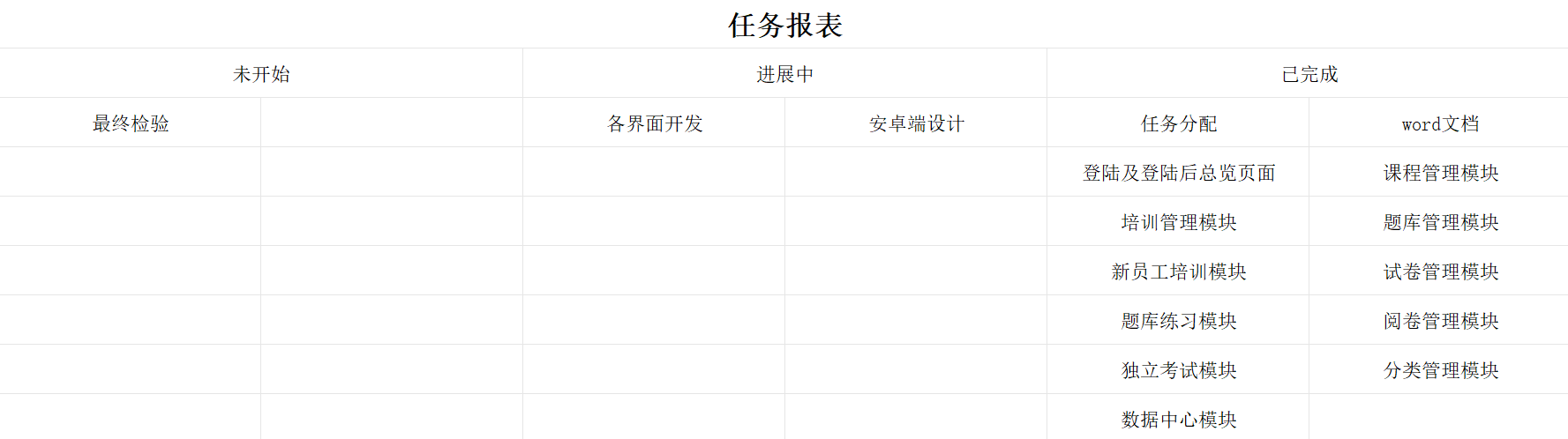
任务看板:
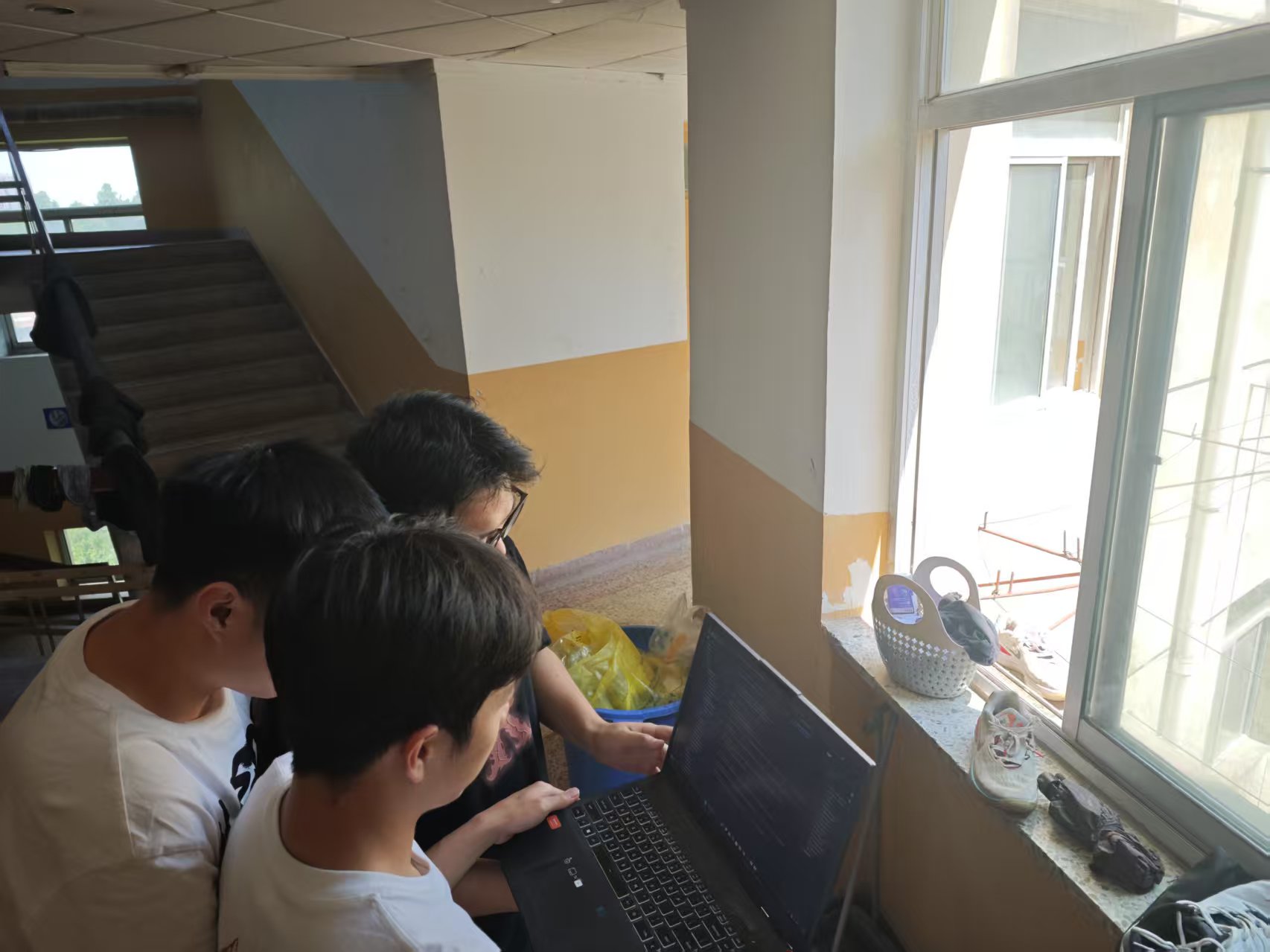
SCRUM会议照片:
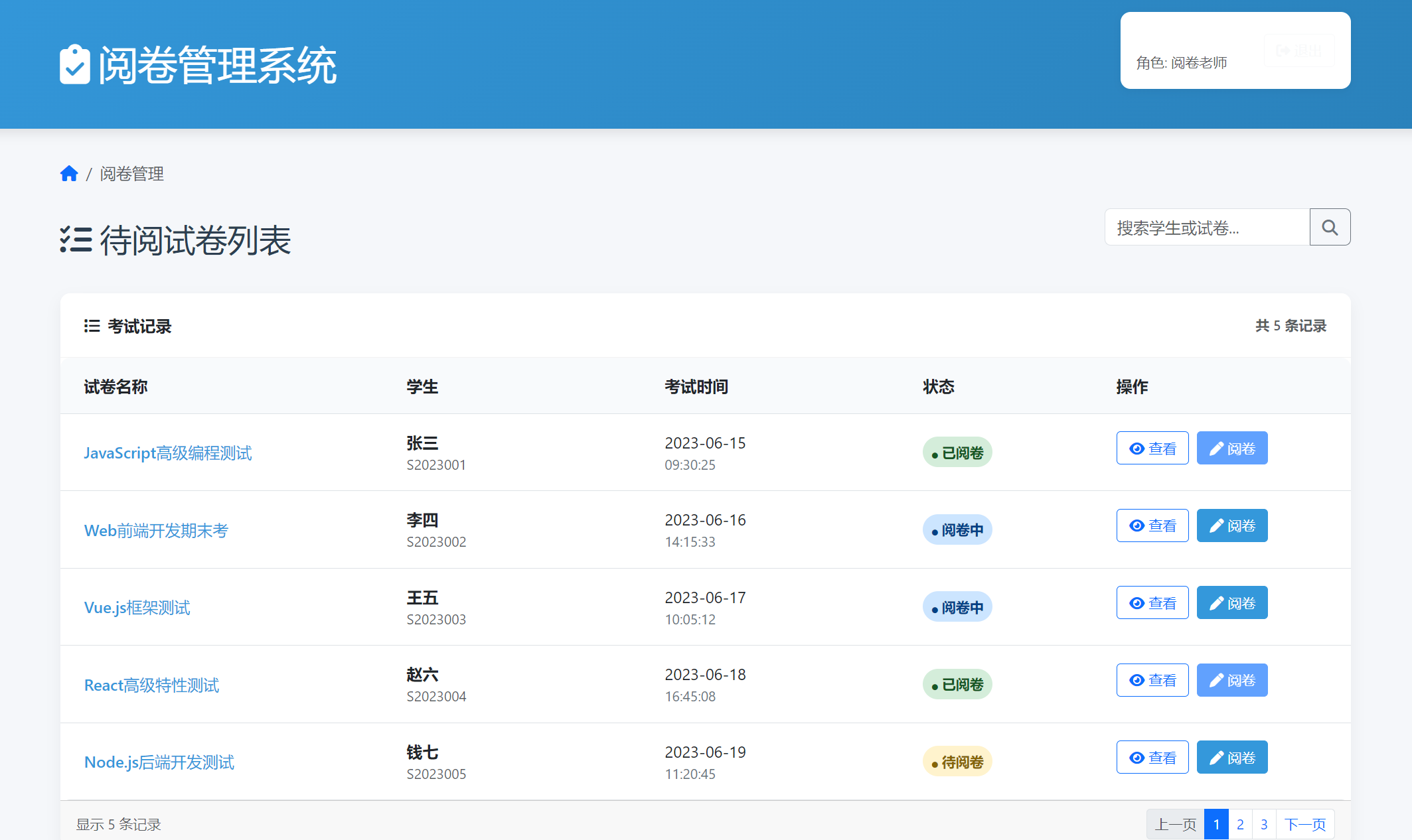
产品状态:
阅卷管理系统
界面演示:在这里可以显示试卷和阅卷情况,老师阅完卷就不会再次阅卷
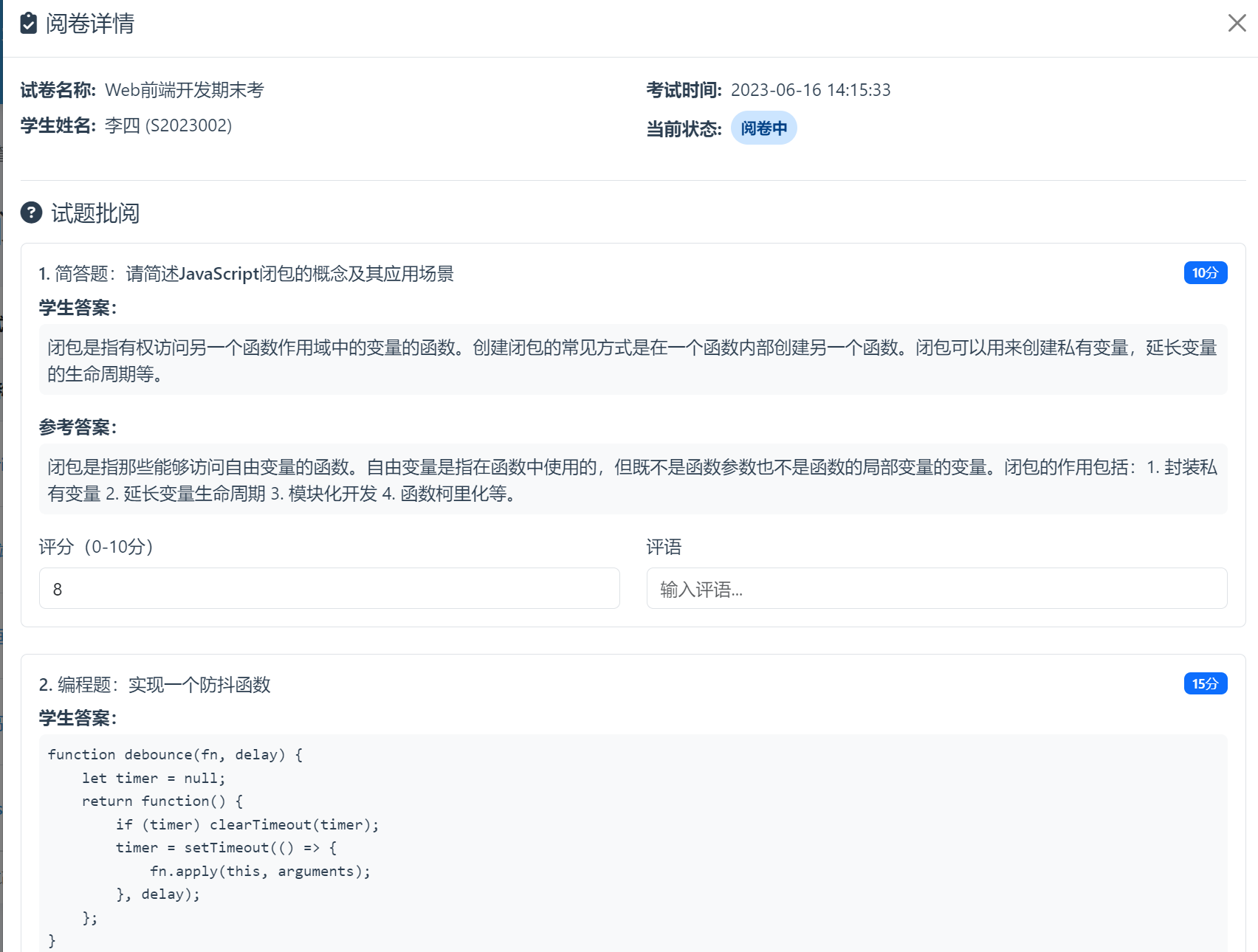
可以查看学生阅卷情况
代码:`
body {
font-family: 'Segoe UI', Tahoma, Geneva, Verdana, sans-serif;
color: var(--dark-text);
background-color: #f5f7fa;
}
.header {
background: linear-gradient(135deg, var(--primary-color), var(--secondary-color));
color: white;
padding: 1rem 0;
margin-bottom: 2rem;
box-shadow: 0 4px 12px rgba(0, 0, 0, 0.1);
}
.card {
border-radius: 10px;
box-shadow: 0 6px 15px rgba(0, 0, 0, 0.05);
margin-bottom: 2rem;
border: none;
}
.card-header {
background-color: white;
border-bottom: 1px solid rgba(0, 0, 0, 0.05);
font-weight: 600;
padding: 1.25rem 1.5rem;
border-radius: 10px 10px 0 0 !important;
}
.table-responsive {
border-radius: 10px;
overflow: hidden;
}
.table {
margin-bottom: 0;
}
.table th {
background-color: #f8fafc;
font-weight: 600;
padding: 1rem 1.5rem;
border-bottom-width: 1px;
}
.table td {
padding: 1rem 1.5rem;
vertical-align: middle;
}
.btn-primary {
background-color: var(--primary-color);
border-color: var(--primary-color);
}
.btn-primary:hover {
background-color: var(--secondary-color);
border-color: var(--secondary-color);
}
.btn-danger {
background-color: var(--accent-color);
border-color: var(--accent-color);
}
.btn-sm {
padding: 0.35rem 0.75rem;
font-size: 0.875rem;
}
.badge {
font-weight: 500;
padding: 0.35em 0.65em;
}
.search-box {
max-width: 300px;
margin-bottom: 1.5rem;
}
.status-badge {
display: inline-block;
padding: 0.35em 0.65em;
border-radius: 50px;
font-size: 0.875em;
font-weight: 600;
}
.status-waiting {
background-color: #fff3cd;
color: #856404;
}
.status-completed {
background-color: #d4edda;
color: #155724;
}
.status-reviewing {
background-color: #cce5ff;
color: #004085;
}
.user-info-card {
background-color: white;
border-radius: 10px;
padding: 1rem;
box-shadow: 0 2px 8px rgba(0, 0, 0, 0.05);
margin-bottom: 1.5rem;
}
.action-buttons .btn {
margin-right: 0.5rem;
margin-bottom: 0.5rem;
}
.exam-time {
font-size: 0.875rem;
color: #6c757d;
}
.student-name {
font-weight: 600;
}
.paper-name {
font-weight: 500;
color: var(--primary-color);
}
</style>
</head>
<body>
<div class="header">
<div class="container">
<div class="d-flex justify-content-between align-items-center">
<h1 class="mb-0"><i class="fas fa-clipboard-check me-2"></i>阅卷管理系统</h1>
<div class="user-info-card d-flex align-items-center">
<div class="me-3">
<div class="fw-bold" id="userName"></div>
<div class="small text-muted" id="userRole"></div>
</div>
<button class="btn btn-outline-light btn-sm" onclick="logout()">
<i class="fas fa-sign-out-alt me-1"></i>退出
</button>
</div>
</div>
</div>
</div>
<div class="container">
<nav aria-label="breadcrumb" class="mb-4">
<ol class="breadcrumb">
<li class="breadcrumb-item"><a href="#"><i class="fas fa-home"></i></a></li>
<li class="breadcrumb-item active" aria-current="page">阅卷管理</li>
</ol>
</nav>
<div class="d-flex justify-content-between align-items-center mb-4">
<h2 class="mb-0"><i class="fas fa-list-check me-2"></i>待阅试卷列表</h2>
<div class="d-flex">
<div class="input-group search-box">
<input type="text" class="form-control" placeholder="搜索学生或试卷..." id="searchInput">
<button class="btn btn-outline-secondary" type="button" onclick="searchRecords()">
<i class="fas fa-search"></i>
</button>
</div>
</div>
</div>
<div class="card">
<div class="card-header d-flex justify-content-between align-items-center">
<span><i class="fas fa-list me-2"></i>考试记录</span>
<div class="text-muted small">共 <span id="recordCount">0</span> 条记录</div>
</div>
<div class="card-body p-0">
<div class="table-responsive">
<table class="table table-hover mb-0" id="recordTable">
<thead>
<tr>
<th width="25%">试卷名称</th>
<th width="20%">学生</th>
<th width="20%">考试时间</th>
<th width="15%">状态</th>
<th width="20%">操作</th>
</tr>
</thead>
<tbody id="recordTableBody">
<!-- 数据将通过JavaScript动态加载 -->
</tbody>
</table>
</div>
</div>
<div class="card-footer d-flex justify-content-between align-items-center">
<div class="text-muted small">显示 <span id="showingCount">0</span> 条记录</div>
<nav aria-label="Page navigation">
<ul class="pagination pagination-sm mb-0">
<li class="page-item disabled">
<a class="page-link" href="#" tabindex="-1" aria-disabled="true">上一页</a>
</li>
<li class="page-item active"><a class="page-link" href="#">1</a></li>
<li class="page-item"><a class="page-link" href="#">2</a></li>
<li class="page-item"><a class="page-link" href="#">3</a></li>
<li class="page-item">
<a class="page-link" href="#">下一页</a>
</li>
</ul>
</nav>
</div>
</div>
</div>
<!-- 阅卷详情模态框 -->
<div class="modal fade" id="markingModal" tabindex="-1" aria-hidden="true">
<div class="modal-dialog modal-xl">
<div class="modal-content">
<div class="modal-header">
<h5 class="modal-title"><i class="fas fa-clipboard-check me-2"></i>阅卷详情</h5>
<button type="button" class="btn-close" data-bs-dismiss="modal" aria-label="Close"></button>
</div>
<div class="modal-body">
<div class="row mb-4">
<div class="col-md-6">
<div class="d-flex align-items-center mb-2">
<span class="me-2 fw-bold">试卷名称:</span>
<span id="modalPaperName">--</span>
</div>
<div class="d-flex align-items-center mb-2">
<span class="me-2 fw-bold">学生姓名:</span>
<span id="modalStudentName">--</span>
</div>
</div>
<div class="col-md-6">
<div class="d-flex align-items-center mb-2">
<span class="me-2 fw-bold">考试时间:</span>
<span id="modalExamTime">--</span>
</div>
<div class="d-flex align-items-center mb-2">
<span class="me-2 fw-bold">当前状态:</span>
<span id="modalStatus" class="status-badge status-waiting">待阅卷</span>
</div>
</div>
</div>
<div class="border-top pt-3">
<h5 class="mb-3"><i class="fas fa-question-circle me-2"></i>试题批阅</h5>
<div class="question-item mb-4 p-3 border rounded">
<div class="d-flex justify-content-between align-items-center mb-2">
<h6 class="mb-0">1. 简答题:请简述JavaScript闭包的概念及其应用场景</h6>
<span class="badge bg-primary">10分</span>
</div>
<div class="mb-3">
<div class="fw-bold mb-1">学生答案:</div>
<div class="p-2 bg-light rounded">
闭包是指有权访问另一个函数作用域中的变量的函数。创建闭包的常见方式是在一个函数内部创建另一个函数。闭包可以用来创建私有变量,延长变量的生命周期等。
</div>
</div>
<div class="mb-3">
<div class="fw-bold mb-1">参考答案:</div>
<div class="p-2 bg-light rounded">
闭包是指那些能够访问自由变量的函数。自由变量是指在函数中使用的,但既不是函数参数也不是函数的局部变量的变量。闭包的作用包括:1. 封装私有变量 2. 延长变量生命周期 3. 模块化开发 4. 函数柯里化等。
</div>
</div>
<div class="row">
<div class="col-md-6">
<label for="score1" class="form-label">评分(0-10分)</label>
<input type="number" class="form-control" id="score1" min="0" max="10" value="8">
</div>
<div class="col-md-6">
<label for="comment1" class="form-label">评语</label>
<input type="text" class="form-control" id="comment1" placeholder="输入评语...">
</div>
</div>
</div>
<div class="question-item mb-4 p-3 border rounded">
<div class="d-flex justify-content-between align-items-center mb-2">
<h6 class="mb-0">2. 编程题:实现一个防抖函数</h6>
<span class="badge bg-primary">15分</span>
</div>
<div class="mb-3">
<div class="fw-bold mb-1">学生答案:</div>
<pre class="p-2 bg-light rounded"><code>function debounce(fn, delay) {
let timer = null;
return function() {
if (timer) clearTimeout(timer);
timer = setTimeout(() => {
fn.apply(this, arguments);
}, delay);
};
}
参考答案:
function debounce(func, wait, immediate) {
let timeout;
return function() {
const context = this;
const args = arguments;
const later = function() {
timeout = null;
if (!immediate) func.apply(context, args);
};
const callNow = immediate && !timeout;
clearTimeout(timeout);
timeout = setTimeout(later, wait);
if (callNow) func.apply(context, args);
};
}<script src="https://cdn.jsdelivr.net/npm/bootstrap@5.3.0/dist/js/bootstrap.bundle.min.js"></script>
<script>
// 模拟数据
const mockRecords = [
{
recordId: 1,
paperType: "JavaScript高级编程测试",
studentname: "张三",
examTime: "2023-06-15 09:30:25",
status: "待阅卷",
studentId: "S2023001",
class: "计算机科学与技术1班"
},
{
recordId: 2,
paperType: "Web前端开发期末考",
studentname: "李四",
examTime: "2023-06-16 14:15:33",
status: "阅卷中",
studentId: "S2023002",
class: "软件工程2班"
},
{
recordId: 3,
paperType: "Vue.js框架测试",
studentname: "王五",
examTime: "2023-06-17 10:05:12",
status: "待阅卷",
studentId: "S2023003",
class: "计算机科学与技术1班"
},
{
recordId: 4,
paperType: "React高级特性测试",
studentname: "赵六",
examTime: "2023-06-18 16:45:08",
status: "已阅卷",
studentId: "S2023004",
class: "软件工程2班"
},
{
recordId: 5,
paperType: "Node.js后端开发测试",
studentname: "钱七",
examTime: "2023-06-19 11:20:45",
status: "待阅卷",
studentId: "S2023005",
class: "计算机科学与技术1班"
}
];
// 从 URL 参数中获取用户数据
const urlParams = new URLSearchParams(window.location.search);
const userData = {
name: urlParams.get('name') || '管理员',
username: urlParams.get('username') || 'admin',
role: urlParams.get('role') || '阅卷老师'
};
// 页面初始化
document.addEventListener('DOMContentLoaded', function() {
// 显示用户信息
document.getElementById('userName').textContent = `${userData.name} (${userData.username})`;
document.getElementById('userRole').textContent = `角色: ${userData.role}`;
// 加载考试记录
fetchRecords();
// 搜索输入框回车事件
document.getElementById('searchInput').addEventListener('keypress', function(e) {
if (e.key === 'Enter') {
searchRecords();
}
});
});
// 获取考试记录
function fetchRecords() {
// 模拟API调用
setTimeout(() => {
renderRecords(mockRecords);
}, 500);
}
// 搜索考试记录
function searchRecords() {
const keyword = document.getElementById('searchInput').value.toLowerCase();
if (!keyword) {
renderRecords(mockRecords);
return;
}
const filteredRecords = mockRecords.filter(record =>
record.paperType.toLowerCase().includes(keyword) ||
record.studentname.toLowerCase().includes(keyword) ||
record.studentId.toLowerCase().includes(keyword)
);
renderRecords(filteredRecords);
}
// 渲染考试记录
function renderRecords(records) {
const container = document.getElementById('recordTableBody');
container.innerHTML = '';
records.forEach(record => {
const row = document.createElement('tr');
// 试卷名称
const paperCell = row.insertCell();
paperCell.innerHTML = `<span class="paper-name">${record.paperType}</span>`;
// 学生信息
const studentCell = row.insertCell();
studentCell.innerHTML = `
<div class="student-name">${record.studentname}</div>
<div class="small text-muted">${record.studentId}</div>
`;
// 考试时间
const timeCell = row.insertCell();
timeCell.innerHTML = `
<div>${record.examTime.split(' ')[0]}</div>
<div class="exam-time">${record.examTime.split(' ')[1]}</div>
`;
// 状态
const statusCell = row.insertCell();
let statusClass = 'status-waiting';
if (record.status === '阅卷中') statusClass = 'status-reviewing';
if (record.status === '已阅卷') statusClass = 'status-completed';
statusCell.innerHTML = `
<span class="status-badge ${statusClass}">
<i class="fas fa-circle me-1" style="font-size: 6px;"></i>${record.status}
</span>
`;
// 操作
const actionCell = row.insertCell();
actionCell.className = 'action-buttons';
const viewBtn = document.createElement('button');
viewBtn.className = 'btn btn-sm btn-outline-primary me-2';
viewBtn.innerHTML = '<i class="fas fa-eye me-1"></i>查看';
viewBtn.onclick = () => viewMarkingDetails(record.recordId);
const markBtn = document.createElement('button');
markBtn.className = 'btn btn-sm btn-primary';
markBtn.innerHTML = '<i class="fas fa-pen me-1"></i>阅卷';
markBtn.onclick = () => startMarking(record.recordId);
markBtn.disabled = record.status === '已阅卷';
actionCell.appendChild(viewBtn);
actionCell.appendChild(markBtn);
container.appendChild(row);
});
// 更新计数
document.getElementById('recordCount').textContent = records.length;
document.getElementById('showingCount').textContent = records.length;
}
// 查看阅卷详情
function viewMarkingDetails(recordId) {
const record = mockRecords.find(r => r.recordId === recordId);
if (!record) return;
// 填充模态框数据
document.getElementById('modalPaperName').textContent = record.paperType;
document.getElementById('modalStudentName').textContent = `${record.studentname} (${record.studentId})`;
document.getElementById('modalExamTime').textContent = record.examTime;
// 更新状态显示
const statusBadge = document.getElementById('modalStatus');
statusBadge.textContent = record.status;
statusBadge.className = 'status-badge ';
if (record.status === '待阅卷') statusBadge.classList.add('status-waiting');
else if (record.status === '阅卷中') statusBadge.classList.add('status-reviewing');
else statusBadge.classList.add('status-completed');
// 显示模态框
const modal = new bootstrap.Modal(document.getElementById('markingModal'));
modal.show();
}
// 开始阅卷
function startMarking(recordId) {
const record = mockRecords.find(r => r.recordId === recordId);
if (!record) return;
// 更新状态为"阅卷中"
record.status = "阅卷中";
renderRecords(mockRecords);
// 打开阅卷模态框
viewMarkingDetails(recordId);
// 显示提示
showAlert(`已开始阅卷: ${record.paperType} - ${record.studentname}`, 'success');
}
// 保存评分
function saveMarking() {
// 这里可以添加保存评分的逻辑
showAlert('评分已保存', 'success');
}
// 完成阅卷
function completeMarking() {
// 这里可以添加完成阅卷的逻辑
const recordId = 1; // 实际应用中应该获取当前阅卷的记录ID
const record = mockRecords.find(r => r.recordId === recordId);
if (record) {
record.status = "已阅卷";
renderRecords(mockRecords);
}
// 关闭模态框
const modal = bootstrap.Modal.getInstance(document.getElementById('markingModal'));
modal.hide();
showAlert('阅卷已完成', 'success');
}
// 显示提示信息
function showAlert(message, type) {
const alert = document.createElement('div');
alert.className = `alert alert-${type} alert-dismissible fade show position-fixed top-0 end-0 m-3`;
alert.style.zIndex = '1100';
alert.role = 'alert';
alert.innerHTML = `
${message}
<button type="button" class="btn-close" data-bs-dismiss="alert" aria-label="Close"></button>
`;
document.body.appendChild(alert);
// 5秒后自动消失
setTimeout(() => {
const bsAlert = new bootstrap.Alert(alert);
bsAlert.close();
}, 5000);
}
// 退出登录
function logout() {
window.location.href = 'login.html';
}
</script>
`

浙公网安备 33010602011771号
