
sprint day6
1.项目预期任务量:15天
2.已花费时间:11天
3.剩余时间:4天
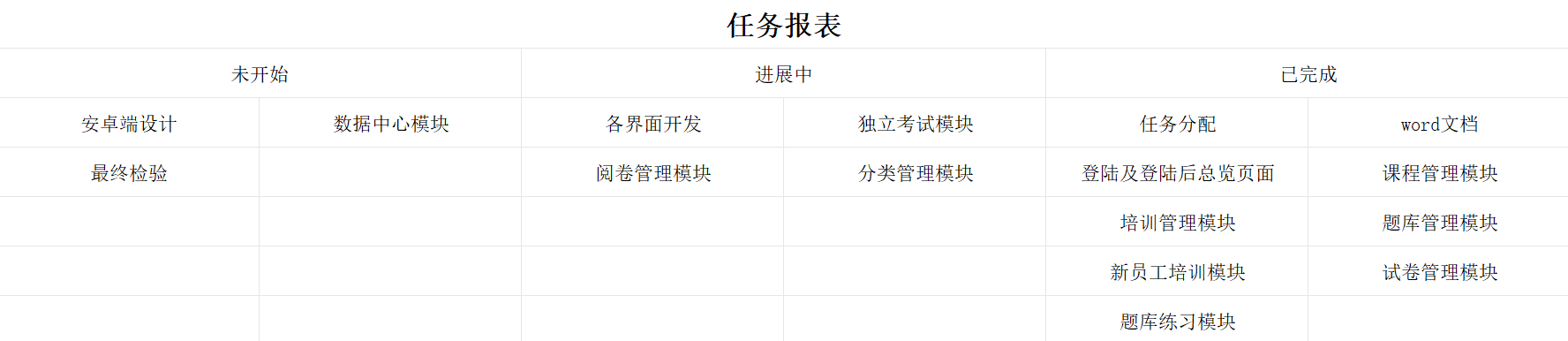
任务看板:
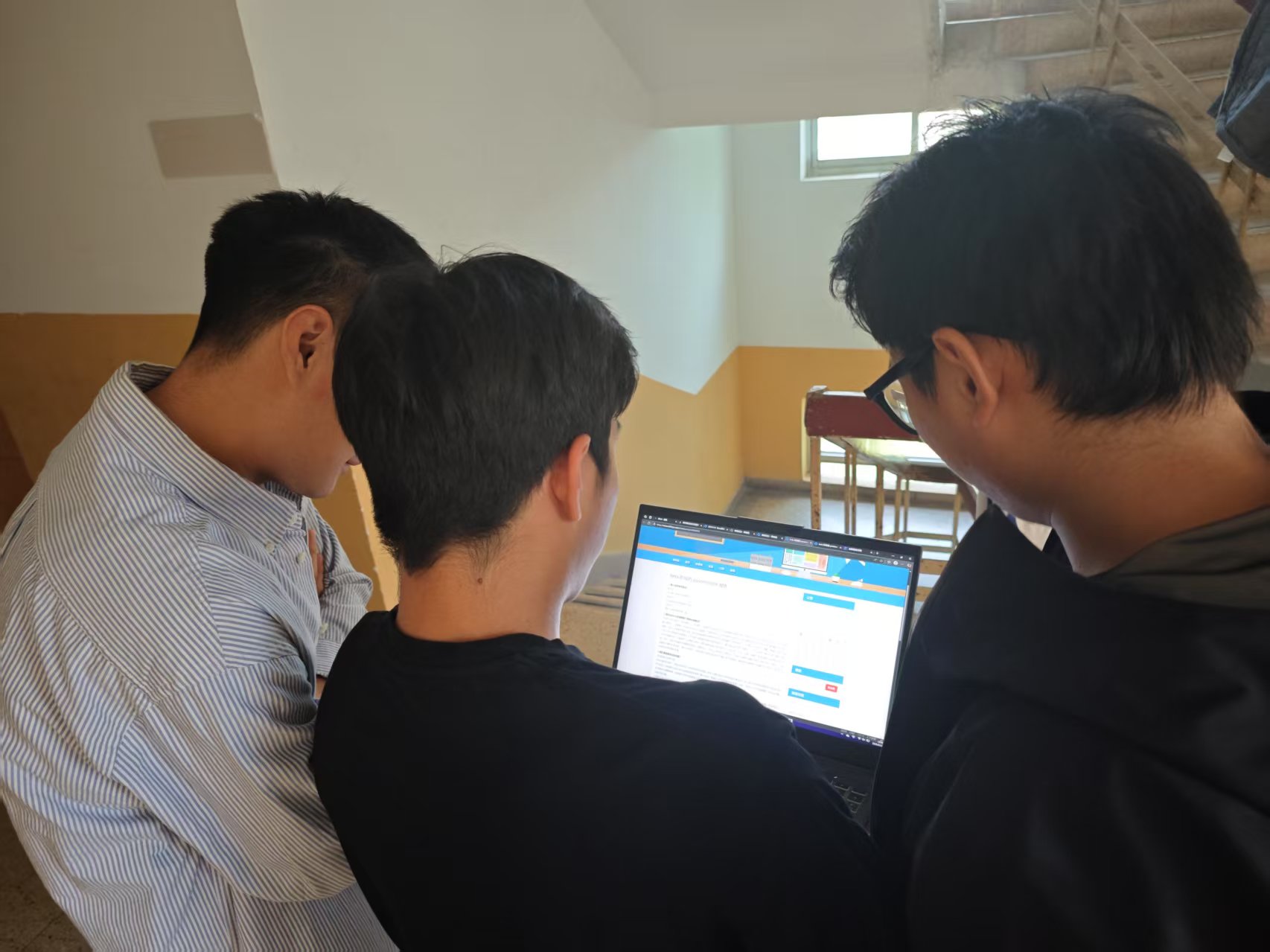
SCRUM会议照片:
产品状态:
题库练习界面
界面演示:首先我们可以在这个界面进行题库练习,之前做错的题目会添加到这个界面里边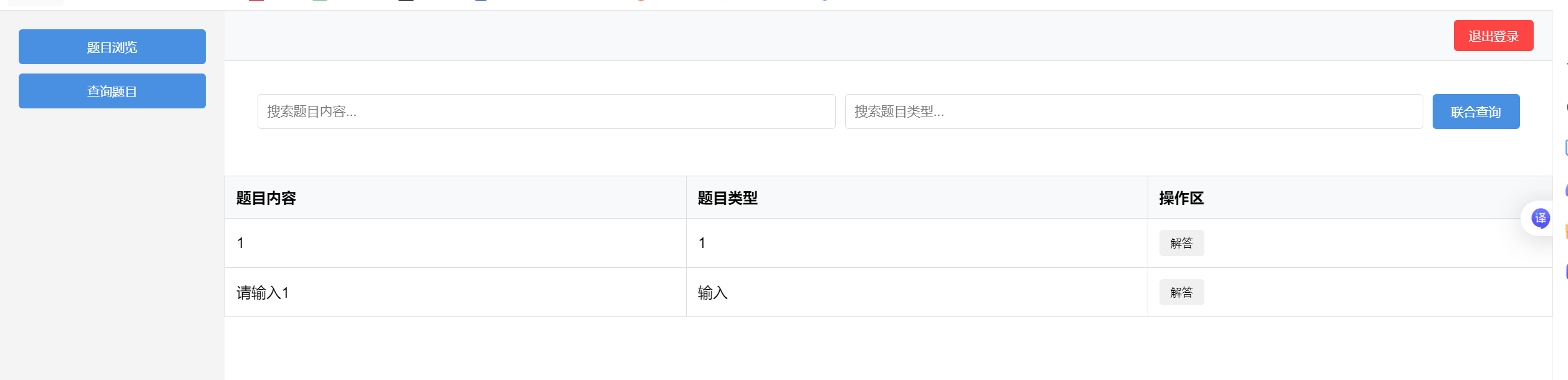
然后这个是我们的解答界面,在这个界面我们进行解答问题
代码:`
/* 左侧导航栏样式 */
.sidebar {
width: 200px;
background-color: #f4f4f4;
padding: 20px;
display: flex;
flex-direction: column;
}
.sidebar button {
margin-bottom: 10px;
padding: 10px;
border: none;
border-radius: 4px;
background-color: #4a90e2;
color: white;
cursor: pointer;
}
/* 右侧内容区域样式 */
.main-content {
flex: 1;
display: flex;
flex-direction: column;
}
/* 顶部角色栏样式 */
.role-bar {
display: flex;
justify-content: space-between;
align-items: center;
padding: 10px 20px;
background-color: #f8f9fa;
border-bottom: 1px solid #ddd;
}
/* 角色栏中登录信息样式 */
.login-info {
font-size: 14px;
}
/* 角色栏中退出登录按钮样式 */
.logout-btn {
background-color: #ff4444;
color: white;
border: none;
padding: 8px 16px;
border-radius: 4px;
cursor: pointer;
}
/* 题目信息表格样式 */
.question-table {
width: 100%;
border-collapse: collapse;
margin-top: 15px;
}
.question-table th,
.question-table td {
padding: 12px;
text-align: left;
border: 1px solid #ddd;
}
.question-table th {
background-color: #f8f9fa;
font-weight: 600;
}
/* 操作按钮样式(保留空样式,以备未来可能使用) */
.action-btn {
padding: 6px 12px;
border: none;
border-radius: 4px;
cursor: pointer;
font-size: 12px;
margin-right: 5px;
}
/* 表单容器样式(隐藏添加/编辑表单) /
[style="display: none"],
#addQuestionFormContainer,
#editQuestionFormContainer {
display: none !important;
}
/* 搜索框容器样式 /
#searchBoxContainer {
margin: 20px;
padding: 15px;
display: flex;
gap: 10px; / 输入框间距 */
align-items: center;
}
.search-input {
flex-grow: 1; /* 输入框自动扩展 */
padding: 10px;
border: 1px solid #ddd;
border-radius: 4px;
font-size: 14px;
}
.function-btn {
padding: 10px 20px;
border: none;
border-radius: 4px;
background-color: #4a90e2;
color: white;
cursor: pointer;
}
/* 答题表单容器样式 */
.form-container {
display: none;
position: fixed;
top: 50%;
left: 50%;
transform: translate(-50%, -50%);
background-color: #ffffff;
padding: 30px;
border-radius: 10px;
box-shadow: 0 0 20px rgba(0, 0, 0, 0.2);
z-index: 1000;
width: 40%;
min-width: 300px;
}
.form-container h2 {
margin-top: 0;
color: #333;
font-size: 24px;
text-align: center;
}
.form-container p {
margin-bottom: 15px;
color: #666;
font-size: 16px;
}
.form-container input[type="text"] {
width: 100%;
padding: 12px;
margin-bottom: 20px;
border: 1px solid #ccc;
border-radius: 5px;
box-sizing: border-box;
font-size: 16px;
}
.form-container button {
padding: 12px 20px;
border: none;
border-radius: 5px;
cursor: pointer;
font-size: 16px;
margin-right: 10px;
transition: background-color 0.3s ease;
}
.form-container button[type="button"] {
background-color: #4a90e2;
color: white;
}
.form-container button[type="button"]:hover {
background-color: #357abd;
}
.form-container button[type="button"]:last-child {
background-color: #f4f4f4;
color: #333;
}
.form-container button[type="button"]:last-child:hover {
background-color: #e0e0e0;
}
/* 遮罩层样式 */
.overlay {
display: none;
position: fixed;
top: 0;
left: 0;
width: 100%;
height: 100%;
background-color: rgba(0, 0, 0, 0.5);
z-index: 999;
}
/* 结果文本样式 */
#resultText {
font-weight: bold;
margin-top: 10px;
}
resultText.correct {
color: #28a745;
}
resultText.incorrect {
color: #dc3545;
}
| 题目内容 | 题目类型 | 操作区 |
|---|
答题页面

 浙公网安备 33010602011771号