
sprint day1
1.项目预期任务量:15天
2.已花费时间:6天
3.剩余时间:9天
任务看板:
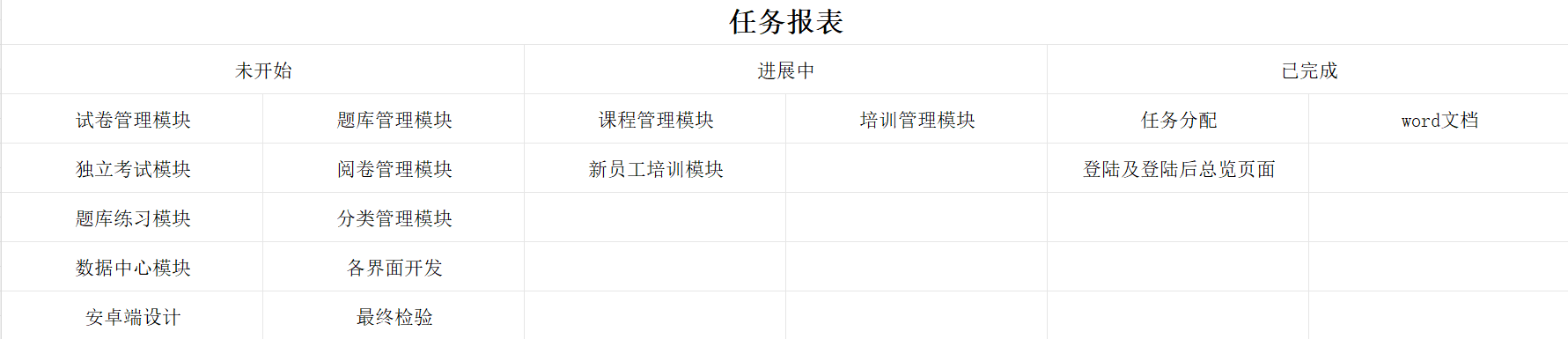
SCRUM会议照片:

产品状态:
登录界面以及登陆后系统的主页面
界面演示:
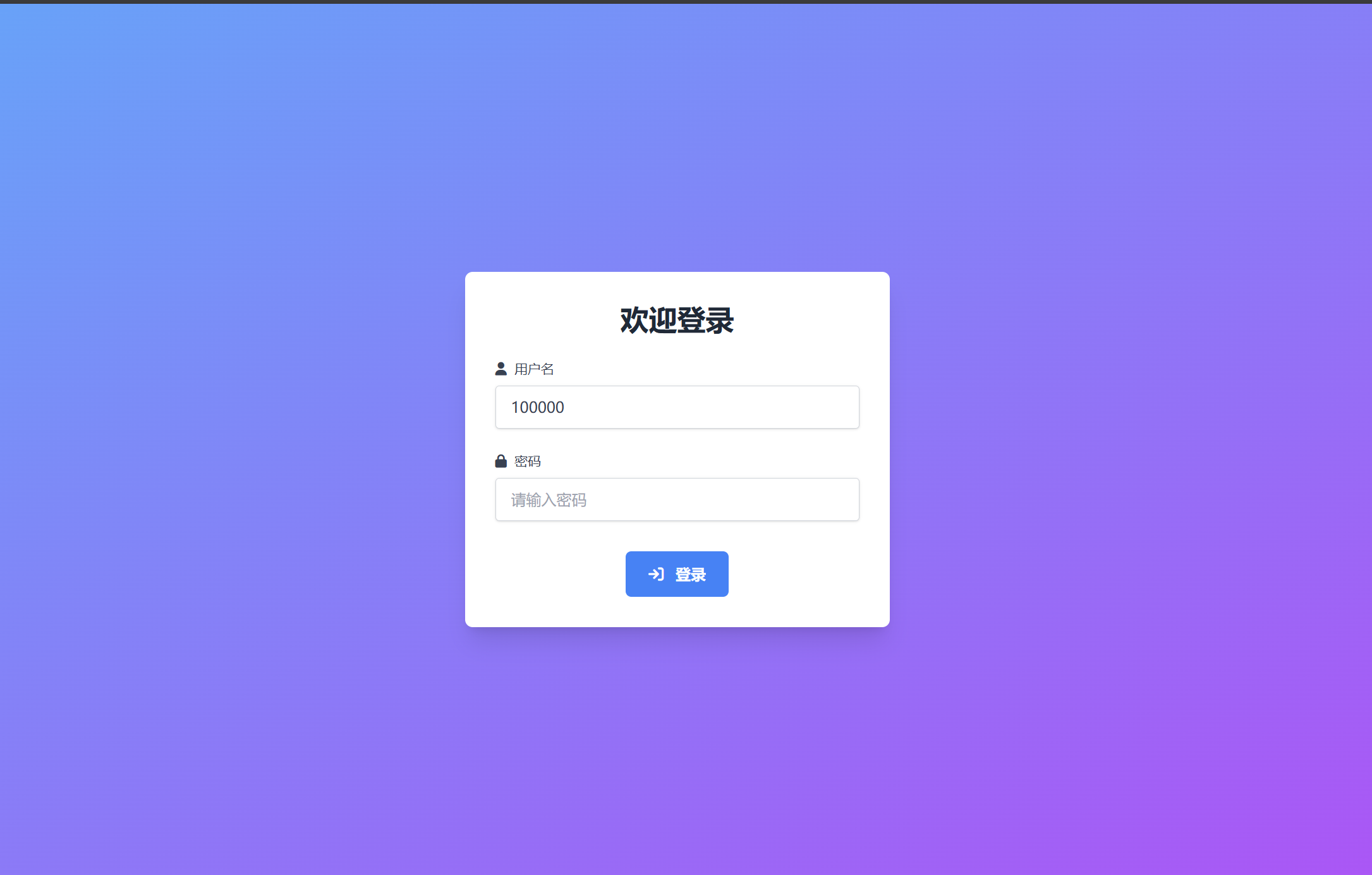
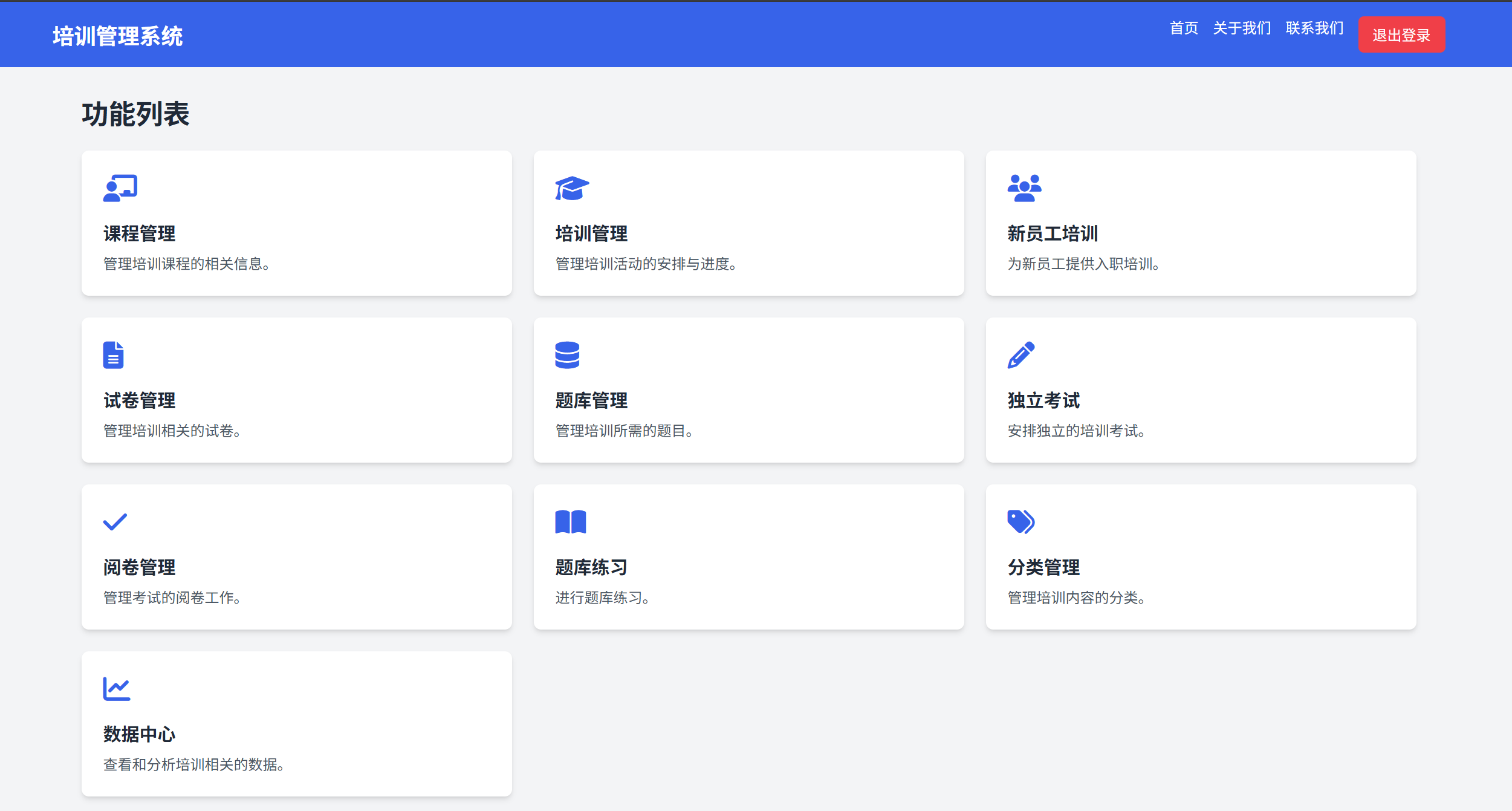
代码:
登录界面
<!DOCTYPE html>
<html lang="en">

<head>
    <meta charset="UTF-8">
    <meta name="viewport" content="width=device-width, initial-scale=1.0">
    <script src="https://cdn.tailwindcss.com"></script>
    <link href="https://cdnjs.cloudflare.com/ajax/libs/font-awesome/6.7.2/css/all.min.css" rel="stylesheet">
    <title>登录界面</title>
    <style>
        /* 添加自定义动画 */
        .animate-fade-in {
            animation: fadeIn 0.5s ease-in-out;
        }

        @keyframes fadeIn {
            from {
                opacity: 0;
                transform: translateY(-20px);
            }
            to {
                opacity: 1;
                transform: translateY(0);
            }
        }

        /* 按钮悬停动画 */
        .hover:scale-105 {
            transition: transform 0.3s ease;
        }
    </style>
</head>

<body class="bg-gradient-to-br from-blue-400 to-purple-500 h-screen flex justify-center items-center">
<div class="bg-white p-8 rounded-lg shadow-xl w-full max-w-md animate-fade-in">
    <h2 class="text-3xl font-extrabold text-center text-gray-800 mb-6">欢迎登录</h2>
    <form id="loginForm">
        <div class="mb-6">
            <label for="username" class="block text-gray-700 text-sm font-medium mb-2">
                <i class="fa-solid fa-user mr-1"></i> 用户名
            </label>
            <input type="text" id="username" name="username"
                   class="shadow appearance-none border border-gray-300 rounded w-full py-3 px-4 text-gray-700 leading-tight focus:outline-none focus:border-blue-500 focus:ring-blue-500 focus:ring-1"
                   placeholder="请输入用户名">
        </div>
        <div class="mb-8">
            <label for="password" class="block text-gray-700 text-sm font-medium mb-2">
                <i class="fa-solid fa-lock mr-1"></i> 密码
            </label>
            <input type="password" id="password" name="password"
                   class="shadow appearance-none border border-gray-300 rounded w-full py-3 px-4 text-gray-700 leading-tight focus:outline-none focus:border-blue-500 focus:ring-blue-500 focus:ring-1"
                   placeholder="请输入密码">
        </div>
        <div class="flex justify-center">
            <button type="submit"
                    class="bg-blue-500 hover:bg-blue-600 hover:scale-105 text-white font-bold py-3 px-6 rounded-md focus:outline-none focus:ring-2 focus:ring-blue-400 focus:ring-opacity-50">
                <i class="fa-solid fa-sign-in mr-2"></i> 登录
            </button>
        </div>
    </form>
    <div id="errorMessage" class="text-red-500 text-center mt-6 hidden animate-fade-in">用户名或密码错误</div>
    <div id="serverError" class="text-red-500 text-center mt-6 hidden animate-fade-in">登录时发生错误,请稍后再试</div>
</div>

<script>
    const loginForm = document.getElementById('loginForm');
    const errorMessage = document.getElementById('errorMessage');
    const serverError = document.getElementById('serverError');

    loginForm.addEventListener('submit', function (e) {
        e.preventDefault();

        const username = document.getElementById('username').value;
        const password = document.getElementById('password').value;

        // 简单验证输入是否为空
        if (username === '' || password === '') {
            errorMessage.classList.remove('hidden');
            return;
        }

        const formData = new URLSearchParams();
        formData.append('username', username);
        formData.append('password', password);

        // 修改 fetch 部分为 POST 请求
        fetch('/login', {
            method: 'POST',
            headers: {
                'Content-Type': 'application/x-www-form-urlencoded'
            },
            body: new URLSearchParams({
                username: username,
                password: password
            })
        })
            .then(response => {
                if (response.ok) {
                    return response.json();
                }
                // 处理 HTTP 错误状态码
                if (response.status === 401) {
                    throw new Error('认证失败');
                }
                throw new Error('网络请求失败');
            })
            .then(data => {
                // 严格判断返回的 User 对象是否为 null
                if (data!== null && typeof data === 'object') {
                    // 使用 URL 参数传递数据
                    const queryString = Object.keys(data).map(key => `${encodeURIComponent(key)}=${encodeURIComponent(JSON.stringify(data[key]))}`).join('&');
                    window.location.href = `index.html?${queryString}`;
                } else {
                    // 处理业务逻辑错误
                    errorMessage.classList.remove('hidden');
                    serverError.classList.add('hidden');
                }
            })
            .catch(error => {
                console.error('Error:', error);
                if (error.message.includes('认证失败')) {
                    errorMessage.classList.remove('hidden');
                } else {
                    serverError.classList.remove('hidden');
                }
            });
    });
</script>
</body>

</html>
主功能界面
<!DOCTYPE html>
<html lang="en">

<head>
  <meta charset="UTF-8">
  <meta name="viewport" content="width=device-width, initial-scale=1.0">
  <script src="https://cdn.tailwindcss.com"></script>
  <link href="https://cdnjs.cloudflare.com/ajax/libs/font-awesome/6.7.2/css/all.min.css" rel="stylesheet">
  <title>培训管理系统 - 首页</title>
  <style>
    body {
      font-family: 'Inter', sans-serif;
    }
  </style>
</head>

<body class="bg-gray-100">
<!-- 导航栏 -->
<nav class="bg-blue-600 p-4 text-white">
  <div class="container mx-auto flex justify-between items-center">
    <h1 class="text-2xl font-bold">培训管理系统</h1>
    <div class="flex space-x-4">
      <a href="#" class="hover:text-gray-300">首页</a>
      <a href="#" class="hover:text-gray-300">关于我们</a>
      <a href="#" class="hover:text-gray-300">联系我们</a>
      <button id="logoutButton" class="hover:text-gray-300 bg-red-500 px-4 py-2 rounded-md">退出登录</button>
    </div>
  </div>
</nav>

<!-- 主内容区域 -->
<!-- 主内容区域 -->
<main class="container mx-auto p-8">
  <h2 class="text-3xl font-bold text-gray-800 mb-6">功能列表</h2>
  <div class="grid grid-cols-1 md:grid-cols-2 lg:grid-cols-3 gap-6">
    <!-- 课程管理(保留原链接逻辑) -->
    <a href="#" id="courseManagement"
       class="bg-white p-6 rounded-lg shadow-md hover:shadow-lg transform hover:scale-105 transition duration-300">
      <i class="fa-solid fa-chalkboard-user text-3xl text-blue-600 mb-4"></i>
      <h3 class="text-xl font-bold text-gray-800 mb-2">课程管理</h3>
      <p class="text-gray-600">管理培训课程的相关信息。</p>
    </a>
    <!-- 培训管理(链接置空) -->
    <a href="#" id="trainingManagement"
       class="bg-white p-6 rounded-lg shadow-md hover:shadow-lg transform hover:scale-105 transition duration-300">
      <i class="fa-solid fa-graduation-cap text-3xl text-blue-600 mb-4"></i>
      <h3 class="text-xl font-bold text-gray-800 mb-2">培训管理</h3>
      <p class="text-gray-600">管理培训活动的安排与进度。</p>
    </a>
    <!-- 新员工培训(链接置空) -->
    <a href="#" id="newEmployeeTraining"
       class="bg-white p-6 rounded-lg shadow-md hover:shadow-lg transform hover:scale-105 transition duration-300">
      <i class="fa-solid fa-users text-3xl text-blue-600 mb-4"></i>
      <h3 class="text-xl font-bold text-gray-800 mb-2">新员工培训</h3>
      <p class="text-gray-600">为新员工提供入职培训。</p>
    </a>
    <!-- 试卷管理(链接置空) -->
    <a href="#" id="examPaperManagement"
       class="bg-white p-6 rounded-lg shadow-md hover:shadow-lg transform hover:scale-105 transition duration-300">
      <i class="fa-solid fa-file-lines text-3xl text-blue-600 mb-4"></i>
      <h3 class="text-xl font-bold text-gray-800 mb-2">试卷管理</h3>
      <p class="text-gray-600">管理培训相关的试卷。</p>
    </a>
    <!-- 题库管理(链接置空) -->
    <a href="#" id="questionBankManagement"
       class="bg-white p-6 rounded-lg shadow-md hover:shadow-lg transform hover:scale-105 transition duration-300">
      <i class="fa-solid fa-database text-3xl text-blue-600 mb-4"></i>
      <h3 class="text-xl font-bold text-gray-800 mb-2">题库管理</h3>
      <p class="text-gray-600">管理培训所需的题目。</p>
    </a>
    <!-- 独立考试(链接置空) -->
    <a href="#" id="independentExam"
       class="bg-white p-6 rounded-lg shadow-md hover:shadow-lg transform hover:scale-105 transition duration-300">
      <i class="fa-solid fa-pencil text-3xl text-blue-600 mb-4"></i>
      <h3 class="text-xl font-bold text-gray-800 mb-2">独立考试</h3>
      <p class="text-gray-600">安排独立的培训考试。</p>
    </a>
    <!-- 阅卷管理(链接置空) -->
    <a href="#" id="gradingManagement"
       class="bg-white p-6 rounded-lg shadow-md hover:shadow-lg transform hover:scale-105 transition duration-300">
      <i class="fa-solid fa-check text-3xl text-blue-600 mb-4"></i>
      <h3 class="text-xl font-bold text-gray-800 mb-2">阅卷管理</h3>
      <p class="text-gray-600">管理考试的阅卷工作。</p>
    </a>
    <!-- 题库练习(链接置空) -->
    <a href="#" id="questionBankPractice"
       class="bg-white p-6 rounded-lg shadow-md hover:shadow-lg transform hover:scale-105 transition duration-300">
      <i class="fa-solid fa-book-open text-3xl text-blue-600 mb-4"></i>
      <h3 class="text-xl font-bold text-gray-800 mb-2">题库练习</h3>
      <p class="text-gray-600">进行题库练习。</p>
    </a>
    <!-- 分类管理(链接置空) -->
    <a href="#" id="categoryManagement"
       class="bg-white p-6 rounded-lg shadow-md hover:shadow-lg transform hover:scale-105 transition duration-300">
      <i class="fa-solid fa-tags text-3xl text-blue-600 mb-4"></i>
      <h3 class="text-xl font-bold text-gray-800 mb-2">分类管理</h3>
      <p class="text-gray-600">管理培训内容的分类。</p>
    </a>
    <!-- 数据中心(链接置空) -->
    <a href="#" id="dataCenter"
       class="bg-white p-6 rounded-lg shadow-md hover:shadow-lg transform hover:scale-105 transition duration-300">
      <i class="fa-solid fa-chart-line text-3xl text-blue-600 mb-4"></i>
      <h3 class="text-xl font-bold text-gray-800 mb-2">数据中心</h3>
      <p class="text-gray-600">查看和分析培训相关的数据。</p>
    </a>
  </div>
</main>

<script>
  // 移除原链接批量设置逻辑(仅保留课程管理的原有逻辑,其他链接已手动置空)
  // 退出登录和角色控制逻辑保持不变
  const urlParams = new URLSearchParams(window.location.search);
  const userData = {};
  urlParams.forEach((value, key) => {
    try {
      userData[key] = JSON.parse(value);
    } catch (error) {
      userData[key] = value;
    }
  });

  // 仅为课程管理链接设置带参数的 href
  const courseLink = document.getElementById('courseManagement');
  if (courseLink) {
    const queryString = Object.keys(userData)
            .map(key => `${encodeURIComponent(key)}=${encodeURIComponent(JSON.stringify(userData[key]))}`)
            .join('&');
    courseLink.href = `course.html?${queryString}`; // 目标页面改为实际地址
  }

  const classLink = document.getElementById('categoryManagement');
  if (classLink) {
    const queryString = Object.keys(userData)
            .map(key => `${encodeURIComponent(key)}=${encodeURIComponent(JSON.stringify(userData[key]))}`)
            .join('&');
    classLink.href = `classification_management.html?${queryString}`; // 目标页面改为实际地址
  }

  const dataLink = document.getElementById('dataCenter');
  if (dataLink) {
    const queryString = Object.keys(userData)
            .map(key => `${encodeURIComponent(key)}=${encodeURIComponent(JSON.stringify(userData[key]))}`)
            .join('&');
    dataLink.href = `data_center.html?${queryString}`; // 目标页面改为实际地址
  }

  const independentExamLink = document.getElementById('independentExam');
  if (independentExamLink) {
    const queryString = Object.keys(userData)
            .map(key => `${encodeURIComponent(key)}=${encodeURIComponent(JSON.stringify(userData[key]))}`)
            .join('&');
    independentExamLink.href = `exam.html?${queryString}`;
  }

  const examPaperManagementLink = document.getElementById('examPaperManagement');
  if (examPaperManagementLink) {
    const queryString = Object.keys(userData)
            .map(key => `${encodeURIComponent(key)}=${encodeURIComponent(JSON.stringify(userData[key]))}`)
            .join('&');
    examPaperManagementLink.href = `exam-paper-management.html?${queryString}`;
  }

  const gradingManagementLink = document.getElementById('gradingManagement');
  if (gradingManagementLink) {
    const queryString = Object.keys(userData)
            .map(key => `${encodeURIComponent(key)}=${encodeURIComponent(JSON.stringify(userData[key]))}`)
            .join('&');
    gradingManagementLink.href = `marking.html?${queryString}`;
  }

  const newEmployeeTrainingLink = document.getElementById('newEmployeeTraining');
  if (newEmployeeTrainingLink) {
    const queryString = Object.keys(userData)
            .map(key => `${encodeURIComponent(key)}=${encodeURIComponent(JSON.stringify(userData[key]))}`)
            .join('&');
    newEmployeeTrainingLink.href = `New-employee-training-management.html?${queryString}`;
  }

  const questionBankManagementLink = document.getElementById('questionBankManagement');
  if (questionBankManagementLink) {
    const queryString = Object.keys(userData)
            .map(key => `${encodeURIComponent(key)}=${encodeURIComponent(JSON.stringify(userData[key]))}`)
            .join('&');
    questionBankManagementLink.href = `question-bank-management.html?${queryString}`;
  }

  const questionBankPracticeLink = document.getElementById('questionBankPractice');
  if (questionBankPracticeLink) {
    const queryString = Object.keys(userData)
            .map(key => `${encodeURIComponent(key)}=${encodeURIComponent(JSON.stringify(userData[key]))}`)
            .join('&');
    questionBankPracticeLink.href = `question_practice.html?${queryString}`;
  }

  const trainingManagementLink = document.getElementById('trainingManagement');
  if (trainingManagementLink) {
    const queryString = Object.keys(userData)
            .map(key => `${encodeURIComponent(key)}=${encodeURIComponent(JSON.stringify(userData[key]))}`)
            .join('&');
    trainingManagementLink.href = `training-management.html?${queryString}`;
  }


  const logoutButton = document.getElementById('logoutButton');
  logoutButton.addEventListener('click', () => {
    window.location.href = 'login.html';
  });

  const role = userData.role;
  if (role === '学生') {
    const allowedLinks = ['courseManagement', 'questionBankManagement', 'questionBankPractice', 'independentExam'];
    links.forEach(linkId => {
      const link = document.getElementById(linkId);
      if (!allowedLinks.includes(linkId)) {
        link.style.display = 'none';
      }
    });
  }
</script>
</body>

</html>

 浙公网安备 33010602011771号