
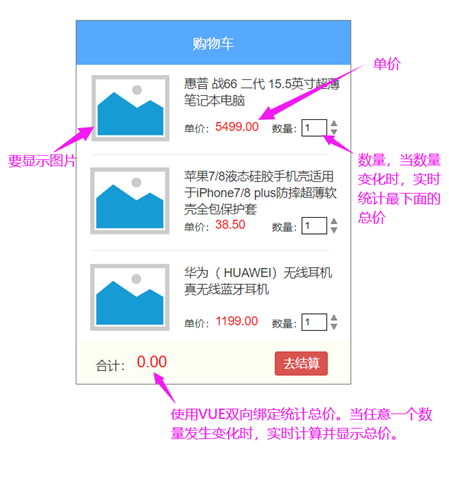
VUE + ElementUI VUE双向绑定实现购物车开发
<template>
    <div>
        <el-table :data=productList>
            <el-table-column label="图片">
                <template slot-scope="scope">
                    <img v-bind:src="scope.row.img" height="80px;"/>
                </template>
            </el-table-column>
            <el-table-column label="信息">
                <template slot-scope="scope">
                    <h3>{{scope.row.name}}</h3>
                    <h4>{{scope.row.price}}</h4>
                    <!-- <input  v-model="scope.row.num" /> -->
                    <!-- <el-input v-model="scope.row.num"></el-input> -->
                    <el-input-number v-model="scope.row.num" @change="handleChange" :min="1" :max="10" label="描述文字"></el-input-number>
                </template>
            </el-table-column>
        </el-table>
        <div>
            总价:{{total}}
            <el-button type="primary">结算</el-button>
        </div>
    </div>
</template>

<script>
    export default {
        data(){
            return {
                total:0,
                productList:[{id:1,name:"三星笔记本",img:"https://m.360buyimg.com/babel/jfs/t1/117444/8/7913/170413/5ec683daEb1c3383c/2329ef2d22fa3a4f.jpg!q70.jpg",price:4590.0,num:1},
                             {id:2,name:"苹果手机",img:"https://m.360buyimg.com/babel/jfs/t1/98009/30/16479/84223/5e7cb5e6E314629e2/3dff9921d9b72d21.jpg!q70.jpg",price:6590.0,num:2}]
            }
        },
        methods:{
            handleChange(){
                console.log(this.productList);
                this.totalPrice();
            },
            totalPrice(){
                let total = 0;
                this.productList.forEach(p=>{
                    total += p.price * p.num;
                })
                console.log(total);
                this.total = total;
            }
        },
        created(){
            this.totalPrice();
        }
    }
</script>

<style scoped>

</style>

 浙公网安备 33010602011771号