
时区与时间
一. 网址参考
2. How to Set the Time Zone in Linux
4. setenv环境变量函数
5. settimeofday()--Set System Clock
7. zic - 时区编辑器
8. tzdata(github工程,包含yearistype.sh,由IANA组织维护)
二. 实践
1. 使用zic命令生成时区文件
-
编辑Utc.txt文件,内容如下:
-
# GMT+3:30和GMT+4:30为将要生成的文件名, -3:30表示与UTC的偏移时间
Zone GMT+3:30 -3:30 - UTC Zone GMT+4:30 -4:30 - UTC -
用zic命令编译Utc.txt文件
-
# UTC为保存时区文件的目录 zic -d UTC Utc.txt -
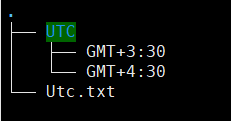
目录如下:
![]()
-
把UTC目录拷贝到demo板的/opt目录下,并修改/etc/localtime软链接
-
rm /etc/localtime
ln -s /opt/GMT\+3\:30 /etc/localtime
-
则本地时间会比UTC时间晚3:30, 注意:其文件名为‘+’,但内部偏移为‘-’
2. setenv函数:
通过此函数并不能添加或修改 shell 进程的环境变量,或者说通过setenv函数设置的环境变量只在本进程,而且是本次执行中有效。如果在某一次运行程序时执行了setenv函数,进程终止后再次运行该程序,上次的设置是无效的,上次设置的环境变量是不能读到的。
3. settimeofday函数:通过秒值,修改系统的UTC时间;
函数原型:

struct timeval {
    time_t      tv_sec;     /* seconds */
    suseconds_t tv_usec;    /* microseconds */
};
struct timezone {
    int tz_minuteswest;     /* minutes west of Greenwich */
    int tz_dsttime;         /* type of DST correction */
};
 int settimeofday (struct timeval *tp,
                  struct timezone *tzp);
示例:
#include <sys/time.h>
#include <stdio.h>
#include <errno.h>

int main(int argc, char *argv[])
{
    struct timeval now;
    int rc;

    now.tv_sec=866208142;
    now.tv_usec=290944;

    rc=settimeofday(&now, NULL);
    if(rc==0) {
        printf("settimeofday() successful.\n");
    }
    else {
        printf("settimeofday() failed, "
        "errno = %d\n",errno);
        return -1;
    }

    return 0;
}
Example Output:
settimeofday() successful.

 浙公网安备 33010602011771号