【c++】基于apache的cgi搭建http服务器 并支持 python和c++语言
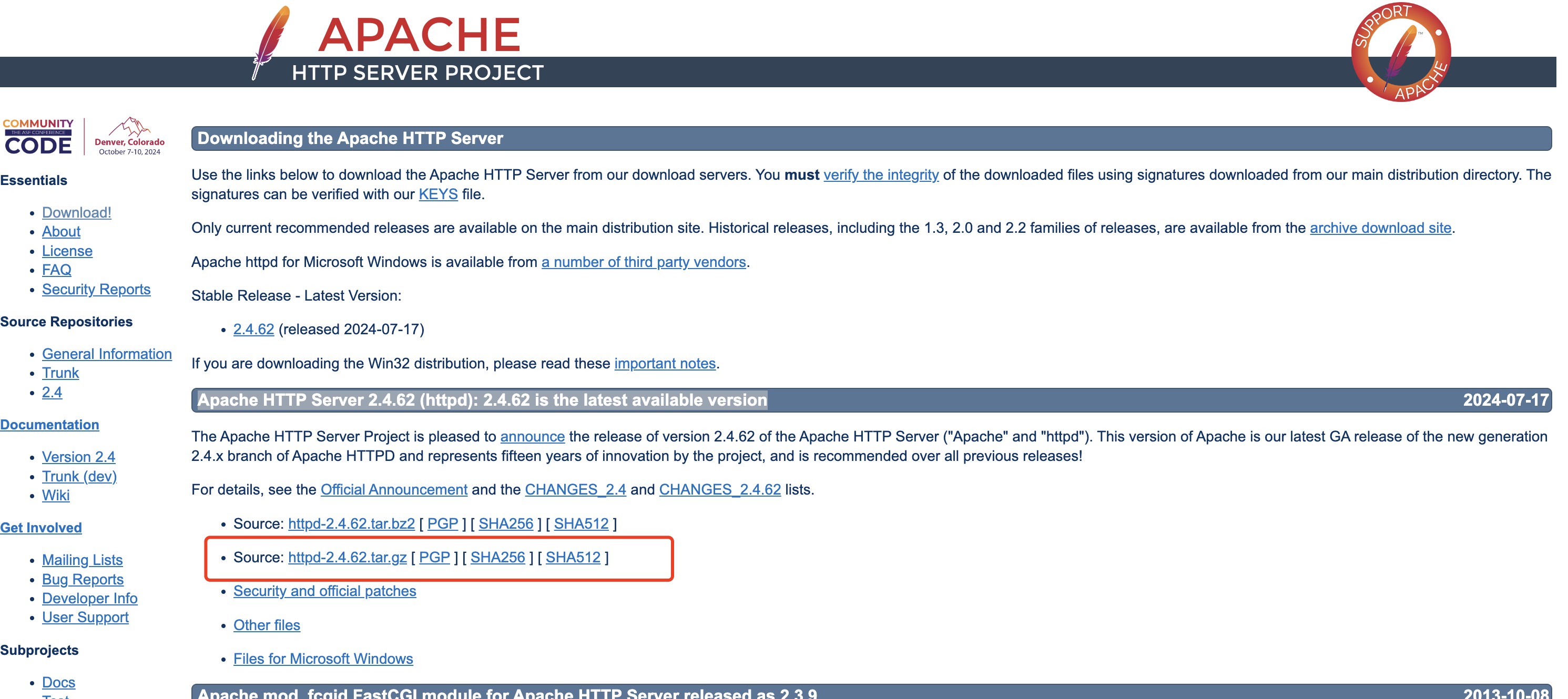
一、下载apache cgi的安装包(mac电脑)
官网地址:https://httpd.apache.org/download.cgi
二、基于源码进行安装

2.1、macos电脑
①源码文件进行解压后,然后进入到目录中,执行配置命令
shangxiaofei@XXSHANG-MC0 apachecgi % ls
httpd-2.4.62        httpd-2.4.62.tar.gz    temp.py
shangxiaofei@XXSHANG-MC0 apachecgi %
shangxiaofei@XXSHANG-MC0 apachecgi %
shangxiaofei@XXSHANG-MC0 apachecgi % cd httpd-2.4.62
shangxiaofei@XXSHANG-MC0 httpd-2.4.62 % ls
ABOUT_APACHE        README.CHANGES        httpd.dep
Apache-apr2.dsw        README.cmake        httpd.dsp
Apache.dsw        README.platforms    httpd.mak
BuildAll.dsp        ROADMAP            httpd.spec
BuildBin.dsp        VERSIONING        include
CHANGES            acinclude.m4        libhttpd.dep
CMakeLists.txt        ap.d            libhttpd.dsp
INSTALL            apache_probes.d        libhttpd.mak
InstallBin.dsp        build            modules
LAYOUT            buildconf        os
LICENSE            changes-entries        server
Makefile.in        config.layout        srclib
Makefile.win        configure        support
NOTICE            configure.in        test
NWGNUmakefile        docs
README            emacs-style
shangxiaofei@XXSHANG-MC0 httpd-2.4.62 % ./configure
checking for chosen layout... Apache
checking for working mkdir -p... yes
checking for grep that handles long lines and -e... /usr/bin/grep
checking for egrep... /usr/bin/grep -E
checking build system type... aarch64-apple-darwin23.5.0
checking host system type... aarch64-apple-darwin23.5.0
checking target system type... aarch64-apple-darwin23.5.0
configure:
configure: Configuring Apache Portable Runtime library...
configure:
checking for APR... no  #没有发现apr的工具,需要先安装这个工具
configure: error: APR not found.  Please read the documentation.
②安装APR工具,并配置环境路径
shangxiaofei@XXSHANG-MC0 httpd-2.4.62 % brew install apr apr-util
==> Auto-updating Homebrew...
Adjust how often this is run with HOMEBREW_AUTO_UPDATE_SECS or disable with
HOMEBREW_NO_AUTO_UPDATE. Hide these hints with HOMEBREW_NO_ENV_HINTS (see `man brew`).
==> Downloading https://ghcr.io/v2/homebrew/portable-ruby/portable-ruby/blobs/sha256:ce5c135bf98da783bf5964e89aab587e3341c8adc379f36ace17ae7881f53e8c
######################################################################################################### 100.0%
==> Pouring portable-ruby-3.3.4_1.arm64_big_sur.bottle.tar.gz
==> Auto-updated Homebrew!
Updated 3 taps (homebrew/services, homebrew/core and homebrew/cask).
==> New Formulae
aider                       gfxutil                     libgedit-gfls               safety
asm6809                     ghc@9.8                     libmps                      serpl
basedpyright                go@1.22                     libxpresent                 slackdump
boost@1.85                  golangci-lint-langserver    mariadb@11.4                spidermonkey@115
clangql                     gql                         mysql-client@8.4            spoofdpi
cmrc                        graphviz2drawio             mysql@8.4                   sq
crow                        grizzly                     nuspell                     stellar-cli
dependabot                  http-server-rs              onion-location              tabiew
dra                         js-beautify                 oxker                       tevent
dwarfs                      jsbeautifier                packcc                      tmpmail
fast_float                  kea                         passt                       ufbt
fierce                      kubehound                   pcaudiolib                  usage
firefly                     kubernetes-cli@1.30         pgcopydb                    wush
flexiblas                   libassuan@2                 progressline                xroar
gabo                        libblastrampoline           pyupgrade
==> New Casks
approf                      font-ibm-plex-sans-tc       labplot                     retcon
bbackupp                    font-lxgw-simxihei          localcan                    rize
cables                      font-lxgw-simzhisong        meta-quest-developer-hub    truetree
choice-financial-terminal   font-satoshi                microsoft-openjdk@21        winbox
cork                        font-scientifica            neo-network-utility         xmenu
crosspaste                  font-server-mono            nrf-connect                 zipic
find-my-ports               gauntlet                    oxygen-xml-developer
flutterflow                 istat-menus@6               pearcleaner
font-ibm-plex-math          kindle-create               photostickies

You have 1 outdated formula installed.

==> Downloading https://ghcr.io/v2/homebrew/core/apr/manifests/1.7.5
######################################################################################################### 100.0%
==> Fetching apr
==> Downloading https://ghcr.io/v2/homebrew/core/apr/blobs/sha256:d4ddf068fd1c071ac911af823e5b7b6de2a4506a1812e9
######################################################################################################### 100.0%
==> Downloading https://ghcr.io/v2/homebrew/core/apr-util/manifests/1.6.3_1
######################################################################################################### 100.0%
==> Fetching apr-util
==> Downloading https://ghcr.io/v2/homebrew/core/apr-util/blobs/sha256:e21a775a4cd6e721ad4f09cd7ed0355b5a1181ca8
######################################################################################################### 100.0%
==> Pouring apr--1.7.5.arm64_sonoma.bottle.tar.gz
==> Caveats
apr is keg-only, which means it was not symlinked into /opt/homebrew,
because Apple's CLT provides apr.

If you need to have apr first in your PATH, run:
  echo 'export PATH="/opt/homebrew/opt/apr/bin:$PATH"' >> ~/.zshrc

For compilers to find apr you may need to set:
  export LDFLAGS="-L/opt/homebrew/opt/apr/lib"
  export CPPFLAGS="-I/opt/homebrew/opt/apr/include"
==> Summary
🍺  /opt/homebrew/Cellar/apr/1.7.5: 60 files, 1.4MB
==> Running `brew cleanup apr`...
Disable this behaviour by setting HOMEBREW_NO_INSTALL_CLEANUP.
Hide these hints with HOMEBREW_NO_ENV_HINTS (see `man brew`).
==> Pouring apr-util--1.6.3_1.arm64_sonoma.bottle.tar.gz
==> Caveats
apr-util is keg-only, which means it was not symlinked into /opt/homebrew,
because Apple's CLT provides apr (but not apr-util).

If you need to have apr-util first in your PATH, run:
  echo 'export PATH="/opt/homebrew/opt/apr-util/bin:$PATH"' >> ~/.zshrc

For compilers to find apr-util you may need to set:
  export LDFLAGS="-L/opt/homebrew/opt/apr-util/lib"
  export CPPFLAGS="-I/opt/homebrew/opt/apr-util/include"
==> Summary
🍺  /opt/homebrew/Cellar/apr-util/1.6.3_1: 55 files, 915.5KB
==> Running `brew cleanup apr-util`...
==> `brew cleanup` has not been run in the last 30 days, running now...
Disable this behaviour by setting HOMEBREW_NO_INSTALL_CLEANUP.
Hide these hints with HOMEBREW_NO_ENV_HINTS (see `man brew`).
Removing: /Users/shangxiaofei/Library/Caches/Homebrew/openssl@3--3.3.1... (9.5MB)
Removing: /Users/shangxiaofei/Library/Logs/Homebrew/openssl@3... (64B)
Removing: /Users/shangxiaofei/Library/Logs/Homebrew/ca-certificates... (64B)
Pruned 0 symbolic links and 2 directories from /opt/homebrew
==> Caveats
==> apr
apr is keg-only, which means it was not symlinked into /opt/homebrew,
because Apple's CLT provides apr.

If you need to have apr first in your PATH, run:
  echo 'export PATH="/opt/homebrew/opt/apr/bin:$PATH"' >> ~/.zshrc

For compilers to find apr you may need to set:
  export LDFLAGS="-L/opt/homebrew/opt/apr/lib"
  export CPPFLAGS="-I/opt/homebrew/opt/apr/include"
==> apr-util
apr-util is keg-only, which means it was not symlinked into /opt/homebrew,
because Apple's CLT provides apr (but not apr-util).

If you need to have apr-util first in your PATH, run:
  echo 'export PATH="/opt/homebrew/opt/apr-util/bin:$PATH"' >> ~/.zshrc

For compilers to find apr-util you may need to set:
  export LDFLAGS="-L/opt/homebrew/opt/apr-util/lib"
  export CPPFLAGS="-I/opt/homebrew/opt/apr-util/include"
shangxiaofei@XXSHANG-MC0 httpd-2.4.62 % brew --prefix apr
/opt/homebrew/opt/apr
shangxiaofei@XXSHANG-MC0 httpd-2.4.62 % brew --prefix apr-util
/opt/homebrew/opt/apr-util
③根据安装的apr工具中的提示,将上边蓝色标注的信息,添加到当前电脑用户目录下的.zshrc文件中。 文件内容如下的蓝色部分
source ~/.bash_profile
export PATH="$PATH:$HOME/.ft"


export NVM_DIR="$HOME/.nvm"
[ -s "$NVM_DIR/nvm.sh" ] && \. "$NVM_DIR/nvm.sh"  # This loads nvm
[ -s "$NVM_DIR/bash_completion" ] && \. "$NVM_DIR/bash_completion"  # This loads nvm bash_completion
export PATH="/opt/homebrew/opt/apr/bin:$PATH"
export PATH="/opt/homebrew/opt/apr-util/bin:$PATH"
export LDFLAGS="-L/opt/homebrew/opt/apr/lib"
export CPPFLAGS="-I/opt/homebrew/opt/apr/include"
export LDFLAGS="-L/opt/homebrew/opt/apr-util/lib"
export CPPFLAGS="-I/opt/homebrew/opt/apr-util/include"
~
④安装pcre类库
shangxiaofei@XXSHANG-MC0 httpd-2.4.62 % brew install pcre
==> Downloading https://formulae.brew.sh/api/formula.jws.json
######################################################################################################### 100.0%
==> Downloading https://formulae.brew.sh/api/cask.jws.json
######################################################################################################### 100.0%
==> Downloading https://ghcr.io/v2/homebrew/core/pcre/manifests/8.45
######################################################################################################### 100.0%
==> Fetching pcre
==> Downloading https://ghcr.io/v2/homebrew/core/pcre/blobs/sha256:fbc1ec29701c2c3f0eb750a0aecf03b90acb6d47f1bbf
######################################################################################################### 100.0%
==> Pouring pcre--8.45.arm64_sonoma.bottle.tar.gz
🍺  /opt/homebrew/Cellar/pcre/8.45: 205 files, 4.7MB
==> Running `brew cleanup pcre`...
⑤配置好apr 和 pcre 的类库信息后,重新执行配置命令
shangxiaofei@XXSHANG-MC0 httpd-2.4.62 % ./configure
checking for chosen layout... Apache
checking for working mkdir -p... yes
checking for grep that handles long lines and -e... /usr/bin/grep
checking for egrep... /usr/bin/grep -E
---中间省略xx行
config.status: creating build/rules.mk
config.status: creating build/pkg/pkginfo
config.status: creating build/config_vars.sh
config.status: creating include/ap_config_auto.h
config.status: executing default commands
configure: summary of build options:
Server Version: 2.4.62
Install prefix: /usr/local/apache2
C compiler: clang
CFLAGS: -g -O2 -Wall
CPPFLAGS: -I/opt/homebrew/opt/apr-util/include -DDARWIN -DSIGPROCMASK_SETS_THREAD_MASK
LDFLAGS: -L/opt/homebrew/opt/apr-util/lib -L/opt/homebrew/opt/openssl@3/lib
LIBS:
C preprocessor: clang -E
⑤最后执行make 和 make install的命令
shangxiaofei@XXSHANG-MC0 httpd-2.4.62 % make
Making all in srclib
Making all in os
Making all in unix
--中间省略xx行
/opt/homebrew/opt/apr/build-1/libtool --silent --mode=link clang  -g -O2 -Wall     -L/opt/homebrew/opt/openssl@3/lib  -L/opt/homebrew/opt/apr-util/lib    -o mod_rewrite.la -rpath /usr/local/apache2/modules -module -avoid-version  mod_rewrite.lo

shangxiaofei@XXSHANG-MC0 httpd-2.4.62 % sudo make install
Password:
Making install in srclib
Making install in os
Making install in unix
Making install in server
Making install in mpm
Making install in event
mkdir /usr/local/apache2
mkdir /usr/local/apache2/modules
Making install in modules
Making install in aaa
/opt/homebrew/opt/apr/build-1/libtool --silent --mode=install install mod_authn_file.la /usr/local/apache2/modules/
/opt/homebrew/opt/apr/build-1/libtool --silent --mode=install install mod_authn_dbm.la /usr/local/apache2/modules/
/opt/homebrew/opt/apr/build-1/libto
--中间省略xx行-------
Installing man pages and online manual
mkdir /usr/local/apache2/man
mkdir /usr/local/apache2/man/man1
mkdir /usr/local/apache2/man/man8
mkdir /usr/local/apache2/manual
二、下载apache cgi的安装包(liunx电脑)
1、电脑下载源码安装包,并copy到目录下/httpd_source_tree_root
官网地址:https://httpd.apache.org/download.cgi

2、下载apr,apr-util源码包,并copy到目录下/httpd_source_tree_root/httpd-2.4.62/srclib目录下
apr工具依赖的下载网址:https://apr.apache.org/
apache cgi (https://httpd.apache.org/docs/2.4/install.html)的操作文档有如下的描述:
Make sure you have APR and APR-Util already installed on your system. If you don't, or prefer to not use the system-provided versions, download the latest versions of both APR and APR-Util from Apache APR, unpack them into /httpd_source_tree_root/srclib/apr and /httpd_source_tree_root/srclib/apr-util (be sure the directory names do not have version numbers; for example, the APR distribution must be under /httpd_source_tree_root/srclib/apr/) and use ./configure's --with-included-apr option. On some platforms, you may have to install the corresponding -dev packages to allow httpd to build against your installed copy of APR and APR-Util.
下载好依赖的源码包,并进行解压,重命名不能带版本号

3、在/httpd_source_tree_root/httpd-2.4.62目录下执行如下命令,进行配置
./configure --with-included-apr --prefix=/usr/local/apache2 --sysconfdir=/usr/local/apache2/conf
4、在/httpd_source_tree_root/httpd-2.4.62目录下执行如下命令,进行编译
make
5、如果第4步出现错误,比如是 sudo yum install expat-devel,请重新执行如下命令
make clean
./configure --with-included-apr
make
6、执行安装
make install
7、配置文件
[root@VM-212-227-tencentos conf]# pwd
/usr/local/apache2/conf
[root@VM-212-227-tencentos conf]# ls
extra  httpd.conf  magic  mime.types  original
[root@VM-212-227-tencentos conf]# vim httpd.conf

=====修改配置文件内容的项如下======
Listen 8088
ServerName ip:8088
8、启动测试
不要这样启动测试
[root@VM-212-227-tencentos bin]# apachectl start
bash: apachectl: command not found...
Install package 'httpd' to provide command 'apachectl'? [N/y] y (这块其实可以不用选择,也可以直接选择N)


 * Waiting in queue...
The following packages have to be installed:
 httpd-2.4.37-65.module+el8.10.0+673+2d55fd1f.2.x86_64  Apache HTTP Server
 mod_http2-1.15.7-10.module+el8.10.0+673+2d55fd1f.x86_64        module implementing HTTP/2 for Apache 2
Proceed with changes? [N/y] N  (这块如果选择y,则使用了系统自带的apache httpd,所以选择N)

The transaction did not proceed.
Failed to install packages: user declined simulation
9、正确的启动测试方法
[root@VM-212-227-tencentos bin]# pwd
/usr/local/apache2/bin
[root@VM-212-227-tencentos bin]# ls
ab         apr-1-config  apxs      dbmmanage  envvars-std  htcacheclean  htdigest  httpd      logresolve
apachectl  apu-1-config  checkgid  envvars    fcgistarter  htdbm         htpasswd  httxt2dbm  rotatelogs
[root@VM-212-227-tencentos bin]# ./apachectl start
[root@VM-212-227-tencentos bin]#
11、检查项目是否有启动起来
[root@VM-212-227-tencentos bin]# ps aux | grep httpd
root     3149295  0.0  0.0  66716  3880 ?        Ss   15:41   0:00 /usr/local/apache2/bin/httpd -k start
daemon   3149296  0.0  0.0 2059624 3864 ?        Sl   15:41   0:00 /usr/local/apache2/bin/httpd -k start
daemon   3149297  0.0  0.0 2059624 3864 ?        Sl   15:41   0:00 /usr/local/apache2/bin/httpd -k start
daemon   3149299  0.0  0.0 2059624 3864 ?        Sl   15:41   0:00 /usr/local/apache2/bin/httpd -k start
root     3150272  0.0  0.0 223008  1188 pts/0    S+   15:42   0:00 grep --color=auto httpd
10、页面测试

三、卸载源码安装的
1、在CentOS/RHEL上:
sudo yum remove httpd
2、 清理指定目录的内容
rm -rf /usr/local/apache2
四、在cgi服务器下运行c++可执行文件
4.1、编写一个可执行文件 testc.cpp
#include <iostream>
using namespace std;
int main (){
   cout << "Content-type:text/html\r\n\r\n";
   cout << "<html>\n";
   cout << "<head>\n";
   cout << "<title>Hello World - First CGI Program 尚晓飞</title>\n";
   cout << "</head>\n";
   cout << "<body>\n";
   cout << "<h2>Hello World! This is my first CGI program</h2>\n";
   cout << "</body>\n";
   cout << "</html>\n";
   return 0;
}
4.2、对c++文件进行编译-生成可执行文件
g++ testc.cpp -o testc
4.3、对c++文件copy到cgi的目录下
cp testc /usr/local/apache2/cgi-bin/mypc/

# /usr/local/apache2/cgi-bin/ 这个是cgi的目录
# mypc 是个人自定义的目录
4.4、对cgi的配置文件进行修改/usr/local/apache2/conf/httpd.conf
#放开如下行的注释
LoadModule cgid_module modules/mod_cgid.so

#改变监听的端口号
Listen 8088

#修改服务器运行的用户和用户组
<IfModule unixd_module>
#
# If you wish httpd to run as a different user or group, you must run
# httpd as root initially and it will switch.
#
# User/Group: The name (or #number) of the user/group to run httpd as.
# It is usually good practice to create a dedicated user and group for
# running httpd, as with most system services.
#
User apache
Group apache

</IfModule>


#修改服务的地址信息
ServerName {自己所在机器的本地ip}:8088


#目录的访问权限
<Directory "/usr/local/apache2/cgi-bin">
    AllowOverride None
    Require all granted
</Directory>

#在最后一行添加默认编码方式,让浏览器按这个编码方式进行展示
AddDefaultCharset utf-8
4.5、重启服务/usr/local/apache2/bin
cd /usr/local/apache2/bin
./apachectl restart
4.6、浏览器访问

五、在cgi服务器下运行c++可执行文件获取http请求的参数信息
5.1、获取请求数据的源代码c++


#include <iostream>

#include <stdio.h>
#include <stdlib.h>

using namespace std;
int main (){
  std::string sEntryString("");
  //通过上下文环境变量获取get请求的数据
  char *queryString = getenv("QUERY_STRING");
  //通过上下文环境变量获取post请求body的长度
  char *pContentLength = getenv("CONTENT_LENGTH");
  int length;
  length = atoi(pContentLength);
  char *pTemp = new char[length+1];
  pTemp[length] = 0;
  //读取body的内容
  fread(pTemp,length,1,stdin);
  sEntryString = pTemp;
  delete[] pTemp;
   //将请求数据在通过输出流在页面上展示出来
   std::cout << "Content-type:text/html\r\n\r\n";
   std::cout << "<html>\n";
   std::cout << "<head>\n";
   std::cout << "<title>Hello World - First CGI Program</title>\n";
   std::cout << "</head>\n";
   std::cout << "<body>\n";
   std::cout << "<h2>GET请求的参数信息=>"<< queryString <<"</h2>\n";
   std::cout << "<h2>POST请求的参数信息=>"<< sEntryString <<"</h2>\n";
   std::cout << "</body>\n";
   std::cout << "</html>\n";


   return 0;
}
5.2、完成编译,并将代码copy到cgi-bin目录下
5.3、接触postMan进行验证

参考:
https://blog.51cto.com/u_16213675/8620627
https://www.jb51.net/server/3243012ss.htm
https://blog.51cto.com/u_12895411/8582959
https://httpd.apache.org/docs/2.4/ (文档)

 浙公网安备 33010602011771号