

使用gpg实现非对称加密
gpg --gen-key :在hostA主机上生成公钥/私钥对
[root@hostA ~]# gpg --gen-key

gpg (GnuPG) 2.0.22; Copyright (C) 2013 Free Software Foundation, Inc.

This is free software: you are free to change and redistribute it.

There is NO WARRANTY, to the extent permitted by law.


gpg: directory `/root/.gnupg' created

gpg: new configuration file `/root/.gnupg/gpg.conf' created

gpg: WARNING: options in `/root/.gnupg/gpg.conf' are not yet active during this run

gpg: keyring `/root/.gnupg/secring.gpg' created

gpg: keyring `/root/.gnupg/pubring.gpg' created

Please select what kind of key you want:

   (1) RSA and RSA (default)

   (2) DSA and Elgamal

   (3) DSA (sign only)

   (4) RSA (sign only)  #有4中不同的加密方式

Your selection?   #选择上述的加密方式,默认是RSA

RSA keys may be between 1024 and 4096 bits long.

What keysize do you want? (2048) 1024   #键入1024,选择字节长度

Requested keysize is 1024 bits

Please specify how long the key should be valid.

         0 = key does not expire

      <n>  = key expires in n days

      <n>w = key expires in n weeks

      <n>m = key expires in n months

      <n>y = key expires in n years    #提示可以选择根据周、月、年来进行设置

Key is valid for? (0)   #设置私钥密码的有效期,默认为0,永久有效

Key does not expire at all

Is this correct? (y/N) y   #询问你是否确定


GnuPG needs to construct a user ID to identify your key.
Real name: baiyang   #键入这个密钥是给那个用户用的

Email address:    #邮箱可以不用设置

Comment: shendan   #这个设置可以和上面的那个名字不一样

You selected this USER-ID:

    "baiyang (shendan)"


Change (N)ame, (C)omment, (E)mail or (O)kay/(Q)uit? o   #询问是否还要更改上述设置

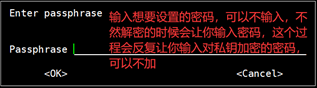
You need a Passphrase to protect your secret key.


You don't want a passphrase - this is probably a *bad* idea!

I will do it anyway.  You can change your passphrase at any time,

using this program with the option "--edit-key".   #在这块开始读入磁盘以及鼠标的轨迹

                              #可以再开个端口输入” dd if=/dev/sda of=/dev/null”来加快这个过程

We need to generate a lot of random bytes. It is a good idea to perform

......


gpg: checking the trustdb    #这个地方是之前设置的相关信息

gpg: 3 marginal(s) needed, 1 complete(s) needed, PGP trust model

gpg: depth: 0  valid:   1  signed:   0  trust: 0-, 0q, 0n, 0m, 0f, 1u

pub   1024R/B7276D09 2020-09-06

      Key fingerprint = 41F7 1848 4C0C FF3B 4E9D  EE4F EADE AB6F B727 6D09

uid                  baiyang (shendan)

sub   1024R/29CC038B 2020-09-06
gpg --list-keys :在hostA主机上查看公钥
[root@hostA ~]# gpg --list-keys

/root/.gnupg/pubring.gpg

------------------------

pub   1024R/B7276D09 2020-09-06

uid                  baiyang (shendan)

sub   1024R/29CC038B 2020-09-06

[root@hostA ~]# ls  #可以看见这个地方目前还是没有什么非隐藏目录的
gpg -a --export -o pubkeyname.pubkey :在hostA主机上导出公钥到pubkeyname.pubkey
[root@hostA ~]# gpg -a --export -o bai.pubkey

[root@hostA ~]# ls    #经过导入公钥后就发发现当前目录下多了个公钥文件

bai.pubkey
然后使用scp将公钥导到hostB主机上:scp pubkeyname.pubkey hostB:
[root@hostA ~]# scp bai.pubkey 10.0.0.22:/root

root@10.0.0.22's password:

bai.pubkey                                                                                                                 100% 1000     1.1MB/s   00:00
在hostB主机上导入公钥:gpg --import pubkeyname.pubkey
[root@hostB ~]# ls

bai.pubkey  fstab

[root@hostB ~]# gpg --import bai.pubkey   #将scp来的公钥文件导入

gpg: directory '/root/.gnupg' created

gpg: keybox '/root/.gnupg/pubring.kbx' created

gpg: /root/.gnupg/trustdb.gpg: trustdb created

gpg: key EADEAB6FB7276D09: public key "baiyang (shendan)" imported

gpg: Total number processed: 1

gpg:               imported: 1
gpg --list-keys查看当前主机的公钥
[root@hostB ~]# gpg --list-keys   #查看当前主机上的公钥,uid很重要,下一步要用

/root/.gnupg/pubring.kbx

------------------------

pub   rsa1024 2020-09-06 [SC]

      41F718484C0CFF3B4E9DEE4FEADEAB6FB7276D09

uid           [ unknown] baiyang (shendan)

sub   rsa1024 2020-09-06 [E]
用从hostA主机导入的公钥,加密hostB主机的文件file,生成file.gpg
gpg -e -r uid file;-r就是制定使用的密钥的
[root@hostB ~]# gpg -e -r bai.pubkey fstab    #这一步不能输公钥文件夹的名称,输入的必须是上一步uid的名称;这个地方就报错了

gpg: bai.pubkey: skipped: No public key

gpg: fstab: encryption failed: No public key

[root@hostB ~]# gpg -e -r baiyang fstab

gpg: 1280BFCC29CC038B: There is no assurance this key belongs to the named user

sub  rsa1024/1280BFCC29CC038B 2020-09-06 baiyang (shendan)

 Primary key fingerprint: 41F7 1848 4C0C FF3B 4E9D  EE4F EADE AB6F B727 6D09

      Subkey fingerprint: EDCE C796 7399 96A0 0722  0BFF 1280 BFCC 29CC 038B


It is NOT certain that the key belongs to the person named

in the user ID.  If you *really* know what you are doing,

you may answer the next question with yes.


Use this key anyway? (y/N) y  #询问是否确认使用这个公钥来加密

[root@hostB ~]# ls   #再次查看当前目录就会发现多了个*.gpg的加密文件了

bai.pubkey  fstab  fstab.gpg
复制加密文件到hostA主机:scp fstab.gpg hostA:
[root@hostB ~]# scp fstab.gpg 10.0.0.21:/root

root@10.0.0.21's password:

fstab.gpg                                                                                                                  100%  609   779.6KB/s   00:00
在hostA主机解密文件
gpg -d file.gpg
gpg -o file -d file.gpg
[root@hostA ~]# ls

bai.pubkey  fstab.gpg

[root@hostA ~]# gpg -o fstab -d fstab.gpg  #这一步就和加密对称密钥一样-o是指定解密后输出到那个文件下

gpg: encrypted with 1024-bit RSA key, ID 29CC038B, created 2020-09-06

      "baiyang (shendan)"

[root@hostA ~]# cat fstab


#

# /etc/fstab

......

[root@hostA ~]# gpg -d fstab.gpg    #这样子就是查看加密的文件的内容,直接输出

gpg: encrypted with 1024-bit RSA key, ID 29CC038B, created 2020-09-06

      "baiyang (shendan)"


#

# /etc/fstab

......

[root@hostA ~]# gpg -d fstab.gpg > fstab1   #也可以这样子放到一个文件中

gpg: encrypted with 1024-bit RSA key, ID 29CC038B, created 2020-09-06

      "baiyang (shendan)"

[root@hostA ~]# cat fstab1


#

# /etc/fstab

......

 浙公网安备 33010602011771号