
JavaWeb-Cookie、Session
一、Cookie、Session
1.1、会话
会话:用户打开一个浏览器,点击了很多超链接,访问多个 web资源,关闭浏览器,这个过程可以称之为会话。
有状态会话:一个同学来过教室,下次再来教室,我们会知道这个同学,曾经来过,称之为有状态会话。
一个网站,怎么证明你来过?
- 服务端给客户端一个 信件,客户端下次访问服务端带上信件就可以了;cookie
- 服务器登记你来过了,下次你来的时候我来匹配你;seesion
1.2、保存会话的两种技术
cookie:客户端技术(响应,请求)
session:服务器技术,利用这个技术,可以保存用户的会话信息,我们可以把信息或者数据放在 Session中!
常见于:网站登录之后,你下次不用再登录了,第二次访问直接就上去了!
1.3、Cookie
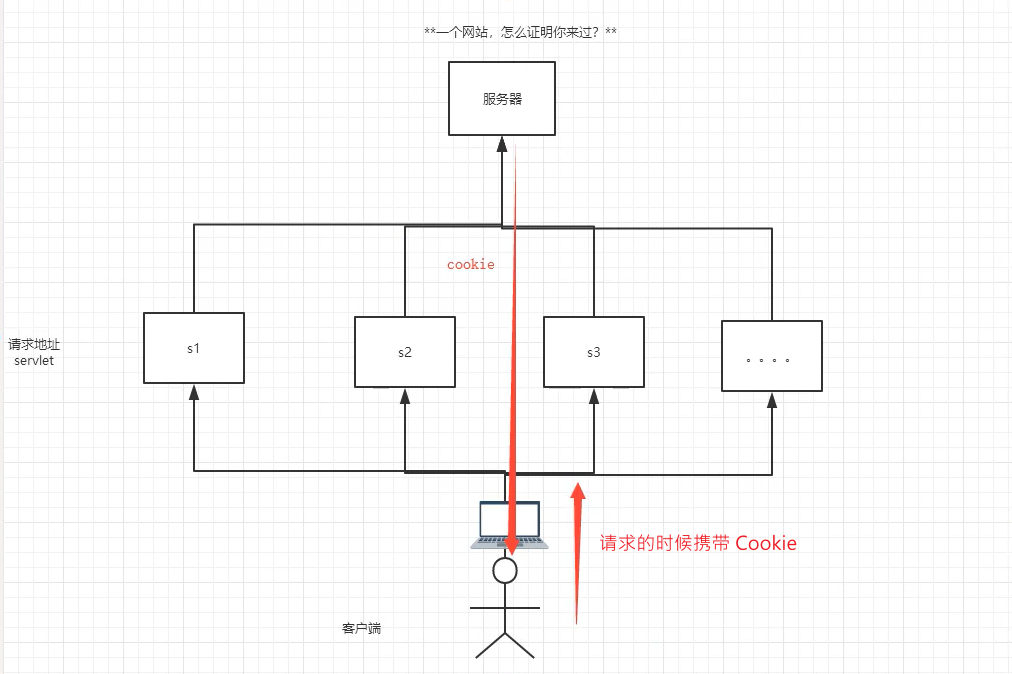
- 从请求中拿到 cookie信息
- 服务器响应给客户端 cookie
Cookie[] cookies = req.getCookies(); // 获得 Cookie
cookie.getName(); // 获得 cookie中的 key
cookie.getValue(); // 获得 cookie中的 vlaue
new Cookie("lastLoginTime",System.currentTimeMillis()+""); // 新建一个 cookie
cookie.setMaxAge(24*60*60); // 设置 cookie有效期
resp.addCookie(cookie); // 相应给客户端一个 cookie
cookie:一般会保存在本地的 用户目录下 appdata;
案例:判断浏览器是否有 cookie,没有则添加一个 cookie
package com.kuang.servlet;

import javax.servlet.ServletException;
import javax.servlet.http.Cookie;
import javax.servlet.http.HttpServlet;
import javax.servlet.http.HttpServletRequest;
import javax.servlet.http.HttpServletResponse;
import java.io.IOException;
import java.io.PrintWriter;
import java.util.Date;

// 保存用户上一次访问的时间
public class CookieDemo01 extends HttpServlet {
    @Override
    protected void doGet(HttpServletRequest req, HttpServletResponse resp) throws ServletException, IOException {
        // 服务器,告诉你,你来的时间,把这个时间封装成为一个 信件,你下次带来,我就知道你来了

        // 解决中文乱码
        req.setCharacterEncoding("utf-16");
        resp.setCharacterEncoding("utf-16");

        PrintWriter out = resp.getWriter();

        // Cookie,服务器端从客户端获取;
        Cookie[] cookies = req.getCookies(); // 这里返回数组,说明 Cookie可能存在多个

        // 判断 Cookie是否存在
        if (cookies != null){
            // 如果存在怎么办
            out.write("你上一次访问的时间是:");
            for (int i = 0; i < cookies.length; i++){
                Cookie cookie = cookies[i];
                // 获取 cookie的名字
                if (cookie.getName().equals("lastLoginTime")){
                    // 获取 cookie中的值
                    long lastLoginTime = Long.parseLong(cookie.getValue());
                    Date date = new Date(lastLoginTime);
                    out.write(date.toLocaleString());
                }
            }
        }else {
            out.write("这是您第一次访问本站");
        }

        // 服务器给客户端响应一个 Cookie
        Cookie cookie = new Cookie("lastLoginTime", System.currentTimeMillis() + "");

        // 设置 cookie有效期为 1天,不设置则浏览器关闭就到期。
        cookie.setMaxAge(24*60*60);

        resp.addCookie(cookie);
    }
}
cookie 细节问题:
- 一个 Cookie只能保存一个信息;
- 一个 Web站点可以给浏览器发送多个 cookie,站点最多存放 20个 cookie;
- Cookie大小由限制,最多 4kb;
- 浏览器上限是 300个 cookie。
删除 Cookie:
- 不设置有效期,关闭浏览器,自动失效;
- 设置有效期时间为 0;
- 用于删除浏览器已经存在的 cookie
package com.kuang.servlet;

import javax.servlet.ServletException;
import javax.servlet.http.Cookie;
import javax.servlet.http.HttpServlet;
import javax.servlet.http.HttpServletRequest;
import javax.servlet.http.HttpServletResponse;
import java.io.IOException;

// 保存用户上一次访问的时间
public class CookieDemo02 extends HttpServlet {
    @Override
    protected void doGet(HttpServletRequest req, HttpServletResponse resp) throws ServletException, IOException {

        // 创建一个 cookie,名字必须和 要删除的名字一致
        Cookie cookie = new Cookie("lastLoginTime", System.currentTimeMillis() + "");

        // 设置 cookie有效期为 0
        cookie.setMaxAge(0);

        resp.addCookie(cookie);
    }
}
中文数据传递乱码问题:
package com.kuang.servlet;

import javax.servlet.ServletException;
import javax.servlet.http.Cookie;
import javax.servlet.http.HttpServlet;
import javax.servlet.http.HttpServletRequest;
import javax.servlet.http.HttpServletResponse;
import java.io.IOException;
import java.io.PrintWriter;
import java.net.URLDecoder;
import java.net.URLEncoder;

// 中文数据传递
public class CookieDemo03 extends HttpServlet {
    @Override
    protected void doGet(HttpServletRequest req, HttpServletResponse resp) throws ServletException, IOException {
        // 解决中文乱码
        req.setCharacterEncoding("utf-16");
        resp.setCharacterEncoding("utf-16");

        // Cookie,服务器端从客户端获取
        Cookie[] cookies = req.getCookies();
        PrintWriter out = resp.getWriter();

        // 判断 Cookie是否存在
        if (cookies != null){
            // 如果存在怎么办
            out.write("你上一次访问的时间是:");
            for (int i = 0; i < cookies.length; i++){
                Cookie cookie = cookies[i];
                // 获取 cookie的名字
                if (cookie.getName().equals("name")){

                    // 解码
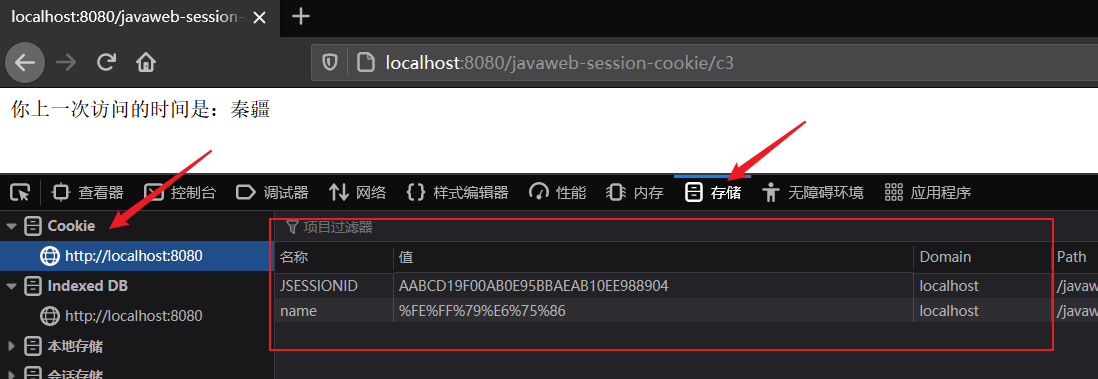
                    out.write(URLDecoder.decode(cookie.getValue(),"utf-16"));
                }
            }
        }else {
            out.write("这是您第一次访问本站");
        }

        // 编码
        resp.addCookie(new Cookie("name", URLEncoder.encode("秦疆", "utf-16")));
    }
}
效果图:
1.4、Session (重点)
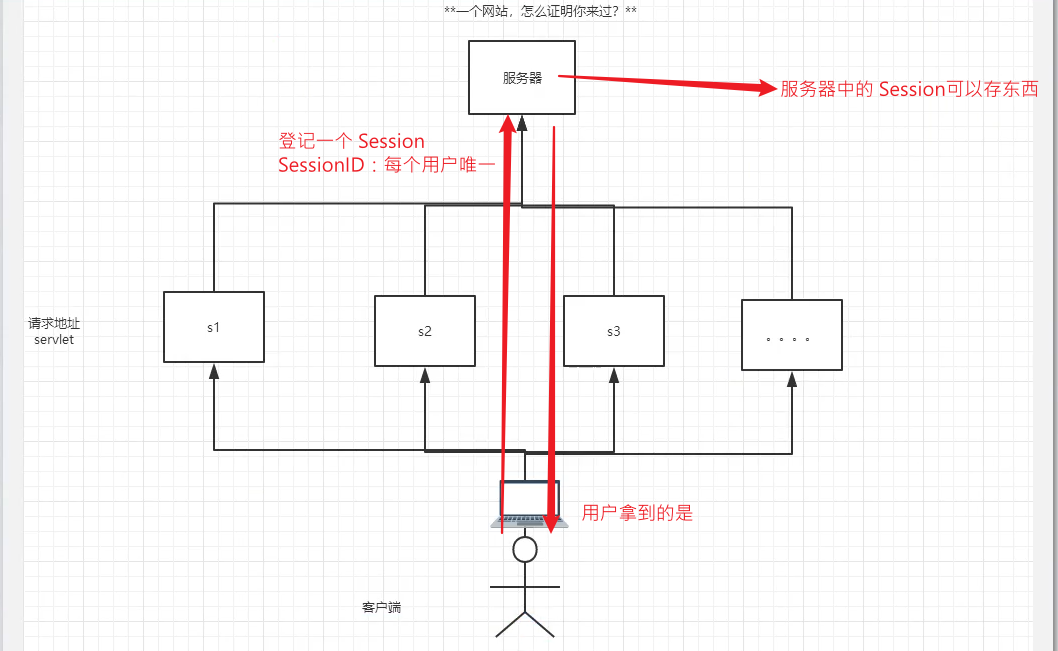
什么是 Session:
- 服务器会给每一个用户(浏览器)创建一个 Session对象;
- 一个 Session独占一个浏览器,只要浏览器没有关闭,这个 Session就存在;
- 用户登录之后,整个网站它都可以访问!--> 保存用户的信息;保存购物车的信息....
Session和 Cookie的区别:
- Cookie是把用户的数据写给用户的浏览器,浏览器保存(可以保存多个)
- Session把用户的数据写到用户独占 Session中,服务器端保存(保存重要的信息,减少服务器资源的浪费)
- Session对象由服务器创建
使用 Session:
-
创建 Session
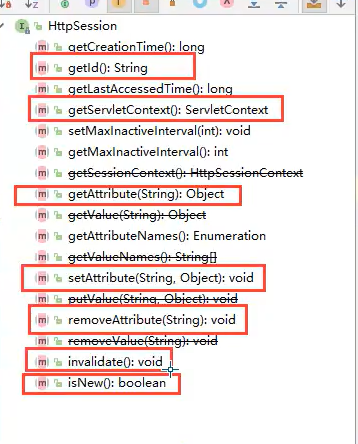
package com.kuang.servlet; import com.kuang.pojo.Person; import javax.servlet.ServletException; import javax.servlet.http.HttpServlet; import javax.servlet.http.HttpServletRequest; import javax.servlet.http.HttpServletResponse; import javax.servlet.http.HttpSession; import java.io.IOException; public class SessionDemo01 extends HttpServlet { @Override protected void doGet(HttpServletRequest req, HttpServletResponse resp) throws ServletException, IOException { // 解决乱码问题 req.setCharacterEncoding("UTF-16"); resp.setCharacterEncoding("UTF-16"); resp.setContentType("text/html;charset=utf-16"); // 得到 Session HttpSession session = req.getSession(); // 给 Session中存东西 session.setAttribute("name",new Person("秦疆",1)); // 获取 Session的 ID String sessionId = session.getId(); // 判断 Session是不是新创建 if (session.isNew()){ resp.getWriter().write("Session创建成功,ID:"+sessionId); }else { resp.getWriter().write("Session已经在服务器中存在了,ID:"+sessionId); } } } -
创建用于保存用户数据的类
package com.kuang.pojo; public class Person { private String name; private int age; public Person() { } public Person(String name, int age) { this.name = name; this.age = age; } public String getName() { return name; } public void setName(String name) { this.name = name; } public int getAge() { return age; } public void setAge(int age) { this.age = age; } @Override public String toString() { return "Person{" + "name='" + name + '\'' + ", age=" + age + '}'; } } -
获取 Session存储的值
package com.kuang.servlet; import com.kuang.pojo.Person; import javax.servlet.ServletException; import javax.servlet.http.HttpServlet; import javax.servlet.http.HttpServletRequest; import javax.servlet.http.HttpServletResponse; import javax.servlet.http.HttpSession; import java.io.IOException; public class SessionDemo02 extends HttpServlet { @Override protected void doGet(HttpServletRequest req, HttpServletResponse resp) throws ServletException, IOException { // 解决乱码问题 req.setCharacterEncoding("UTF-16"); resp.setCharacterEncoding("UTF-16"); resp.setContentType("text/html;charset=utf-16"); // 得到 Session HttpSession session = req.getSession(); // 获取 Session存储的值 Person person = (Person) session.getAttribute("name"); System.out.println(person); } } -
注销 Session
-
手动注销
package com.kuang.servlet; import javax.servlet.ServletException; import javax.servlet.http.HttpServlet; import javax.servlet.http.HttpServletRequest; import javax.servlet.http.HttpServletResponse; import javax.servlet.http.HttpSession; import java.io.IOException; public class SessionDemo03 extends HttpServlet { @Override protected void doGet(HttpServletRequest req, HttpServletResponse resp) throws ServletException, IOException { HttpSession session = req.getSession(); session.removeAttribute("name"); // 手动注销 Session session.invalidate(); } } -
会话自动过期:web.xml 配置
<web-app xmlns="http://xmlns.jcp.org/xml/ns/javaee"
        xmlns:xsi="http://www.w3.org/2001/XMLSchema-instance"
        xsi:schemaLocation="http://xmlns.jcp.org/xml/ns/javaee
                    http://xmlns.jcp.org/xml/ns/javaee/web-app_4_0.xsd"
        version="4.0"
        metadata-complete="true">

<!-- 设置 Session默认的失效时间 -->
<session-config>
    <!-- 1分钟后 Session自动失效,以分钟为单位 -->
    <session-timeout>1</session-timeout>
</session-config>

</web-app>
-

 浙公网安备 33010602011771号