

【ArcMap】复制选中的线并将其上移一段距离
首先选中需要复制的线
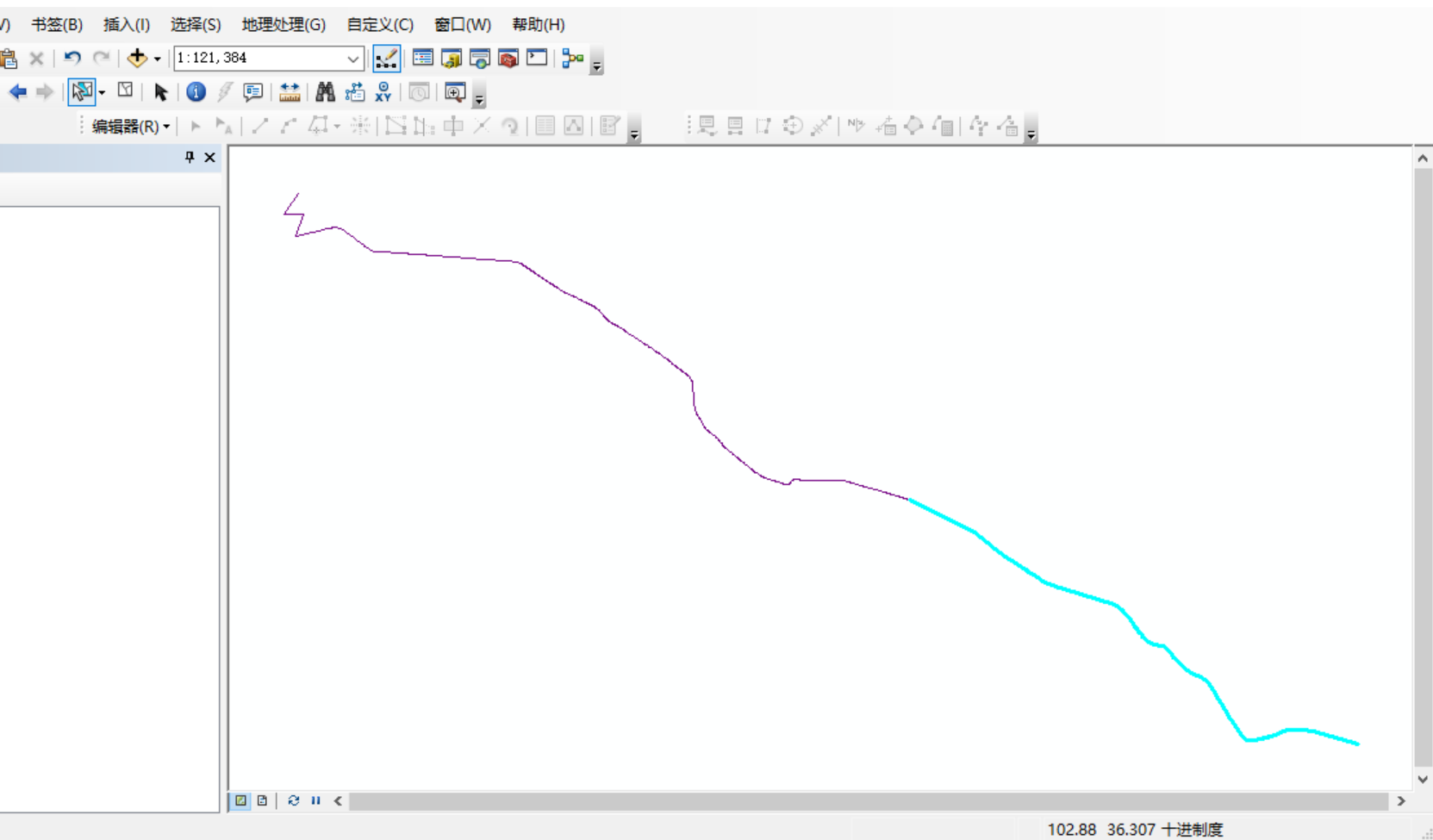
在python2窗口中输入以下代码:此处为上移10米
-
对于地理坐标系,使用0.00009度(约10米)
-
对于投影坐标系,使用10米
# -*- coding: utf-8 -*-
import arcpy
import os
import sys

# 重新加载sys并设置默认编码
reload(sys)
sys.setdefaultencoding('utf-8')

# 设置环境
arcpy.env.overwriteOutput = True

try:
    # 获取当前地图文档
    mxd = arcpy.mapping.MapDocument("CURRENT")
    df = arcpy.mapping.ListDataFrames(mxd)[0]

    arcpy.AddMessage("脚本开始执行...")

    # 查找线图层
    target_layer = None
    for layer in arcpy.mapping.ListLayers(mxd):
        if layer.isFeatureLayer:
            desc = arcpy.Describe(layer)
            if desc.shapeType == "Polyline":
                target_layer = layer
                break

    if target_layer is None:
        arcpy.AddError("未找到线图层")
        sys.exit()

    arcpy.AddMessage("找到图层: " + target_layer.name)

    # 检查是否有选中的要素
    desc = arcpy.Describe(target_layer)
    if not desc.FIDSet:
        arcpy.AddError("没有选中的要素")
        sys.exit()

    # 获取选中要素的数量
    result = arcpy.GetCount_management(target_layer)
    selected_count = int(result.getOutput(0))
    arcpy.AddMessage("选中的要素数量: " + str(selected_count))

    # 获取数据源路径
    data_source = desc.catalogPath
    arcpy.AddMessage("数据源: " + data_source)

    # 获取空间参考
    spatial_ref = desc.spatialReference
    arcpy.AddMessage("坐标系: " + spatial_ref.name)

    # 获取选中要素的OID
    selected_oids = []
    with arcpy.da.SearchCursor(target_layer, ["OID@"]) as cursor:
        for row in cursor:
            selected_oids.append(row[0])

    arcpy.AddMessage("选中的要素OID: " + str(selected_oids))

    # 创建查询条件
    oid_field = arcpy.Describe(target_layer).OIDFieldName
    where_clause = "{} IN ({})".format(arcpy.AddFieldDelimiters(data_source, oid_field),
                                      ",".join(str(oid) for oid in selected_oids))

    # 获取字段列表
    field_names = []
    for field in arcpy.ListFields(target_layer):
        if field.type not in ["OID", "Geometry"]:
            field_names.append(field.name)

    arcpy.AddMessage("将复制的字段: " + str(field_names))

    # 确定移动距离 - 缩短为10米
    if spatial_ref.type == "Geographic":
        y_offset = 0.00009  # 大约10米 (1度≈111公里,10米≈0.00009度)
    else:
        y_offset = 10.0  # 10米

    arcpy.AddMessage("向上移动距离: " + str(y_offset) + (" 度" if spatial_ref.type == "Geographic" else " 米"))

    # 开始编辑会话
    edit = arcpy.da.Editor(os.path.dirname(data_source))
    edit.startEditing(False, True)
    edit.startOperation()

    try:
        # 使用插入游标将移动后的要素添加到同一图层
        with arcpy.da.InsertCursor(data_source, ["SHAPE@"] + field_names) as insert_cursor:
            # 使用搜索游标读取选中的要素
            with arcpy.da.SearchCursor(data_source, ["SHAPE@"] + field_names, where_clause) as search_cursor:
                moved_count = 0
                for row in search_cursor:
                    shape = row[0]
                    attributes = row[1:]

                    if shape:
                        # 创建一个新的数组来存储移动后的点
                        new_parts = arcpy.Array()

                        # 遍历原始几何的每个部分
                        for part in shape:
                            new_part = arcpy.Array()

                            # 遍历每个点
                            for point in part:
                                if point:
                                    # 创建新点,Y坐标增加偏移量
                                    new_point = arcpy.Point(point.X, point.Y + y_offset)
                                    new_part.add(new_point)

                            new_parts.add(new_part)

                        # 创建新的Polyline几何
                        moved_shape = arcpy.Polyline(new_parts, spatial_ref)

                        # 插入移动后的要素到同一图层
                        insert_cursor.insertRow([moved_shape] + list(attributes))
                        moved_count += 1
                        arcpy.AddMessage("已复制并移动要素 " + str(moved_count))

        # 提交编辑
        edit.stopOperation()
        edit.stopEditing(True)

        arcpy.AddMessage("成功复制并移动 " + str(moved_count) + " 个要素到原始图层")

        # 刷新视图
        arcpy.RefreshActiveView()
        arcpy.RefreshTOC()

        # 清除选择集,显示所有要素
        target_layer.setSelectionSet("NEW", [])

        arcpy.AddMessage("操作完成! 所有移动后的要素都已添加到原始图层中")
        arcpy.AddMessage("原始要素保持不变,新要素已向上移动10米")
        arcpy.AddMessage("现在图层中有 " + str(selected_count + moved_count) + " 个要素")
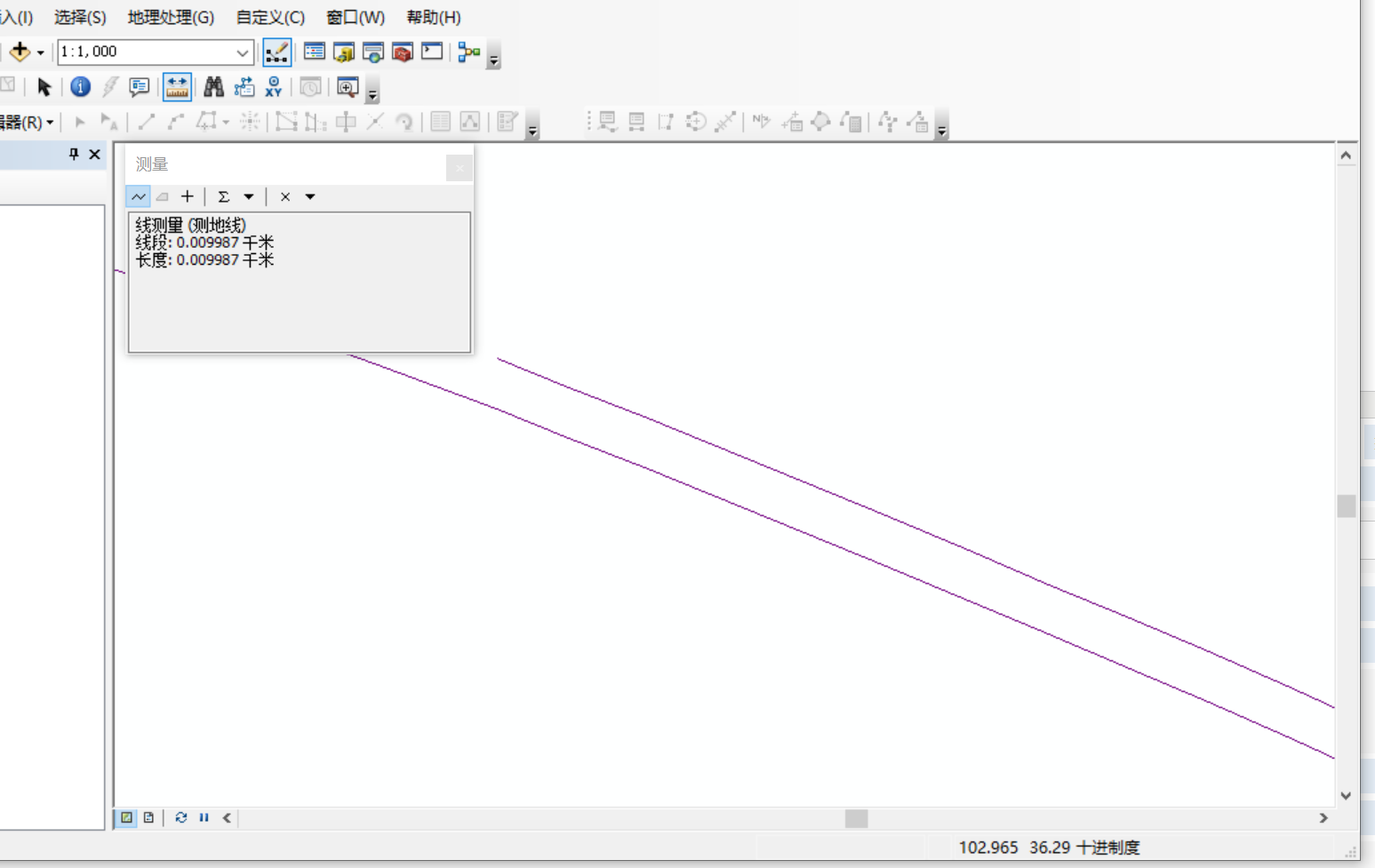
        arcpy.AddMessage("请使用测量工具验证两条线之间的距离是否为10米")
        arcpy.AddMessage("注意:由于10米距离很小,可能需要放大查看")

    except Exception as e:
        # 中止编辑
        edit.stopOperation()
        edit.stopEditing(False)
        raise e

except Exception as e:
    arcpy.AddError("错误: " + str(e))
    import traceback
    error_msg = traceback.format_exc()
    arcpy.AddError(error_msg)
运行后如下:
将复制后线的xcfx字段由A改为B
# -*- coding: utf-8 -*-
import arcpy
import os
import sys

# 重新加载sys并设置默认编码
reload(sys)
sys.setdefaultencoding('utf-8')

# 设置环境
arcpy.env.overwriteOutput = True

try:
    # 获取当前地图文档
    mxd = arcpy.mapping.MapDocument("CURRENT")
    df = arcpy.mapping.ListDataFrames(mxd)[0]

    arcpy.AddMessage("脚本开始执行...")

    # 查找线图层
    target_layer = None
    for layer in arcpy.mapping.ListLayers(mxd):
        if layer.isFeatureLayer:
            desc = arcpy.Describe(layer)
            if desc.shapeType == "Polyline":
                target_layer = layer
                break

    if target_layer is None:
        arcpy.AddError("未找到线图层")
        sys.exit()

    arcpy.AddMessage("找到图层: " + target_layer.name)

    # 检查是否有选中的要素
    desc = arcpy.Describe(target_layer)
    if not desc.FIDSet:
        arcpy.AddError("没有选中的要素")
        sys.exit()

    # 获取选中要素的数量
    result = arcpy.GetCount_management(target_layer)
    selected_count = int(result.getOutput(0))
    arcpy.AddMessage("选中的要素数量: " + str(selected_count))

    # 获取数据源路径
    data_source = desc.catalogPath
    arcpy.AddMessage("数据源: " + data_source)

    # 获取空间参考
    spatial_ref = desc.spatialReference
    arcpy.AddMessage("坐标系: " + spatial_ref.name)

    # 获取选中要素的OID
    selected_oids = []
    with arcpy.da.SearchCursor(target_layer, ["OID@"]) as cursor:
        for row in cursor:
            selected_oids.append(row[0])

    arcpy.AddMessage("选中的要素OID: " + str(selected_oids))

    # 创建查询条件
    oid_field = arcpy.Describe(target_layer).OIDFieldName
    where_clause = "{} IN ({})".format(arcpy.AddFieldDelimiters(data_source, oid_field),
                                      ",".join(str(oid) for oid in selected_oids))

    # 获取字段列表
    field_names = []
    for field in arcpy.ListFields(target_layer):
        if field.type not in ["OID", "Geometry"]:
            field_names.append(field.name)

    arcpy.AddMessage("将复制的字段: " + str(field_names))

    # 确定移动距离 - 缩短为10米
    if spatial_ref.type == "Geographic":
        y_offset = 0.00009  # 大约10米 (1度≈111公里,10米≈0.00009度)
    else:
        y_offset = 10.0  # 10米

    arcpy.AddMessage("向上移动距离: " + str(y_offset) + (" 度" if spatial_ref.type == "Geographic" else " 米"))

    # 开始编辑会话
    edit = arcpy.da.Editor(os.path.dirname(data_source))
    edit.startEditing(False, True)
    edit.startOperation()

    try:
        # 使用插入游标将移动后的要素添加到同一图层
        with arcpy.da.InsertCursor(data_source, ["SHAPE@"] + field_names) as insert_cursor:
            # 使用搜索游标读取选中的要素
            with arcpy.da.SearchCursor(data_source, ["SHAPE@"] + field_names, where_clause) as search_cursor:
                moved_count = 0
                for row in search_cursor:
                    shape = row[0]
                    attributes = row[1:]

                    # 修改XCFX字段的值
                    modified_attributes = list(attributes)
                    if "XCFX" in field_names:
                        xcfx_index = field_names.index("XCFX")
                        modified_attributes[xcfx_index] = "B"
                        arcpy.AddMessage("已将XCFX字段值从A修改为B")

                    if shape:
                        # 创建一个新的数组来存储移动后的点
                        new_parts = arcpy.Array()

                        # 遍历原始几何的每个部分
                        for part in shape:
                            new_part = arcpy.Array()

                            # 遍历每个点
                            for point in part:
                                if point:
                                    # 创建新点,Y坐标增加偏移量
                                    new_point = arcpy.Point(point.X, point.Y + y_offset)
                                    new_part.add(new_point)

                            new_parts.add(new_part)

                        # 创建新的Polyline几何
                        moved_shape = arcpy.Polyline(new_parts, spatial_ref)

                        # 插入移动后的要素到同一图层
                        insert_cursor.insertRow([moved_shape] + modified_attributes)
                        moved_count += 1
                        arcpy.AddMessage("已复制并移动要素 " + str(moved_count))

        # 提交编辑
        edit.stopOperation()
        edit.stopEditing(True)

        arcpy.AddMessage("成功复制并移动 " + str(moved_count) + " 个要素到原始图层")

        # 刷新视图
        arcpy.RefreshActiveView()
        arcpy.RefreshTOC()

        # 清除选择集,显示所有要素
        target_layer.setSelectionSet("NEW", [])

        arcpy.AddMessage("操作完成! 所有移动后的要素都已添加到原始图层中")
        arcpy.AddMessage("原始要素保持不变,新要素已向上移动10米且XCFX字段值已从A改为B")
        arcpy.AddMessage("现在图层中有 " + str(selected_count + moved_count) + " 个要素")
        arcpy.AddMessage("请使用测量工具验证两条线之间的距离是否为10米")
        arcpy.AddMessage("注意:由于10米距离很小,可能需要放大查看")

    except Exception as e:
        # 中止编辑
        edit.stopOperation()
        edit.stopEditing(False)
        raise e

except Exception as e:
    arcpy.AddError("错误: " + str(e))
    import traceback
    error_msg = traceback.format_exc()
    arcpy.AddError(error_msg)
进阶版适用GG:1.复制全部路线;2.复制后的路线不相交;3.起止点处理(合并连接的,保留端点)
# -*- coding: utf-8 -*- import arcpy import os import sys import math # 重新加载sys并设置默认编码 reload(sys) sys.setdefaultencoding('utf-8') # 设置环境 arcpy.env.overwriteOutput = True def calculate_segment_offset_direction(start_point, end_point, distance=10): """ 计算单个线段的偏移方向 """ dx = end_point.X - start_point.X dy = end_point.Y - start_point.Y # 计算线段长度 length = math.sqrt(dx*dx + dy*dy) if length == 0: return 0, distance # 归一化方向向量 dx /= length dy /= length # 计算垂直向量(左侧偏移) offset_dx = -dy * distance offset_dy = dx * distance return offset_dx, offset_dy def offset_polyline_segments(line_geometry, distance=10, spatial_ref=None): """ 对多段线进行逐段偏移,避免S型线相交 """ new_parts = arcpy.Array() for part in line_geometry: new_part = arcpy.Array() points = [] # 收集所有点 for point in part: if point: points.append((point.X, point.Y)) if len(points) < 2: continue # 对每个线段计算偏移方向 offset_points = [] # 处理第一个点 first_offset_dx, first_offset_dy = calculate_segment_offset_direction( arcpy.Point(points[0][0], points[0][1]), arcpy.Point(points[1][0], points[1][1]), distance ) offset_points.append(( points[0][0] + first_offset_dx, points[0][1] + first_offset_dy )) # 处理中间点 - 使用前后线段方向的平均值 for i in range(1, len(points)-1): # 前一线段的方向 prev_dx, prev_dy = calculate_segment_offset_direction( arcpy.Point(points[i-1][0], points[i-1][1]), arcpy.Point(points[i][0], points[i][1]), distance ) # 后一线段的方向 next_dx, next_dy = calculate_segment_offset_direction( arcpy.Point(points[i][0], points[i][1]), arcpy.Point(points[i+1][0], points[i+1][1]), distance ) # 使用平均值来平滑过渡 avg_dx = (prev_dx + next_dx) / 2 avg_dy = (prev_dy + next_dy) / 2 offset_points.append(( points[i][0] + avg_dx, points[i][1] + avg_dy )) # 处理最后一个点 last_offset_dx, last_offset_dy = calculate_segment_offset_direction( arcpy.Point(points[-2][0], points[-2][1]), arcpy.Point(points[-1][0], points[-1][1]), distance ) offset_points.append(( points[-1][0] + last_offset_dx, points[-1][1] + last_offset_dy )) # 创建新的线段 for x, y in offset_points: new_part.add(arcpy.Point(x, y)) new_parts.add(new_part) return arcpy.Polyline(new_parts, spatial_ref) def check_and_adjust_offset(line_geometry, offset_line, distance=10, spatial_ref=None): """ 检查偏移线是否与原始线相交,如果相交则调整 """ try: # 检查是否相交 if line_geometry.crosses(offset_line) or line_geometry.overlaps(offset_line): arcpy.AddMessage("检测到偏移线与原始线相交,尝试反向偏移") # 尝试反向偏移 return offset_polyline_segments(line_geometry, -distance, spatial_ref) else: return offset_line except: # 如果几何检查失败,使用距离检查 try: if line_geometry.distanceTo(offset_line) < distance * 0.5: arcpy.AddMessage("偏移距离过小,尝试反向偏移") return offset_polyline_segments(line_geometry, -distance, spatial_ref) else: return offset_line except: return offset_line def smooth_polyline(polyline, tolerance=0.1, spatial_ref=None): """ 对多段线进行平滑处理,减少尖锐转角 """ new_parts = arcpy.Array() for part in polyline: if part.count < 3: new_parts.add(part) continue new_part = arcpy.Array() points = [] # 收集所有点 for point in part: if point: points.append((point.X, point.Y)) # 添加第一个点 new_part.add(arcpy.Point(points[0][0], points[0][1])) # 对中间点进行平滑 for i in range(1, len(points)-1): prev_x, prev_y = points[i-1] curr_x, curr_y = points[i] next_x, next_y = points[i+1] # 计算前后向量的角度 vec1_angle = math.atan2(curr_y - prev_y, curr_x - prev_x) vec2_angle = math.atan2(next_y - curr_y, next_x - curr_x) # 如果角度变化太大,进行平滑 angle_diff = abs(vec1_angle - vec2_angle) if angle_diff > tolerance: # 使用中点 smooth_x = (prev_x + next_x) / 2 smooth_y = (prev_y + next_y) / 2 new_part.add(arcpy.Point(smooth_x, smooth_y)) else: new_part.add(arcpy.Point(curr_x, curr_y)) # 添加最后一个点 new_part.add(arcpy.Point(points[-1][0], points[-1][1])) new_parts.add(new_part) return arcpy.Polyline(new_parts, spatial_ref) def find_connected_segments(features): """ 找到相连的线段组,并识别起点和终点线段 """ # 构建端点索引 endpoint_index = {} for feature in features: shape = feature['shape'] if not shape: continue first_point = shape.firstPoint last_point = shape.lastPoint first_key = (round(first_point.X, 6), round(first_point.Y, 6)) last_key = (round(last_point.X, 6), round(last_point.Y, 6)) # 记录每个端点对应的要素 if first_key not in endpoint_index: endpoint_index[first_key] = [] endpoint_index[first_key].append(('start', feature)) if last_key not in endpoint_index: endpoint_index[last_key] = [] endpoint_index[last_key].append(('end', feature)) # 找到相连的线段组 connected_groups = [] processed_oids = set() for feature in features: if feature['oid'] in processed_oids: continue # 开始一个新的连接组 connected_group = [] queue = [feature] while queue: current_feature = queue.pop(0) if current_feature['oid'] in processed_oids: continue processed_oids.add(current_feature['oid']) connected_group.append(current_feature) # 查找连接的线段 shape = current_feature['shape'] first_point = shape.firstPoint last_point = shape.lastPoint first_key = (round(first_point.X, 6), round(first_point.Y, 6)) last_key = (round(last_point.X, 6), round(last_point.Y, 6)) # 查找连接到起点的线段 if first_key in endpoint_index: for endpoint_type, connected_feature in endpoint_index[first_key]: if (connected_feature['oid'] not in processed_oids and connected_feature['oid'] != current_feature['oid']): queue.append(connected_feature) # 查找连接到终点的线段 if last_key in endpoint_index: for endpoint_type, connected_feature in endpoint_index[last_key]: if (connected_feature['oid'] not in processed_oids and connected_feature['oid'] != current_feature['oid']): queue.append(connected_feature) if connected_group: # 识别起点和终点线段 start_segment, end_segment = identify_start_end_segments(connected_group, endpoint_index) connected_groups.append({ 'segments': connected_group, 'start_segment': start_segment, 'end_segment': end_segment }) return connected_groups def identify_start_end_segments(connected_group, endpoint_index): """ 识别连接组中的起点线段和终点线段 """ # 计算每个端点的出现次数 endpoint_count = {} for feature in connected_group: shape = feature['shape'] if not shape: continue first_point = shape.firstPoint last_point = shape.lastPoint first_key = (round(first_point.X, 6), round(first_point.Y, 6)) last_key = (round(last_point.X, 6), round(last_point.Y, 6)) endpoint_count[first_key] = endpoint_count.get(first_key, 0) + 1 endpoint_count[last_key] = endpoint_count.get(last_key, 0) + 1 # 找到只出现一次的端点(起点和终点) unique_endpoints = [coords for coords, count in endpoint_count.items() if count == 1] start_segment = None end_segment = None if len(unique_endpoints) == 2: # 有两个唯一端点,分别是起点和终点 start_point = unique_endpoints[0] end_point = unique_endpoints[1] # 找到包含起点和终点的线段 for feature in connected_group: shape = feature['shape'] if not shape: continue first_point = shape.firstPoint last_point = shape.lastPoint first_key = (round(first_point.X, 6), round(first_point.Y, 6)) last_key = (round(last_point.X, 6), round(last_point.Y, 6)) # 检查是否是起点线段 if first_key == start_point or last_key == start_point: start_segment = { 'feature': feature, 'is_first_point': first_key == start_point, 'point': start_point } # 检查是否是终点线段 if first_key == end_point or last_key == end_point: end_segment = { 'feature': feature, 'is_first_point': first_key == end_point, 'point': end_point } elif len(unique_endpoints) == 1: # 只有一个唯一端点(环状线),起点和终点相同 point = unique_endpoints[0] # 找到包含这个端点的线段 for feature in connected_group: shape = feature['shape'] if not shape: continue first_point = shape.firstPoint last_point = shape.lastPoint first_key = (round(first_point.X, 6), round(first_point.Y, 6)) last_key = (round(last_point.X, 6), round(last_point.Y, 6)) if first_key == point or last_key == point: if start_segment is None: start_segment = { 'feature': feature, 'is_first_point': first_key == point, 'point': point } else: end_segment = { 'feature': feature, 'is_first_point': first_key == point, 'point': point } break # 如果没有找到起点和终点,使用第一个和最后一个线段 if start_segment is None and connected_group: first_feature = connected_group[0] shape = first_feature['shape'] if shape: start_segment = { 'feature': first_feature, 'is_first_point': True, 'point': (shape.firstPoint.X, shape.firstPoint.Y) } if end_segment is None and connected_group: last_feature = connected_group[-1] shape = last_feature['shape'] if shape: end_segment = { 'feature': last_feature, 'is_first_point': False, 'point': (shape.lastPoint.X, shape.lastPoint.Y) } return start_segment, end_segment def adjust_offset_line_endpoints(offset_line, original_line, is_start_segment, is_first_point, target_point): """ 调整偏移线的端点,使其与目标点对齐 """ if not offset_line or not target_point: return offset_line new_parts = arcpy.Array() for part in offset_line: new_part = arcpy.Array() points = [] # 收集所有点 for point in part: if point: points.append((point.X, point.Y)) if len(points) < 2: new_parts.add(part) continue # 如果是起点线段,调整起点 if is_start_segment and is_first_point: points[0] = target_point elif is_start_segment and not is_first_point: points[-1] = target_point # 如果是终点线段,调整终点 if not is_start_segment and is_first_point: points[0] = target_point elif not is_start_segment and not is_first_point: points[-1] = target_point # 重新构建线段 for x, y in points: new_part.add(arcpy.Point(x, y)) new_parts.add(new_part) return arcpy.Polyline(new_parts, offset_line.spatialReference) def get_all_line_features(layer): """ 获取图层中的所有线要素 """ features = [] with arcpy.da.SearchCursor(layer, ["OID@", "SHAPE@"]) as cursor: for row in cursor: features.append({ 'oid': row[0], 'shape': row[1] }) return features def copy_all_lines_with_offset(target_layer, data_source, spatial_ref, move_distance): """ 复制所有线要素为下行线B,保留分段结构,并精确控制端点连接 """ # 获取所有线要素 all_features = get_all_line_features(target_layer) arcpy.AddMessage("找到 {} 个线要素".format(len(all_features))) # 找到相连的线段组并识别起点终点 arcpy.AddMessage("正在分析线段连接关系...") connected_groups = find_connected_segments(all_features) arcpy.AddMessage("找到 {} 个连接组".format(len(connected_groups))) # 获取字段列表 copy_field_names = [] for field in arcpy.ListFields(target_layer): if field.type not in ["OID", "Geometry"]: copy_field_names.append(field.name) # 开始编辑会话 edit = arcpy.da.Editor(os.path.dirname(data_source)) edit.startEditing(False, True) edit.startOperation() try: # 使用插入游标将偏移后的要素添加到同一图层 with arcpy.da.InsertCursor(data_source, ["SHAPE@"] + copy_field_names) as insert_cursor: processed_count = 0 # 处理每个连接组 for group_idx, group_info in enumerate(connected_groups): connected_group = group_info['segments'] start_segment_info = group_info['start_segment'] end_segment_info = group_info['end_segment'] arcpy.AddMessage("处理连接组 {},包含 {} 个线段".format(group_idx+1, len(connected_group))) # 处理组中的每个线段 for feature in connected_group: oid = feature['oid'] # 从原始数据中获取要素的完整属性 with arcpy.da.SearchCursor(data_source, ["OID@", "SHAPE@"] + copy_field_names, "{} = {}".format(arcpy.Describe(target_layer).OIDFieldName, oid)) as cursor: for row in cursor: attributes = list(row[2:]) # 跳过OID和SHAPE@ # 修改XCFX字段的值 if "XCFX" in copy_field_names: xcfx_index = copy_field_names.index("XCFX") attributes[xcfx_index] = "B" shape = row[1] if shape: # 对线段进行偏移 offset_shape = offset_polyline_segments(shape, move_distance, spatial_ref) # 检查并调整偏移 offset_shape = check_and_adjust_offset(shape, offset_shape, move_distance, spatial_ref) # 平滑处理 offset_shape = smooth_polyline(offset_shape, 0.2, spatial_ref) # 检查是否是起点或终点线段,并相应调整端点 if start_segment_info and start_segment_info['feature']['oid'] == oid: arcpy.AddMessage("调整起点线段 {} 的端点".format(oid)) offset_shape = adjust_offset_line_endpoints( offset_shape, shape, True, start_segment_info['is_first_point'], start_segment_info['point'] ) if end_segment_info and end_segment_info['feature']['oid'] == oid: arcpy.AddMessage("调整终点线段 {} 的端点".format(oid)) offset_shape = adjust_offset_line_endpoints( offset_shape, shape, False, end_segment_info['is_first_point'], end_segment_info['point'] ) # 插入偏移后的要素 insert_cursor.insertRow([offset_shape] + attributes) processed_count += 1 arcpy.AddMessage("成功处理要素 {}".format(oid)) # 提交编辑 edit.stopOperation() edit.stopEditing(True) arcpy.AddMessage("成功处理 " + str(processed_count) + " 个要素") return processed_count except Exception as e: # 中止编辑 edit.stopOperation() edit.stopEditing(False) raise e try: # 获取当前地图文档 mxd = arcpy.mapping.MapDocument("CURRENT") df = arcpy.mapping.ListDataFrames(mxd)[0] arcpy.AddMessage("开始处理所有线形...") # 查找线图层 target_layer = None for layer in arcpy.mapping.ListLayers(mxd): if layer.isFeatureLayer: desc = arcpy.Describe(layer) if desc.shapeType == "Polyline": target_layer = layer break if target_layer is None: arcpy.AddError("未找到线图层") sys.exit() arcpy.AddMessage("找到图层: " + target_layer.name) # 检查字段是否存在 field_names = [field.name for field in arcpy.ListFields(target_layer)] if "XCFX" not in field_names: arcpy.AddError("图层中不存在 XCFX 字段") sys.exit() # 获取数据源路径 desc = arcpy.Describe(target_layer) data_source = desc.catalogPath arcpy.AddMessage("数据源: " + data_source) # 获取空间参考 spatial_ref = desc.spatialReference arcpy.AddMessage("坐标系: " + spatial_ref.name) # 确定移动距离 if spatial_ref.type == "Geographic": move_distance = 0.00009 # 大约10米 else: move_distance = 10.0 # 10米 arcpy.AddMessage("偏移距离: " + str(move_distance) + (" 度" if spatial_ref.type == "Geographic" else " 米")) # 复制所有线要素为下行线B moved_count = copy_all_lines_with_offset(target_layer, data_source, spatial_ref, move_distance) # 刷新视图 arcpy.RefreshActiveView() arcpy.RefreshTOC() # 清除选择集 target_layer.setSelectionSet("NEW", []) arcpy.AddMessage("处理完成! 所有线形已成功复制为下行线") arcpy.AddMessage("精确控制端点连接,确保整条下行线的起点和终点与原始线对齐") arcpy.AddMessage("共处理 {} 个要素".format(moved_count)) except Exception as e: arcpy.AddError("错误: " + str(e)) import traceback error_msg = traceback.format_exc() arcpy.AddError(error_msg)

 浙公网安备 33010602011771号