
產生JSON字串的幾種方式整理
转载自http://www.dotblogs.com.tw/shadow/archive/2012/08/16/74099.aspx
這邊就以Google API裡有段JSON字串當作練習怎麼產生:
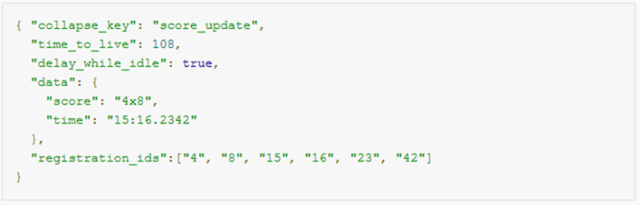
1. 字串拼接
最麻煩的方式,可讀性也差,若遇到Boolean型別的變數要記得轉小寫
 View Code

protected void Page_Load(object sender, EventArgs e)
    {
        if (!IsPostBack)//Get Method
        {
            //準備資料
            string collapse_key = "score_update";
            int time_to_live = 108;
            bool delay_while_idle = true;
            string score = "4x8";
            string time = "15:16.2342";
            List<string> registration_ids = new List<string>() { "4","8","15","16","23","42"};


            //開始拼接字串
            StringBuilder sb = new StringBuilder();
            sb.AppendLine("{");
            sb.AppendLine("\"collapse_key\":\""+collapse_key+"\",");
            sb.AppendLine("\"time_to_live\":"+time_to_live+",");
            sb.AppendLine("\"delay_while_idle\":"+delay_while_idle.ToString().ToLower()+",");
            sb.AppendLine("\"data\":{");
            sb.AppendLine("\"score\":\""+score+"\",");
            sb.AppendLine("\"time\":\""+time+"\"");
            sb.AppendLine("},");
            sb.AppendLine("\"registration_ids\":[");
            foreach (string item in registration_ids)
            {
                sb.Append("\""+item+"\",");
            }
            sb = new StringBuilder(sb.ToString().TrimEnd(','));//移除最後一個「,」字元
            sb.AppendLine("]");
            sb.AppendLine("}");

            //輸出結果
            Response.Write(sb.ToString());
        }
    }
2. 使用JsonTextWriter
用法很像XmlTextWriter,寫起來有點囉嗦
View Code
protected void Page_Load(object sender, EventArgs e)
    {
        if (!IsPostBack)//Get Method
        {
            //準備資料
            string collapse_key = "score_update";
            int time_to_live = 108;
            bool delay_while_idle = true;
            string score = "4x8";
            string time = "15:16.2342";
            List<string> registration_ids = new List<string>() { "4","8","15","16","23","42"};


            //要輸出的變數
            StringWriter sw = new StringWriter();
            //建立JsonTextWriter
            JsonTextWriter writer = new JsonTextWriter(sw);
            writer.WriteStartObject();
            writer.WritePropertyName("collapse_key"); writer.WriteValue(collapse_key);
            writer.WritePropertyName("time_to_live"); writer.WriteValue(time_to_live);
            writer.WritePropertyName("delay_while_idle"); writer.WriteValue(delay_while_idle);
            writer.WritePropertyName("data");
            writer.WriteStartObject();
            writer.WritePropertyName("score"); writer.WriteValue(score);
            writer.WritePropertyName("time"); writer.WriteValue(time);
            writer.WriteEndObject();
            writer.WritePropertyName("registration_ids");
            writer.WriteStartArray();
            foreach (string item in registration_ids)
            {
                writer.WriteValue(item);
            }
            writer.WriteEndArray();
            writer.WriteEndObject();

            //輸出結果
            Response.Write(sw.ToString());
        }
    }
3. 使用JObject匿名物件
比起JsonTextWriter簡化了許多,不過大概是每個Property和值都要再寫一次建構子名稱,我覺得還是有點麻煩
View Code
protected void Page_Load(object sender, EventArgs e)
    {
        if (!IsPostBack)//Get Method
        {
            //準備資料
            string collapse_key = "score_update";
            int time_to_live = 108;
            bool delay_while_idle = true;
            string score = "4x8";
            string time = "15:16.2342";
            List<string> registration_ids = new List<string>() { "4","8","15","16","23","42"};

            //JObject匿名物件
            JObject obj = new JObject(
                 new JProperty("collapse_key",collapse_key),
                 new JProperty("time_to_live",time_to_live),
                 new JProperty("delay_while_idle",delay_while_idle),
                 new JProperty("data",
                     new JObject(
                         new JProperty("score",score),
                         new JProperty("time",time))),
                new JProperty("registration_ids",registration_ids)
                );

            //序列化為JSON字串並輸出結果
            Response.Write(JsonConvert.SerializeObject(obj,Formatting.Indented));
        }
    }
4. 物件序列化
這個要先知道輸出的json字串長什麼樣子
貼到http://json2csharp.com/去產生類別程式碼
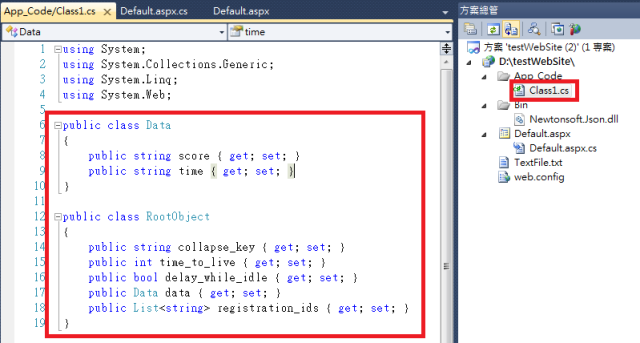
然后
View Code
protected void Page_Load(object sender, EventArgs e)
{
    if (!IsPostBack)//Get Method
    {
        //準備資料
        string collapse_key = "score_update";
        int time_to_live = 108;
        bool delay_while_idle = true;
        string score = "4x8";
        string time = "15:16.2342";
        List<string> registration_ids = new List<string>() { "4","8","15","16","23","42"};


        //建立物件,塞資料
        RootObject root = new RootObject();
        root.collapse_key = collapse_key;
        root.time_to_live = time_to_live;
        root.delay_while_idle = delay_while_idle;
        Data data = new Data();
        root.data = data;
        root.data.score = score;
        root.data.time = time;
        root.registration_ids = registration_ids;
        //物件序列化
        string strJson = JsonConvert.SerializeObject(root, Formatting.Indented);
        //輸出結果
        Response.Write(strJson);
    }
}
或者使用初始化设置值
View Code
protected void Page_Load(object sender, EventArgs e)
{
    if (!IsPostBack)//Get Method
    {
        //準備資料
        string collapse_key = "score_update";
        int time_to_live = 108;
        bool delay_while_idle = true;
        string score = "4x8";
        string time = "15:16.2342";
        List<string> registration_ids = new List<string>() { "4","8","15","16","23","42"};


        //建立物件,塞資料
        RootObject root = new RootObject()
        {
            collapse_key = collapse_key,
            time_to_live = time_to_live,
            delay_while_idle = delay_while_idle,
            data = new Data()
            {
               score = score,
               time=time
            },
            registration_ids = registration_ids
        };

        //物件序列化
        string strJson = JsonConvert.SerializeObject(root, Formatting.Indented);
        //輸出結果
        Response.Write(strJson);
    }
}
5.用Linq直接組JSON
這招在Json.net的官方文件有範例(用JObject.FromObject的那個):http://james.newtonking.com/projects/json/help/html/CreatingLINQtoJSON.htm
但只有範例,沒寫為什麼Linq要那樣寫,誰看得懂阿XD
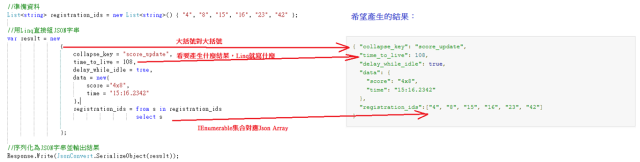
要用Linq直接組JSON
大概把握幾點:
Json Object:Json字串用大括號{}表示,Linq也是用大括號{}表示
Json Object的Name(Key、Property):Json字串在兩個雙引號””裡寫一個英文單字,Linq就直接寫英文單字即可
Json Array:Json字串用中括號[]表示,Linq就用from o in XXX select o,這種回傳IEnumerable的寫法(如果JSON字串是物件陣列的話就用from o in XXX select new {欄位1=YYY}這種形式)
Json Value:Linq就看Json字串填什麼值就跟著填什麼值
View Code
protected void Page_Load(object sender, EventArgs e)
{
    if (!IsPostBack)//Get Method
    {
        //準備資料
        List<string> registration_ids = new List<string>() { "4", "8", "15", "16", "23", "42" };

        //用Linq直接組
        var result = new
                        {
                            collapse_key = "score_update",
                            time_to_live = 108,
                            delay_while_idle = true,
                            data = new{
                                score ="4x8",
                                time = "15:16.2342"
                            },
                            registration_ids = from s in registration_ids
                                                        select s

                        };

        //序列化為JSON字串並輸出結果
        Response.Write(JsonConvert.SerializeObject(result));
    }
}
請看圖示解說↓
由於Linq支援DataTable的查詢,所以再難的JSON格式都組得出來,不用再跑for迴圈寫一堆Code,開發速度大幅提昇
以下截自實務上的一段Code(有做了一點修改)
View Code
DataTable dt = new DataTable();//撈出一張資料表的所有數據(這個表類似北風資料庫的員工資料表,有階層關係)
DataTable dtDetail = new DataTable();//上一張表的一對多明細表
var firstLevel = dt.Select("pid is NULL");//第一層數據
var result = new
{
      Info = new
    {
        Level1 = from a in firstLevel
                 join b in dt.AsEnumerable() on a.Field<int>("id") equals b.Field<int?>("pid") into secondLevel
                 select new
                 {
                     Title =  a.Field<string>("Title"),
                     Level2 = secondLevel.Select(c => new
                     {
                         Title =  c.Field<string>("Title"),
                         Photos = from s in secondLevel
                                       join uu in dtDetail.AsEnumerable() on s.Field<int>("id") equals uu.Field<int>("id")
                                       where s.Field<int>("id") == c.Field<int>("id")
                                select new
                                {
                                    PhotoID = uu.Field<string>("PhotoID"),
                                    PhotoTitle = uu.Field<string>("PhotoTitle")
                                }

                     })
                 }
    }
};
※不過要注意對於寫的人是寫很快,後人維護會有閱讀困難的可能

 浙公网安备 33010602011771号