学习计划:
HTML5:
各类新增标签。
1.HTML5语法变得简洁:DOCTYPE和character encoding (charset)定义
<!DOCTYPE html>

<meta charset="UTF-8">
2.新增8个结构标签,可在css中设置display为block
header, section, footer, aside, nav, main, article, figure {
    display: block;
}
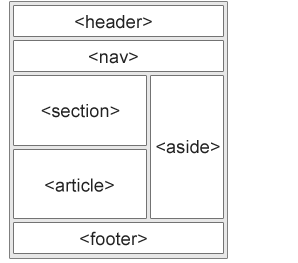
(1)section:独立内容区块,可以用h1~h6组成大纲,表示文档结构,也可以有章节、页眉、页脚或页眉的其他部分;
(2)article:特殊独立区块,表示这篇页眉中的核心内容;
(3)aside:标签内容之外与标签内容相关的辅助信息;
(4)header:某个区块的头部信息/标题;
(5)hgroup:头部信息/标题的补充内容;
(6)footer:底部信息;
(7)nav:导航条部分信息
(8)figure:独立的单元,例如某个有图片与内容的新闻块。
例如:
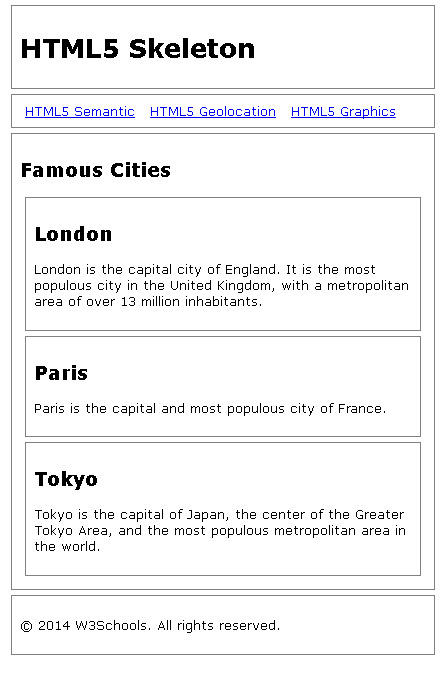
1 <!DOCTYPE html> 2 <html lang="en"> 3 <head> 4 <title>HTML5 Skeleton</title> 5 <meta charset="utf-8"> 6 7 <!--[if lt IE 9]> 8 <script src="http://html5shiv.googlecode.com/svn/trunk/html5.js"> 9 </script> 10 <![endif]--> 11 12 <style> 13 body {font-family: Verdana, sans-serif; font-size:0.8em;} 14 header,nav, section,article,footer 15 {border:1px solid grey; margin:5px; padding:8px;} 16 nav ul {margin:0; padding:0;} 17 nav ul li {display:inline; margin:5px;} 18 </style> 19 </head> 20 <body> 21 22 <header> 23 <h1>HTML5 SKeleton</h1> 24 </header> 25 26 <nav> 27 <ul> 28 <li><a href="html5_semantic_elements.asp">HTML5 Semantic</a></li> 29 <li><a href="html5_geolocation.asp">HTML5 Geolocation</a></li> 30 <li><a href="html5_canvas.asp">HTML5 Graphics</a></li> 31 </ul> 32 </nav> 33 34 <section> 35 36 <h1>Famous Cities</h1> 37 38 <article> 39 <h2>London</h2> 40 <p>London is the capital city of England. It is the most populous city in the United Kingdom, 41 with a metropolitan area of over 13 million inhabitants.</p> 42 </article> 43 44 <article> 45 <h2>Paris</h2> 46 <p>Paris is the capital and most populous city of France.</p> 47 </article> 48 49 <article> 50 <h2>Tokyo</h2> 51 <p>Tokyo is the capital of Japan, the center of the Greater Tokyo Area, 52 and the most populous metropolitan area in the world.</p> 53 </article> 54 55 </section> 56 57 <footer> 58 <p>© 2014 W3Schools. All rights reserved.</p> 59 </footer> 60 61 </body> 62 </html>
运行:
3.表单标签
(1)email:必须输入邮件;
(2)url:必须输入url地址;
(3)number:必须输入数值;
(4)range:必须输入一定范围内的数值;
(5)Date Pickers:日期选择器;
a.date:选取日、月、年
b.month:选取月、年
c.week:选取周和年
d.time:选取时间(小时和分钟)
e.datetime:选取时间、日、月、年(UTC时间)
f.datetime-local:选取时间、日、月、年(本地时间)
(6)search:搜索常规的文本域;
(7)color:颜色
4、媒体标签
(1)video:视频
(2)audio:音频
(3)embed:嵌入内容(包括各种媒体),Midi、Wav、AU、MP3、Flash、AIFF等。
5、其他功能标签
(1)mark:标注(像荧光笔做笔记)
(2)progress:进度条;<progress max="最大进度条的值" value="当前进度条的值">
(3)time:数据标签,给搜索引擎使用;发布日期<time datetime="2014-12-25T09:00">9:00</time>更新日期<time datetime="2015- 01-23T04:00" pubdate>4:00</time>
(4)ruby和rt:对某一个字进行注释;<ruby><rt>注释内容</rt><rp>浏览器不支持时如何显示</rp></ruby>
(5)wbr:软换行,页面宽度到需要换行时换行;
(6)canvas:使用JS代码做内容进行图像绘制;
(7)command:按钮;
(8)deteils :展开菜单;
(9)dateilst:文本域下拉提示;
(10)keygen:加密;
web 布局
参考资料:
https://www.quanzhanketang.com/html/html5_browsers.html
https://blog.csdn.net/garvisjack/article/details/54754928
布局: https://www.2cto.com/kf/201203/122394.html

 浙公网安备 33010602011771号