spring03-依赖注入
6、依赖注入
- 依赖注入(Dependency Injection,DI)。
- 依赖 : 指Bean对象的创建依赖于容器 . Bean对象的依赖资源 .
- 注入 : 指Bean对象所依赖的资源 , 由容器来设置和装配 .
6.1、构造器注入
之前已经接触
6.2、Set注入【重点】
要求被注入的属性 , 必须有set方法 , set方法的方法名由set + 属性首字母大写 , 如果属性是boolean类型 , 没有set方法 , 是 is .
【环境搭建】
1、测试pojo类
Address.java
public class Address {
    private String address;

    public String getAddress() {
        return address;
    }

    public void setAddress(String address) {
        this.address = address;
    }
}
Student.java
public class Student {

    private String name;
    private Address address;
    private String[] books;
    private List<String> hobbys;
    private Map<String,String> card;
    private Set<String> games;
    private String wife;
    private Properties info;

    public String getName() {
        return name;
    }

    public void setName(String name) {
        this.name = name;
    }

    public Address getAddress() {
        return address;
    }

    public void setAddress(Address address) {
        this.address = address;
    }

    public String[] getBooks() {
        return books;
    }

    public void setBooks(String[] books) {
        this.books = books;
    }

    public List<String> getHobbys() {
        return hobbys;
    }

    public void setHobbys(List<String> hobbys) {
        this.hobbys = hobbys;
    }

    public Map<String, String> getCard() {
        return card;
    }

    public void setCard(Map<String, String> card) {
        this.card = card;
    }

    public Set<String> getGames() {
        return games;
    }

    public void setGames(Set<String> games) {
        this.games = games;
    }

    public String getWife() {
        return wife;
    }

    public void setWife(String wife) {
        this.wife = wife;
    }

    public Properties getInfo() {
        return info;
    }

    public void setInfo(Properties info) {
        this.info = info;
    }

    @Override
    public String toString() {
        return "Student{" +
                "name='" + name + '\'' +
                ", address=" + address +
                ", books=" + Arrays.toString(books) +
                ", hobbys=" + hobbys +
                ", card=" + card +
                ", games=" + games +
                ", wife='" + wife + '\'' +
                ", info=" + info +
                '}';
    }
}
1、常量注入
 <bean id="student" class="com.kuang.pojo.Student">
     <property name="name" value="小明"/>
 </bean>
测试:
 @Test
 public void test01(){
     ApplicationContext context = newClassPathXmlApplicationContext("applicationContext.xml");

     Student student = (Student) context.getBean("student");

     System.out.println(student.getName());

 }
2、Bean注入
注意点:这里的值是一个引用,ref
 <bean id="addr" class="com.kuang.pojo.Address">
     <property name="address" value="重庆"/>
 </bean>

 <bean id="student" class="com.kuang.pojo.Student">
     <property name="name" value="小明"/>
     <property name="address" ref="addr"/>
 </bean>
3、数组注入
 <bean id="student" class="com.kuang.pojo.Student">
     <property name="name" value="小明"/>
     <property name="address" ref="addr"/>
     <property name="books">
         <array>
             <value>西游记</value>
             <value>红楼梦</value>
             <value>水浒传</value>
         </array>
     </property>
 </bean>
4、List注入
 <property name="hobbys">
     <list>
         <value>听歌</value>
         <value>看电影</value>
         <value>爬山</value>
     </list>
 </property>
5、Map注入
 <property name="card">
     <map>
         <entry key="中国邮政" value="456456456465456"/>
         <entry key="建设" value="1456682255511"/>
     </map>
 </property>
6、set注入
 <property name="games">
     <set>
         <value>LOL</value>
         <value>BOB</value>
         <value>COC</value>
     </set>
 </property>
7、Null注入
<property name="wife"><null/></property>
8、Properties注入
 <property name="info">
     <props>
         <prop key="学号">20190604</prop>
         <prop key="性别">男</prop>
         <prop key="姓名">小明</prop>
     </props>
 </property>
2、beans.xml
<?xml version="1.0" encoding="UTF-8"?>
<beans xmlns="http://www.springframework.org/schema/beans"
       xmlns:xsi="http://www.w3.org/2001/XMLSchema-instance"
       xsi:schemaLocation="http://www.springframework.org/schema/beans
       http://www.springframework.org/schema/beans/spring-beans.xsd">

    <bean id="addr" class="com.sen.pojo.Address">
        <property name="address" value="西安"/>
    </bean>

    <bean id="student" class="com.sen.pojo.Student">
        <!--第一种:普通注入-->
        <property name="name" value="liuSen"/>

        <!--第二种:Bean注入-->
        <property name="address" ref="addr"/>

        <!--第三种:数组注入-->
        <property name="books">
            <array>
                <value>西游记</value>
                <value>红楼梦</value>
                <value>水浒传</value>
            </array>
        </property>

        <!--第四种:List注入-->
        <property name="hobbys">
            <list>
                <value>听歌</value>
                <value>看电影</value>
                <value>爬山</value>
            </list>
        </property>

        <!--第五种:Map注入-->
        <property name="card">
            <map>
                <entry key="中国邮政" value="456456456465456"/>
                <entry key="建设" value="1456682255511"/>
            </map>
        </property>

        <!--第六种:Set注入-->
        <property name="games">
            <set>
                <value>LOL</value>
                <value>BOB</value>
                <value>COC</value>
            </set>
        </property>

        <!--第七种:Properties注入-->
        <property name="info">
            <props>
                <prop key="学号">20190604</prop>
                <prop key="性别">男</prop>
                <prop key="姓名">小明</prop>
            </props>
        </property>

        <!--第八种:Null注入-->
        <property name="wife"><null/></property>
    </bean>

</beans>
3、测试类
public class Mytest {
    @Test
    public void test(){
        ApplicationContext classPathXmlApplicationContext = new ClassPathXmlApplicationContext("beans.xml");
        Student student = (Student) classPathXmlApplicationContext.getBean("student");
        System.out.println(student);
    }
}
测试结果:
Student{
 name='liuSen',
 address=西安,
 books=[西游记, 红楼梦, 水浒传],
 hobbys=[听歌, 看电影, 爬山],
 card={中国邮政=456456456465456, 建设=1456682255511},
 games=[LOL, BOB, COC],
 wife='null',
 info={学号=20190604, 性别=男, 姓名=小明}
  }
6.3、拓展方式注入
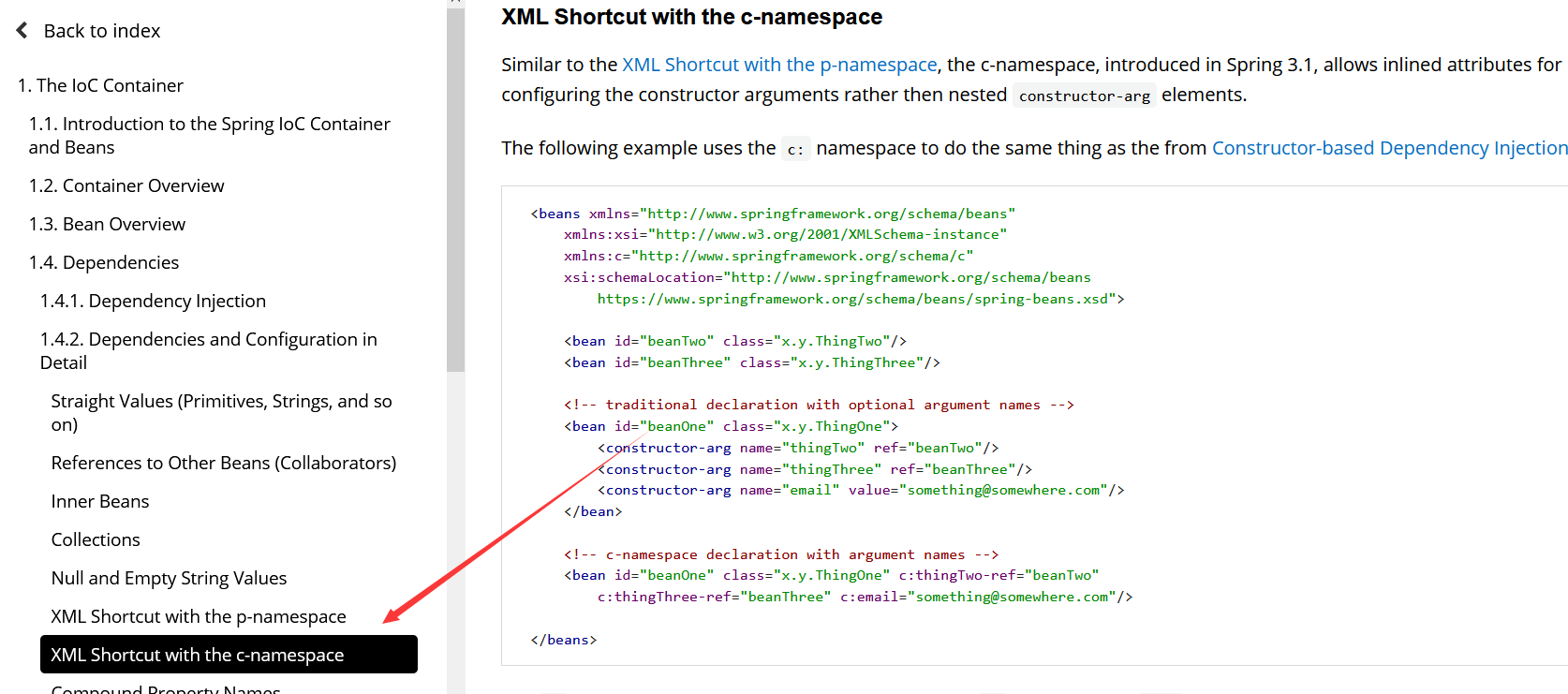
我们可以使用p命名空间和c命名空间进行注入
官方解释:
User.java :【注意:这里没有有参构造器!】
 public class User {
     private String name;
     private int age;

     public void setName(String name) {
         this.name = name;
    }

     public void setAge(int age) {
         this.age = age;
    }

     @Override
     public String toString() {
         return "User{" +
                 "name='" + name + '\'' +
                 ", age=" + age +
                 '}';
    }
 }
1、P命名空间注入 : 需要在头文件中加入约束文件
 导入约束 : xmlns:p="http://www.springframework.org/schema/p"

 <!--P(属性: properties)命名空间 , 属性依然要设置set方法-->
 <bean id="user" class="com.kuang.pojo.User" p:name="狂神" p:age="18"/>
2、c 命名空间注入 : 需要在头文件中加入约束文件
 导入约束 : xmlns:c="http://www.springframework.org/schema/c"
 <!--C(构造: Constructor)命名空间 , 属性依然要设置set方法-->
 <bean id="user" class="com.kuang.pojo.User" c:name="狂神" c:age="18"/>
发现问题:爆红了,刚才我们没有写有参构造!
解决:把有参构造器加上,这里也能知道,c 就是所谓的构造器注入!
测试代码:
 @Test
 public void test02(){
     ApplicationContext context = newClassPathXmlApplicationContext("applicationContext.xml");
     User user = (User) context.getBean("user");
     System.out.println(user);
 }
6.4、bean的作用域
在Spring中,那些组成应用程序的主体及由Spring IoC容器所管理的对象,被称之为bean。简单地讲,bean就是由IoC容器初始化、装配及管理的对象 .
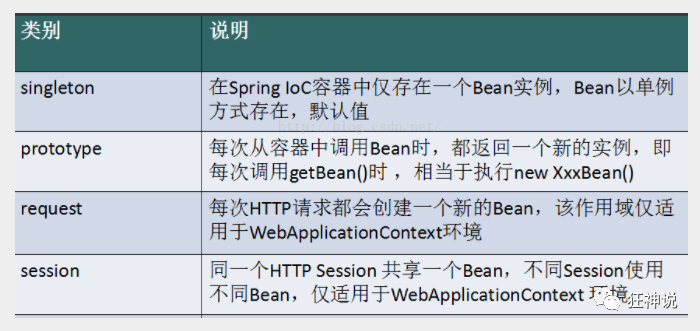
几种作用域中,request、session作用域仅在基于web的应用中使用(不必关心你所采用的是什么web应用框架),只能用在基于web的Spring ApplicationContext环境。
6.4.1、Singleton(单例模式:spring默认机制)
当一个bean的作用域为Singleton,那么Spring IoC容器中只会存在一个共享的bean实例,并且所有对bean的请求,只要id与该bean定义相匹配,则只会返回bean的同一实例。Singleton是单例类型,就是在创建起容器时就同时自动创建了一个bean的对象,不管你是否使用,他都存在了,每次获取到的对象都是同一个对象。注意,Singleton作用域是Spring中的缺省作用域。要在XML中将bean定义成singleton,可以这样配置:
<bean id="ServiceImpl" class="cn.csdn.service.ServiceImpl" scope="singleton">
测试:
 @Test
 public void test03(){
     ApplicationContext context = newClassPathXmlApplicationContext("applicationContext.xml");
     User user = (User) context.getBean("user");
     User user2 = (User) context.getBean("user");
     System.out.println(user==user2);
 }
6.4.2、Prototype(原型模式:每次从容器中get的时候,都会产生一个新对象)
当一个bean的作用域为Prototype,表示一个bean定义对应多个对象实例。Prototype作用域的bean会导致在每次对该bean请求(将其注入到另一个bean中,或者以程序的方式调用容器的getBean()方法)时都会创建一个新的bean实例。Prototype是原型类型,它在我们创建容器的时候并没有实例化,而是当我们获取bean的时候才会去创建一个对象,而且我们每次获取到的对象都不是同一个对象。根据经验,对有状态的bean应该使用prototype作用域,而对无状态的bean则应该使用singleton作用域。在XML中将bean定义成prototype,可以这样配置:
 <bean id="account" class="com.foo.DefaultAccount" scope="prototype"/>
  或者
 <bean id="account" class="com.foo.DefaultAccount" singleton="false"/>
Request
当一个bean的作用域为Request,表示在一次HTTP请求中,一个bean定义对应一个实例;即每个HTTP请求都会有各自的bean实例,它们依据某个bean定义创建而成。该作用域仅在基于web的Spring ApplicationContext情形下有效。考虑下面bean定义:
<bean id="loginAction" class=cn.csdn.LoginAction" scope="request"/>
针对每次HTTP请求,Spring容器会根据loginAction bean的定义创建一个全新的LoginAction bean实例,且该loginAction bean实例仅在当前HTTP request内有效,因此可以根据需要放心的更改所建实例的内部状态,而其他请求中根据loginAction bean定义创建的实例,将不会看到这些特定于某个请求的状态变化。当处理请求结束,request作用域的bean实例将被销毁。
Session
当一个bean的作用域为Session,表示在一个HTTP Session中,一个bean定义对应一个实例。该作用域仅在基于web的Spring ApplicationContext情形下有效。考虑下面bean定义:
<bean id="userPreferences" class="com.foo.UserPreferences" scope="session"/>
针对某个HTTP Session,Spring容器会根据userPreferences bean定义创建一个全新的userPreferences bean实例,且该userPreferences bean仅在当前HTTP Session内有效。与request作用域一样,可以根据需要放心的更改所创建实例的内部状态,而别的HTTP Session中根据userPreferences创建的实例,将不会看到这些特定于某个HTTP Session的状态变化。当HTTP Session最终被废弃的时候,在该HTTP Session作用域内的bean也会被废弃掉。

 浙公网安备 33010602011771号