
webpack配置详解 - 33.devServer
webpack开发服务器可用于快速开发应用程序。
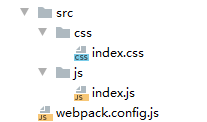
1.文件结构
2.代码
index.css
html,
body {
    height: 100%;
    background-color: pink;
}
index.js
import '$css/index';
webpack.config.js
const {resolve} = require('path')
const htmlWebpackPlugin = require('html-webpack-plugin')

module.exports = {
    entry: './src/js/index.js',
    output: {
        filename: "js/[name].js",
        path: resolve(__dirname, 'build'),
    },
    module: {
        rules: [
            {
                test: /\.css$/,
                use: ['style-loader', 'css-loader']
            },
        ]
    },
    plugins: [new htmlWebpackPlugin()],
    mode: 'development',
    resolve: {
        alias: {
            $css: resolve(__dirname, 'src/css')
        },
        extensions: ['.js', '.json', '.jsx', '.css'],
        modules: [resolve(__dirname, '../../node_modules'), 'node_modules']
    },
    //devserver启动命令: npx webpack-dev-server
    devServer: {
        // 运行代码的目录
        contentBase: resolve(__dirname, 'build'),
        // 监视 contentBase 目录下的所有文件,一旦文件发生变化就会 reload
        watchContentBase: true,
        watchOptions: {
            // 忽略文件
            ignored: /node_modules/,
        },
        // 启动 gzip 压缩
        compress: true,
        // 端口号
        port: 5000,
        //域名
        host: 'localhost',
        //自动打开浏览器
        open: true,
        //开启 HMR 功能
        hot: true,
        // 不要显示启动服务器日志信息
        clientLogLevel: 'none',
        // 除了一些基本的启动信息以外,其它内容都不要显示
        quiet: true,
        // 如果出错了,不要全屏显示
        overlay: false,
        // 服务器代理 --> 解决开发环境跨域问题
        proxy: {
            //一旦 devServer(5000) 服务器收到 /api/xxx 的请求,就会把请求转发到另一个服务器(3000)
            'api': {
                target: 'http://localhost:3000',
                // 发送请求时,请求路径重写: 将 /api/xxx --> /xxx  (去掉 /api)
                pathRewrite: {
                    '^/api': ''
                }

            }
        }


    }
}
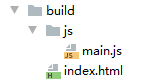
3.打包
$ webpack
end~

 浙公网安备 33010602011771号