
Webpack 打包 - 14. html压缩
这里使用 html-webpack-plugin 插件压缩 html 文件。
1.文件结构
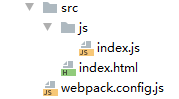
2.代码
index.html
<!DOCTYPE html>
<html lang="en">
<head>
    <meta charset="UTF-8">
    <title>webpack</title>
</head>
<body>
<!--这里是注释-->
<h5>webpack</h5>
</body>
</html>
index.js
//第二种方式: 全部js兼容性处理
// import '@babel/polyfill'
const add = (x, y)=> {
  return x + y;
}
console.log(add(1, 2));

const promise = new Promise((resolve)=>{
  setTimeout(()=>{
    console.log('定时器执行完毕')
    resolve()
  },1000)
})
console.log("promise:",promise)
webpack.config.js
const {resolve} = require('path')
const HtmlWebpackPlugin = require('html-webpack-plugin')
module.exports = {
    entry: './src/js/index.js',
    output: {
        filename: "js/built.js",
        path: resolve(__dirname, 'build')
    },
    plugins: [
        new HtmlWebpackPlugin({
            template: "./src/index.html",
            //压缩 html 代码
            minify: {
                //移除空格
                collapseWhitespace: true,
                //移除注释
                removeComments: true
            }
        })
    ],
    //生产环境下回自动压缩js代码
    mode: "production"
}
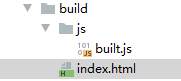
3.打包
$ webpack

end~

 浙公网安备 33010602011771号