
第三方网站微信登录
1,生成微信二维码
1.1需要在微信开放平台申请
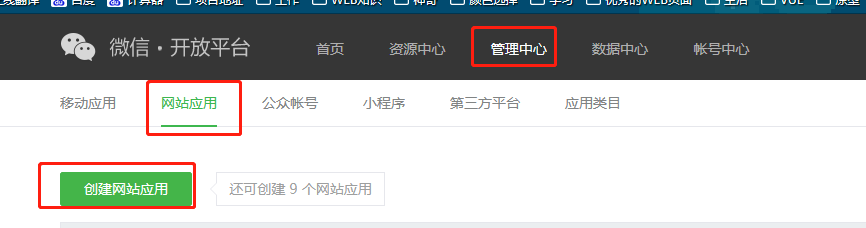
1.2 授权回调域,这个回调域只能填网站的一级地址如:https://www.baidu.com ,测试的话,可以修改

1.3,用代码生成微信的二维码

setWxerwma() {
const s = document.createElement("script");
s.type = "text/javascript";
s.src = "https://res.wx.qq.com/connect/zh_CN/htmledition/js/wxLogin.js";
const wxElement = document.body.appendChild(s);
wxElement.onload = function() {
var obj = new WxLogin({
id: "codeBox", // 需要显示的容器id
appid: "", // 公众号appid wx*******
scope: "snsapi_login", // 网页默认即可
redirect_uri: "", // 授权成功后回调的url
state: Math.ceil(Math.random() * 1000), // 可设置为简单的随机数加session用来校验
style: "", // 提供"black"、"white"可选。二维码的样式
href: "", // 外部css文件url,需要https
});
};
},
页面上整一个div,来显示二维码
2.1 扫描二维码跳转微信开放平台设置的回调域名,这时候在跳转到的页面上拿到生成的地址栏的code用来请求微信用户的openid
created() {
// 获取参数
this.code = this.$route.query.code;
this.state = this.$route.query.state;
// 判断是否有参数
if (this.code && this.state) {
this.ok = true;
} else {
this.ok = false;
}
this.wxloginFn();
},
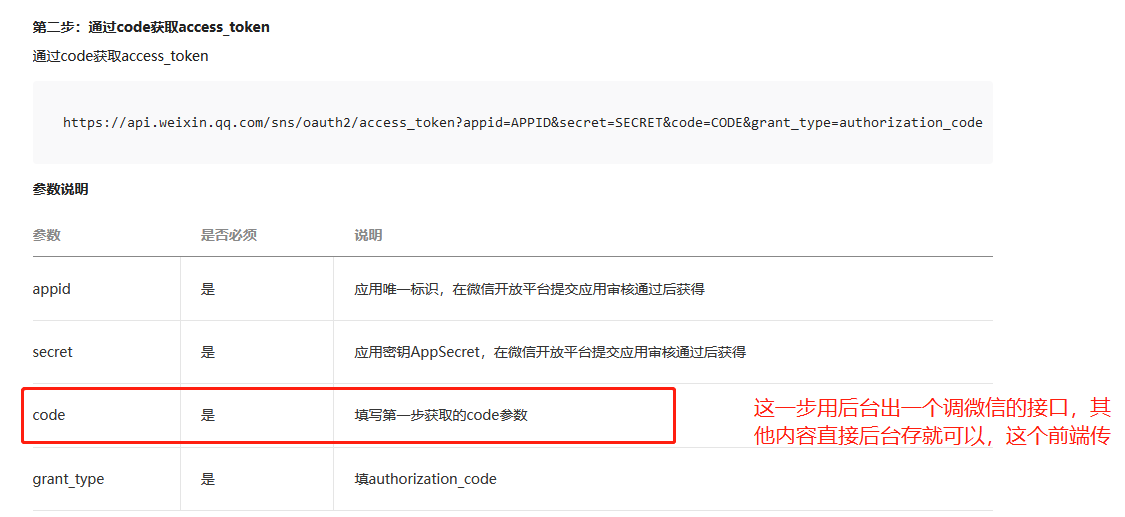
这个是返回的数据,之后就可以根据openid来获取该用户信息

 浙公网安备 33010602011771号