
Linux防火墙iptables学习笔记
目录
iptables防火墙服务简介
前期知识准备
iptables使用原则
iptables名词和术语
iptables四表五链
Iptables防火墙服务工作原理
iptables防火墙服务部署
iptables防火墙服务应用
iptables命令的基本用法
方法一、利用防火墙实现数据包过滤
方法二、利用防火墙实现数据包映射
iptables防火墙服务企业应用
最后注意保存!
iptables防火墙服务简介
前期知识准备
- OSI7层模型以及不同层对应哪些协议?
- TCP/IP三次握手,四次断开的过程,TCP HEADER,状态转换
- 常用的服务端口要非常清楚了解。
- 常用服务协议原理http协议,icmp协议
企业常见防火墙面试题参考:https://user.qzone.qq.com/49000448/blog/1429758060
防火墙官方资料:http://www.netfilter.org/projects/iptables/index.html
主机与主机之间通讯过程,数据包传递方式
    主机A        --->
    数据信息
    传输层头部信息    (TCP UDP  源端口 :目标端口)+ 数据信息
    网络层头部        (IP 源IP:目标IP)                传输层头部+数据信息
    链路层头部        (源mac:目标mac)                 网络层头部+传输层头部+数据信息
    物理层           将所有数据信息转换为二进制信息 01010101011101
    网卡(网线)     将0信号变为低电压传递 1信号高电压

    主机B        <---
    网卡(网线)     将电信号转为二进制信息
    物理层           将二进制信息转换成数据包
    链路层           源mac:目标mac 是不是自己本地主机上的mac地址
    网络层           源IP:目标IP    是不是自己本地主机上的IP地址
    传输层           源端口:目标端口
    查看到数据信息 处理响应
OSI七层协议数据传输的封包与解包过程演示:
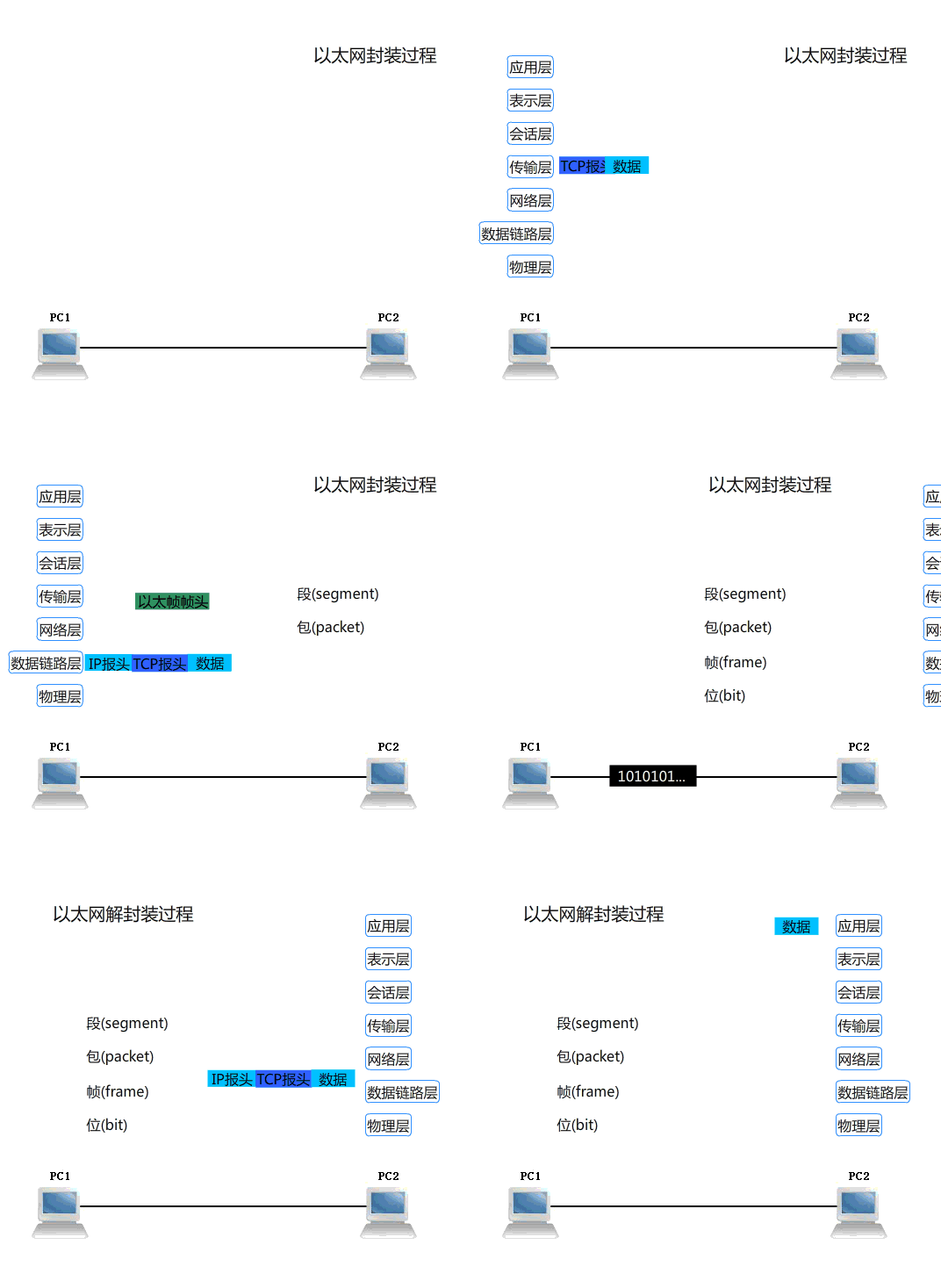
【更多学习可参考资料:https://www.cnblogs.com/linhaifeng/articles/5937962.html】
iptables使用原则:
1)用户并发访问量不大时,使用软件防火墙即可
2)用户并发访问量较高时,使用硬件防火墙
iptables名词和术语
容器
在iptables里,容器是用来描述包含或者说属于的关系。
表(tables)
表(tables)是链的容器,即所有的链(chains)都属于其对应的表(tables)。防护墙中的表拥有不同的功能策略。
链(chains)
链(chains)是规则(Policys)的容器。 控制数据包处理方式。
规则(Policy)
规则(Policy)就是iptables一系列过滤信息的规范和具体方法条款。
iptables四表五链
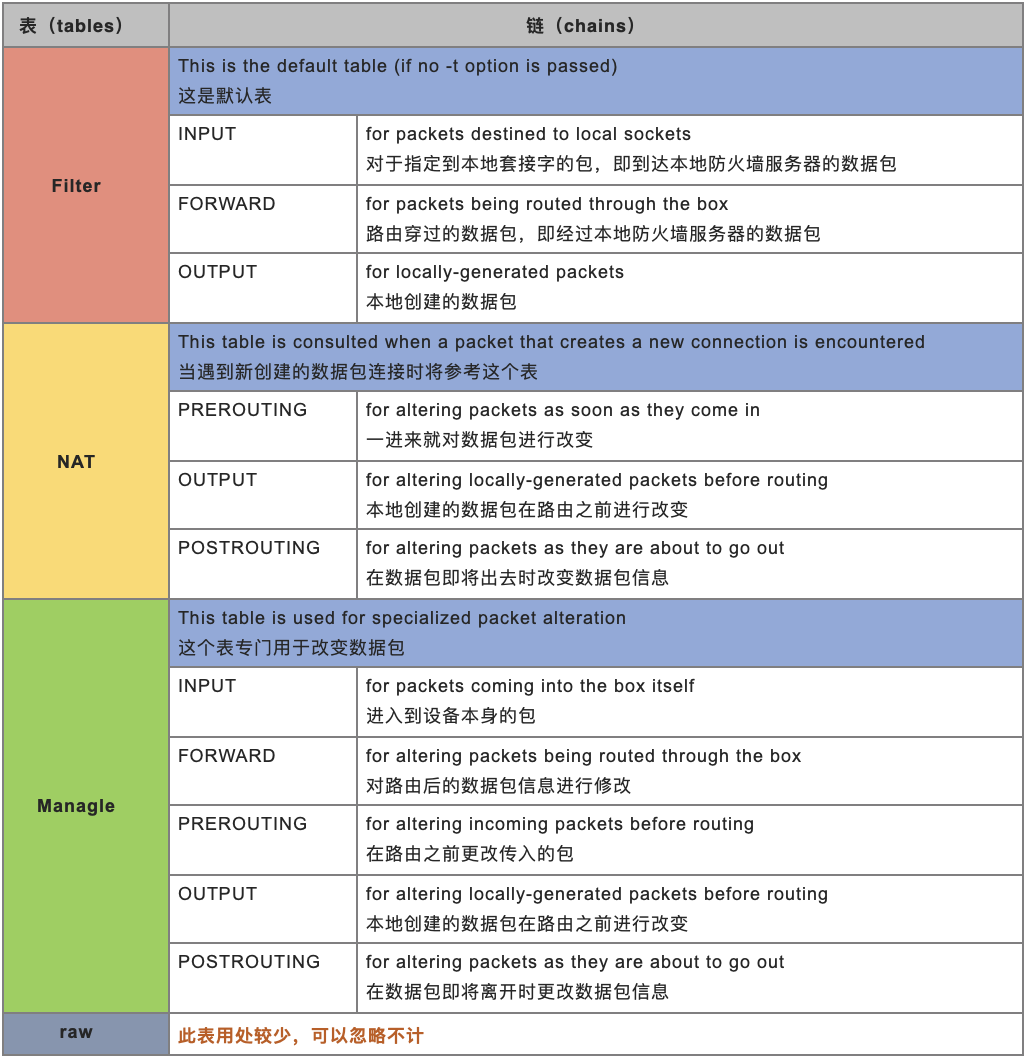
Filter表:这是默认表, 实现数据过滤处理
INPUT链: 流量进入时,进行处理方式
OUTPUT链: 流量出去时,进行处理方式
FORWARD链:流经网卡流量
NAT表:当遇到新创建的数据包连接时将参考这个表, 会将数据进行映射转换
OUTPUT链: 自身产生的流量在出去时,做映射转换
PREROUTING链: 经过数据流量,在进入时做映射转换
POSTROUTING链: 经过数据流量,在出去时做映射转换
Managle表:可以将数据包信息进行修改调整
raw表: 将数据包某些标记信息进行拆解
iptables防火墙服务工作原理
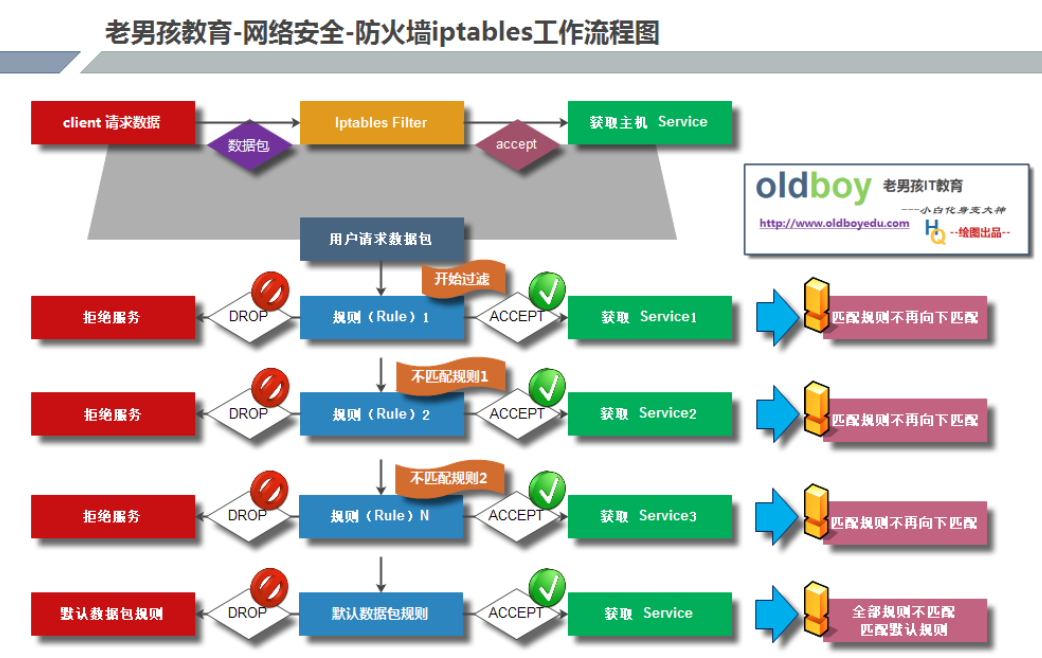
这里以filter表展开说明。
1.防火墙是层层过滤的,实际是按照配置规则的顺序从上到下,从前到后进行过滤的。
2.如果匹配上规则,即明确表示是阻止还是通过,数据包就不再向下匹配新的规则。
3.如果规则中没有明确表明是阻止还是通过的,也就是没有匹配规则,就会继续向下进行匹配,直到匹配到明确的阻止或通过,如果全部规则都没有匹配到,则执行默认规则。
4.防火墙的默认规则是所有规则执行完才执行的。
iptables防火墙服务部署
安装和确认
yum install -y iptables-services    //安装
systemctl start iptables.service     //启动
systemctl status iptables.service    //查看是否成功启动,显示active为成功启动
ps -ef|grep iptables    //在进程中s
查看filter表iptables默认配置
iptables -nL    //查看默认配置

Filter表信息解释 【在企业中,默认设置一般都会清除掉,然后重新部署)
Chain INPUT (policy ACCEPT)    //INPUT链。默认接受
target     prot opt source       destination
ACCEPT     all  --  0.0.0.0/0    0.0.0.0/0        state RELATED,ESTABLISHED
//允许任何地址任何目标进行连接
ACCEPT     icmp --  0.0.0.0/0    0.0.0.0/0
//icmp允许ping,企业中建议用DROP
ACCEPT     all  --  0.0.0.0/0    0.0.0.0/0
ACCEPT     tcp  --  0.0.0.0/0    0.0.0.0/0        state NEW tcp dpt:22
//只能用TCP方式访问22端口
REJECT     all  --  0.0.0.0/0    0.0.0.0/0        reject-with icmp-host-prohibited
//REJECT拒绝特殊方式ping

Chain FORWARD (policy ACCEPT)    //FORWARD链的默认设置
target     prot opt source       destination
REJECT     all  --  0.0.0.0/0    0.0.0.0/0        reject-with icmp-host-prohibited

Chain OUTPUT (policy ACCEPT)    //OUTPUT链的默认设置
target     prot opt source       destination
iptables防火墙服务应用
iptables命令的基本用法
语法规则:
  iptables [-t table] COMMAND [chain] CRETIRIA -j ACTION
  //-t table:指操作的表,默认为filter表,可不加此参数,但要指定其他三个表时必须加此参数。
  //COMMAND:子命令,定义对规则的管理
  //chain:指明链路
  //CRETIRIA:匹配的条件或标准
  //ACTION:操作动作
查看信息用法:
    iptables -n -L    //-n信息以数值方式显示,-L列表显示相应表规则信息,可以合写为 -nL
    iptables -nL -t 表名   //-t 表名:指定要查看的表信息。
    iptables -nL -v    //-v显示详细的配置规则信息,pkts/bytes可用于查看阻止或允许了多少数据包(pkts)和流量(bytes)以及进出信息等。
    iptables -nL --line-number    //--line-number查看规则序号信息

初始化清除操作:
    建议把默认配置信息和旧的配置信息删除,重新配置新规则,避免规则不完善或冲突。
    iptables -F    //flush,清空所有规则。可用于放开让人攻击,再分析攻击行为
    iptables -Z    //zero,清空防火墙计数器,可用于查看流量进行排错
    iptables -X    //delete-chain-X,清空自定义规则
  【清除操作不会删除默认规则】
方法一、利用防火墙实现数据包过滤
eg01:禁止外网用户访问服务22端口 【基于四层进行过滤处理】
iptables -t filter -A INPUT -p tcp --dport 22 -j DROP    //在INPUT链添加规则
//-t filter:指定表filter
//-A INPUT:在INPUT链添加,-D为删除//-p tcp:采用tcp协议方式
//--dport 22:目标端口
//-j DROP:jump选定之后的操作,ACCEPT(接受)、DROP(丢弃)、REJECT(拒绝),阻止时建议选用DROP
iptables -t filter -D INPUT 序号    //删除规则时可采用指定规则序号方式
iptables -t filter -A OUTPUT -p tcp --sport 22 -j DROP    //在OUTPUT链添加规则
eg02:只禁止10.0.0.1访问22端口【基于三层和四层进行过滤】
iptables -t filter -A INPUT -s 10.0.0.1 -p tcp --dport 22 -j DROP
//-s 10.0.0.1:指定源地址,后面用--dport,禁止此地址的用户进来
iptables -t filter -A OUTPUT -d 10.0.0.1 -p tcp --sport 22 -j DROP
//-d 10.0.0.1指定目标地址,后面用--sport,禁止去此地址的用户出去
iptables -t filter -A INPUT -s 10.0.0.0/24 -d 172.16.0.0/24  DROP
//禁止源网段10.0.0.0/24访问目标地址172.16.0.0/24
eg03:实现禁止ping
双方向禁ping:
    iptables -t filter -A INPUT -p icmp -j DROP   //彻底禁止ping过程

单反向禁ping:
    iptables -A INPUT -p icmp --icmp-type 8 -j DROP    //禁止外网ping linux
    iptables -A OUTPUT -p icmp --icmp-type 8 -j DROP    //禁止linux ping外网
icmp协议说明:
8类型是请求icmp包
0类型是响应icmp包
eg04:禁止多个端口不能访问
方式一:连续多端口进行阻止
    iptables -A INPUT -p tcp --dport 23:80 -j DROP

方式二:间隔多端口进行配置
    iptables -A INPUT -p tcp --dport 23,25,80 -j DROP    //此方法用报错,需加入如下行命令的-m参数
    iptables -A INPUT -m multiport -p tcp --dport 23,25,80 -j DROP
eg05:调整规则顺序
iptables -I INPUT 3 -p tcp --dport 22 -j DROP
//-I:将指定规则插入到某条规则之上,无序号参数的默认插入到第一条规则
eg06:修改默认规则
iptables -P INPUT DROP
//默认规则修改为ACCEPT:链规则采用黑名单方式。默认允许,列黑名单禁止
//默认规则修改为DROP:链规则采用白名单方式。此方法最安全,默认禁止,列白名单允许
//用-F等清空规则时,默认规则不受影响
方法二、利用防火墙实现数据包映射
1)将拥有内网IP地址主机实现访问外网
步骤1:配置内网地址网卡信息
    网卡地址:172.16.1.10/24
    网关地址:172.16.1.201
    DNS地址: 223.5.5.5

步骤2:开启防火墙服务器转发功能
    vi /etc/sysctl.conf    //修改系统内核功能文件,加入下行的开启转发功能命令行
    net.ipv4.ip_forward = 1    //开启参数为1,默认是关闭0(或无此命令行)
    sysctl -p    //立即加载系统内核配置,无需重启服务或重启主机

步骤3:配置防火墙NAT功能实现内网访问外网
    iptables -t nat -A POSTROUTING -s 172.16.1.10 -o eth0 -j SNAT --to-source 10.0.0.200
  //-t nat:指定在NAT表配置
  //-A POSTROUTING:把源添加映射
  //-o eth0:在网卡eth0出去的接口上。-o出out,-i入in
  //-j SNAT:操作源的映射SNAT,目标映射DNAT
  //--to-source:映射成什么地址
2)实现外网主机可以访问内网服务
iptables -t nat -A PREROUTING  -d 10.0.0.200 -p tcp --dport 9000 -j DNAT --to-destination 172.16.1.10:3389
//外网地址和端口等价映射到内网地址和端口:10.0.0.200 9000 === 172.16.1.10 3389
iptables防火墙服务企业应用
1、清理当前所有规则和计数器
iptables -F    //清空所有规则。可用于放开让人攻击,再分析攻击行为
iptables -Z    //清空防火墙计数器,可用于查看流量进行排错
iptables -X    //清空自定义规则
2、配置允许SSH登录端口进入
允许SSH服务端口开放连接(以下三种方式选择其一即可)
iptables -A INPUT -p tcp --dport 22 -s 10.0.0.0/24 -j ACCEPT
iptables -A INPUT -p tcp -s 10.0.0.0/24 -j ACCEPT
iptables -A INPUT -p tcp --dport 22 -j ACCEPT
提示:此步是为了防止执行下面的步骤,把自己关在外面。【在本地主机处理,这步可以不做】
建议在系统里设置定时任务,在时限内完成所有配置的话就取消定时任务,超时则就执行定时任务,把所有配置清空(iptables -F),这样就可以在时限之后重新进入,避免自己被关在外面。
3、配置允许本机lo通讯规则
//允许本机回环lo接口数据流量流出与流入
iptables -A INPUT -i lo -j ACCEPT    //允许从环回接口进来的流量
iptables -A OUTPUT -o lo -j ACCEPT    //允许从环回接口出去的流量
//loopback环回接口,ping自己127.0.0.1
4、配置默认的防火墙禁止和允许规则
//设置默认DROP掉FORWARD,INPUT链,允许OUTPUT链
iptables -P INPUT DROP    //默认禁止,只允许安全的白名单进入
iptables -P FORWARD DROP    //默认禁止
iptables -P OUTPUT ACCEPT    //出去的默认允许,可设置黑名单禁止出去
//-P:policy
5、开启信任的IP网段
//允许IDC LAN/WAN和办公网IP的访问,及对外合作机构访问
iptables -A INPUT -s 124.43.62.96/27 -p all -j ACCEPT    //<- 办公室固定IP段
iptables -A INPUT -s 192.168.1.0/24 -p all -j ACCEPT    //<- IDC机房的内网网段
iptables -A INPUT -s 10.0.0.0/24 -p all -j ACCEPT       //<- 其它机房的内网网段
iptables -A INPUT -s 203.83.24.0/24 -p all -j ACCEPT    //<- IDC机房的外网网段
iptables -A INPUT -s 201.82.34.0/24 -p all -j ACCEPT    //<- 其它IDC机房的外网网段
//提示:本步骤表示允许IDC LAN和办公网IP的无条件连接访问,因为是我们自己人,所以要信任通过,但是对于外部用户还无法访问服务器的任何服务。
6、允许业务服务端口对外访问(允许http服务无条件通过)
//允许所有人都能访问的端口
iptables -A INPUT -p tcp --dport 80 -j ACCEPT    //http网站服务
iptables -A INPUT -p tcp --dport 443 -j ACCEPT    //https网站服务
//网络安全人员关注,此处是别人入侵的门
7、允许icmp类型协议通过
//开启内外网利用icmp协议访问的规则
iptables -A INPUT -p icmp -m icmp --icmp-type any -j ACCEPT
iptables -A INPUT -p icmp --icmp-type 8 -j ACCEPT
//如果对内开,对外不开就用下面的方式
iptables -A INPUT -p icmp -s 172.16.1.0/24 -m icmp --icmp-type any -j ACCEPT
8、允许关联的状态包通过(web服务不要使用FTP服务)
//允许关联的状态包
iptables -A INPUT -m state --state ESTABLISHED,RELATED -j ACCEPT
iptables -A OUTPUT -m state --state ESTABLISHED,RELATED -j ACCEPT
//比喻:看电影出去wc或者接电话,回来也得允许进去
最后注意:防火墙配置完毕后,一定要保存配置!!!
//所有配置都是临时的,如果重启服务就会丢失,保存到文件中才是永久保存

方法一:
    /etc/init.d/iptables save
方法二:
    iptables-save >/etc/sysconfig/iptables

//提示:/etc/sysconfig/iptables为iptables的默认配置文件路径
//注意:第一次保存可以覆盖,以后保存只能追加
附录1:iptables常用参数:
链管理
  -N, --new-chain chain:新建一个自定义的规则链;
  -X, --delete-chain [chain]:删除用户自定义的引用计数为0的空链;
  -F, --flush [chain]:清空指定的规则链上的规则;
  -E, --rename-chain old-chain new-chain:重命名链;
  -Z, --zero [chain [rulenum]]:置零计数器;
  -P, --policy chain target, 设置链路的默认策略

规则管理
  -A, --append chain rule-specification:追加新规则于指定链的尾部;
  -I, --insert chain [rulenum] rule-specification:插入新规则于指定链的指定位置,默认为首部;
  -R, --replace chain rulenum rule-specification:替换指定的规则为新的规则;
  -D, --delete chain rulenum:根据规则编号删除规则

查看规则
  -L, --list [chain]:列出规则;
  -v, --verbose:详细信息;
    -vv, -vvv  更加详细的信息
  -n, --numeric:数字格式显示主机地址和端口号;
  -x, --exact:显示计数器的精确值;
  --line-numbers:列出规则时,显示其在链上的相应的编号;
  -S, --list-rules [chain]:显示指定链的所有规则

匹配条件
[!] -s, --source address[/mask][,...]:检查报文的源IP地址是否符合此处指定的范围,或是否等于此处给定的地址;
[!] -d, --destination address[/mask][,...]:检查报文的目标IP地址是否符合此处指定的范围,或是否等于此处给定的地址;
[!] -p, --protocol protocol:匹配报文中的协议,可用值tcp, udp, udplite, icmp, icmpv6,esp, ah, sctp, mh 或者 "all", 亦可以数字格式指明协议;
[!] -i, --in-interface name:限定报文仅能够从指定的接口流入;only for packets entering the INPUT, FORWARD and PREROUTING chains.
[!] -o, --out-interface name:限定报文仅能够从指定的接口流出;for packets entering the FORWARD, OUTPUT and POSTROUTING chains.
附录2:iptables手册(使用命令:man iptables)
NAME
iptables/ip6tables — administration tool for
IPv4/IPv6 packet filtering and NAT
SYNOPSIS
iptables [-t table] {-A|-C|-D} chain rule-specifi‐
cation
ip6tables [-t table] {-A|-C|-D} chain rule-specifi‐
cation
iptables [-t table] -I chain [rulenum] rule-speci‐
fication
iptables [-t table] -R chain rulenum rule-specifi‐
cation
iptables [-t table] -D chain rulenum
iptables [-t table] -S [chain [rulenum]]
iptables [-t table] {-F|-L|-Z} [chain [rulenum]]
[options...]
iptables [-t table] -N chain
iptables [-t table] -X [chain]
iptables [-t table] -P chain target
iptables [-t table] -E old-chain-name new-chain-
name
rule-specification = [matches...] [target]
match = -m matchname [per-match-options]
target = -j targetname [per-target-options]
DESCRIPTION
Iptables and ip6tables are used to set up, main‐
tain, and inspect the tables of IPv4 and IPv6
packet filter rules in the Linux kernel. Several
different tables may be defined. Each table con‐
tains a number of built-in chains and may also con‐
tain user-defined chains.
Each chain is a list of rules which can match a set
of packets. Each rule specifies what to do with a
packet that matches. This is called a `target',
which may be a jump to a user-defined chain in the
same table.
TARGETS
A firewall rule specifies criteria for a packet and
a target. If the packet does not match, the next
rule in the chain is examined; if it does match,
then the next rule is specified by the value of the
target, which can be the name of a user-defined
chain, one of the targets described in ipta‐
bles-extensions(8), or one of the special values
ACCEPT, DROP or RETURN.
ACCEPT means to let the packet through. DROP means
to drop the packet on the floor. RETURN means stop
traversing this chain and resume at the next rule
in the previous (calling) chain. If the end of a
built-in chain is reached or a rule in a built-in
chain with target RETURN is matched, the target
specified by the chain policy determines the fate
of the packet.
TABLES
There are currently five independent tables (which
tables are present at any time depends on the ker‐
nel configuration options and which modules are
present).
-t, --table table
This option specifies the packet matching
table which the command should operate on.
If the kernel is configured with automatic
module loading, an attempt will be made to
load the appropriate module for that table
if it is not already there.
The tables are as follows:
filter:
This is the default table (if no -t
option is passed). It contains the
built-in chains INPUT (for packets des‐
tined to local sockets), FORWARD (for
packets being routed through the box),
and OUTPUT (for locally-generated pack‐
ets).
nat:
This table is consulted when a packet
that creates a new connection is encoun‐
tered. It consists of three built-ins:
PREROUTING (for altering packets as soon
as they come in), OUTPUT (for altering
locally-generated packets before rout‐
ing), and POSTROUTING (for altering
packets as they are about to go out).
IPv6 NAT support is available since ker‐
nel 3.7.
mangle:
This table is used for specialized
packet alteration. Until kernel 2.4.17
it had two built-in chains: PREROUTING
(for altering incoming packets before
routing) and OUTPUT (for altering
locally-generated packets before rout‐
ing). Since kernel 2.4.18, three other
built-in chains are also supported:
INPUT (for packets coming into the box
itself), FORWARD (for altering packets
being routed through the box), and
POSTROUTING (for altering packets as
they are about to go out).
raw:
This table is used mainly for configur‐
ing exemptions from connection tracking
in combination with the NOTRACK target.
It registers at the netfilter hooks with
higher priority and is thus called
before ip_conntrack, or any other IP
tables. It provides the following
built-in chains: PREROUTING (for packets
arriving via any network interface) OUT‐
PUT (for packets generated by local pro‐
cesses)
security:
This table is used for Mandatory Access
Control (MAC) networking rules, such as
those enabled by the SECMARK and
CONNSECMARK targets. Mandatory Access
Control is implemented by Linux Security
Modules such as SELinux. The security
table is called after the filter table,
allowing any Discretionary Access Con‐
trol (DAC) rules in the filter table to
take effect before MAC rules. This ta‐
ble provides the following built-in
chains: INPUT (for packets coming into
the box itself), OUTPUT (for altering
locally-generated packets before rout‐
ing), and FORWARD (for altering packets
being routed through the box).
OPTIONS
The options that are recognized by iptables and
ip6tables can be divided into several different
groups.
COMMANDS
These options specify the desired action to per‐
form. Only one of them can be specified on the com‐
mand line unless otherwise stated below. For long
versions of the command and option names, you need
to use only enough letters to ensure that iptables
can differentiate it from all other options.
-A, --append chain rule-specification
Append one or more rules to the end of the
selected chain. When the source and/or des‐
tination names resolve to more than one
address, a rule will be added for each pos‐
sible address combination.
-C, --check chain rule-specification
Check whether a rule matching the specifica‐
tion does exist in the selected chain. This
command uses the same logic as -D to find a
matching entry, but does not alter the
existing iptables configuration and uses its
exit code to indicate success or failure.
-D, --delete chain rule-specification
-D, --delete chain rulenum
Delete one or more rules from the selected
chain. There are two versions of this com‐
mand: the rule can be specified as a number
in the chain (starting at 1 for the first
rule) or a rule to match.
-I, --insert chain [rulenum] rule-specification
Insert one or more rules in the selected
chain as the given rule number. So, if the
rule number is 1, the rule or rules are
inserted at the head of the chain. This is
also the default if no rule number is speci‐
fied.
-R, --replace chain rulenum rule-specification
Replace a rule in the selected chain. If
the source and/or destination names resolve
to multiple addresses, the command will
fail. Rules are numbered starting at 1.
-L, --list [chain]
List all rules in the selected chain. If no
chain is selected, all chains are listed.
Like every other iptables command, it
applies to the specified table (filter is
the default), so NAT rules get listed by
iptables -t nat -n -L
Please note that it is often used with the
-n option, in order to avoid long reverse
DNS lookups. It is legal to specify the -Z
(zero) option as well, in which case the
chain(s) will be atomically listed and
zeroed. The exact output is affected by the
other arguments given. The exact rules are
suppressed until you use
iptables -L -v
-S, --list-rules [chain]
Print all rules in the selected chain. If
no chain is selected, all chains are printed
like iptables-save. Like every other ipta‐
bles command, it applies to the specified
table (filter is the default).
-F, --flush [chain]
Flush the selected chain (all the chains in
the table if none is given). This is equiv‐
alent to deleting all the rules one by one.
-Z, --zero [chain [rulenum]]
Zero the packet and byte counters in all
chains, or only the given chain, or only the
given rule in a chain. It is legal to spec‐
ify the -L, --list (list) option as well, to
see the counters immediately before they are
cleared. (See above.)
-N, --new-chain chain
Create a new user-defined chain by the given
name. There must be no target of that name
already.
-X, --delete-chain [chain]
Delete the optional user-defined chain spec‐
ified. There must be no references to the
chain. If there are, you must delete or
replace the referring rules before the chain
can be deleted. The chain must be empty,
i.e. not contain any rules. If no argument
is given, it will attempt to delete every
non-builtin chain in the table.
-P, --policy chain target
Set the policy for the chain to the given
target. See the section TARGETS for the
legal targets. Only built-in (non-user-
defined) chains can have policies, and nei‐
ther built-in nor user-defined chains can be
policy targets.
-E, --rename-chain old-chain new-chain
Rename the user specified chain to the user
supplied name. This is cosmetic, and has no
effect on the structure of the table.
-h Help. Give a (currently very brief)
description of the command syntax.
PARAMETERS
The following parameters make up a rule specifica‐
tion (as used in the add, delete, insert, replace
and append commands).
-4, --ipv4
This option has no effect in iptables and
iptables-restore. If a rule using the -4
option is inserted with (and only with)
ip6tables-restore, it will be silently
ignored. Any other uses will throw an error.
This option allows to put both IPv4 and IPv6
rules in a single rule file for use with
both iptables-restore and ip6tables-restore.
-6, --ipv6
If a rule using the -6 option is inserted
with (and only with) iptables-restore, it
will be silently ignored. Any other uses
will throw an error. This option allows to
put both IPv4 and IPv6 rules in a single
rule file for use with both iptables-restore
and ip6tables-restore. This option has no
effect in ip6tables and ip6tables-restore.
[!] -p, --protocol protocol
The protocol of the rule or of the packet to
check. The specified protocol can be one of
tcp, udp, udplite, icmp, icmpv6,esp, ah,
sctp, mh or the special keyword "all", or it
can be a numeric value, representing one of
these protocols or a different one. A pro‐
tocol name from /etc/protocols is also
allowed. A "!" argument before the protocol
inverts the test. The number zero is equiv‐
alent to all. "all" will match with all pro‐
tocols and is taken as default when this
option is omitted. Note that, in ip6tables,
IPv6 extension headers except esp are not
allowed. esp and ipv6-nonext can be used
with Kernel version 2.6.11 or later. The
number zero is equivalent to all, which
means that you cannot test the protocol
field for the value 0 directly. To match on
a HBH header, even if it were the last, you
cannot use -p 0, but always need -m hbh.
[!] -s, --source address[/mask][,...]
Source specification. Address can be either
a network name, a hostname, a network IP
address (with /mask), or a plain IP address.
Hostnames will be resolved once only, before
the rule is submitted to the kernel. Please
note that specifying any name to be resolved
with a remote query such as DNS is a really
bad idea. The mask can be either an ipv4
network mask (for iptables) or a plain num‐
ber, specifying the number of 1's at the
left side of the network mask. Thus, an
iptables mask of 24 is equivalent to
255.255.255.0. A "!" argument before the
address specification inverts the sense of
the address. The flag --src is an alias for
this option. Multiple addresses can be
specified, but this will expand to multiple
rules (when adding with -A), or will cause
multiple rules to be deleted (with -D).
[!] -d, --destination address[/mask][,...]
Destination specification. See the descrip‐
tion of the -s (source) flag for a detailed
description of the syntax. The flag --dst
is an alias for this option.
-m, --match match
Specifies a match to use, that is, an exten‐
sion module that tests for a specific prop‐
erty. The set of matches make up the condi‐
tion under which a target is invoked.
Matches are evaluated first to last as spec‐
ified on the command line and work in short-
circuit fashion, i.e. if one extension
yields false, evaluation will stop.
-j, --jump target
This specifies the target of the rule; i.e.,
what to do if the packet matches it. The
target can be a user-defined chain (other
than the one this rule is in), one of the
special builtin targets which decide the
fate of the packet immediately, or an exten‐
sion (see EXTENSIONS below). If this option
is omitted in a rule (and -g is not used),
then matching the rule will have no effect
on the packet's fate, but the counters on
the rule will be incremented.
-g, --goto chain
This specifies that the processing should
continue in a user specified chain. Unlike
the --jump option return will not continue
processing in this chain but instead in the
chain that called us via --jump.
[!] -i, --in-interface name
Name of an interface via which a packet was
received (only for packets entering the
INPUT, FORWARD and PREROUTING chains). When
the "!" argument is used before the inter‐
face name, the sense is inverted. If the
interface name ends in a "+", then any
interface which begins with this name will
match. If this option is omitted, any
interface name will match.
[!] -o, --out-interface name
Name of an interface via which a packet is
going to be sent (for packets entering the
FORWARD, OUTPUT and POSTROUTING chains).
When the "!" argument is used before the
interface name, the sense is inverted. If
the interface name ends in a "+", then any
interface which begins with this name will
match. If this option is omitted, any
interface name will match.
[!] -f, --fragment
This means that the rule only refers to sec‐
ond and further IPv4 fragments of fragmented
packets. Since there is no way to tell the
source or destination ports of such a packet
(or ICMP type), such a packet will not match
any rules which specify them. When the "!"
argument precedes the "-f" flag, the rule
will only match head fragments, or unfrag‐
mented packets. This option is IPv4 spe‐
cific, it is not available in ip6tables.
-c, --set-counters packets bytes
This enables the administrator to initialize
the packet and byte counters of a rule (dur‐
ing INSERT, APPEND, REPLACE operations).
OTHER OPTIONS
The following additional options can be specified:
-v, --verbose
Verbose output. This option makes the list
command show the interface name, the rule
options (if any), and the TOS masks. The
packet and byte counters are also listed,
with the suffix 'K', 'M' or 'G' for 1000,
1,000,000 and 1,000,000,000 multipliers
respectively (but see the -x flag to change
this). For appending, insertion, deletion
and replacement, this causes detailed infor‐
mation on the rule or rules to be printed.
-v may be specified multiple times to possi‐
bly emit more detailed debug statements.
-w, --wait [seconds]
Wait for the xtables lock. To prevent mul‐
tiple instances of the program from running
concurrently, an attempt will be made to
obtain an exclusive lock at launch. By
default, the program will exit if the lock
cannot be obtained. This option will make
the program wait (indefinitely or for
optional seconds) until the exclusive lock
can be obtained.
-W, --wait-interval microseconds
Interval to wait per each iteration. When
running latency sensitive applications,
waiting for the xtables lock for extended
durations may not be acceptable. This option
will make each iteration take the amount of
time specified. The default interval is 1
second. This option only works with -w.
-n, --numeric
Numeric output. IP addresses and port num‐
bers will be printed in numeric format. By
default, the program will try to display
them as host names, network names, or ser‐
vices (whenever applicable).
-x, --exact
Expand numbers. Display the exact value of
the packet and byte counters, instead of
only the rounded number in K's (multiples of
1000) M's (multiples of 1000K) or G's (mul‐
tiples of 1000M). This option is only rele‐
vant for the -L command.
--line-numbers
When listing rules, add line numbers to the
beginning of each rule, corresponding to
that rule's position in the chain.
--modprobe=command
When adding or inserting rules into a chain,
use command to load any necessary modules
(targets, match extensions, etc).
MATCH AND TARGET EXTENSIONS
iptables can use extended packet matching and tar‐
get modules. A list of these is available in the
iptables-extensions(8) manpage.
DIAGNOSTICS
Various error messages are printed to standard
error. The exit code is 0 for correct functioning.
Errors which appear to be caused by invalid or
abused command line parameters cause an exit code
of 2, and other errors cause an exit code of 1.
BUGS
Bugs? What's this? ;-) Well, you might want to
have a look at http://bugzilla.netfilter.org/
COMPATIBILITY WITH IPCHAINS
This iptables is very similar to ipchains by Rusty
Russell. The main difference is that the chains
INPUT and OUTPUT are only traversed for packets
coming into the local host and originating from the
local host respectively. Hence every packet only
passes through one of the three chains (except
loopback traffic, which involves both INPUT and
OUTPUT chains); previously a forwarded packet would
pass through all three.
The other main difference is that -i refers to the
input interface; -o refers to the output interface,
and both are available for packets entering the
FORWARD chain.
The various forms of NAT have been separated out;
iptables is a pure packet filter when using the
default `filter' table, with optional extension
modules. This should simplify much of the previous
confusion over the combination of IP masquerading
and packet filtering seen previously. So the fol‐
lowing options are handled differently:
-j MASQ
-M -S
-M -L
There are several other changes in iptables.
SEE ALSO
iptables-apply(8), iptables-save(8), ipta‐
bles-restore(8), iptables-extensions(8),
The packet-filtering-HOWTO details iptables usage
for packet filtering, the NAT-HOWTO details NAT,
the netfilter-extensions-HOWTO details the exten‐
sions that are not in the standard distribution,
and the netfilter-hacking-HOWTO details the netfil‐
ter internals.
See http://www.netfilter.org/.
AUTHORS
Rusty Russell originally wrote iptables, in early
consultation with Michael Neuling.
Marc Boucher made Rusty abandon ipnatctl by lobby‐
ing for a generic packet selection framework in
iptables, then wrote the mangle table, the owner
match, the mark stuff, and ran around doing cool
stuff everywhere.
James Morris wrote the TOS target, and tos match.
Jozsef Kadlecsik wrote the REJECT target.
Harald Welte wrote the ULOG and NFQUEUE target, the
new libiptc, as well as the TTL, DSCP, ECN matches
and targets.
The Netfilter Core Team is: Marc Boucher, Martin
Josefsson, Yasuyuki Kozakai, Jozsef Kadlecsik,
Patrick McHardy, James Morris, Pablo Neira Ayuso,
Harald Welte and Rusty Russell.
Man page originally written by Herve Eychenne
<rv@wallfire.org>.
VERSION
This manual page applies to iptables/ip6tables
@PACKAGE_AND_VERSION@.
iptables 1.4.21 IPTABLES(8)

 浙公网安备 33010602011771号