
Pytest03--运行测试
被测程序
创建calc.py文件
class Calc:
    def add(self,a,b):
        return a+b
    def sub(self,a,b):
        return a--b #预留缺陷
if __name__=='__main__': #调试
    c=Calc()
    print(c.add(3,5)) #预期 8
    print(c.sub(3,5)) #预期 -2
创建pytest测试用例并执行
创建demo01.py文件
import calc, pytest
def test_add(): #测试函数,pytest测试用例1
    c=calc.Calc()
    case=[4,6,10]
    a,b,expect=case
    actual=c.add(a,b)
    if actual==expect: #pytest不认可自己写的比对结果的写法
        print('测试通过')
    else: print(f'测试失败==预期:{expect}==实际:{actual}')
def test_sub(): #pytest测试用例2
    c=calc.Calc()
    case=[4,6,-2]
    a,b,expect=case
    actual=c.sub(a,b)
    if expect==actual: print('测试通过')
    else: print(f'测试失败==预期:{expect}==实际:{actual}')
class TestCalc:
    def testadd(self):
        actual=calc.Calc().add(2,0)
        expect=2
        if expect == actual: print('测试通过')
        else: print(f'测试失败==预期:{expect}==实际:{actual}')
    def testsub(self):
        actual=calc.Calc().sub(2,0)
        expect=2
        if expect == actual: print('测试通过')
        else: print(f'测试失败==预期:{expect}==实际:{actual}')
#执行pytest测试用例
if __name__=='__main__':
    # pytest.main(['-s','-v','demo01.py']) #-s允许输入输出,stdio
    pytest.main(['-sv', 'demo01.py']) #-v表示显示详细的测试结果,verbosity
    # pytest.main(['-sv demo01.py']) #错误写法
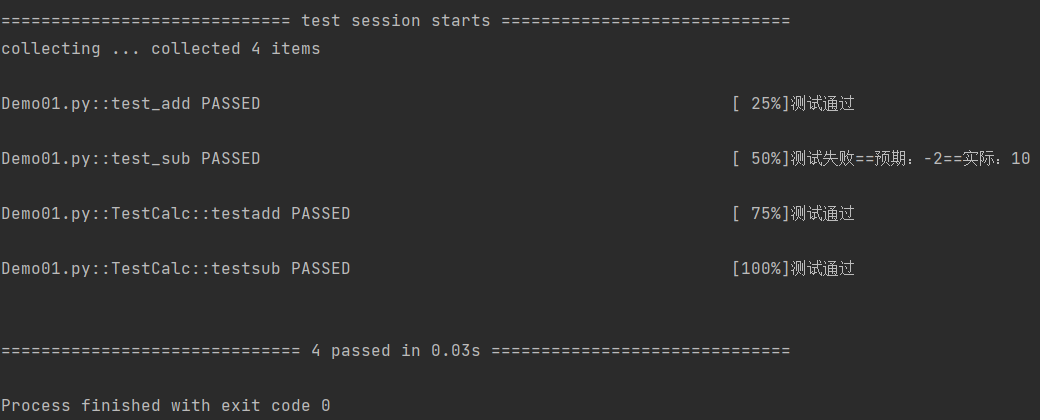
创建test_demo01.py里面创建一个测试类,包含2个测试方法
import pytest


class Testdemo01:
    def test_case1(self):
        print('这是第一条测试用例')

    def test_case2(self):
        print('这是第二条测试用例')


if __name__ == '__main__':
    pytest.main(['test_demo01.py'])
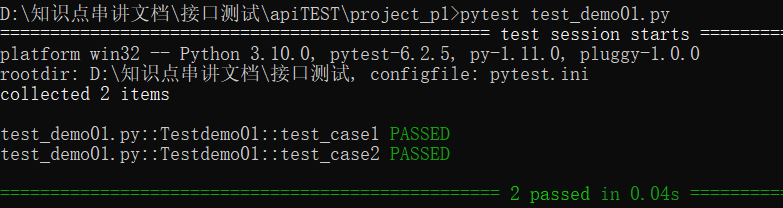
Pytest Exit Code 含义清单
    Exit code 0 所有用例执行完毕,全部通过
    Exit code 1 所有用例执行完毕,存在Failed的测试用例
    Exit code 2 用户中断了测试的执行
    Exit code 3 测试执行过程发生了内部错误
    Exit code 4 pytest 命令行使用错误
    Exit code 5 未采集到可用测试用例文件
运行测试
按照类中测试函数编写的先后顺序执行
IDLE及pycharm中运行
if __name__=='__main__':
    pytest.main(['参数1', '参数2', ..., '参数n', '模块名.py'])
1)不能通过调用测试函数来执行用例
2)[ ]不能省略
3)允许依次执行多个模块中的测试,按模块名的书写顺序执行其中的测试用例,模块中的函数或方法的执行顺序也是按照书写顺序执行
4)常用基本参数
        -v:日志中显示每个测试函数的执行结果,verbosity:详细程度
           ①通过用PASSED表示,失败用FAILED,sv可以一起用,写成‘-sv’或[ ‘-s’, ‘-v’, ]
        -q:日志中只显示整体测试结果
        -s:启用测试函数中print()输出
            ①platform:测试平台,测试时使用了哪些软件或安装的模块
            ②rootdir:根目录,即项目所在的路径
            ③collected 1 item:收集或发现了几个pytest测试用例
            ④ce_calc.py  .  [100%]:ce_calc.py是模块名;句点表示测试通过,F表示测试失败;100%表示执行进度
            ⑤1 passed in 0.33s:passed表示测试通过,1表示数量,0.33s表示测试时长
        -x:出现一条测试用例失败就退出测试,调试时使用
        -sv:
            ①ce_calc.py::test_add1:
                ::是间隔符;一般的格式是模块名::函数名或模块名::类名::方法名
命令行中运行
    pytest   可省参数   py文件名.py
    参数也支持 -v、-q、-s、-x
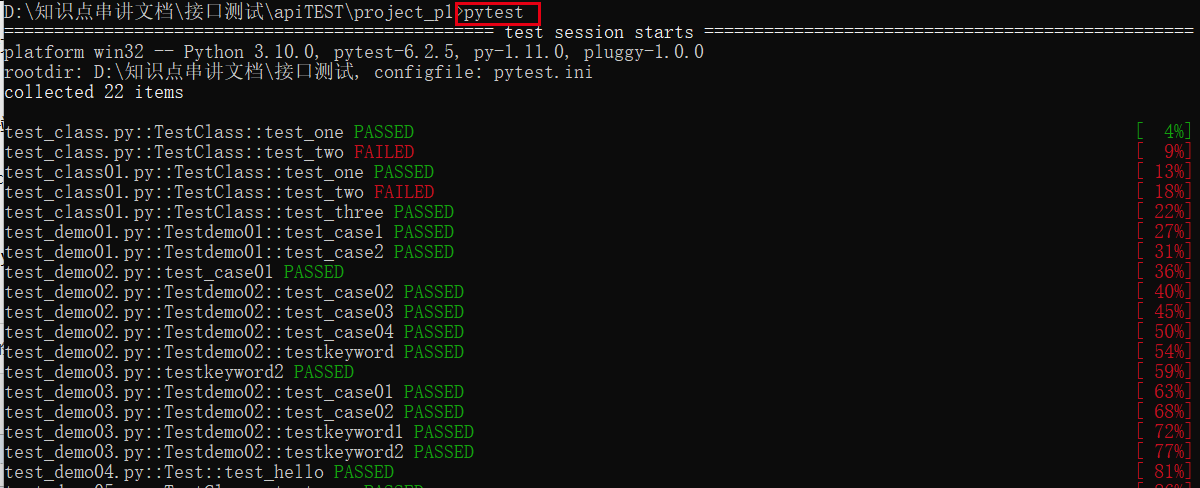
    pytest运行规则: 查找当前目录及其子目录下以test_*.py或*_test.py文件,找到文件后,在文件中找到以test开头函数并执行
运行test_demo01.py文件
第一种运行代码方法:
        在terminal(终端)中输入pytest(或者输入py.test也可以)

第二种运行代码方法:
    打开test_demo01.py所在的文件夹,cmd窗口输入:pytest(或者输入py.test也可以)
运行一个指定的测试(按节点运行)
    pytest   参数  模块名.py::函数名
    pytest   参数  模块名.py::类名::方法名
    pytest   参数  -k   keyword   模块名.py
        -k表示运行名称中带有keyword关键字的测试函数或方法
        上述方法适用于cmd和pycharm
    注意:
        pass 通过
        deselected 取消选择
制作test_case02.py文件并运行测试
def test_case01():
    print("这是测试第一条")
class Testdemo02:
    def test_case02(self):
        print("这是测试第一条")
    def test_case03(self):
        print("这是测试第二条")
    def test_case04(self):
        print("这是测试第三条")
    def testkeyword(self):
        print("这是测试第三条")



运行多个指定的测试
    pytest  参数  模块名.py::函数名1   模块名.py::类名::方法名1
    pytest  参数  -k  "keyword1  or  keyword2"  模块名.py
        -k表示运行名称中带有keyword1或keyword2关键字的测试函数或方法
        cmd下双引号不能省略
    上述方法适用于cmd和pycharm
创建test_demo03.py文件,并运行测试
def testkeyword2():
    print("这是测试第一条")
class Testdemo02:
    def test_case01(self):
        print("这是测试第一条")
    def test_case02(self):
        print("这是测试第二条")
    def testkeyword1(self):
        print("这是测试第三条")
    def testkeyword2(self):
        print("这是测试第三条")


运行多个模块中的所有测试
pytest  参数  测试模块名1.py   测试模块名2.py
    上述方法适用于cmd和pycharm
运行目录中的的所有测试
    pytest  参数
        只运行当前目录中符合命名规则的测试
        测试模块名必须使用test_开头或_test结尾,下划线不能省略
    pytest   参数  目录
        只运行指定目录中符合命名规则的测试
    上述命名仅用于cmd下
执行测试类
    创建test_class.py文件
    启动cmd,cd到test_class.py所在目录下
    输入py.test -q test_class.py
    -q 指定执行的文件
创建测试类并编写测试用例
class TestClass:
    def test_one(self):
        x = "this"
        assert "h" in x

    def test_two(self):
        x = "hello"
        assert hasattr(x, "check")
练习创建目录及编写测试用例
    project_P1
        test_class01.py
        test_sample01.py
    cmd执行pytest用例有三种方法(建议使用第一种):
        pytest
        py.test
        python -m pytest
执行规则:
    执行某个目录下所有的用例
        pytest 文件名/
    执行某一个py文件下用例
        pytest 脚本名称.py
    -k 按关键字匹配
        pytest -k “MyClass and not method”
    这将运行包含与给定字符串表达式匹配的名称的测试,其中包括Python使用文件名,类名和函数名作为变量的运算符
test_class01.py
class TestClass:
    def test_one(self):
        x = "this"
        assert 'h' in x

    def test_two(self):
        x = "hello"
        assert hasattr(x, 'check')

    def test_three(self):
        a = "hello"
        b = "hello world"
        assert a in b
test_sample01.py
def func(x):
    return x + 1

def test_answer():
    assert func(3) == 5
标记表达式
    pytest -m slow
    将运行用@pytest.mark.slow装饰器修饰的所有测试。
pytest -x( 遇到错误时停止测试)
pytest -x test_class.py
pytest -maxfail=num(当用例错误个数达到指定数量时,停止测试)
pytest --maxfail=1
pycharm配置pytest
以pytest方式运行,需要改该工程设置默认的运行器:file->Setting->Tools->Python Integrated Tools->项目名称->Default test runner->选择pytest
pycharm运行三种方式
以xx.py脚本方式直接执行
当写的代码里面没用到unittest和pytest框架时,并且脚本名称不是以test_开头命名的,此时pycharm会以xx.py脚本方式运行
project_P1创建hello.py并编写测试用例
def hello():
    print("hello world !")

if __name__=="__main__":
    hello()
以unittest方式运行
创建test_demo04.py文件编写以下内容
import unittest


class Test(unittest.TestCase):
    def test_hello(self):
        print("hello world !")
当脚本命名为test_demo04.py时,用到unittest框架,此时运行代码,pycharm会自动识别到以unittest方式运行
pytest方式运行
以pytest方式运行,需要改该工程设置默认的运行器:file->Setting->Tools->Python Integrated Tools->项目名称->Default test runner->选择pytest
import pytest

class TestClass:
        def test_one(self):
            x = "this"
            assert 'h' in x

        def test_two(self):
            x = "hello"
            assert hasattr(x, 'check')

        def test_three(self):
            a = "hello"
            b = "hello world"
            assert a in b

if __name__ == "__main__":
    pytest.main('-q test_demo05.py')
运用pycharm实现pytest代码
在project_p1中创建test_demo05.py
import pytest

class TestClass:
        def test_one(self):
            x = "this"
            assert 'h' in x

        def test_two(self):
            x = "hello"
            assert hasattr(x, 'check')

        def test_three(self):
            a = "hello"
            b = "hello world"
            assert a in b

if __name__ == "__main__":
    pytest.main('-q test_demo05.py')
pytest是可以兼容unittest脚本的,之前写的unittest用例也能用pytest框架去运行
本文来自博客园,作者:暄总-tester,转载请注明原文链接:https://www.cnblogs.com/sean-test/p/15527997.html

 浙公网安备 33010602011771号