

一、点击排行展示
- 在请求根路由时去数据库查询按点击量排行的10条新闻
新闻new模型设计
class News(BaseModel, db.Model):
    """新闻"""
    __tablename__ = "info_news"

    id = db.Column(db.Integer, primary_key=True)  # 新闻编号
    title = db.Column(db.String(256), nullable=False)  # 新闻标题
    source = db.Column(db.String(64), nullable=False)  # 新闻来源
    digest = db.Column(db.String(512), nullable=False)  # 新闻摘要
    content = db.Column(db.Text, nullable=False)  # 新闻内容
    clicks = db.Column(db.Integer, default=0)  # 浏览量
    index_image_url = db.Column(db.String(256))  # 新闻列表图片路径
    category_id = db.Column(db.Integer, db.ForeignKey("info_category.id"))
    user_id = db.Column(db.Integer, db.ForeignKey("info_user.id"))  # 当前新闻的作者id
    status = db.Column(db.Integer, default=0)  # 当前新闻状态 如果为0代表审核通过,1代表审核中,-1代表审核不通过
    reason = db.Column(db.String(256))  # 未通过原因,status = -1 的时候使用
    # 当前新闻的所有评论
    comments = db.relationship("Comment", lazy="dynamic")

    def to_review_dict(self):
        resp_dict = {
            "id": self.id,
            "title": self.title,
            "create_time": self.create_time.strftime("%Y-%m-%d %H:%M:%S"),
            "status": self.status,
            "reason": self.reason if self.reason else ""
        }
        return resp_dict

    def to_basic_dict(self):
        resp_dict = {
            "id": self.id,
            "title": self.title,
            "source": self.source,
            "digest": self.digest,
            "create_time": self.create_time.strftime("%Y-%m-%d %H:%M:%S"),
            "index_image_url": self.index_image_url,
            "clicks": self.clicks,
        }
        return resp_dict

    def to_dict(self):
        resp_dict = {
            "id": self.id,
            "title": self.title,
            "source": self.source,
            "digest": self.digest,
            "create_time": self.create_time.strftime("%Y-%m-%d %H:%M:%S"),
            "content": self.content,
            "comments_count": self.comments.count(),
            "clicks": self.clicks,
            "category": self.category.to_dict(),
            "index_image_url": self.index_image_url,
            "author": self.user.to_dict() if self.user else None
        }
        return resp_dict
后端首页index视图代码
@index_blu.route('/')
def index():
    ...
    # 获取点击排行数据
    news_list = None
    try:
        news_list = News.query.order_by(News.clicks.desc()).limit(constants.CLICK_RANK_MAX_NEWS)
    except Exception as e:
        current_app.logger.error(e)

    click_news_list = []
    for news in news_list if news_list else []:
        click_news_list.append(news.to_basic_dict())

    data = {
        "user_info": user.to_dict() if user else None,
        "click_news_list": click_news_list,
    }

    return render_template('news/index.html', data=data)
创建排行榜前三自定义过滤器
def do_class_index(index):

    if index == 0:
        return "first"
    elif index == 1:
        return "second"
    elif index == 2:
        return "third"
    else:
        return ""
- 在 app 创建的函数里面注册过滤器
from info.utils.common import do_index_class
# 添加自定义过滤器
app.add_template_filter(do_index_class, "index_class")
前端index.html进行模板渲染,及通过对span标签使用自定义过滤器对排行前三特别显示
<div class="rank_con fr">
            <div class="rank_title">
                <h3>点击排行</h3>
            </div>
            <ul class="rank_list">
                {% for news in data.click_news_list %}
                    <li><span class="{{ loop.index0 | indexClass }}">{{ loop.index }}</span><a href="#">{{ news.title }}</a></li>
                {% endfor %}
            </ul>
        </div>
应用效果:
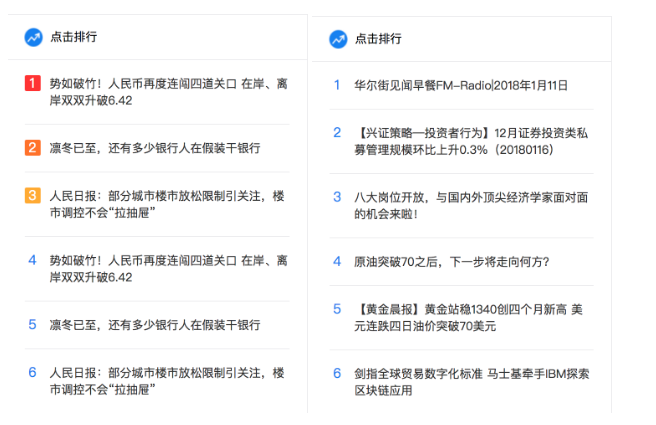
二、新闻分类展示
- 在请求根路由的时候去查询新闻分类,并默认设置第1个分类选中
@index_blue.route("/")
def index():
    user_id =  session.get('user_id')
    user = None
    # 判断用户是否已经登陆,user_id 是否有值
    if user_id:
       # 根据用户的id查询用户
       user = User.query.get(user_id)

    # 查询首页右边的热门排行新闻数据
    news = News.query.order_by(News.clicks.desc()).limit(constants.CLICK_RANK_MAX_NEWS)

    news_list = []

    for new_model in news:
        news_list.append(new_model.to_dict())


    # 上面的分类数据
    categorys =  Category.query.all()

    category_list = []

    for category in categorys:
        category_list.append(category.to_dict())

    data = {
        # "click_news_list":news_list
        "user_info": user.to_dict() if user else None,
        "click_news_list": news_list,
        "categories":category_list
    }

    return render_template('news/index.html',data= data )
前端模板渲染
<ul class="menu fl">
    {% for category in data.categories %}
        <li class="{% if loop.index0 == 0 %}active{% endif %}" data-cid="{{ category.id }}"><a href="javascript:;">{{ category.name }}</a></li>
    {% endfor %}
</ul>
效果如下:

三、新闻列表数据-分页展示
- 新闻列表数据只是当前页面的一部分
- 点击分类时需要去获取当前分类下的新闻数据
- 并在展示的时候需要更新新闻列表界面,不需要整体页面刷新
- 所以新闻数据也使用 ajax 的方式去请求后台接口进行获取
接口设计
- URL:/news_list
- 请求方式:GET
- 传入参数:JSON格式
- 参数
| 参数名 | 类型 | 是否必须 | 参数说明 |
|---|---|---|---|
| cid | string | 是 | 分类id |
| page | int | 否 | 页数,不传即获取第1页 |
| per_page | int | 否 | 每页多少条数据,如果不传,默认10条 |
- 返回类型:JSON
| 参数名 | 类型 | 是否必须 | 参数说明 |
|---|---|---|---|
| errno | int | 是 | 错误码 |
| errmsg | string | 是 | 错误信息 |
| cid | string | 是 | 当前新闻数据的分类id |
| total_page | int | 否 | 总页数 |
| current_page | int | 否 | 当前页数 |
| news_dict_list | list | 否 | 新闻列表数据 |
| newsList.title | string | 是 | 新闻标题 |
| newsList.source | string | 是 | 新闻来源 |
| newsList.digest | string | 是 | 新闻摘要 |
| newsList.create_time | string | 是 | 新闻时间 |
| newsList.index_image_url | string | 是 | 新闻索引图 |
返回示例
{
    "cid":1,
    "current_page":2,
    "errmsg":"OK",
    "errno":"0",
    "news_dict_list":[
        {
            "clicks":65,
            "create_time":"2018-01-17 21:55:55",
            "digest":"1月17日比特币延续了前几日的跌势,并且数字货币血流成河的状况也在持续,跌幅基本保持着两位数。近期全球市场对比特币的监管力度都有所加大。",
            "id":21,
            "index_image_url":"https://wpimg.wallstcn.com/d1643b79-7e69-47c2-91b9-9d3c7a51e0c7.png",
            "source":"WEEX",
            "title":"数字货币继续“血流成河”:比特币遭遇各国监管“围剿”"
        },
        {
            "clicks":8,
            "create_time":"2018-01-17 19:32:04",
            "digest":"今天的话题还包括:1、微信的黄金时代;2、区块链交易暗河:关联利益的庄家,被收割的韭菜;3、霍金的轮椅有多少黑科技。看完想坐...",
            "id":28,
            "index_image_url":"https://wpimg.wallstcn.com/949eab04-2ddf-4601-b9a9-34e6de11b70b.gif",
            "source":"潘凌飞",
            "title":"七点档 | 起底不为人知的网络暴力产业链"
        }
    ],
    "total_page":578
}
后端接口实现
@index_blue.route("/news_list", methods=['GET'])
def get_news_list():
    cid = request.args.get("cid", "1")
    page = request.args.get("page", "1")
    per_page = request.args.get("per_page", "10")

    try:
        cid = int(cid)
        page = int(page)
        per_page = int(per_page)
    except Exception as e:
        cid = 1
        page = 1
        per_page = 10

    # 根据创建时间查询最新的新闻,及分页
    try:
        paginate = News.query.order_by(News.create_time.desc()).paginate(page, per_page, False)
        # 查询出来的数据
        items = paginate.items
        # 获取到总的页数
        toal_page = paginate.pages
        # 获取到当前页
        current_page = paginate.page
    except Exception as e:
        current_app.logger.error(e)
        return jsonify(errno=RET.DBERR, errmsg="数据查询失败")

    items_list = []
    for item in items:
        items_list.append(item.to_dict())

    data = {
        "current_page": current_page,
        "total_page": toal_page,
        "news_dict_li": items_list
    }

    return jsonify(errno=RET.OK, errmsg="ok", data=data)
前端js
var currentCid = 1; // 当前分类 id
var cur_page = 1; // 当前页
var total_page = 1;  // 总页数
var data_querying = true;   // 是否正在向后台获取数据


$(function () {
    // 界面加载完成之后去加载新闻数据
    updateNewsData()

    // 首页分类切换
    $('.menu li').click(function () {
        // 取到指定分类的cid
        var clickCid = $(this).attr('data-cid')
        // 遍历所有的 li 移除身上的选中效果
        $('.menu li').each(function () {
            $(this).removeClass('active')
        })
        // 给当前分类添加选中的状态
        $(this).addClass('active')
        // 如果点击的分类与当前分类不一致
        if (clickCid != currentCid) {
            // 记录当前分类id
            currentCid = clickCid

            // 重置分页参数
            cur_page = 1
            total_page = 1
            updateNewsData()
        }
    })

    //页面滚动加载相关
    $(window).scroll(function () {

        // 浏览器窗口高度
        var showHeight = $(window).height();

        // 整个网页的高度
        var pageHeight = $(document).height();

        // 页面可以滚动的距离
        var canScrollHeight = pageHeight - showHeight;

        // 页面滚动了多少,这个是随着页面滚动实时变化的
        var nowScroll = $(document).scrollTop();

        if ((canScrollHeight - nowScroll) < 100) {
            // 判断页数,去更新新闻数据

            if (!data_querying) {
                data_querying = true

                // 如果当前页数据如果小于总页数,那么才去加载数据
                if (cur_page < total_page) {
                    cur_page += 1
                    // 去加载数据
                    updateNewsData()
                }

            }
        }
    })
})

function updateNewsData() {
    // 更新新闻数据
    var params = {
        "cid": currentCid,
        "page": cur_page,
        "per_page": 10
    }
    $.get("/news_list", params, function (resp) {
        // 数据加载完毕,设置【正在加载数据】的变量为 false 代表当前没有在加载数据
        data_querying = false

        // 给总页数据赋值
        total_page = resp.data.total_page
        // 代表请求成功
        // 清除已有数据
        if (cur_page == 1) {
            $(".list_con").html("")
        }

        // 添加请求成功之后返回的数据

        // 显示数据
        for (var i = 0; i < resp.data.news_dict_li.length; i++) {
            var news = resp.data.news_dict_li[i]
            var content = '<li>'
            content += '<a href="/news/' + news.id + '" class="news_pic fl"><img src="' + news.index_image_url + '?imageView2/1/w/170/h/170"></a>'
            content += '<a href="/news/' + news.id + '" class="news_title fl">' + news.title + '</a>'
            content += '<a href="/news/' + news.id + '" class="news_detail fl">' + news.digest + '</a>'
            content += '<div class="author_info fl">'
            content += '<div class="source fl">来源:' + news.source + '</div>'
            content += '<div class="time fl">' + news.create_time + '</div>'
            content += '</div>'
            content += '</li>'
            $(".list_con").append(content)
        }

    })
}
总结:
1、自定义模板过滤器,通过app.add_template_filter(函数名, '过滤器名称')进行注册, 过滤器名称为html使用的名称一致,例如上述例子
app.add_template_filter(do_index_class, "index_class") 与前端<li><span class="{{ loop.index0 | indexClass }}">{{ loop.index }}</span><a href="#">{{ news.title }}</a></li>
过滤器名称一致;
2、flask中用paginate可实现数据分页效果,paginate用法及属性如下
paginate的用法
paginate(page, per_page, error_out=True)
>>>page 当前页数
>>>per_page 每页显示的条数
>>>error_out 是否打印错误信息

2.paginate的属性
a)paginate.page 当前页数
b)paginate.pages 总页数
c)paginate.total 数据总条数
d)paginate.has_prev 是否存在上一页
返回布尔值

e)paginate.has_next 是否存在下一页
返回布尔值

f)paginate.iter_pages() 所有页码
返回列表 如[1, 2, 3, 4]

g)paginate(page, per_page,error_out).items
返回当前页的所有数据

 浙公网安备 33010602011771号