

用AI一劳永逸解决七大姑八大姨的朋友圈点赞问题
万恶的朋友圈点赞问题
大家是否常常遇到七大姑八大姨的朋友圈点赞问题?反正我是经常遇到,作为程序猿,最近就想着怎么样才能一劳永逸地解决这个问题。最后终于用180行代码解决了这个问题。这期间遇到了很多难点,但最终都一一解决了,因此记录下来与大家分享,希望能帮到大家。
思路
1、其实很多时候,对朋友圈点赞的真实性并没有多少要求,往往只需要截图即可。所以问题就变成如何方便的生成朋友圈点赞截图了。
2、生成点赞截图的思路,就是用程序生成点赞数据,只需要找一批微信头像,按点赞格式画在朋友圈内容下即可。
3、这里的难点在于如何定位位置。即在哪儿开始画点赞的内容。
难点突破
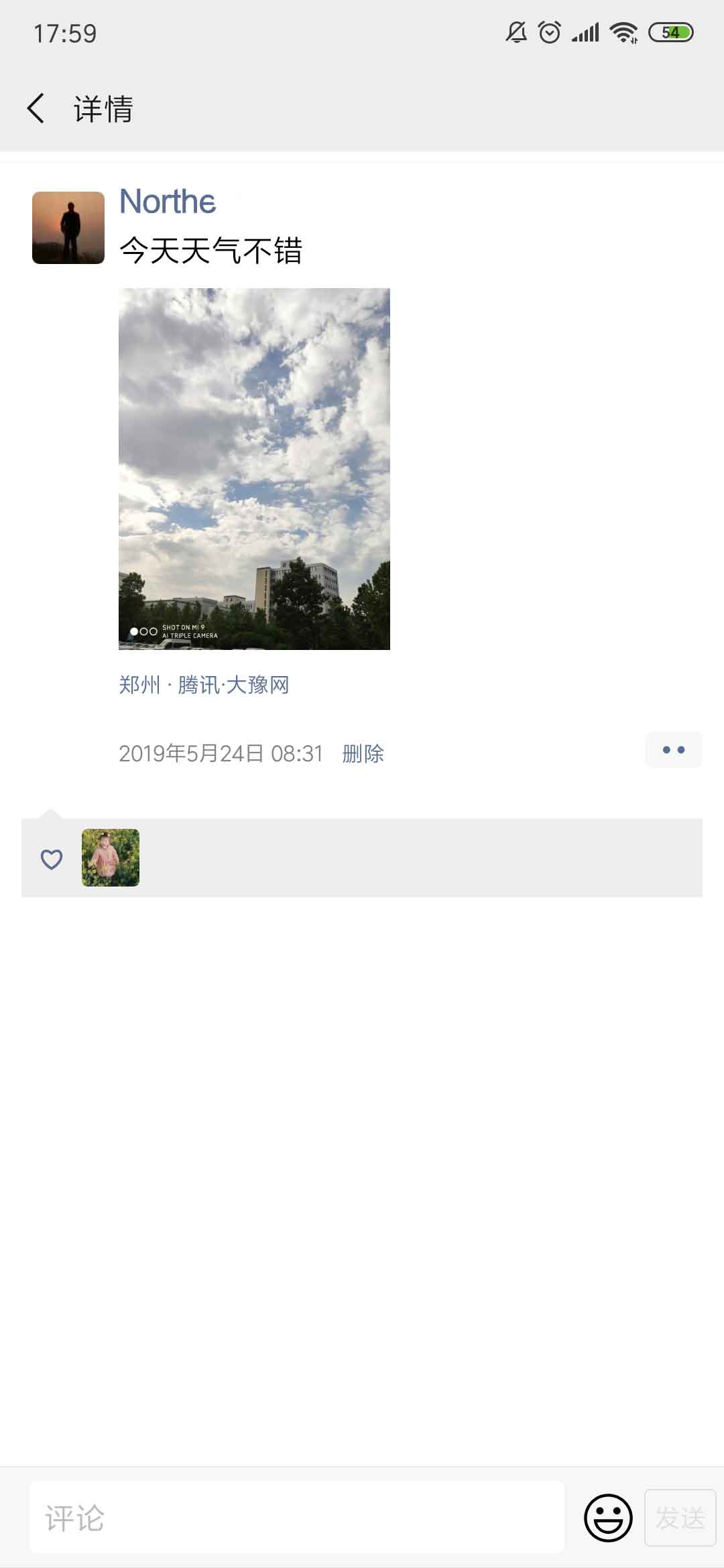
首先来看朋友圈详细页的格式,一般格式如下图:
注:图片来源于网上,如果有侵权请告知,立刻删除
我们要找的位置就是内容结束后面的两个点的评论按钮的位置。
方案一:用像素的方式寻找评论按钮在整个图片中的位置。可以通过像素对比的方式找到,比较耗时。
方案二:用OCR的方式寻找删除功能按钮的位置。技术难度比较大。
方案一测试后发现,因为现在手机截图都很大,处理起来很耗时。满足不了时间的要求。
方案二涉及到图片文字识别提取,在找了一圈开源项目后,发现有两种方案:
1、通过tesseract开源OCR库处理。
2、通过图片文字识别API来实现图片文字提取。这种方式比较简单,很多API每天提供了一定数量的免费额度,完全满足要求。因此本文采用的是这种方案。
这种方案的流程是,上传一张朋友圈详细页截图,然后输入需要的点赞数量,通过API把图片上传到服务器进行识别,找到“删除”二字的位置,然后用随机头像画到图片上保存即可。
具体实现代码
注:本文用的是Laravel环境
1、获取输入参数:
这里只需要获取点赞数量和截图。
<?php
namespace App\Http\Controllers;
use Illuminate\Http\Request;
use App;
use Intervention\Image\Facades\Image;

class WeixinMomentsVoteController extends Controller
{
    public function momentsVote(Request $request) {
        $count = $request -> input("votecount");
        $filePath = public_path() . "/" . $request -> input("img");
    }
}
2、获取API Token,用于调用文字识别的授权。
这里用的是百度AI通用文字识别(含位置信息版),首先要提取Token,代码如下:
$bceToken = $this -> getBaiduBceToken();
if (empty($bceToken)) {
    return "服务器出现故障,请稍后再试";
}

private function request_post($url = '', $param = '') {
    if (empty($url) || empty($param)) {
        return false;
    }

    $postUrl = $url;
    $curlPost = $param;
    $curl = curl_init();//初始化curl
    curl_setopt($curl, CURLOPT_URL,$postUrl);//抓取指定网页
    curl_setopt($curl, CURLOPT_HEADER, 0);//设置header
    curl_setopt($curl, CURLOPT_RETURNTRANSFER, 1);//要求结果为字符串且输出到屏幕上
    curl_setopt($curl, CURLOPT_POST, 1);//post提交方式
    curl_setopt($curl, CURLOPT_POSTFIELDS, $curlPost);
    $data = curl_exec($curl);//运行curl
    curl_close($curl);

    return $data;
}

private function getBaiduBceToken() {
    $url = 'https://aip.baidubce.com/oauth/2.0/token';
    $post_data['grant_type'] = 'client_credentials';
    $post_data['client_id'] = 'your id';
    $post_data['client_secret'] = 'your secret';
    $o = "";
    foreach ( $post_data as $k => $v )
    {
        $o.= "$k=" . urlencode( $v ). "&" ;
    }
    $post_data = substr($o,0,-1);

    $res = $this -> request_post($url, $post_data);
    $res = json_decode($res);
    if ($res) {
        return $res -> access_token;
    } else {
        return "";
    }
}
3、获取图片文字信息
通过API接口获取图片文字信息,找到“删除”两个字的位置:
$wordResults = $this -> getImageTextInfo($bceToken, $filePath);
if (empty($wordResults)) {
    return "上传的图片有误,请查看帮助文档";
}

$posInfo = [
    "width" => 0,
    "height" => 0,
    "top" => 0,
    "left" => 0
];
for ($i=0; $i < count($wordResults); $i++) {
    $word = $wordResults[$i] -> words;
    if (strpos($word, "删除") > 0) {
        $location = $wordResults[$i] -> location;
        $posInfo = [
            "width" => $location -> width,
            "height" => $location -> height,
            "top" => $location -> top,
            "left" => $location -> left
        ];
        break;
    }
}

private function getImageTextInfo($token, $filePath) {
    $url = 'https://aip.baidubce.com/rest/2.0/ocr/v1/general?access_token=' . $token;
    $img = file_get_contents($filePath);
    $img = base64_encode($img);
    $bodys = array(
        "image" => $img
    );
    $res = $this -> request_post($url, $bodys);
    $res = json_decode($res);
    if ($res) {
        return $res -> words_result;
    } else {
        return "";
    }
}
4、绘制截图
剩下的就是绘制点赞头像。
主要步骤如下:
(1)把“删除”两字以下的内容清空
(2)生成点赞图片
(3)生成点赞背景
(4)绘制心形图标
(5)绘制底部输入框
详细代码如下:
$photoItems = $this -> getRandomWeixinPhoto($count);
if (count($photoItems) < $count) {
    $count = count($photoItems);
}

//把“删除”两字以下的内容清空
$img = Image::make($filePath);
$imgWidth = $img -> width();
$imgHeight = $img -> height();
$img->rectangle(0, $posInfo["top"] + $posInfo["height"], $imgWidth, $imgHeight, function ($draw) {
    $draw->background('#ffffff');
});

//生成点赞图片
$iconWidthHeight = 86;
$iconMarginRight = 16;
$iconMarginBottom = 16;
$iconCountPerLine = floor(($imgWidth - 122 - 32) / ($iconWidthHeight + $iconMarginRight));
$iconBgWidth = ($iconCountPerLine - 1) * $iconMarginRight + $iconWidthHeight * $iconCountPerLine;
$iconLineCount = floor($count / $iconCountPerLine);
if ($count % $iconCountPerLine != 0) {
    $iconLineCount += 1;
}
$iconBgHeight = ($iconLineCount - 1) * $iconMarginBottom + $iconWidthHeight * $iconLineCount;
$iconBg = Image::canvas($iconBgWidth, $iconBgHeight, '#eeeeee');
for ($i=0; $i < $count; $i++) {
    $colIndex = $i % $iconCountPerLine;
    $rowIndex = floor($i / $iconCountPerLine);
    $iconBg -> insert(
        Image::make($photoItems[$i]) -> resize($iconWidthHeight, $iconWidthHeight),
        'top-left',
        $colIndex * ($iconWidthHeight + $iconMarginRight),
        $rowIndex * ($iconWidthHeight + $iconMarginBottom));
}

//生成点赞背景
$voteBgWidth = $imgWidth;
$voteBgMarginLeftRight = 32;
$voteHeaderBgHeight = 96;
$voteArrowImg = public_path() . "/imgs/vote_arrow.png";
$voteArrowHeight = 16;
$voteBgHeight = $iconBgHeight + $voteHeaderBgHeight + $iconMarginBottom;
$voteBg = Image::canvas($voteBgWidth, $voteBgHeight, '#ffffff');
$voteBg -> insert($voteArrowImg, "top-left", 55, $voteHeaderBgHeight - $voteArrowHeight - $iconMarginBottom);
$voteBg -> rectangle($voteBgMarginLeftRight, $voteHeaderBgHeight - $iconMarginBottom, $imgWidth - $voteBgMarginLeftRight, $voteBgHeight, function ($draw) {
    $draw->background('#eeeeee');
});
$voteBg -> insert($iconBg, "top-left", 122, 94);

//绘制心形图标
$voteBg -> insert(public_path() . "/imgs/vote_heart.png", "top-left", 60, 124);

$img -> insert($voteBg, "top-left", 0, $posInfo["top"] + $posInfo["height"]);

//绘制底部输入框
$footerImg = Image::make(public_path() . "/imgs/vote_footer.png") -> widen($imgWidth);
$img -> insert($footerImg, "bottom-left", 0, 0);
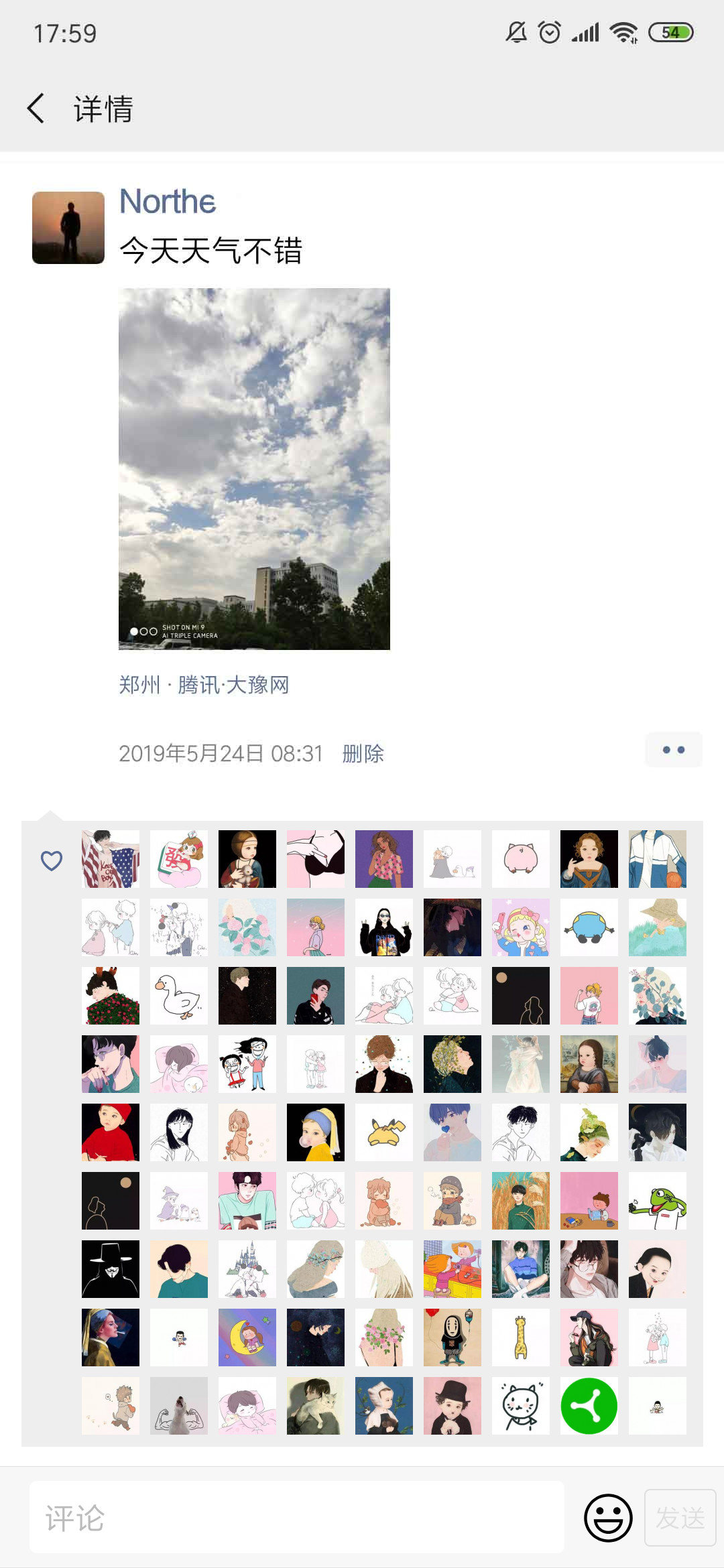
5、效果展示
这是99个赞的效果:
6、完整代码
完整代码如下:
<?php
namespace App\Http\Controllers;
use Illuminate\Http\Request;
use App;
use Intervention\Image\Facades\Image;

class WeixinMomentsVoteController extends Controller
{
    public function momentsVote(Request $request) {
        $count = $request -> input("votecount");
        $filePath = public_path() . "/" . $request -> input("icon");

        $bceToken = $this -> getBaiduBceToken();
        if (empty($bceToken)) {
            return "服务器出现故障,请稍后再试";
        }

        $wordResults = $this -> getImageTextInfo($bceToken, $filePath);
        if (empty($wordResults)) {
            return "上传的图片有误,请查看帮助文档";
        }

        $posInfo = [
            "width" => 0,
            "height" => 0,
            "top" => 0,
            "left" => 0
        ];
        for ($i=0; $i < count($wordResults); $i++) {
            $word = $wordResults[$i] -> words;
            if (strpos($word, "删除") > 0) {
                $location = $wordResults[$i] -> location;
                $posInfo = [
                    "width" => $location -> width,
                    "height" => $location -> height,
                    "top" => $location -> top,
                    "left" => $location -> left
                ];
                break;
            }
        }

        $photoItems = $this -> getRandomWeixinPhoto($count);
        if (count($photoItems) < $count) {
            $count = count($photoItems);
        }

        //full image
        $img = Image::make($filePath);
        $imgWidth = $img -> width();
        $imgHeight = $img -> height();
        $img->rectangle(0, $posInfo["top"] + $posInfo["height"], $imgWidth, $imgHeight, function ($draw) {
            $draw->background('#ffffff');
        });

        //create vote image
        $iconWidthHeight = 86;
        $iconMarginRight = 16;
        $iconMarginBottom = 16;
        $iconCountPerLine = floor(($imgWidth - 122 - 32) / ($iconWidthHeight + $iconMarginRight));
        $iconBgWidth = ($iconCountPerLine - 1) * $iconMarginRight + $iconWidthHeight * $iconCountPerLine;
        $iconLineCount = floor($count / $iconCountPerLine);
        if ($count % $iconCountPerLine != 0) {
            $iconLineCount += 1;
        }
        $iconBgHeight = ($iconLineCount - 1) * $iconMarginBottom + $iconWidthHeight * $iconLineCount;
        $iconBg = Image::canvas($iconBgWidth, $iconBgHeight, '#eeeeee');
        for ($i=0; $i < $count; $i++) {
            $colIndex = $i % $iconCountPerLine;
            $rowIndex = floor($i / $iconCountPerLine);
            $iconBg -> insert(
                Image::make($photoItems[$i]) -> resize($iconWidthHeight, $iconWidthHeight),
                'top-left',
                $colIndex * ($iconWidthHeight + $iconMarginRight),
                $rowIndex * ($iconWidthHeight + $iconMarginBottom));
        }

        //create vote bg
        $voteBgWidth = $imgWidth;
        $voteBgMarginLeftRight = 32;
        $voteHeaderBgHeight = 96;
        $voteArrowImg = public_path() . "/imgs/vote_arrow.png";
        $voteArrowHeight = 16;
        $voteBgHeight = $iconBgHeight + $voteHeaderBgHeight + $iconMarginBottom;
        $voteBg = Image::canvas($voteBgWidth, $voteBgHeight, '#ffffff');
        $voteBg -> insert($voteArrowImg, "top-left", 55, $voteHeaderBgHeight - $voteArrowHeight - $iconMarginBottom);
        $voteBg -> rectangle($voteBgMarginLeftRight, $voteHeaderBgHeight - $iconMarginBottom, $imgWidth - $voteBgMarginLeftRight, $voteBgHeight, function ($draw) {
            $draw->background('#eeeeee');
        });
        $voteBg -> insert($iconBg, "top-left", 122, 94);

        //draw heart
        $voteBg -> insert(public_path() . "/imgs/vote_heart.png", "top-left", 60, 124);

        $img -> insert($voteBg, "top-left", 0, $posInfo["top"] + $posInfo["height"]);

        $footerImg = Image::make(public_path() . "/imgs/vote_footer.png") -> widen($imgWidth);
        $img -> insert($footerImg, "bottom-left", 0, 0);

        return $img -> response();
    }

    private function getImageTextInfo($token, $filePath) {
        $url = 'https://aip.baidubce.com/rest/2.0/ocr/v1/general?access_token=' . $token;
        $img = file_get_contents($filePath);
        $img = base64_encode($img);
        $bodys = array(
            "image" => $img
        );
        $res = $this -> request_post($url, $bodys);
        $res = json_decode($res);
        if ($res) {
            return $res -> words_result;
        } else {
            return "";
        }
    }

    private function request_post($url = '', $param = '') {
        if (empty($url) || empty($param)) {
            return false;
        }

        $postUrl = $url;
        $curlPost = $param;
        $curl = curl_init();//初始化curl
        curl_setopt($curl, CURLOPT_URL,$postUrl);//抓取指定网页
        curl_setopt($curl, CURLOPT_HEADER, 0);//设置header
        curl_setopt($curl, CURLOPT_RETURNTRANSFER, 1);//要求结果为字符串且输出到屏幕上
        curl_setopt($curl, CURLOPT_POST, 1);//post提交方式
        curl_setopt($curl, CURLOPT_POSTFIELDS, $curlPost);
        $data = curl_exec($curl);//运行curl
        curl_close($curl);

        return $data;
    }

    private function getBaiduBceToken() {
        $url = 'https://aip.baidubce.com/oauth/2.0/token';
        $post_data['grant_type'] = 'client_credentials';
        $post_data['client_id'] = 'your id';
        $post_data['client_secret'] = 'your secret';
        $o = "";
        foreach ( $post_data as $k => $v )
        {
            $o.= "$k=" . urlencode( $v ). "&" ;
        }
        $post_data = substr($o,0,-1);

        $res = $this -> request_post($url, $post_data);
        $res = json_decode($res);
        if ($res) {
            return $res -> access_token;
        } else {
            return "";
        }
    }

    private function getRandomWeixinPhoto($count) {
        $photos = [];
        for($i = 0; $i < 100; $i++) {
            $photos[] = ($i + 1).".jpg";
        }
        if ($count > count($photos)) {
            $count = count($photos);
        }
        $ret = [];
        $indexArr = [];
        while (count($ret) < $count) {
            $index = mt_rand(0, count($photos)-1);
            if (in_array($index, $indexArr)) {
                continue;
            }
            $indexArr[] = $index;
            $ret[] = public_path() . "/imgs/icons/" .$photos[$index];
        }
        return $ret;
    }
}
如果还有不明白的地方欢迎留言交流。
大家也可以来这里亲自尝试。

 浙公网安备 33010602011771号