


maven项目之生成allure报表
一.引入依赖
pom文件里添加:
<dependency>
      <groupId>io.qameta.allure</groupId>
      <artifactId>allure-testng</artifactId>
      <version>2.12.1</version>
      <scope>test</scope>
</dependency>
二.编码设置,避免乱码
<properties>
        <!--<maven.compiler.target>1.8</maven.compiler.target>
        <maven.compiler.source>1.8</maven.compiler.source>-->
        <aspectj.version>1.9.1</aspectj.version>
        <!-- 文件拷贝时的编码 -->
        <project.build.sourceEncoding>UTF-8</project.build.sourceEncoding>
        <project.reporting.outputEncoding>UTF-8</project.reporting.outputEncoding>
        <!-- 编译时的编码 -->
        <maven.compiler.encoding>UTF-8</maven.compiler.encoding>
</properties>
三.引入maven surefire插件
<build>
    <plugins>
      <plugin>
        <!-- maven-surefire-plugin 配合testng执行测试用例的maven插件 -->
        <groupId>org.apache.maven.plugins</groupId>
        <artifactId>maven-surefire-plugin</artifactId>
        <version>2.22.1</version>
        <configuration>
          <!-- 测试失败后,是否忽略并继续测试 -->
          <testFailureIgnore>true</testFailureIgnore>
          <suiteXmlFiles>
            <!-- testng配置文件名称 -->
            <suiteXmlFile>testng.xml</suiteXmlFile>
          </suiteXmlFiles>
          <!--设置参数命令行 -->
          <argLine>
            <!-- UTF-8编码 -->
            -Dfile.encoding=UTF-8
            <!-- 配置拦截器 -->
            -javaagent:"${settings.localRepository}/org/aspectj/aspectjweaver/${aspectj.version}/aspectjweaver-${aspectj.version}.jar"
          </argLine>
          <systemProperties>
            <property>
              <!-- 配置 allure 结果存储路径 -->
              <name>allure.results.directory</name>
              <value>${project.build.directory}/allure-results</value>
            </property>
          </systemProperties>
        </configuration>
        <dependencies>
          <!-- aspectjweaver maven坐标 -->
          <dependency>
            <groupId>org.aspectj</groupId>
            <artifactId>aspectjweaver</artifactId>
            <version>${aspectj.version}</version>
          </dependency>
        </dependencies>
      </plugin>
      <plugin>
        <groupId>org.apache.maven.plugins</groupId>
        <artifactId>maven-compiler-plugin</artifactId>
        <configuration>
          <source>8</source>
          <target>8</target>
        </configuration>
      </plugin>
    </plugins>
</build>
1.配置文件名称需要根据自己的配置文件名称修改;
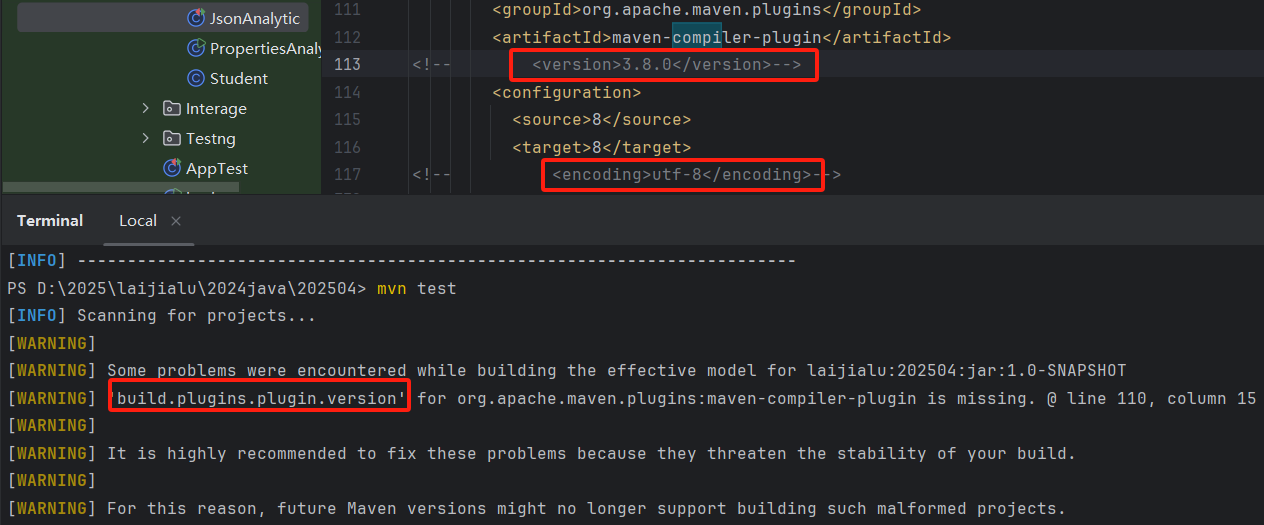
2.compiler的版本如果是1.9可能会编译报错;
3.终端命令执行时提示compiler版本问题,添加版本号后刷新再执行就不会提示了。
四.构建测试,生成报表
1.终端命令行输入mvn test,执行配置文件里的内容;
2.终端命令执行mvn io.qameta.allure:allure-maven:serve,执行并生成allure报表。

 浙公网安备 33010602011771号