
接口自动化基本请求
一.引入依赖-REST-assured
REST-assured是Github上一个开源项目
它的语法非常简洁,是一种专为测试 REST API 而设计的测试框架
Maven的pom.xml添加 REST-Assured 依赖坐标
<dependency>
    <groupId>io.rest-assured</groupId>
    <artifactId>rest-assured</artifactId>
    <version>4.2.0</version>
    <scope>test</scope>
</dependency>
二.请求语法
基本语法
Response response=
given().
    xxx
when().
    xxx
then().
    xxx
given 设置测试预设(包括请求头、请求参数、请求体、cookies 等等)
when 所要执行的操作(GET/POST 请求)
then 解析结果、断言
1.请求头
在请求语法中,请求头可以一个个写(header("headkey","headvalue")),也可以把请求头全部添加到hashmap里,请求中就只要加入headermap,如下:
HashMap<String,String> headermap=new HashMap<>();
headermap.put("Content-Type","application/json;charset=UTF-8");
headermap.put("uid","1977");
headermap.put("platform","4");
headermap.put("User-Agent","Mozilla/5.0 (Windows NT 10.0; Win64; x64) AppleWebKit/537.36 (KHTML, like Gecko) Chrome/81.0.4044.138 Safari/537.36");
headermap.put("deviceInfo","0854af77-58a1-4657-a497-a435ca4ebc01");
2.请求方法
(1)get请求
1)直接在url后面拼接参数
2)通过queryparam添加参数
(2)post请求
1)form表单参数类型
headermap里的content-type为application/x-www-form-urlencoded
2)json参数类型
headermap的content-type为application/json
3)xml参数类型
headermap的content-type为text/xml
4)上传文件
headermap的content-type为multipart/form-data
3.获取响应
有时我们需要获取响应头中的一些信息
三.响应体数据提取
1.json响应体数据提取
response.jsonPath().get("xxx.xxx.xxx")
案例:
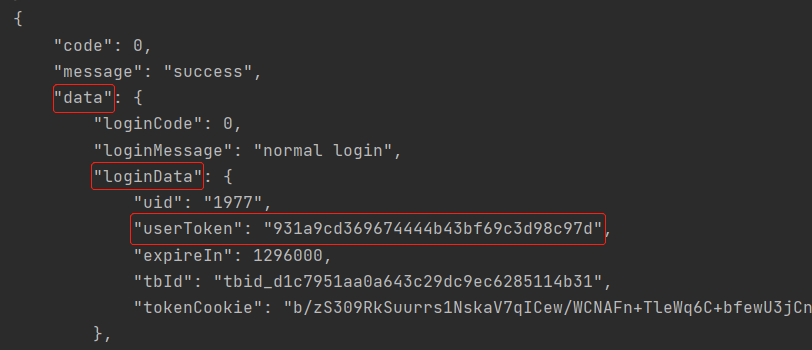
usertoken=loginres.jsonPath().getString("data.loginData.userToken");
2.xml响应体数据提取
response.xmlPath().get("xxx.xxx.xxx")
案例:
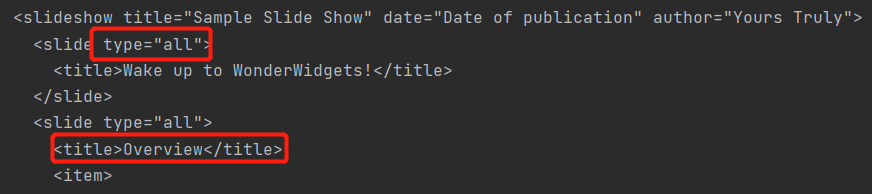
String shuxing=xmlres.xmlPath().get("slideshow.slide[0].@type");   //获取第一个slide标签的type属性值
String title=xmlres.xmlPath().get("slideshow.slide[1].title");     //获取第二个slide标签的title文本值
(1)在xml中有多个slide,要选择第n个slide,在slide后面加上[n-1];
(2)标签.@属性名:在html中获取属性值
(3)标签.标签:获取的是标签包含的文本值
3.html响应体数据提取
response.htmlPath().get("xxx.xxx.xxx")
案例:
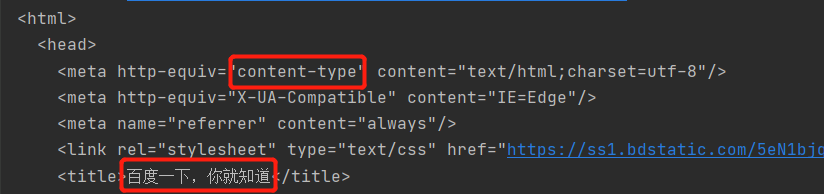
String shuxing=htmlresponse.htmlPath().get("html.head.meta[0].@http-equiv");
String title=htmlresponse.htmlPath().get("html.head.title");
(1)在html中有多个meta,要选择第n个mata,在meta后面加上[n-1];
(2)标签.@属性名:在html中获取属性值
(3)标签.标签:获取的是标签包含的文本值

 浙公网安备 33010602011771号