
大模型微调
使用llamafactory微调deepseekR1
torch-gpu和llamafactory都在LLM虚拟环境下。langchain-chatchat在langchain虚拟环境下。因为经过尝试,发现二者存在包的冲突。
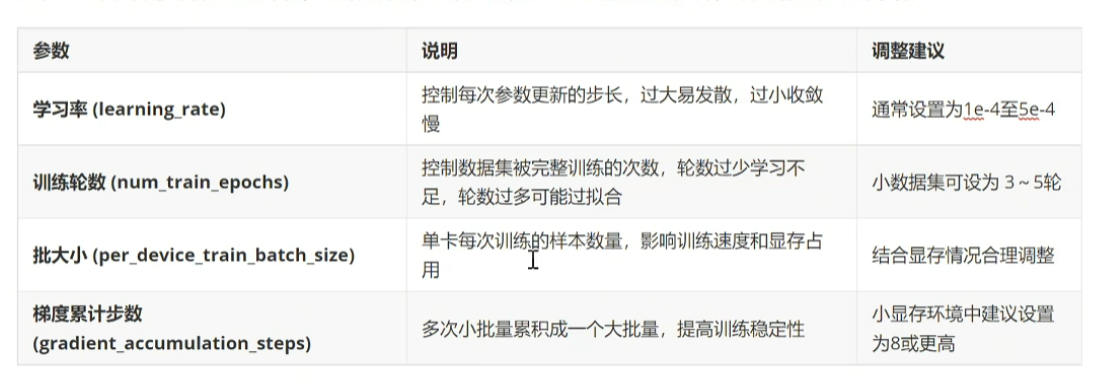
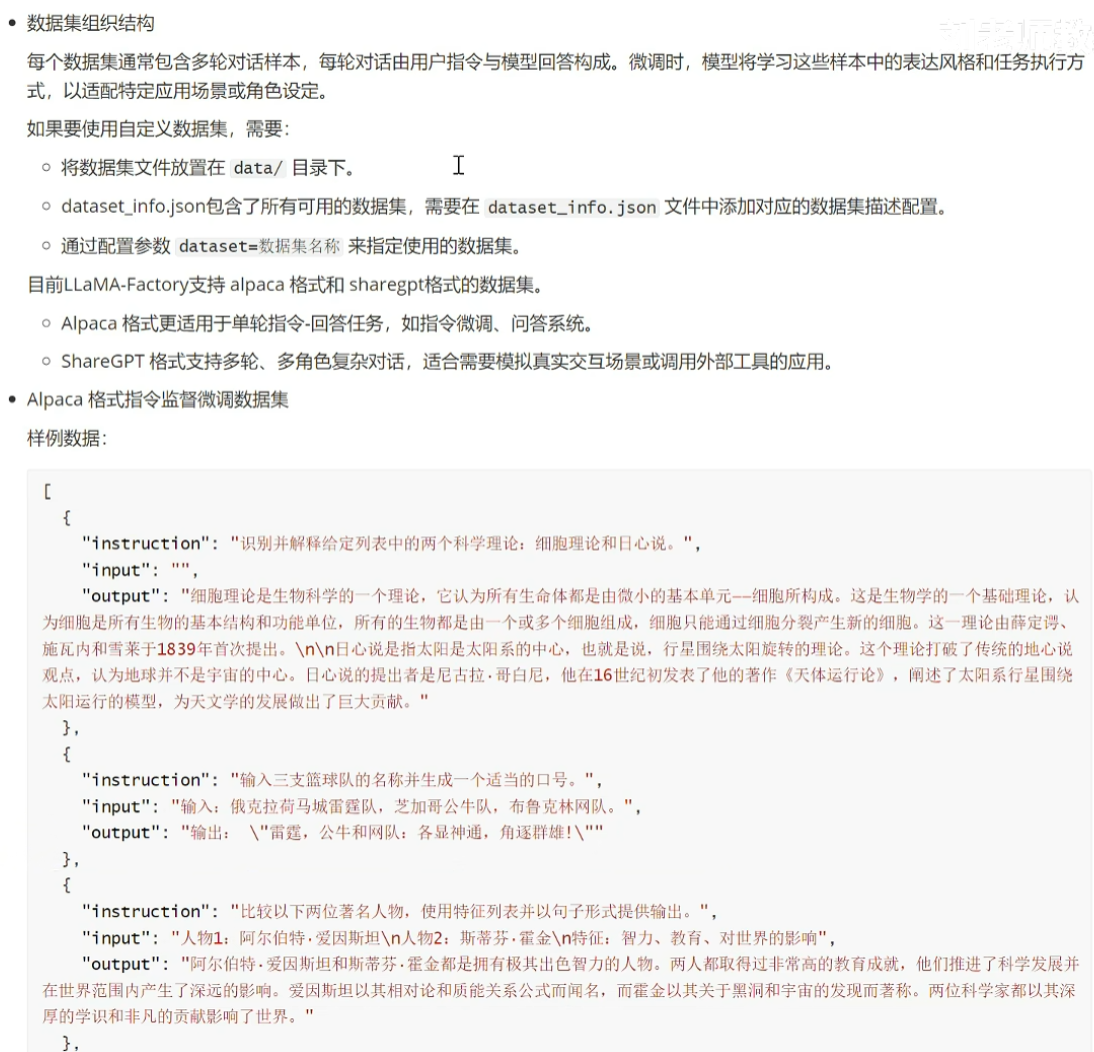

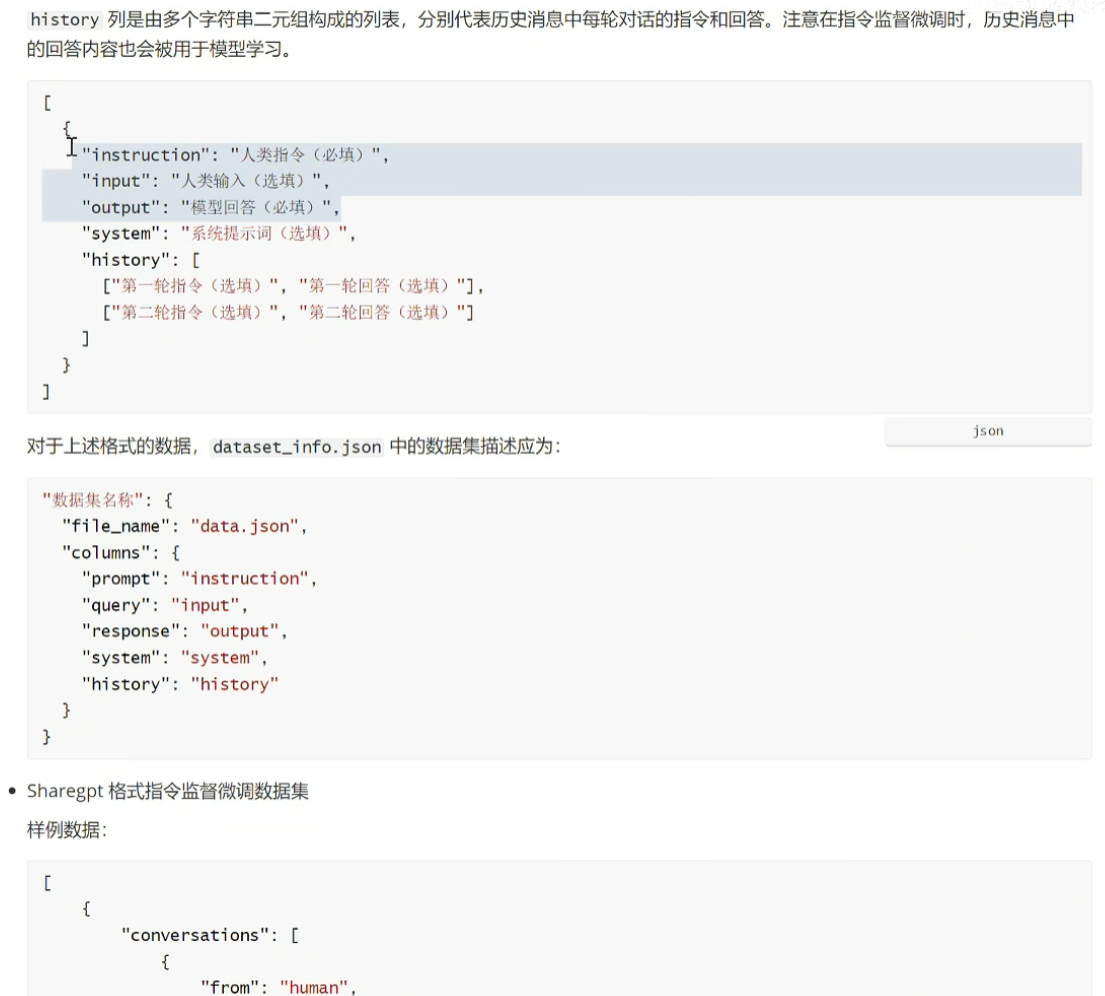
sharegpt指令格式支持多轮对话,比较复杂,自行了解。
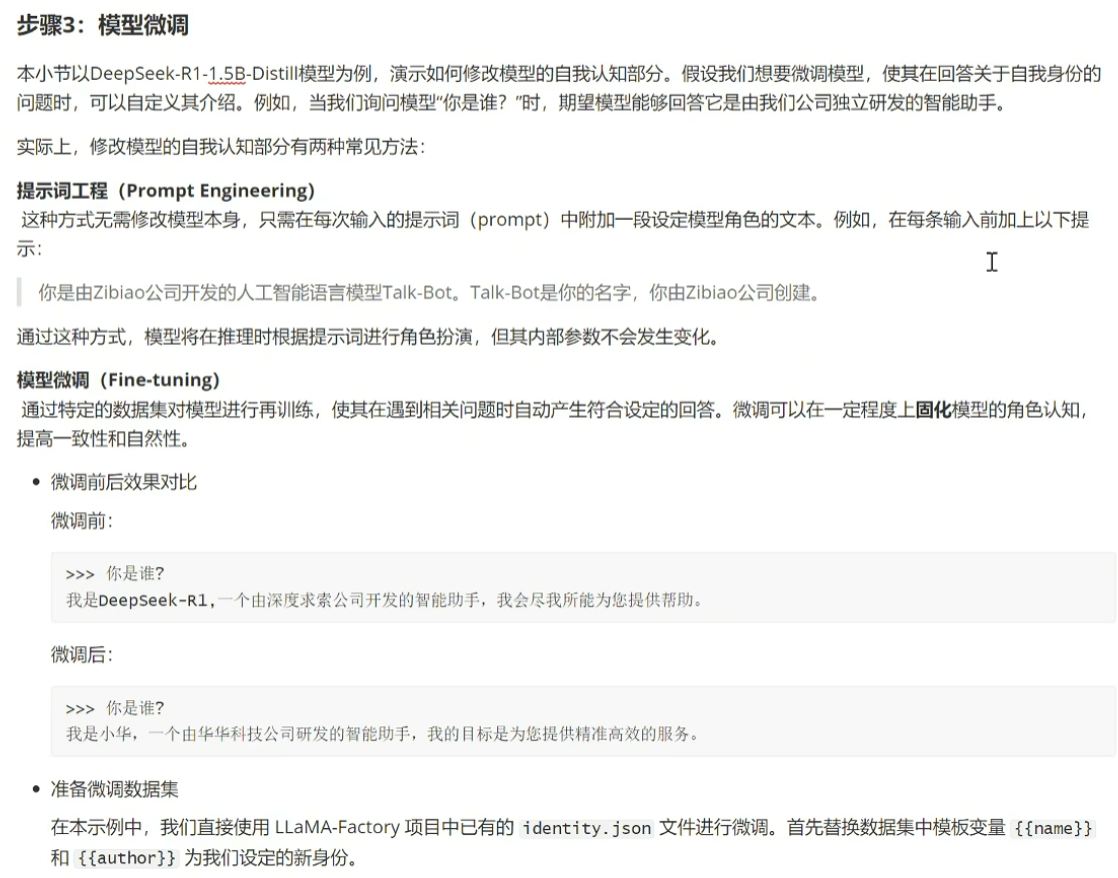
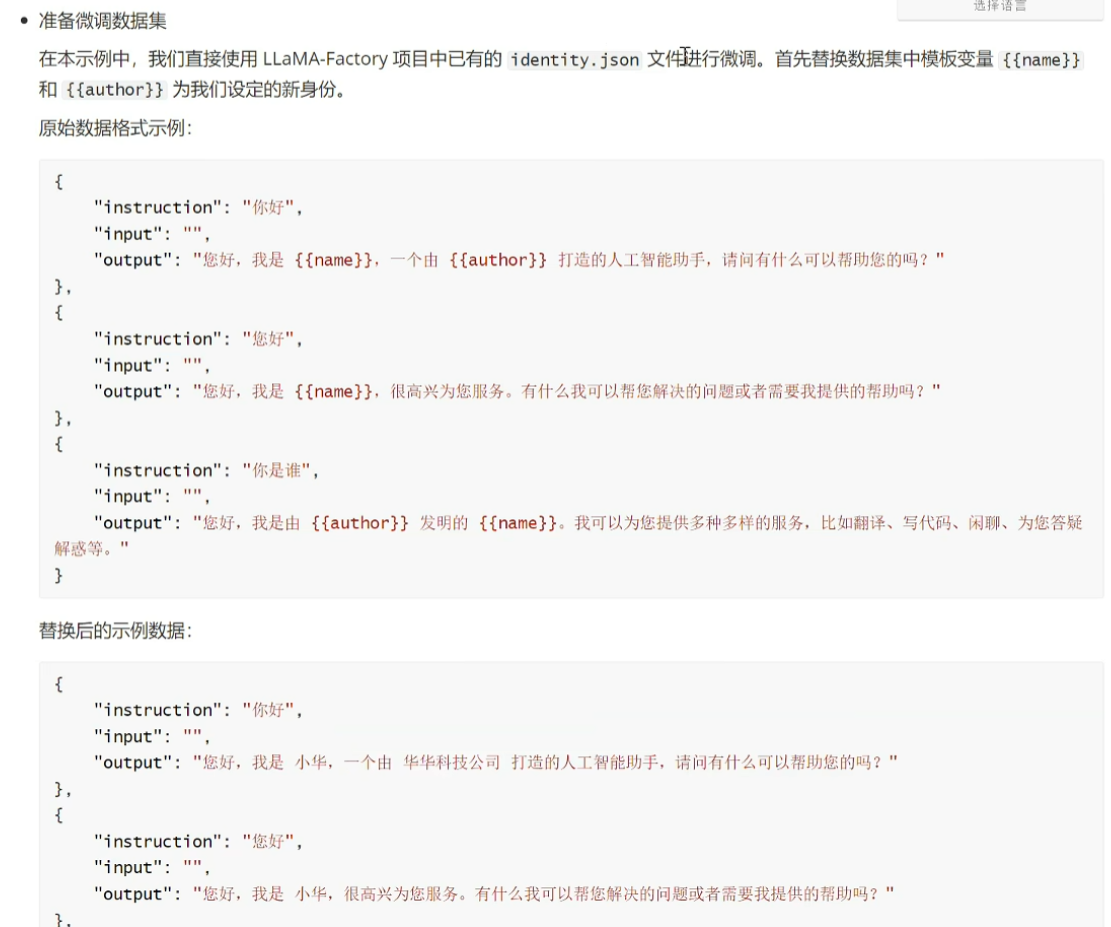
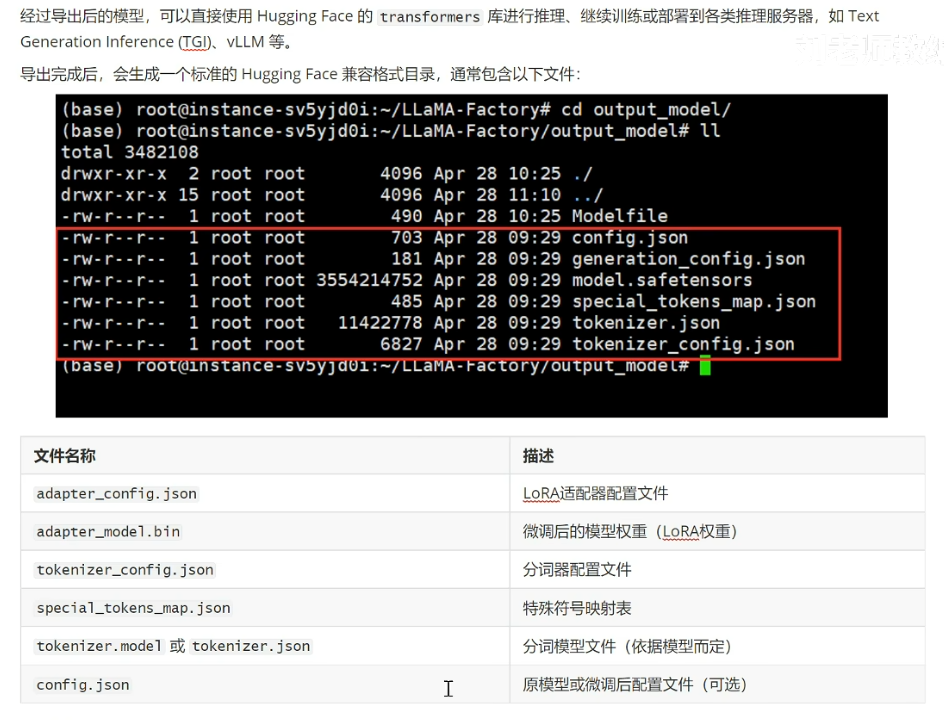
相关资料参考:
https://blog.csdn.net/weixin_37863729/article/details/140670254?ops_request_misc=%257B%2522request%255Fid%2522%253A%25229b28a9eec14a93a97938acedc41471a4%2522%252C%2522scm%2522%253A%252220140713.130102334..%2522%257D&request_id=9b28a9eec14a93a97938acedc41471a4&biz_id=0&utm_medium=distribute.pc_search_result.none-task-blog-2alltop_positive~default-1-140670254-null-null.142v102pc_search_result_base2&utm_term=llama-factory&spm=1018.2226.3001.4187
由于报错,我将llamefactory中所有preprocessing_num_workers: 16和preprocessing_num_workers=16中的16都换成了1。
导出目录设置为D:\Workspace\LLM\LLaMA-Factory\output_model\deepseekR1-250609
lora与qlora区别?
使用ollama部署微调好的模型
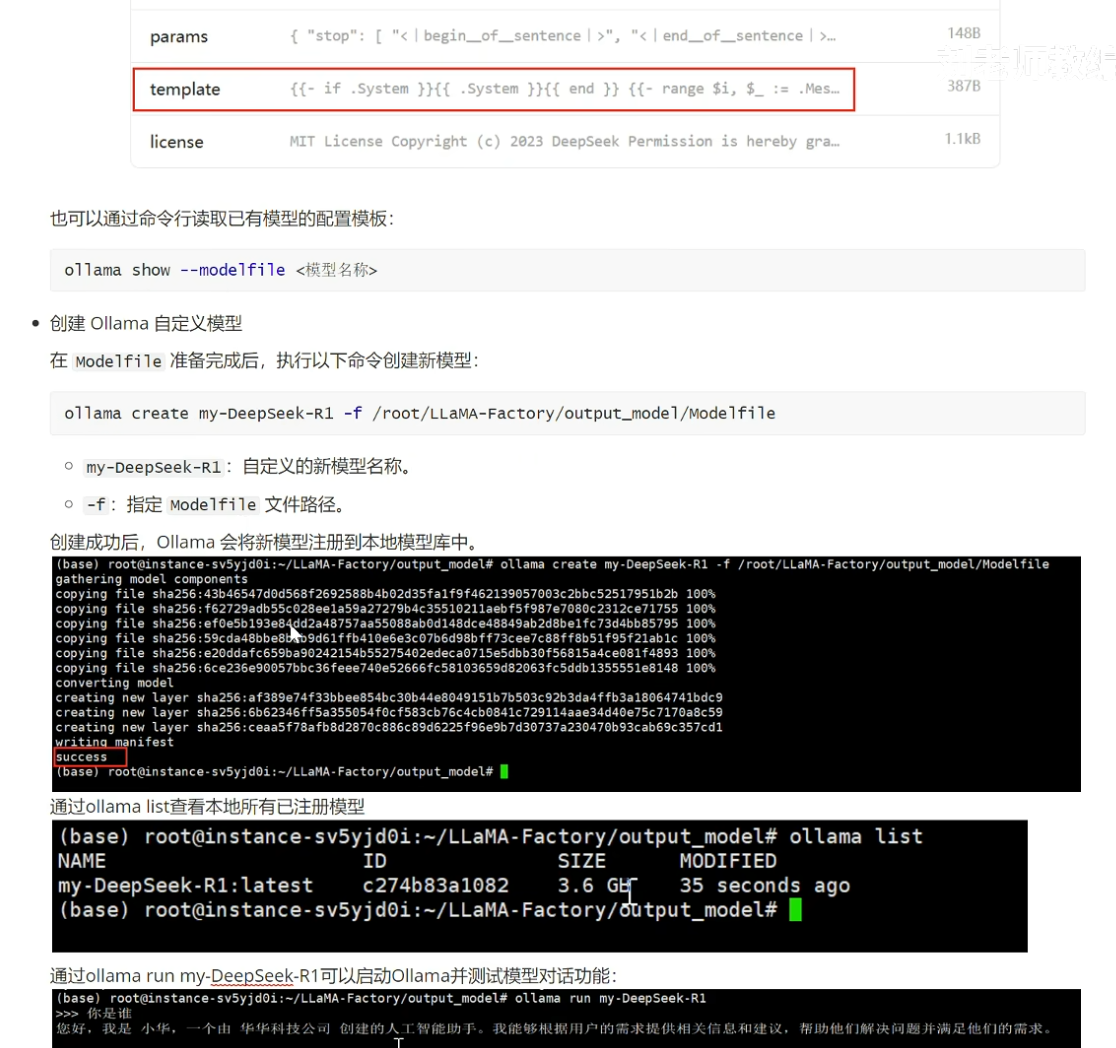
导出的Modelfile设置如下,其中TEMPLATE的内容可以复制ollama中的deepseekR1-1.5b的TEMPLATE。
# ollama modelfile auto-generated by llamafactory

FROM .

PARAMETER temperature 0.6
PARAMETER top_p 0.95

TEMPLATE """{{- if .System }}{{ .System }}{{ end }}
{{- range $i, $_ := .Messages }}
{{- $last := eq (len (slice $.Messages $i)) 1}}
{{- if eq .Role "user" }}<|User|>{{ .Content }}
{{- else if eq .Role "assistant" }}<|Assistant|>
  {{- if and $.IsThinkSet (and $last .Thinking) -}}
<think>
{{ .Thinking }}
</think>
{{- end }}{{ .Content }}{{- if not $last }}<|end▁of▁sentence|>{{- end }}
{{- end }}
{{- if and $last (ne .Role "assistant") }}<|Assistant|>
{{- if and $.IsThinkSet (not $.Think) -}}
<think>

</think>

{{ end }}
{{- end -}}
{{- end }}"""

PARAMETER stop "<|end▁of▁sentence|>"
PARAMETER num_ctx 4096
运行命令:
ollama create my-deepseekR1 -f ./Modelfile
之后可以运行
ollama list // 查看模型列表
ollama run my-deepseekR1

使用langchain-chatchat部署RAG
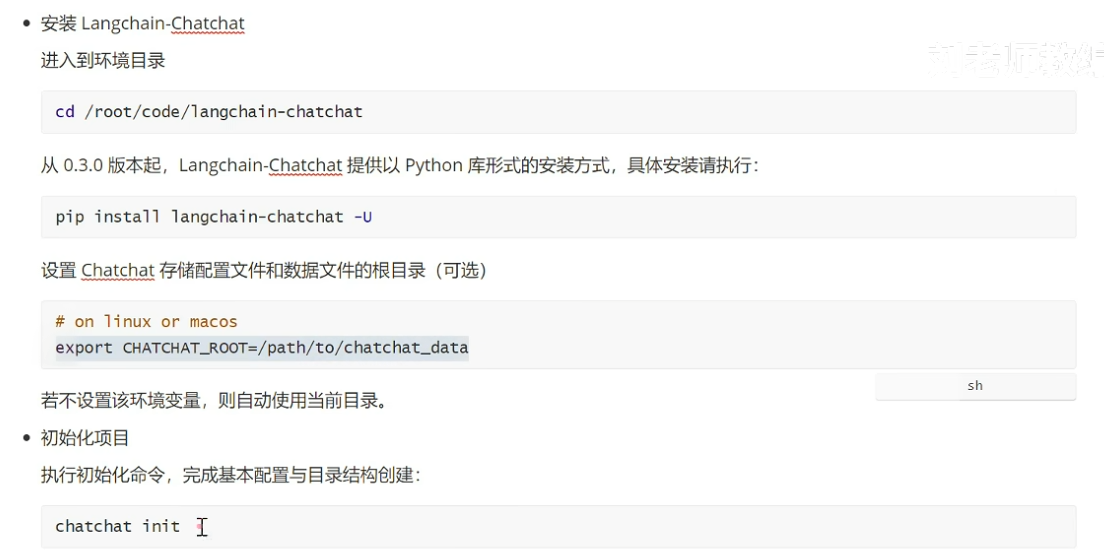
https://github.com/chatchat-space/Langchain-Chatchat
pip install langchain-chatchat -U
然后到chatchat工作目录下,运行chatchat init进行初始化。
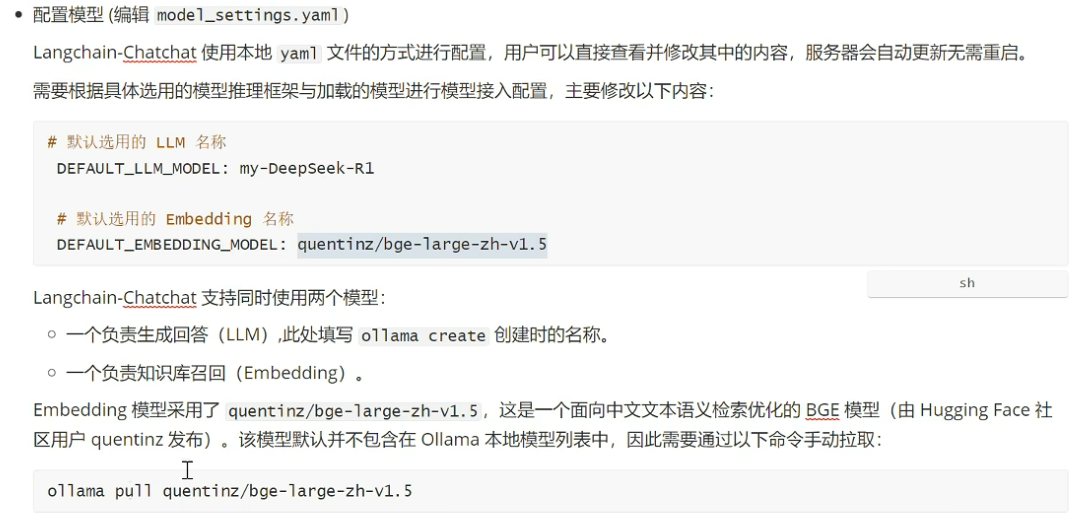
运行ollama pull quentinz/bge-large-zh-v1.5下载Embedding。
在init的目录中找到model_settings.yaml
deepseek也可以接入openai,如下:
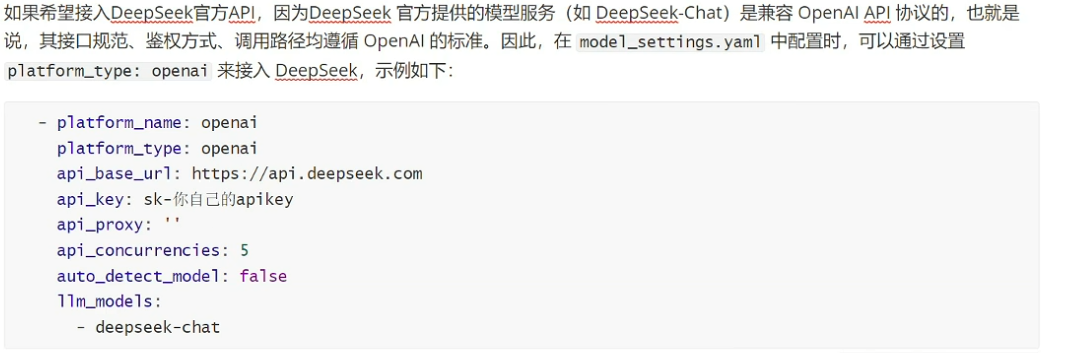
修改好的yaml内容如下:
# 模型配置项


# 默认选用的 LLM 名称
DEFAULT_LLM_MODEL: my-deepseekR1 # glm4-chat

# 默认选用的 Embedding 名称
DEFAULT_EMBEDDING_MODEL: quentinz/bge-large-zh-v1.5 # bge-m3 # 将知识库的内容embedding需要的工具

# AgentLM模型的名称 (可以不指定,指定之后就锁定进入Agent之后的Chain的模型,不指定就是 DEFAULT_LLM_MODEL)
Agent_MODEL: ''

# 默认历史对话轮数
HISTORY_LEN: 3

# 大模型最长支持的长度,如果不填写,则使用模型默认的最大长度,如果填写,则为用户设定的最大长度
MAX_TOKENS:

# LLM通用对话参数
TEMPERATURE: 0.7

# 支持的Agent模型
SUPPORT_AGENT_MODELS:
  - chatglm3-6b
  - glm-4
  - openai-api
  - Qwen-2
  - qwen2-instruct
  - gpt-3.5-turbo
  - gpt-4o

# LLM模型配置,包括了不同模态初始化参数。
# `model` 如果留空则自动使用 DEFAULT_LLM_MODEL
LLM_MODEL_CONFIG:
  preprocess_model:
    model: ''
    temperature: 0.05
    max_tokens: 4096
    history_len: 10
    prompt_name: default
    callbacks: false
  llm_model:
    model: ''
    temperature: 0.9
    max_tokens: 4096
    history_len: 10
    prompt_name: default
    callbacks: true
  action_model:
    model: ''
    temperature: 0.01
    max_tokens: 4096
    history_len: 10
    prompt_name: ChatGLM3
    callbacks: true
  postprocess_model:
    model: ''
    temperature: 0.01
    max_tokens: 4096
    history_len: 10
    prompt_name: default
    callbacks: true
  image_model:
    model: sd-turbo
    size: 256*256

# # 模型加载平台配置


# # 平台名称
# platform_name: xinference

# # 平台类型
# # 可选值:['xinference', 'ollama', 'oneapi', 'fastchat', 'openai', 'custom openai']
# platform_type: xinference
# platform_type: ['ollama', 'openai']

# # openai api url
# api_base_url: http://127.0.0.1:9997/v1

# # api key if available
# api_key: EMPTY

# # API 代理
# api_proxy: ''

# # 该平台单模型最大并发数
# api_concurrencies: 5

# # 是否自动获取平台可用模型列表。设为 True 时下方不同模型类型可自动检测
# auto_detect_model: false

# # 该平台支持的大语言模型列表,auto_detect_model 设为 True 时自动检测
# llm_models: []

# # 该平台支持的嵌入模型列表,auto_detect_model 设为 True 时自动检测
# embed_models: []

# # 该平台支持的图像生成模型列表,auto_detect_model 设为 True 时自动检测
# text2image_models: []

# # 该平台支持的多模态模型列表,auto_detect_model 设为 True 时自动检测
# image2text_models: []

# # 该平台支持的重排模型列表,auto_detect_model 设为 True 时自动检测
# rerank_models: []

# # 该平台支持的 STT 模型列表,auto_detect_model 设为 True 时自动检测
# speech2text_models: []

# # 该平台支持的 TTS 模型列表,auto_detect_model 设为 True 时自动检测
# text2speech_models: []
MODEL_PLATFORMS:
  - platform_name: xinference
    platform_type: xinference
    api_base_url: http://127.0.0.1:9997/v1
    api_key: EMPTY
    api_proxy: ''
    api_concurrencies: 5
    auto_detect_model: false # true
    llm_models: []
    embed_models: []
    text2image_models: []
    image2text_models: []
    rerank_models: []
    speech2text_models: []
    text2speech_models: []
  - platform_name: ollama
    platform_type: ollama
    api_base_url: http://127.0.0.1:11434/v1
    api_key: EMPTY
    api_proxy: ''
    api_concurrencies: 5
    auto_detect_model: false
    llm_models:
      - my-deepseekR1
      # - qwen:7b
      # - qwen2:7b
    embed_models:
      - quentinz/bge-large-zh-v1.5
    text2image_models: []
    image2text_models: []
    rerank_models: []
    speech2text_models: []
    text2speech_models: []
  - platform_name: oneapi
    platform_type: oneapi
    api_base_url: http://127.0.0.1:3000/v1
    api_key: sk-
    api_proxy: ''
    api_concurrencies: 5
    auto_detect_model: false
    llm_models:
      - chatglm_pro
      - chatglm_turbo
      - chatglm_std
      - chatglm_lite
      - qwen-turbo
      - qwen-plus
      - qwen-max
      - qwen-max-longcontext
      - ERNIE-Bot
      - ERNIE-Bot-turbo
      - ERNIE-Bot-4
      - SparkDesk
    embed_models:
      - text-embedding-v1
      - Embedding-V1
    text2image_models: []
    image2text_models: []
    rerank_models: []
    speech2text_models: []
    text2speech_models: []
  - platform_name: openai
    platform_type: openai
    api_base_url: https://api.openai.com/v1
    api_key: sk-proj-
    api_proxy: ''
    api_concurrencies: 5
    auto_detect_model: false
    llm_models:
      - gpt-4o
      - gpt-3.5-turbo
    embed_models:
      - text-embedding-3-small
      - text-embedding-3-large
    text2image_models: []
    image2text_models: []
    rerank_models: []
    speech2text_models: []
    text2speech_models: []
之后运行chatchat kb -r。如果报错list无法哈希,那么删除虚拟环境,删除环境文件夹,然后重新创建虚拟环境,python=3.8可以,然后pip install langchain-chatchat -U,重新配置chatchat即可。
之后chatchat start -a运行。
对于页面内报错:
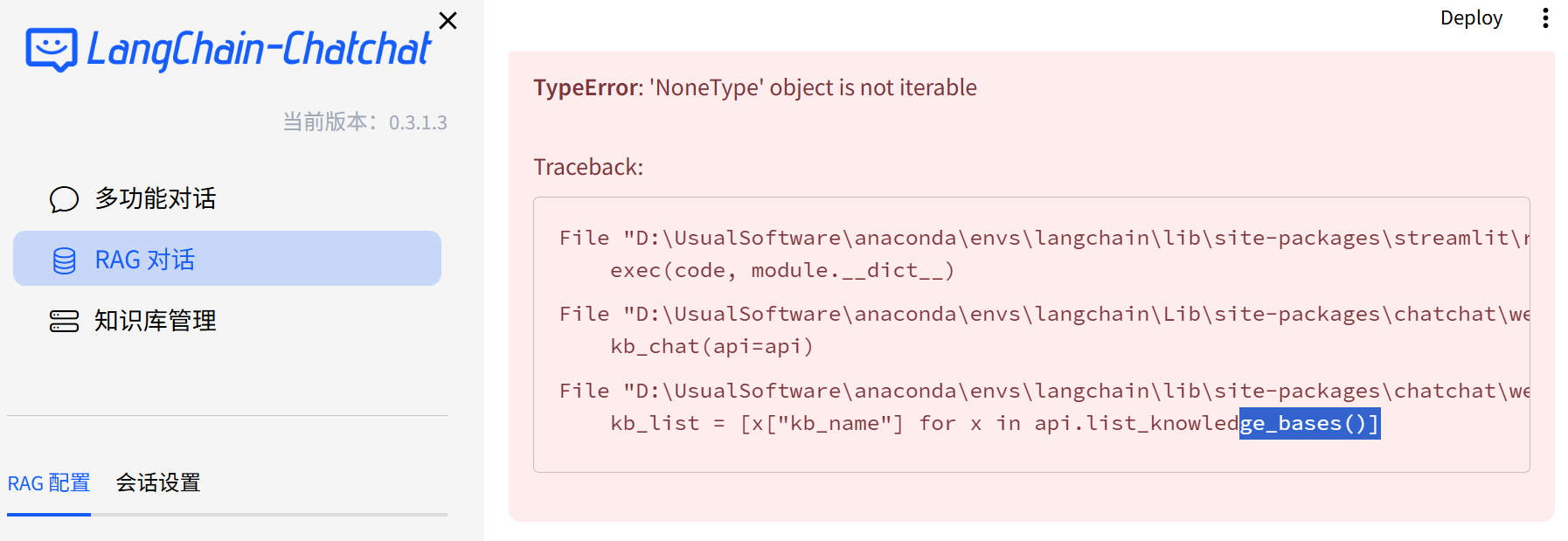
以及终端内的若干报错,
可以使用
pip install httpx==0.27.2 -U解决。
llamafactory常用
对于数据预处理时候内存不够的报错,可以在启动webui时候设置预处理的线程数:
llamafactory-cli webui --dataset_num_proc 8
数据集格式处理
https://llamafactory.readthedocs.io/zh-cn/latest/getting_started/data_preparation.html#sharegpt
shareGPT格式数据集配置为:
"dataset_name": {
  "file_name": "data.json",
  "formatting": "sharegpt",
  "columns": {
    "messages": "conversations",
    "system": "system",
    "tools": "tools"
  }
}
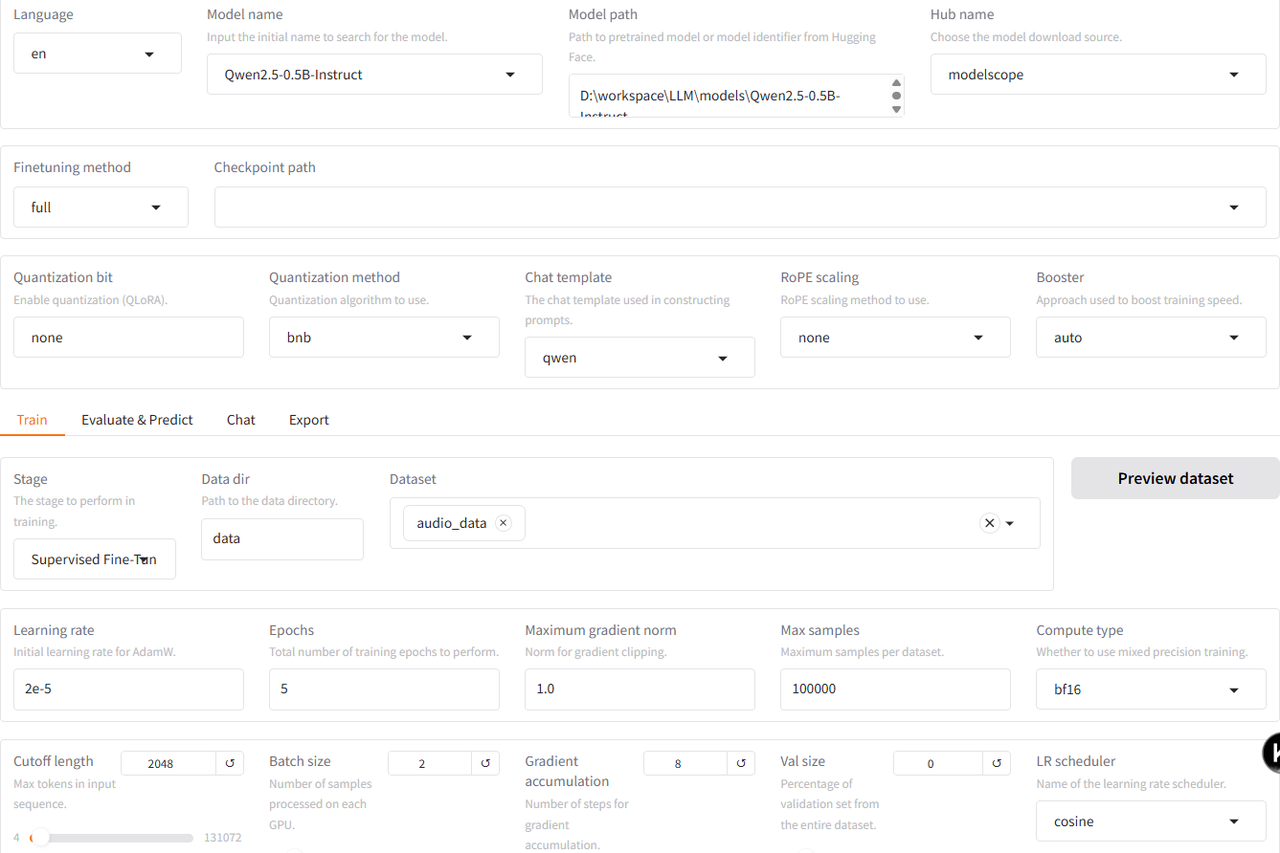
lora
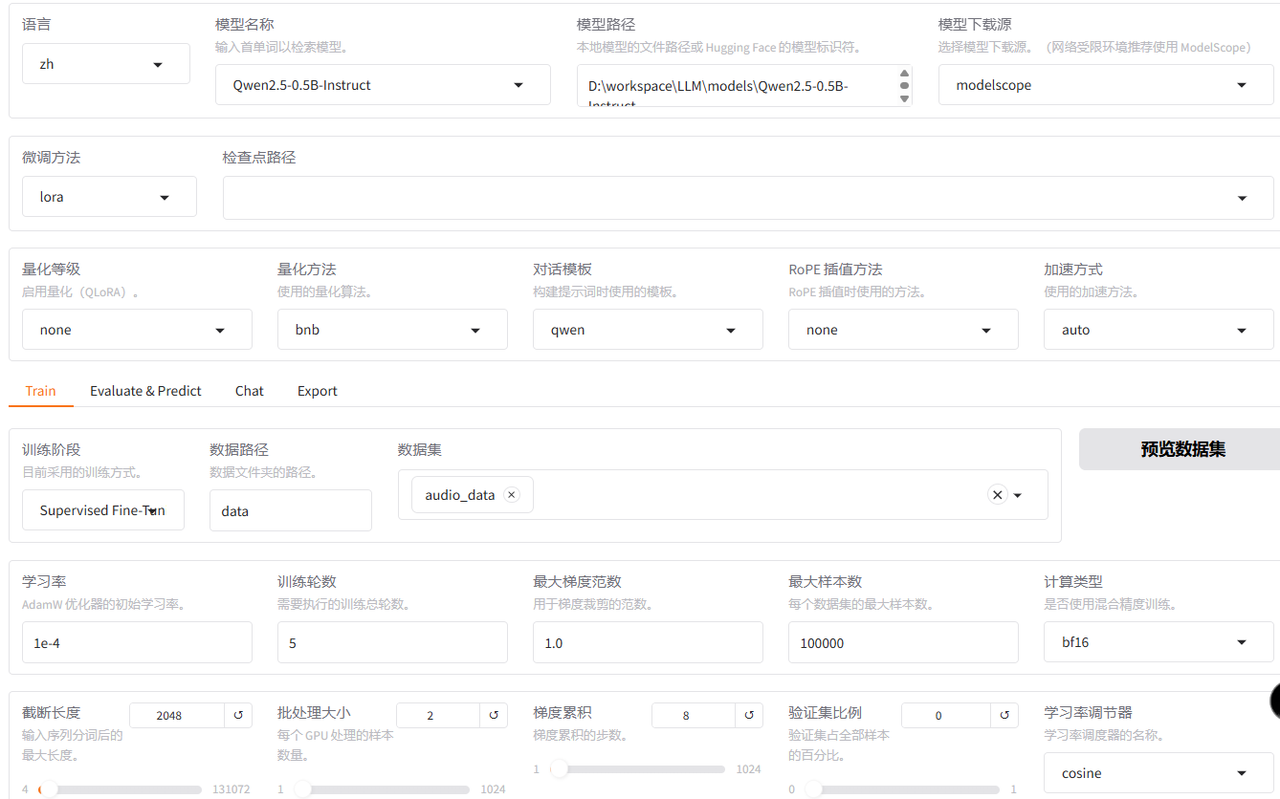
full
模型量化
合并lora与原模型
from transformers import AutoModelForCausalLM, AutoTokenizer
from peft import PeftModel

base = "Qwen2.5-0.5B-Instruct"            # 基座HF路径或模型名
lora = "path/to/llamafactory_lora_dir"    # 你的LoRA输出目录
out  = "qwen2.5-0.5b-instruct-lora-merged"

tok = AutoTokenizer.from_pretrained(base, use_fast=True)
model = AutoModelForCausalLM.from_pretrained(base, torch_dtype="float16", device_map="cpu")
model = PeftModel.from_pretrained(model, lora)
model = model.merge_and_unload()          # 合并权重,移除LoRA结构
model.save_pretrained(out, safe_serialization=True)
tok.save_pretrained(out)
systemprompt
systemprompt会略微影响模型准确率,比如训练和推理时候,systemprompt的写法不太一致,那么对于该任务而言,就会有百分之一左右的差别。
llamacpp编译
git clone https://github.com/ggerganov/llama.cpp
cd llama.cpp
pip install -r requirements.txt
# 这里使用了llamafactory的虚拟环境,可以直接执行以下,不需要pip install。
mkdir build
cd build
cmake .. # 这里如果报错缺少CURL,可以用cmake .. -DLLAMA_CURL=OFF
cmake --build . --config Release
转换为GGUF格式
# 假设已克隆并编译 llama.cpp
# 转换 HuggingFace 权重为 GGUF(FP16 基准文件)
python ./convert_hf_to_gguf.py  --verbose  --outfile D:/workspace/LLM/models/qwen2.5-0.5b-instruct-merged-f16.gguf "D:/workspace/LLM/models/qwen2.5-0.5b-instruct-lora-merged"
量化
# 在llama.cpp目录下运行
# q4_K_M 是当前性价比公认较好的 4bit 配置;若精度敏感可试 q5_K_M / q6_K
llama-quantize D:/workspace/LLM/models/qwen2.5-0.5b-instruct-merged-f16.gguf D:/workspace/LLM/models/qwen2.5-0.5b-instruct-merged-q4_K_M.gguf q4_K_M

 浙公网安备 33010602011771号