
【一】SAP BDT to create a new Tab on GMGRANT the grants management master data transaction
Execute grants management BDT development transaction (GRANT_CUSTOMIZE)
- Grant Master BDT Customizing-> Screen layout and select 'Field groups'(GMS2)

- Click on 'New Entries'

- Enter details of new field group. For this example it is going to be a copy of the
responsibilities tab, which uses a table control.
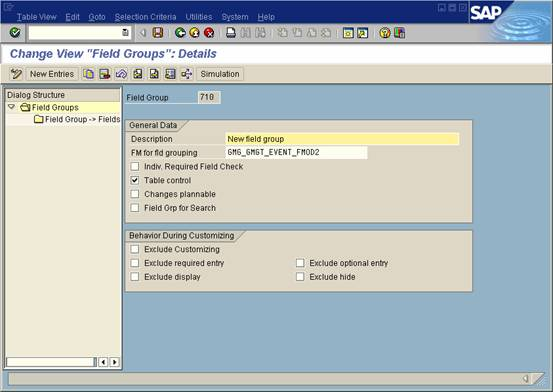
- Go back to main field group screen, select your new entry and double click on the
'Field Group-> Fields' folder option from the left column. Now enter your fields, for this
example I have copied fields from responsibilities group.
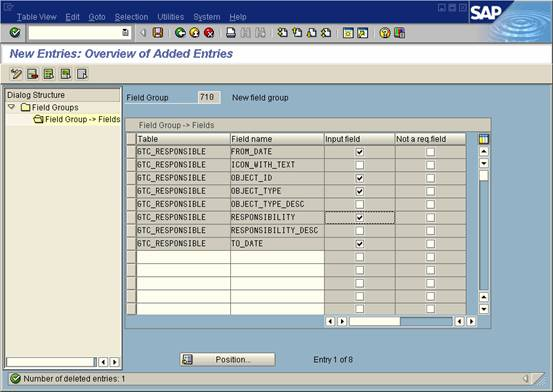
- Return to main BDT customizing screen and select 'Views'(GMS3). Then click the
'New Entries' button

- Enter view information, once again copied from the responsibilities view, but calling
custom created versions of program, screen and function modules, which are
essentially copies of the SAP originals functionality.
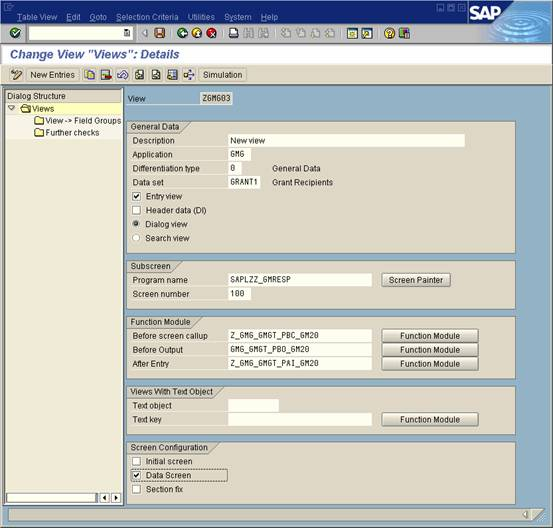
- Go back to main Views screen, select your new entry and double click on the
Views-> Field Groups folder option from the left column. Now enter the new field
group you created previously.
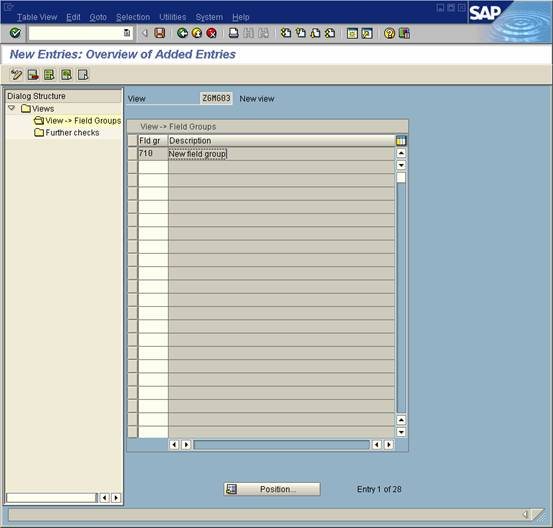
- Return to main BDT customizing screen and select 'Sections'(GMS4). Then click the
'New Entries' button

- Input new entry and give it a description and title

- Go back to main Sections screen, select your new entry and double click on the
Section-> Views folder option from the left column. Now enter the new view you
created previously.

- Return to main BDT customizing screen and select 'Screens'(GMS5). Then click the
'New Entries' button
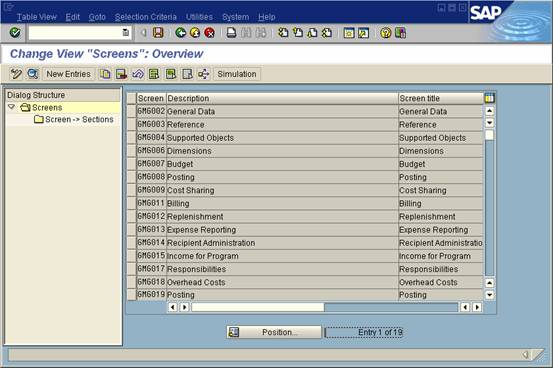
- Enter details for you new screen

- Go back to main Screen screen, select your new entry and double click on the
Screens-> Sections option from the left column. Now enter the new section you
created previously.

- Return to main BDT customizing screen and select 'Screen Sequence'(GMS6). Then
select the screen sequence entry and double click on the Screen Sequence -> Screens
folder option from the left column.

- Add your screen to the sequence by clicking on the 'New Entries' button

- Add you new screen to the screen sequence.

- Execute transaction BUSP (click on option from main grant customizing menu), new
screen will now appear as tab on grant master transaction 'GMGRANT'

^_^很多人都把资料锁进了note里,以后还怎么百度呢^_^

 浙公网安备 33010602011771号