

实验六 进程基础
实验六 进程基础
| 项目 | 内容 |
|---|---|
| 这个作业属于哪个课程 | Linux系统与应用 |
| 这个作业的要求在哪里 | 作业要求链接 |
| 学号-姓名 | 17041411-陈景思 |
| 作业学习目标 | (1)掌握Linux系统环境C语言编程概念; (2)学习Linux系统进程概念; |
实验内容:
1,请举例说明静态链接库的创建与使用。
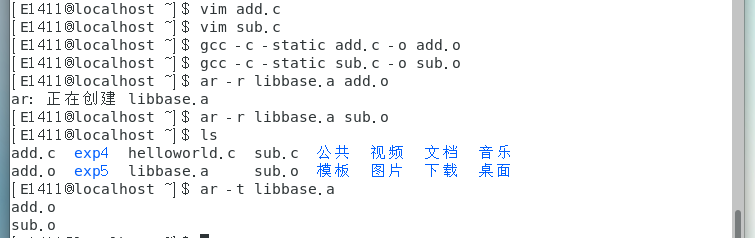
add.c文件代码
int add(int a,int b)
{
 return a+b;
}
sub.c文件代码
int add(int a,int b)
{
 return a-b;
}
main.c文件代码
int add(int a,int b);
int sub(int a,int b);
int main()
{

     printf("16+8=%d\n",add(16,8));
     printf("16-8=%d\n",sub(16,8));
     return 0;
}

2,请举例说明共享库的创建与使用。
(1)开始的目录结构:
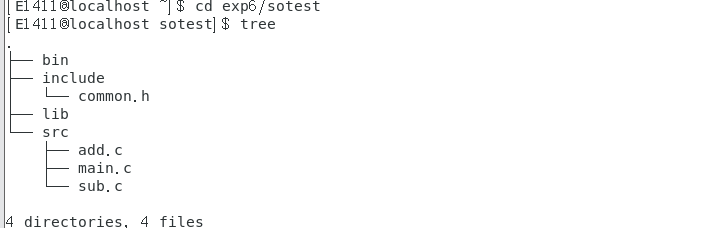
common.h文件代码
#ifndef _common_
#define _common_
int add(int a,int b);
int sub(int a.int b);
#endif
add.c文件代码
int add(int a,int b){
    return a+b;
}
sub.c文件代码
int sub(int a,int b){
    return a-b;
}
main.c文件代码
#include<stdio.h>
#include"common.h"
int main(){
    printf("16+8=%d\n",add(16,8));
    printf("16-8=%d \n",sub(16,8));
    return 0;
}
(2)创建共享库。
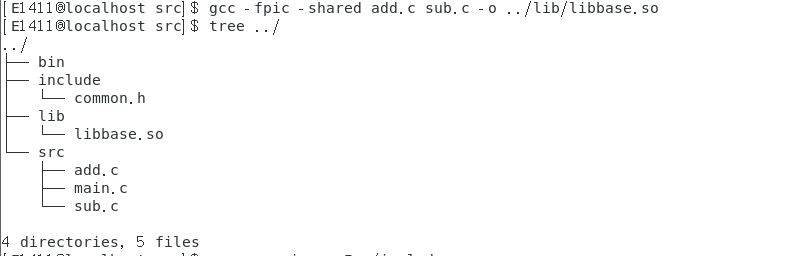
(3)使用共享库。
方式一:
gcc -c main.c -I../include
gcc main.o ../lib/libbase.so -o ../bin/app
ldd bin/app
#使用ldd查看共享库
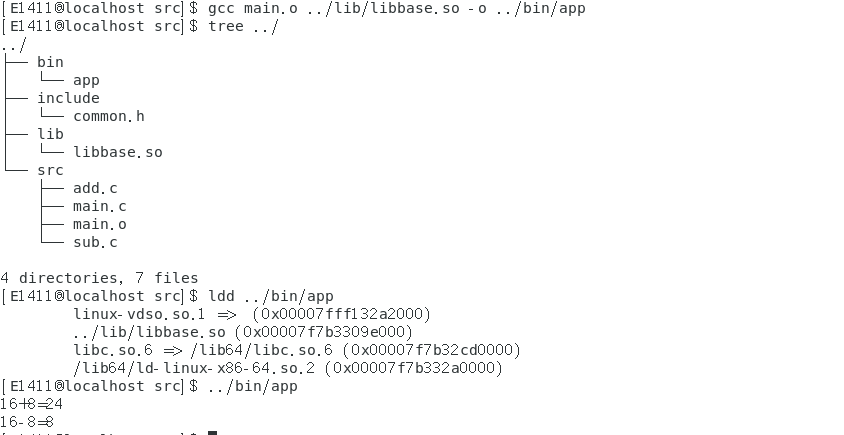
方式二:
gcc main.o -L../lib -lbase -o ../bin/app
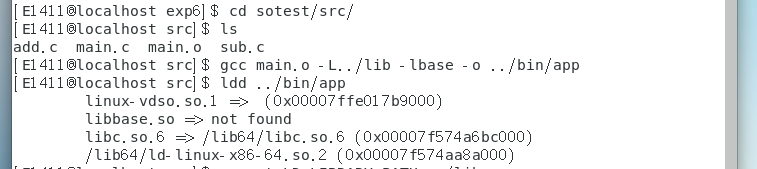
可以发现libbase.so没有找到
添加一个环境变量即可解决
export LD_LIBRARY_PATH=../lib
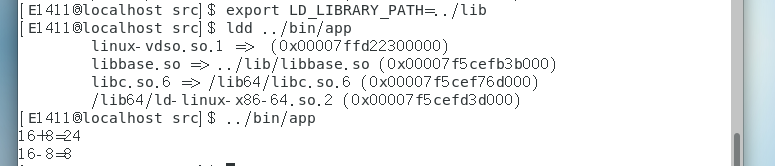
3,编程实现一个简单文件复制命令。
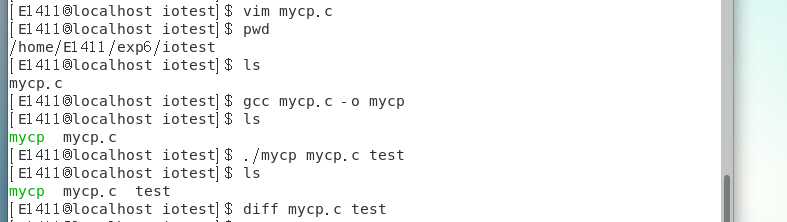
代码如下
#include <unistd.h>
#include <sys/types.h>
#include <sys/stat.h>
#include <fcntl.h>
#include <stdio.h>
#define BUFFERSIZE 4096
int main(int argc, char* argv[]) {

	if (argc != 3) {

		printf("usage:\n mycp src dst\n");
		return 1;
	}
	int srcfd = open(argv[1], O_RDONLY);
	if (srcfd == -1) {

		perror("open");
		return 1;
	}
	int dstfd = open(argv[2], O_CREAT | O_WRONLY, 0666);
	if (dstfd == -1) {

		close(srcfd);
		perror("open");
		return 1;
	}
	int len = 0;
	char buffer[BUFFERSIZE] = {
		0};
	while((len = read(srcfd, buffer, BUFFERSIZE)) > 0) {

		if (write(dstfd, buffer, len) != len) {

			perror("write error");
			return 1;
		}
	}
	if (len < 0) {

		perror("read error");
		return 1;
	}
	close(srcfd);
	close(dstfd);
	return 0;
	}
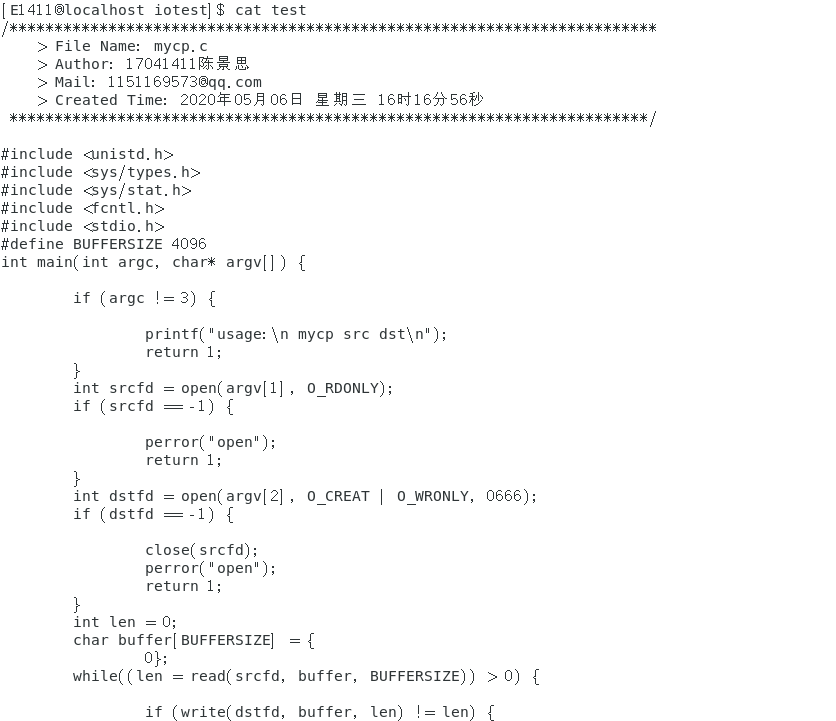
查看test代码如下图(截取了部分内容):
4,使用fork创建一个子进程,进程创建成功后父子进程分别输出不同的内容。
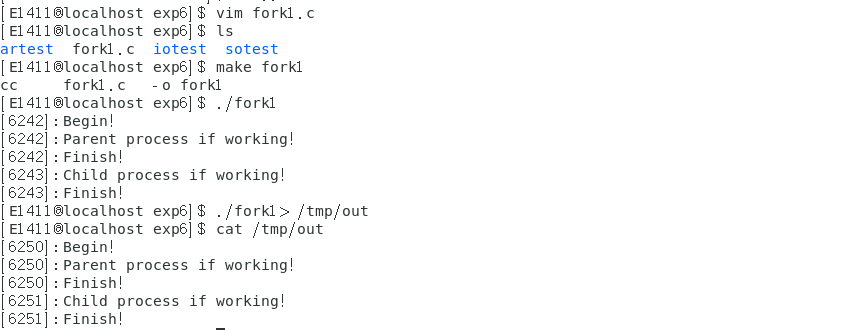
#include <stdio.h>
#include <stdlib.h>
#include <unistd.h>
int main(){

	pid_t pid;
	printf("[%d]:Begin! \n",getpid());
	fflush(NULL);
	pid = fork();
	if(pid<0)
	{

		perror("fork()");
		exit(1);
	}
	else if(pid > 0)
	{

		printf("[%d]:Parent process if working!\n",getpid());
	}
	else
	{

		printf("[%d]:Child process if working!\n",getpid());
	}
	printf("[%d]:Finish!\n",getpid());
	return 0;
}
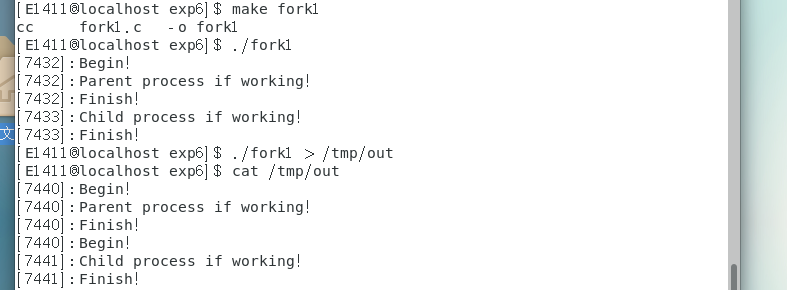
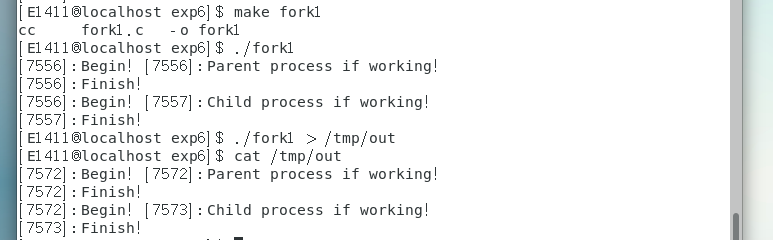
全缓存:填满标准I/O缓存区才进行实际的I/O操作。磁盘上的了件用标准I/O打开,默认都是全缓存的。当缓存区填满或者进行flush操作时候才会进行磁盘操作。
行缓存:当输入输出遇到换行符时候就是行缓存了。标准输入和标准输出都是行缓存。
无缓存:不对I/O操作进行缓存,对流的读写可以立即操作实际文件。典型例子就是标准出错。
(1)做些代码修改,把fflush(NULL)删除,下面是运行结果:
(2)继续修改,把printf("[%d]:Begin! \n",getpid());中的"\n"删除,看运行结果:
5,使用fork创建多个子进程。
int i;
pid_t pid;
for (i = 0; i < 3; i++)
pid = fork();
上面代码段会产生多少子进程?
会产生7个子进程
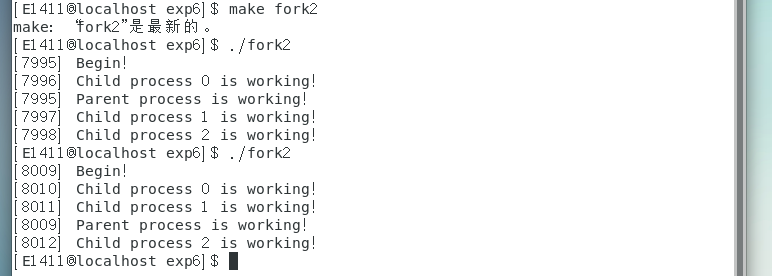
#include <stdio.h>
#include <stdlib.h>
#include <unistd.h>
int main(){
int i;
pid_t pid;
printf("[%d] Begin! \n",getpid());
for (i = 0;i < 3; i++)
{
if((pid = fork()) ==0 )
break;
}
if(pid<0)
{
perror("fork()");
exit(1);
}
else if(pid > 0)
{
printf("[%d] Parent process is working!\n",getpid());
}
else
{
printf("[%d] Child process %d is working!\n",getpid(),i);
}
return 0;
}
6,在 fork 之前以写的方式创建了一个文件 test.txt。然后 fork 出的子进程立即向文件中写入“world”,然后睡眠5秒。而父进程在 fork 后睡眠3秒后向 test.txt 写入 "hello",并关闭描述符。子进程恢复后,又向 test.txt 文件中写入 "lalala"后关闭描述符,结束。
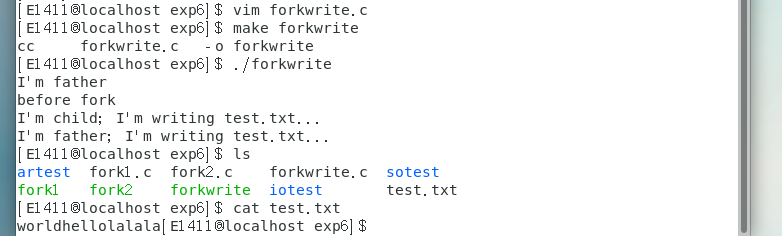
#include <unistd.h>
#include <sys/types.h>
#include <sys/stat.h>
#include <fcntl.h>
#include <stdio.h>
int main() {
int fd = open("test.txt",O_WRONLY | O_CREAT,0664);
if (fd == -1){
perror("open");
return 1;
}
printf("I'm father\n");
printf("before fork\n");
pid_t pid = fork();
if (pid > 0){
sleep(3);
printf("I'm father; I'm writing test.txt...\n");
write(fd, "hello", 5);
close(fd);
}
else if (pid ==0){
printf("I'm child; I'm writing test.txt...\n");
write(fd, "world", 5);
sleep(5);
write(fd, "lalala", 6);
close(fd);
}
else {
perror("fork");
return 1;
}
return 0;
}
7,分别在主函数中使用execvp启动ls命令以及使用fork函数产生子进程调用execvp启动ls。
(1),使用execvp启动ls命令:
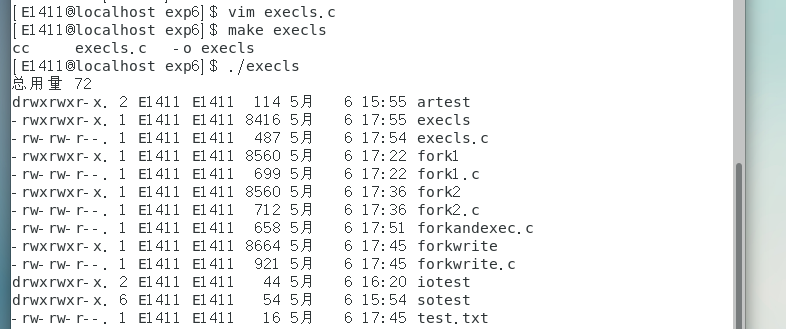
#include<stdio.h>
#include <stdlib.h>
#include <unistd.h>
int main(){

	char* argv[] = {
		"ls","-l",NULL};
	if (execvp("ls",argv) == -1){

		perror("exec");
		return 1;
	}
	return 0;
}
(2),使用fork函数产生子进程调用execvp启动ls命令:
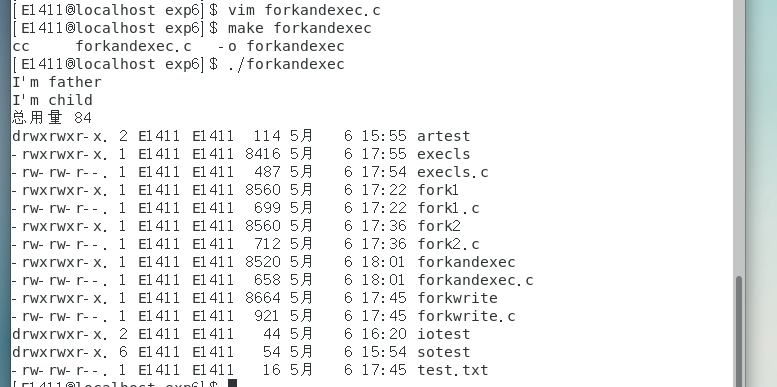
#include <stdio.h>
#include <stdlib.h>
#include <unistd.h>
int main(){
char* argv[] = {"ls","-l",NULL};
pid_t pid = fork();
if (pid > 0){
printf("I'm father\n");
}
else if (pid == 0) {
printf("I'm child\n");
if (execvp("ls",argv) == -1){
perror ("exec");
return 1;
}
}
else {
perror("fork");
return 1;
}
return 0;
}
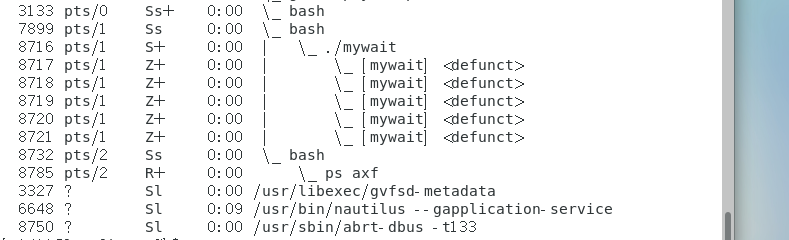
8,创建5个僵尸进程,并在终端通过ps axf命令查看僵尸进程信息。
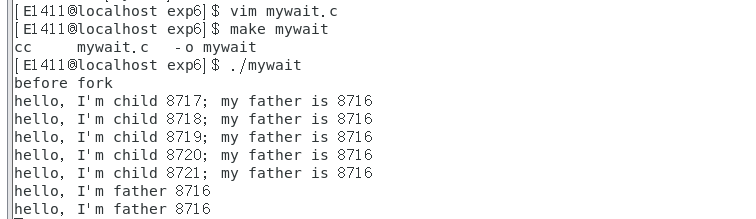
#include <unistd.h>
#include <stdio.h>
#include <string.h>
int main() {
printf("before fork\n");
pid_t pid, n = 5;
while(n--) {
pid = fork();
if (pid == 0)
break;
else if (pid < 0){
perror("fork");
return 1;
}
}
if (pid == 0) {
printf("hello, I'm child %d; my father is %d\n", getpid(),getppid());
return 0;
}
while(1) {
sleep(3);
printf("hello, I'm father %d\n", getpid());
}
return 0;
}
另外再打开一个终端输入ps axf
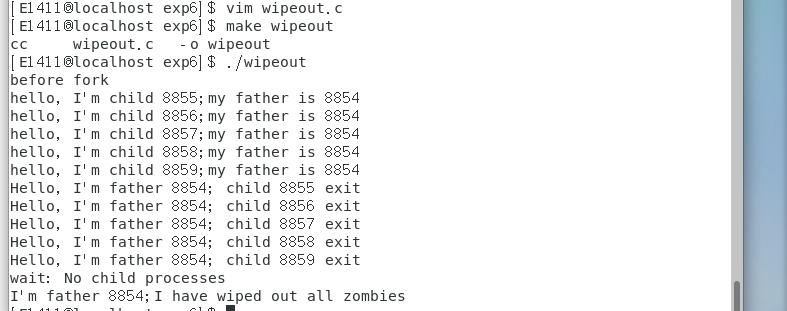
9,通过wait来清理僵尸进程。
#include <stdio.h>
#include <string.h>
#include <sys/wait.h>
#include <sys/types.h>
int main() {
printf("before fork\n");
pid_t pid, n = 5;
while(n--) {
pid = fork();
if (pid == 0)
break;
else if (pid < 0) {
perror("fork");
return 1;
}
}
if (pid == 0) {
printf("hello, I'm child %d;my father is %d\n",getpid(),getppid());
return 0;
}
while(1) {
sleep(3);
pid = wait(NULL);
if (pid == -1) {
perror("wait");
sleep(10);
printf("I'm father %d;I have wiped out all zombies\n",getpid());
return 1;
}
printf("Hello, I'm father %d; child %d exit\n",getpid(),pid);
}
return 0;
}
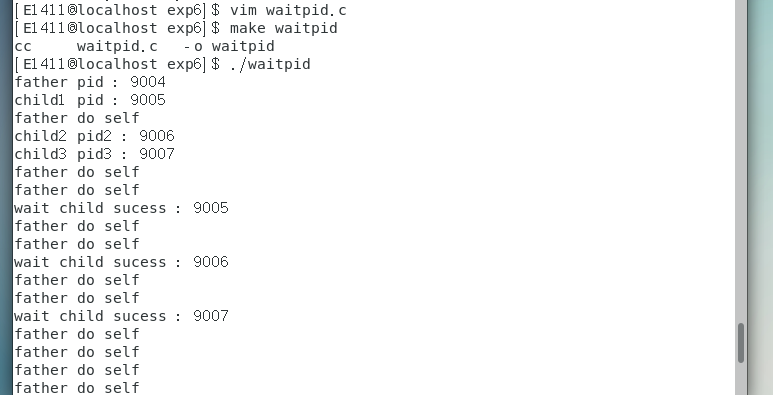
10,父进程通过waitpid函数等待特定子进程结束,若该子进程不结束,父进程一直阻塞。
#include <stdio.h>
#include <signal.h>
#include <unistd.h>
#include <errno.h>
#include <sys/types.h>
#include <sys/wait.h>
#include <stdlib.h>
void handler(int sig)
{
pid_t pid;
while ((pid = waitpid(-1,NULL,WNOHANG)) > 0)
{
printf("wait child sucess : %d\n",pid);

}
}
int main()
{
signal(SIGCHLD,handler);
pid_t pid = fork();
if (pid == 0)
{
printf("child1 pid : %d\n",getpid());
sleep(3);
exit(1);
}
pid_t pid2 = fork();
if (pid2 == 0)
{
printf("child2 pid2 : %d\n",getpid());
sleep(5);
exit(2);
}
pid_t pid3 = fork();
if (pid3 == 0)
{
printf("child3 pid3 : %d\n",getpid());
sleep(7);
exit(3);
}
printf("father pid : %d\n",getpid());
while (1)
{
printf("father do self\n");
sleep(1);
}
return 0;
}

 浙公网安备 33010602011771号